Skip to content

Lights, Strobes, and Lighting Technique / Archived topic

Strobe, strobe arms and setup advice

Started by ATOM65 ·

  • 11Posts
  • 11Replies

Read-only discussion

Strobe, strobe arms and setup advice

11 posts
  1. Hi all,

    I’m new to this forum and I’ve just ordered a seafrogs underwater housing for my Sony A6000 camera. I also ordered a tray and handles and 2 clamps for arms/strobes. 

    I was hoping for some advice about some good arm and strobe choices. I was planning on starting with one strobe (maybe an Inon d200?) and then adding another when budget allows. Would this be sufficient for macro for the time being? 

    I was also wondering about what length of strobe arms I would need and how many clamps, etc. Do you think a 5 and 8/9 inch arm would be a good setup for each strobe? 

    Interested in any suggestions you have.

    Kind regards,

    Atom65

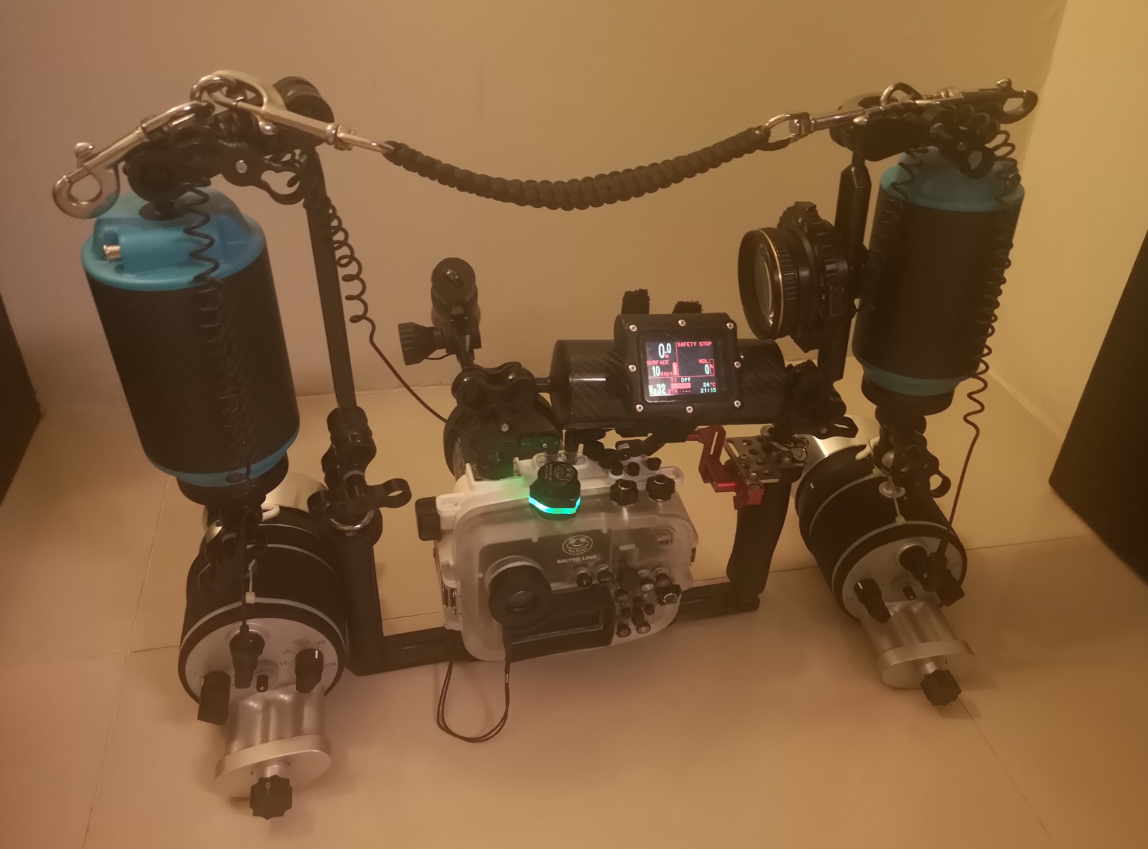
  2. I shoot an A6300 in a SeaFrogs housing and I use two 8-inch ladder arms plus two Weefine WFA37 float arms - these give about 600g of buoyancy but can be partially flooded to reduce buoyancy and dial it in precisely to your requirements. I put another carbon fiber float arm (regular 20x6cm) between right tray handle and cold shoe ball and strap my secondary dive computer onto it, that way it's always in front of my eyes.

    Inon D200 would be adequate for macro, but pushing it for wide-angle, especially with a single strobe. Look at Z-330 or at least a used Z-240. I use a pair of Retra Pros, but it is probably outside your budget.

    A word of caution about SeaFrogs VPS-100 vacuum valve - it can leak underwater; this has happened to me several times. Vivid Housings has a version of Leak Sentinel that fits the SeaFrogs vacuum port; it's more expensive than VPS-100, but much more reliable.

    Another note about clamps - while cheap clamps you can get from SeaFrogs/Aliexpress/Ebay/Amazon work, mostly, I have found that ULCS clamps provide a much better experience. They hold better when tightened down, and slip in a more predictable fashion when loosened, i.e. I can loosen them just a little bit, adjust the strobe position, and the strobe will stay there when I let go - unlike cheap clamps that I used before where it'd flop around unless I tightened the clamp to the point where I couldn't move it anymore.


  3. I'm not familiar at all with strobes other than the ones I've used (YS-D1's and Backscatter Miniflash), but I've shot with dual and single strobes a fair amount.  I'm really liking the Miniflash, sometimes with snoot, for close macro work.  I'm coming to appreciate the look of a deep shadow that you get with one flash over two, so starting with only one is fine.

    I started with a 5 inch and 8 inch segment in each arm.  I've gone to two 8 inch segments to have a bit more reach.  Either works, but with a less powerful flash like the mini versus the D1's, you want to get the light closer.

  4. Arms and clamps are in the buy right buy once category, the name brands like ULCS seem to be more durable and easier to use, you adjust them once UW and then you just move the strobe where you want it and it stays there.  Cheap ones you could find yourself fiddling with 6 different clamps for each position adjustment and quickly tiring of that.

  5. Thanks so much everyone, great information! Will look into better quality arms/clamps and a leak sentinel 

  6. Another vote for ULCS clamps and arms etc. I’ve had mine over 20 years and they all still work perfectly. As Chris says, they are very much in the buy once, buy well category. 
     

    Likewise the Leak Sentinel. For the reassurance alone they are worth the price. 

  7. 12 hours ago, Barmaglot said:

    I put another carbon fiber float arm (regular 20x6cm) between right tray handle and cold shoe ball and strap my secondary dive computer onto it, that way it's always in front of my eyes.

    Could you share a photo of this setup? I'm trying to picture it but I'm a little sleep deprived and not thinking straight.

  8. 45 minutes ago, Dann-Oh said:

    Could you share a photo of this setup? I'm trying to picture it but I'm a little sleep deprived and not thinking straight.

    image.thumb.png.e0cc13032f68b1889465c7f5537e870d.png

    I have the primary computer mounted in this photo (don't recall what I was doing, maybe preparing for a night dive? - my backup doesn't have a backlight) but you get the idea.

  9. 22 hours ago, Barmaglot said:

    image.thumb.png.e0cc13032f68b1889465c7f5537e870d.png

    I have the primary computer mounted in this photo (don't recall what I was doing, maybe preparing for a night dive? - my backup doesn't have a backlight) but you get the idea.

    Okay, that's kind of what I was thinking you were doing.  I have been thinking about putting an arm across the whole top of my camera to hold my computer as well.

  10. 1 hour ago, Dann-Oh said:

    I have been thinking about putting an arm across the whole top of my camera to hold my computer as well.

    That's what I had on my setup. I really liked it. The horizontal bar was loaded with Stix so provided buoyancy, an excellent location for the computer ( I actually looked at it!) and a very good carrying handle. I used 2x 3-clamps to hold it in place with the two strobe arms and the housing.

  11. 3 hours ago, Dann-Oh said:

    Okay, that's kind of what I was thinking you were doing.  I have been thinking about putting an arm across the whole top of my camera to hold my computer as well.

    I thought about getting a longer arm to mount across the top of tray handles, but then it blocks the cold shoe and won't let me mount a focus light. On Nauticam et al the cold shoe is usually on top of the macro port, but on SeaFrogs, it's on the housing itself, so I use a double clamp on the left handle, triple on the right, and another triple to hold the focus light and horizontal bar to the ball on the cold shoe.

Ultralight Control Systems

Account

Navigation

Search

Search

Configure browser push notifications

Chrome (Android)
  1. Tap the lock icon next to the address bar.
  2. Tap Permissions → Notifications.
  3. Adjust your preference.
Chrome (Desktop)
  1. Click the padlock icon in the address bar.
  2. Select Site settings.
  3. Find Notifications and adjust your preference.