



Skip to content

Beginner Forum / Archived topic

Flip Diopter and Canon 100mm Macro lens

Started by JohnN ·

  • 8Posts
  • 8Replies

Read-only discussion

Flip Diopter and Canon 100mm Macro lens

8 posts
  1. I'd like to use a flip diopter with my Canon 100mm macro lens, but am having no luck getting it to focus. (Canon 6D + Ikelite housings & extension)

    This the "old" EF 100mm macro (not the USM variant), and the diopter is an wet-lens INON UCL-165-M67.  I've successfully used the diopter in a compact camera setup

    My first attempts underwater with the lens in an Ikelite housing were unsuccessful.  I've since removed the camera/lens and put them on a table, focused on a near object and then tried moving the diopter. closer/nearer to the lens.  All without any success.

    I've tried the equivalent with my compact camera and it has no problem focusing out of the water with the same diopter.

    If I 'upgrade' to the newer USM variant of the 100mm macro lens, will I have better luck?
  2. Thanks for the reply.  I've checked with Mike @ Ikelite, and he believes my 'bench test' is valid.

    Just for fun, I tried screwing a +4 and a +10 diopter to the front of the lens and with those in place, the camera would focus with the +4 but not with the +10

    Strange indeed. I'm positive I'm not the only person trying to use a flip diopter with a Canon macro lens

  3. On 11/18/2022 at 11:45 AM, JohnN said:

    I'd like to use a flip diopter with my Canon 100mm macro lens, but am having no luck getting it to focus. (Canon 6D + Ikelite housings & extension)

    This the "old" EF 100mm macro (not the USM variant), and the diopter is an wet-lens INON UCL-165-M67.  I've successfully used the diopter in a compact camera setup

    My first attempts underwater with the lens in an Ikelite housing were unsuccessful.  I've since removed the camera/lens and put them on a table, focused on a near object and then tried moving the diopter. closer/nearer to the lens.  All without any success.

    I've tried the equivalent with my compact camera and it has no problem focusing out of the water with the same diopter.

    If I 'upgrade' to the newer USM variant of the 100mm macro lens, will I have better luck?

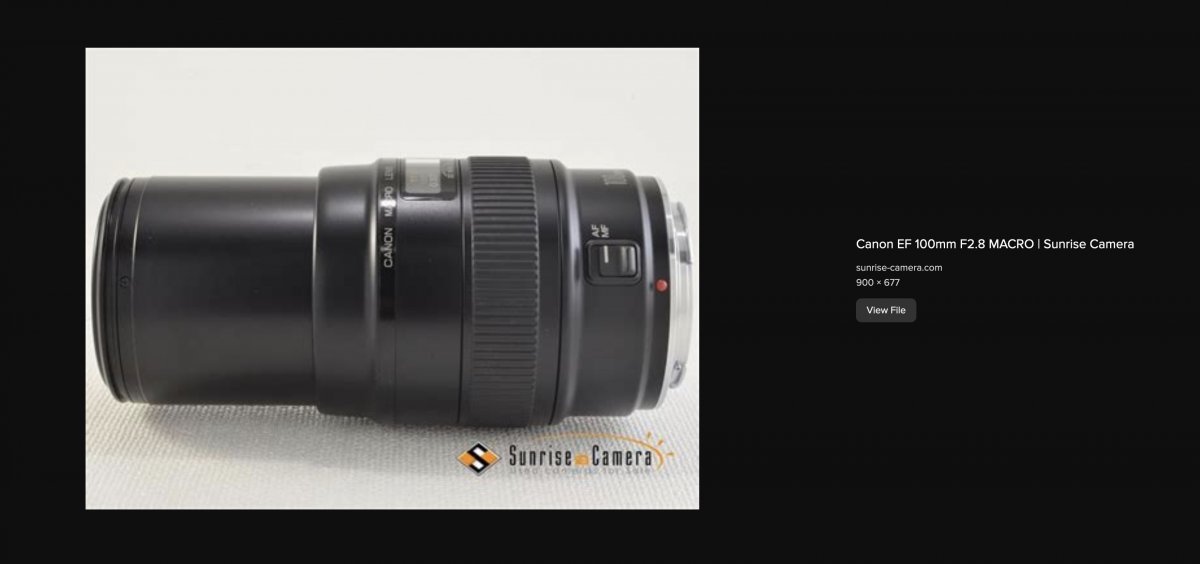
    The pre-USM 100mm macro came out in 1990 according to this: http://www.eflens.com/ef-lenses/ef_100_f_28_macro.html  There is not much on the internet about this lens. I found the attached pic but the link did not work.  This pic suggests that the lens extends when focusing which you can confirm. If so you will likely not be able to use any wet lens because to accommodate the lens in a housing there needs to be enough head space for the lens extension.

    You will note that most all of the Nauticam macro wet lenses (e.g. EMWL, SMCs) are not listed with this type of macro lens  (others are currently in production). You can however use a close up lens attached directly to the 100mm. Canon made two-element diopters that should work.

    Screen Shot 2022-11-21 at 5.32.40 PM.jpg

  4. plenty of people seem to use flip diopters on the latest EF IS L 100mm macro lens, but I haven't seen any report of your UCL165 macro lens being used with it.  There are of course 2 100mm macro lenses prior to the L series with IS being released. 

    the first is the 100mm f2.8 macro released in 1990 and it changes length as it focuses.

    the second released in 2000 uses Internal focus so does not change length and has a USM.

    The caveat of course is the port needs to fit well as the diopter needs to be close to the front element. 

    Your answer may depend on which macro lens you have - it it's the first one the changing lens and port/extension and buying another macro lens would seem to be the answer.  the power of any diopter varies as spacing from the front element changes and also with changing focal length of the prime lens. 

    If you have the second one issued in 2000, then maybe the answer is a different macro lens?

  5. Yes, to reiterate, I think you should be able to use a diopter.

    The issue is that the Inon one is not designed to work with your lens. 

  6. 11 hours ago, ChrisRoss said:

    plenty of people seem to use flip diopters on the latest EF IS L 100mm macro lens, but I haven't seen any report of your UCL165 macro lens being used with it.  There are of course 2 100mm macro lenses prior to the L series with IS being released. 

    the first is the 100mm f2.8 macro released in 1990 and it changes length as it focuses.

    the second released in 2000 uses Internal focus so does not change length and has a USM.

    The caveat of course is the port needs to fit well as the diopter needs to be close to the front element. 

    Your answer may depend on which macro lens you have - it it's the first one the changing lens and port/extension and buying another macro lens would seem to be the answer.  the power of any diopter varies as spacing from the front element changes and also with changing focal length of the prime lens. 

    If you have the second one issued in 2000, then maybe the answer is a different macro lens?

    Thanks very much (again).  I've resigned myself to purchasing another 100mm macro lens, this time the USM IS variant.  I don't know if my existing port will be too long, to allow the camera to focus with the diopter.    In the meantime, the non-USM macro lens works, I just wanted chocolate sprinkles on top of my ice-cream.

  7. 8 hours ago, JohnN said:

    Thanks very much (again).  I've resigned myself to purchasing another 100mm macro lens, this time the USM IS variant.  I don't know if my existing port will be too long, to allow the camera to focus with the diopter.    In the meantime, the non-USM macro lens works, I just wanted chocolate sprinkles on top of my ice-cream.

    according the port chart, assuming you have a four lock housing for it the port remains the same you just need a different extension.

Account

Navigation

Search

Search

Configure browser push notifications

Chrome (Android)
  1. Tap the lock icon next to the address bar.
  2. Tap Permissions → Notifications.
  3. Adjust your preference.
Chrome (Desktop)
  1. Click the padlock icon in the address bar.
  2. Select Site settings.
  3. Find Notifications and adjust your preference.
