Skip to content

Classifieds / Archived topic

Em5iii, nauticam housing, 4 lenses, 3 ports

Started by scubadubadave ·

  • 7Posts
  • 7Replies

Read-only discussion

Em5iii, nauticam housing, 4 lenses, 3 ports

7 posts
  1. Hi everyone I'm selling my old equipment cause I need the money right now and these haven't been used all of 2022.

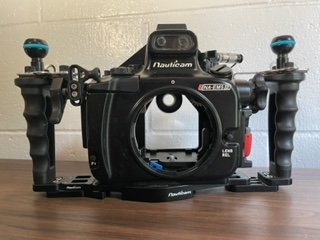
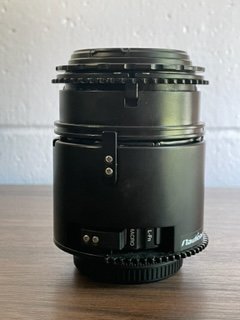
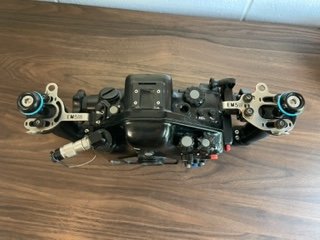
    Em5iii, nauticam housing, 12-40 2.8 pro, 8mm 1.8 fisheye pro and dome port, 60mm 2.8 macro lens with port and flip holder and wet lens, and 12-50 3.5-5.6 conversion lens and port. I just had the housing rebuilt to make sure it was all ok from backscatter.com in November. This entire set up brand new is over 10k worth of gear. I'm asking 6k with free shipping in the US and if you don't want to do friends and family on paypal ill cover the fees as well. This is a great entry level mirrorless set up. Comes with two cases for the housing and the dome port, lots of o-rings for all the ports and housing and I'll even throw in my older mf1 strobe and battery from backscatter if I get the full 6k for it. I loved this set up, its easy to travel with, not super heavy and the 12-50 lens has done some great work for me being able to switch between semi wide and good macro. If you have any questions feel free to ask. Thanks!
    IMG_8846.jpg

    IMG_8845.jpg

    IMG_8844.jpg

    IMG_8843.jpg

    IMG_8842.jpg

    IMG_8841.jpg

    IMG_8840.jpg

    IMG_8839.jpg

    IMG_8838.jpg

    IMG_8837.jpg

    IMG_8836.jpg

    IMG_8835.jpg

    IMG_8834.jpg

    IMG_8833.jpg

    IMG_8832.jpg

    IMG_8831.jpg

    IMG_8829.jpg

    IMG_8828.jpg

  2. EDIT: 12-40 2.8 pro has been sold


    Asking 5500 for whole package

  3. asking 5000 for whole package or taking offers for pieces

  4. bump

  5. How much for the dome? 

  6. dropping price to 4400 for entire kit. including shipping and PayPal fees in the US

  7. all sold

Kraken Sports

Account

Navigation

Search

Search

Configure browser push notifications

Chrome (Android)
  1. Tap the lock icon next to the address bar.
  2. Tap Permissions → Notifications.
  3. Adjust your preference.
Chrome (Desktop)
  1. Click the padlock icon in the address bar.
  2. Select Site settings.
  3. Find Notifications and adjust your preference.