Skip to content

Photography Gear and Technique / Archived topic

Same housing for A7IV and A7RV?

Started by fruehaufsteher2 ·

  • 11Posts
  • 11Replies

Read-only discussion

Same housing for A7IV and A7RV?

11 posts
  1. I just saw on the website of my favorite dealer that the new Nauticam housing for the A7RV can be equipped with some additional things and then fits the A7IV. Does anyone know whether this works vice versa?

    https://www.panoceanphoto.com/nauticam-umbau-kit-na-a7rv--a7iv?number=NA17433U

    Upgrading from the 7IV to the 7RV could be interesting for many of us 

    Edited by fruehaufsteher2
  2. 19 minutes ago, fruehaufsteher2 said:

    I just saw on the website of my favorite dealer that the new Nauticam housing for the A7RV can be equipped with some additional things and then fits the A7IV. Does anyone know whether this works vice versa?

    https://www.panoceanphoto.com/nauticam-umbau-kit-na-a7rv--a7iv?number=NA17433U

    Upgrading from the 7IV to the 7RV could be interesting for many of us 

    https://www.nauticam.com/products/na-a7rv-housing-for-sony-α7r-v-camera

    Compatible cameras:  Sony α7R V camera, α7R IV  with Conversion Kit

    I believe conversion kit means a different tray and adapters

    So if you buy the R5 housing you can use R4 and R5 viceversa normally not supported


  3. No not really. It‘s not the RIV but the IV (without R).

    The interesting question is: I do have the A7 IV housing. Can I upgrade to the A7R V and just buy the adaptor kit or is only the downgrade (having the A7R V housing and using it with the A7 IV) possible?

  4. 7 minutes ago, fruehaufsteher2 said:

    No not really. It‘s not the RIV but the IV (without R).

    The interesting question is: I do have the A7 IV housing. Can I upgrade to the A7R V and just buy the adaptor kit or is only the downgrade (having the A7R V housing and using it with the A7 IV) possible?

    The german says conversion kit for the A7RV housing to use the A7IV not viceversa. likely a typo missing an R in the IV

  5. I don’t think so. It is the A7 IV and the A7R V they are referring to. 

    https://camerasize.com/compare/#898,883

    I seems that the controls are pretty much the same between A7 IV and A7R V but the „R“ is 2,6mm thicker than than A7 IV.

    So it‘s a one-way downgrade option. :cry:

  6. I don’t think so. It is the A7 IV and the A7R V they are referring to. 
    https://camerasize.com/compare/#898,883
    I seems that the controls are pretty much the same between A7 IV and A7R V but the „R“ is 2,6mm thicker than than A7 IV.
    So it‘s a one-way downgrade option. :cry:

    It is most likely an error
    Look at the official nauticam page I linked
    The a7rv housing officially supports the RIV with a conversion kit
    Similar to the A1 housing with the a7s3
    So now you have two options for the RIV you can get the 2020 housing or the A7RV housing
    Phil Rudin has tried several other cameras in the a1 housing all seem to work


    Sent from my iPhone using Tapatalk
  7. Just to be clear I used the new A7R V in a Nauticam NA-A1 housing for one project. 

    The LCD is thicker and longer than those from previous A7 line and A1 cameras. As a result with a housing where the LCD sits flat against the rear of the camera most housings will not close without the LCD pressing against against the LCD window and in many cases it will not close at all. 

    Nauticam housings have a deeper back plate that allows the LCD screen to be tilted about 20 degrees to give a better downward view of the LCD. If you remove the little stop on the rear of the tray (has a small screw) you can get the LCD on the rear of the A7R V to fit without pressing against the rear LCD window on the A1 housing. NOT ALL of the controls lineup and this would very for a Nauticam A7R IV housing. The controls that did work allowed me the turn the camera on and off, I was able to control Aperture, shutter speed and ISO. I could review images and the lower four way arrows mostly worked. I don't do video so not sure about those controls. If you don't remove the little stop from the tray the LCD could be damaged trying to close the housing. 

    I understand the A7R IV being able to fit into the NA-A7R V housing with a conversion kit but it is unlikely that it would work the other way around because the A7R IV housing will not be deep enough for the A7R V to fit. I suggest that if you have the IV housing and the V body that you try with the combination with the stop removed and see if any of the controls lineup and if the housing will close.


  8. I guess we have to write an email to nauticam to knownfor sure

    Sent from my SM-S908E using Tapatalk

  9. I guess we have to write an email to nauticam to knownfor sure


    Sent from my SM-S908E using Tapatalk


    It is stated on their website am not sure why anybody would trust a single reseller that has likely made an typo instead of the source


    https://www.nauticam.com/products/na-a7rv-housing-for-sony-%ce%b17r-v-camera


    The newer camera is 3mm thicker it will be a problem to operate with smaller housing. The buttons on the back will get stuck

    The other way around you can put spacers


    Sent from my iPhone using Tapatalk

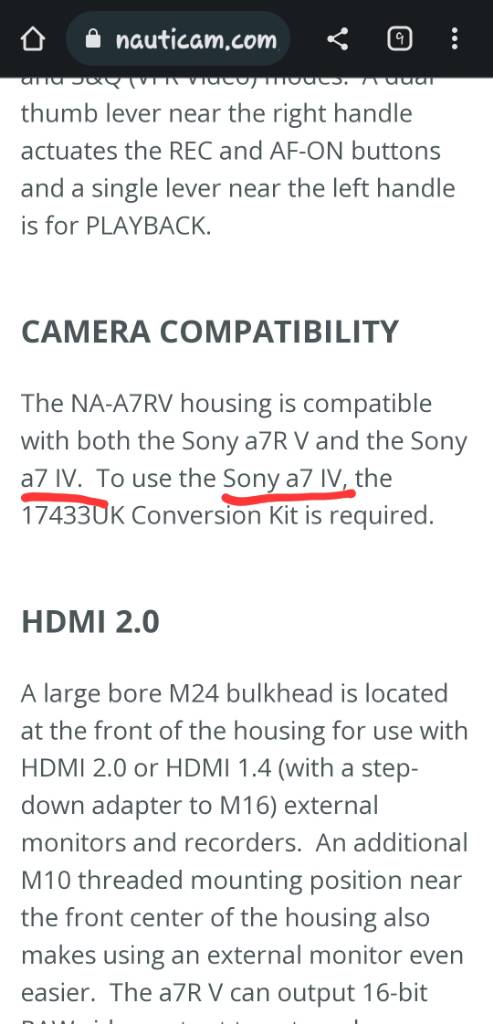
  10. I followed you link. And this is what I saw. A missing R ? Is that what you are saying??Screenshot_20230411_144506_Chrome.jpg

    Sent from my SM-S908E using Tapatalk

  11. 58 minutes ago, hellhole said:

    I followed you link. And this is what I saw. A missing R ? Is that what you are saying??Screenshot_20230411_144506_Chrome.jpg

    Sent from my SM-S908E using Tapatalk
     

    I would say Nauticam have a typo themselves. The A7RIV is much slimmer than the A7RV so that should read A7IV

    So if you have an A7RV you can use an A7IV as back up camera which is interesting generally


Account

Navigation

Search

Search

Configure browser push notifications

Chrome (Android)
  1. Tap the lock icon next to the address bar.
  2. Tap Permissions → Notifications.
  3. Adjust your preference.
Chrome (Desktop)
  1. Click the padlock icon in the address bar.
  2. Select Site settings.
  3. Find Notifications and adjust your preference.