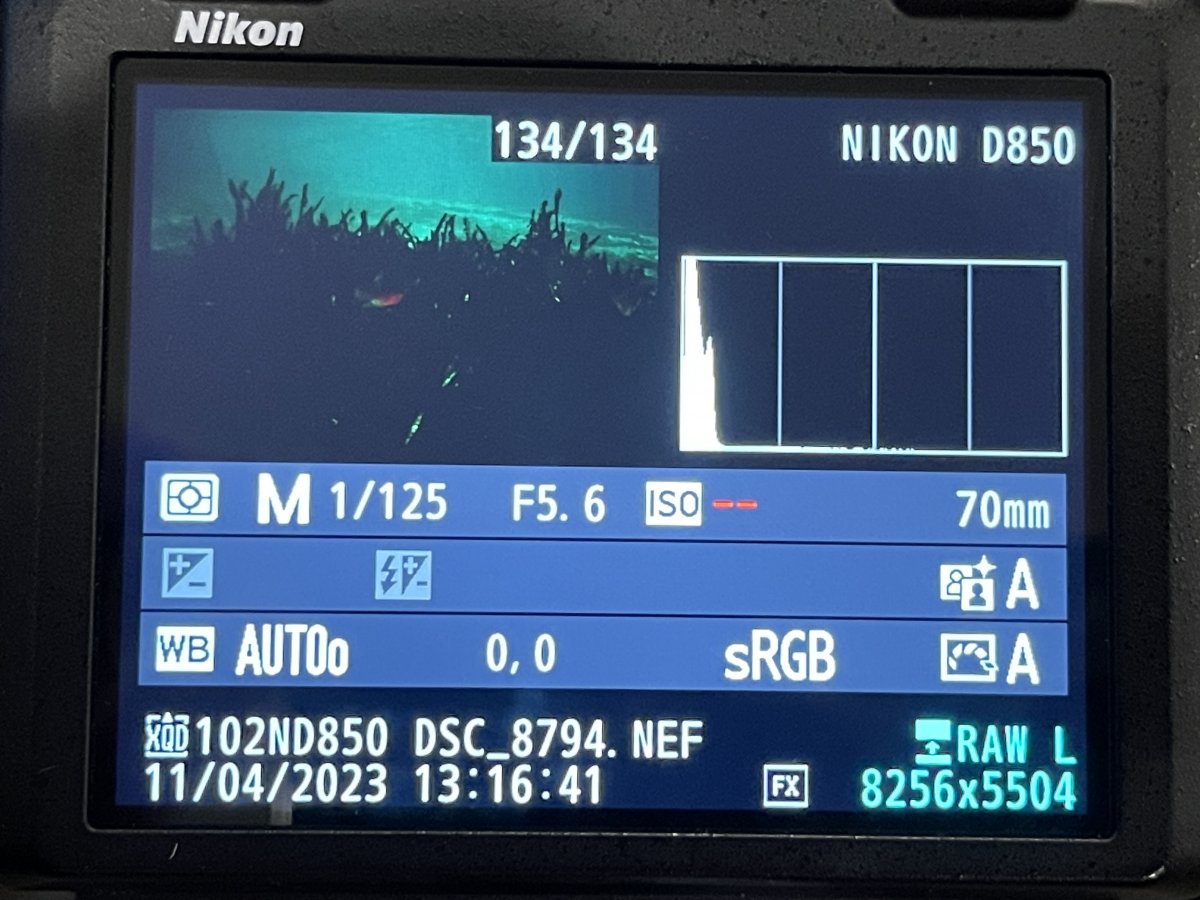
I have a problem with my Nikon D850 that just started happening today. I can adjust the ISO to any value I want but it makes no difference to the actual images captured. In Lightroom, the EXIF data shows ISO 3. On the back of the camera when I play the image, the ISO shows no value. I've tried using auto-ISO and I get the same results (although the ISO shows up as two red dashes on the camera's LCD when I playback the image vs no value when I don't have auto-ISO turned on).
I am in Manual mode so it's not that. I've tried different lenses and get the same behavior with both my 28-70 and Sigma 15. Does anyone have any idea what this is? I'm hoping it's some strange menu item that got turned on rather than a problem with my camera.
Would appreciate any thoughts / advice.
Thanks
Andy
The first question is does the camera expose correctly when you change ISO in manual - so if you turn ISO up does the image get brighter? You could try a factory reset on the camera to see if that corrects the issue. You may be able to save all your settings to restore later depending on the outcome of the reset.
Mine never did that, but I settled into a certain range of settings for the time I used it. It does at first sound like the gain part of the sensor just failed, but it seems more reasonable that an odd setting is at play. Any chance you have it set for a manual focus lens?
I'd try a 2-button reset and a battery removal/replace.
The sensor has a PGA for analog gain on board that seems to have failed or the interface controlling the gain has failed
I doubt this is a setting problem
I've not seen that one before, Andy. It does look like a camera issue, sadly.
You could try and full settings reset. But sadly, I would not be hopeful.
Alex
A hard reset did no good. I’ve sent it in to Nikon for repair and will order a backup body. Thanks for the feedback.