



Skip to content

Photography Gear and Technique / Archived topic

Sea & Sea MDX-AU + YS-D2 issues

Started by NagiA ·

  • 8Posts
  • 8Replies

Read-only discussion

Sea & Sea MDX-AU + YS-D2 issues

8 posts
  1. Hi All -

    I have a Sea & Sea MDX-AU housing for my Sony A1 camera. It came with Sea & Sea's manual flash trigger (SS-50146) installed. I have two older strobes: a YS-D1 and a YS-D2.

    For some reason, I'm having problems with getting the YS-D2 to trigger when directly attached to the housing's fiber optic ports. The YS-D1 has no problems whatsoever. Additionally, the YS-D2 does trigger perfectly fine when daisy-chained to the YS-D1 - i.e., YS-D1 connected to housing's FO port, YS-D2 connected to the YS-D1 output (daisy-chain) FO port. I've tried different FO cables (both Sea & Sea OEM cables), both FO ports on the housing, and no luck with the YS-D2 directly connected to the housing. The weird thing is that it triggers perfectly happily when daisy-chained to the YS-D1.

    Hoping to get some suggestions for further debugging of this problem - I would prefer the strobes to be directly connected to the housing instead of being daisy-chained.

    Thanks!
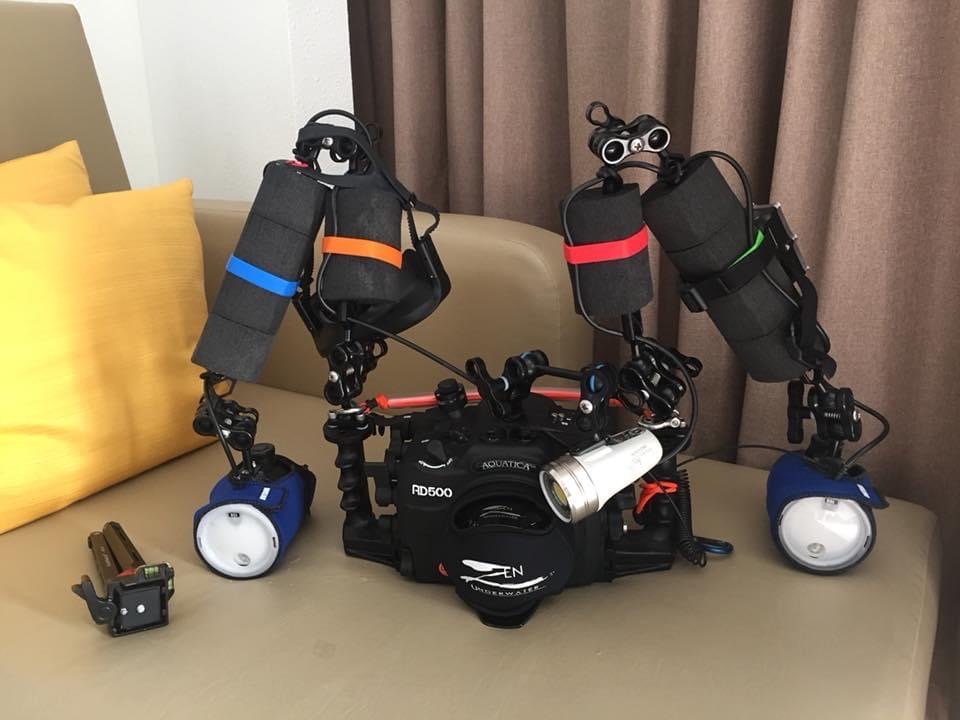
  2. Yeah the D2 has always had an issue with less sensitivity on the sensor.. the D3 more so even!

    I bought a D1 and then a D2 to use with a sony on direct strobe trigger, then when I upgraded to a DSLR rig with a Aquatica LED trigger I ran into that issue and tried so many different Fiber Optics, keeping the setup daisy chained while the search continued... in the end I gave up and just made my own custom Fiber Optic with Toslink cable that I run from one strobe to the other attached to the arms.. then I just run one FO from the housing to the D1.. it has worked fine for many years, I guess I just got used to it!

    IMG_0860.JPG.59f3c855ad4e51e59ee215c64393fe79.JPG

  3. Agree the YS-D2 sensitivity of the sensor is quite poor.  I would expect no issues at all triggering a strobe by daisy chain as the light intensity is so much higher out of the strobe.  I assume you have checked that he D1 will trigger from either port?  Are you using seperate cables one going to each fibre optic port?

    You need the best quality optic fibre cables to have a chance also check that the LED trigger output is properly aligned with the ports.  Check that the glass cover under the trigger ports is clean.  All of these have been the cause of triggering issues in the past for other issues.

  4. Thanks - that's what I'm seeing as well, and was seriously considering a D3 upgrade for. I'll probably nix the D3 option, given your comments about D3 sensitivity. I may just stick with the daisy-chain setup that seems to be working, annoying though it might be.

  5. Thanks, yes, the daisy-chain setup seems to work fine with the D1 primary and the D2 secondary (triggering off the D1), at least while dry-testing at home. I'll be visiting a nearby Scuba shop with a pool to verify that it's also fine while submerged.

    For cables, I'm using Sea & Sea's OEM cables, and they seem to be doing the job fine in the daisy-chain setup. To avoid cable entanglements, I'll probably zip-tie the D1->D2 connecting cable to the arms and the housing like ChrisDarke shows in his photo above.

    Good suggestion about the alignment of the trigger with the housing ports. It came preassembled, so I'll take it out and check - visually, all looks good, but can't hurt to verify myself.

  6. Will look into whether multi-core FO cables might make a difference - thanks for the tip!


  7. Really annoying but this does indeed seem to be a problem with the YS-Dx strobes.

    Check also that the output from the fibre optic is centred on the strobes' sensor. Even  slight off-centering can cause issues. 

    I can recommend the 613-core Fused Multi-core Simplex Cable, Polyethylene Jacket- MCQ-1000 from Industrial Fiber Optics. Making your own cables is straight-forward as long as you use a very sharp knife to get a clean, square cut on the cable, ie use a Stanley knife or box cutter-type blade - not scissors (and yes, I learnt the hard way)

Account

Navigation

Search

Search

Configure browser push notifications

Chrome (Android)
  1. Tap the lock icon next to the address bar.
  2. Tap Permissions → Notifications.
  3. Adjust your preference.
Chrome (Desktop)
  1. Click the padlock icon in the address bar.
  2. Select Site settings.
  3. Find Notifications and adjust your preference.

