Has anyone experienced lack of sharpness with the WACP-1 and Sony 28-60mm combination? I happen to need a decent amount of light (strobes) to get detail in the images. If I’m shooting with natural light, it’s a lost cause. I’m not sure what is causing it, have even thought about sending the WACP to be tested somewhere. I really appreciate any help.
Thanks!
Sent from my iPhone using Tapatalk
Example images would be great to understand more
On my last trip one photographer was struggling to get edge to edge sharpness with the WACP, and it turned out it was the camera lens that had a misaligned element, causing a blurry area in the pictures, which moved as the lens focused.
Alex
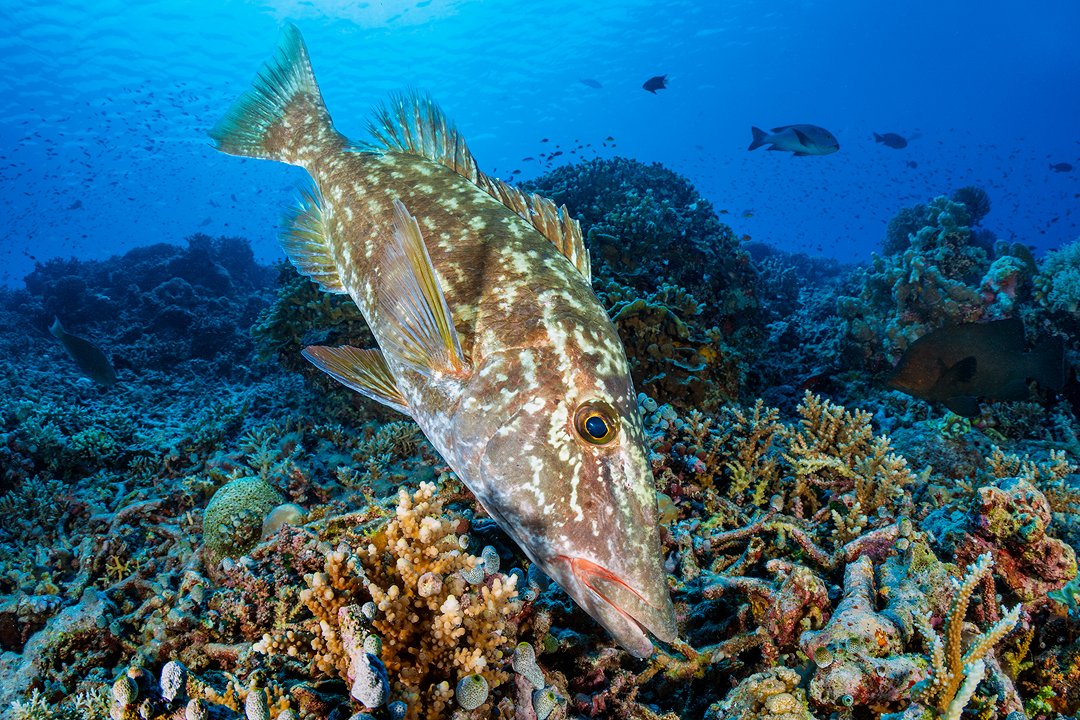
[EDIT] I was just edited WACP-1 + 28-60mm shots from last week this morning. Here is one taken at 30mm of a emperor feeding on the reef.
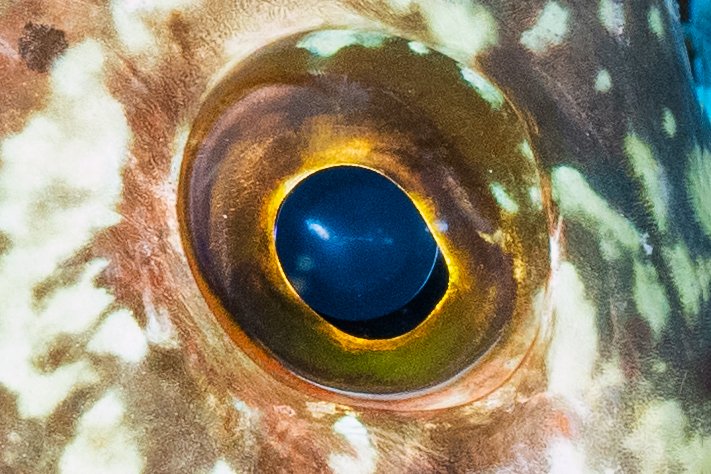
and crop of eye to show sharpness (these are compressed on upload to Wetpixel - but you can see they are sharp):
we had the same problem with the 28-60 but in the macro range
2 identical cameras and attachment lenses (cmc and weefine)
Identical camera settings, but some of the images looked fuzzy
and blurry, not in focus or no focus point was recognizable.
It turned out that a 28-60 was defective
This seems to suggest that you should conduct testing of the 28-60 on land at similar settings - try it at various distances and the same f-stop to see if it is sharp on land.
If the op has not tested the lens topside I would be amazed
Any time I get a new lens I check for decentering and run comparative shots on a tripod to other lenses I have before investing in underwater housing gears etc