Skip to content

Photography Gear and Technique / Archived topic

Sigma 16mm in Fantasea FML dome port A6

Started by sarthur1 ·

  • 5Posts
  • 5Replies

Read-only discussion

Sigma 16mm in Fantasea FML dome port A6

5 posts
  1. Hey all

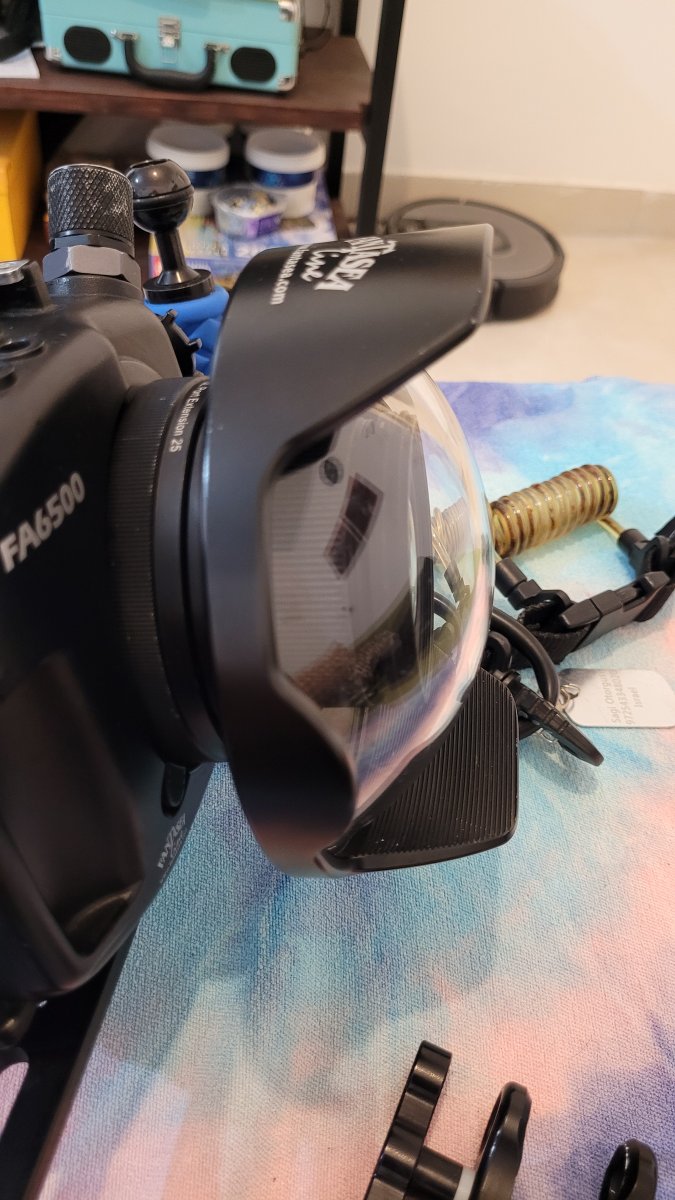
    I recently started using the Fantasea FML Dome Port A6 with Sigma 16mm along with my sony 6300 (Fantasea FA6500 housing).

    after I assembled the gear I looked into the dome port and saw that the lens is quite close to the dome glass (attached image).

    Is it suppose to be that way or the lens is too close to the glass?

    according to Fantasea port chart, the port need only 1 25mm extension ring, should I add another ring (total 50mm)?


    image.thumb.png.23eb0fadac93624d5555a25a4339aa5a.png

    20230609_133328.thumb.jpg.e67d993d9c3fa73e403ede087b3095ad.jpg

  2. It does look to be too close, but positioning depends upon the location of the entrance pupil for the lens which should be placed at the centre of curvature of the dome.  Normally wide angle lenses have the entrance pupil towards the front of the lens  With the lens in hand you can even estimate where the entrance pupil is by the apparent distance of the aperture stop from the front of the lens.  This would give you guidance on how much extension to add to get it in the right position. 

    You would need to estimate where the centre of curvature lies for the dome, it all could be done on a scale drawing.  It is difficult to make any sort of recommendation without the lens in hand.

    I would also add that this is a focal length of 24mm full frame equivalent, so it is a little less an ultra wide (weitwinkel) lens with 16mm FF equivalent field of view.  How does the lens perform currently, is there chromatic aberration apparent or soft edges to the image?


  3. On 6/11/2023 at 8:41 AM, ChrisRoss said:

    How does the lens perform currently, is there chromatic aberration apparent or soft edges to the image?


    I had only 2 dives with it so far.

    on the first dive most of the images were a little soft, no chromatic aberration.

    on the second dive the pictures were quite sharp, also without chromatic aberration.


    how do I measure all of the things you mentioned here?

  4. If you have another extension ring on hand, shoot a pool wall (underwater, obviously) with one and two rings and compare the output.

  5. 8 hours ago, sarthur1 said:

    I had only 2 dives with it so far.

    on the first dive most of the images were a little soft, no chromatic aberration.

    on the second dive the pictures were quite sharp, also without chromatic aberration.


    how do I measure all of the things you mentioned here?

    It's fairly basic geometry, the hardest part is the dome radius - it's nominally a 6"dome but looks it's not a full hemisphere, you need to measure the height of the dome.  Then you plug in the numbers to this calculator:

    https://monolithicdome.com/spherical-dome-calculator

    Only enter the diameter of 152mm and the height and change units to suit, then just read off the radius.

    Then estimate where the entrance pupil lies - doing it by eye is reasonable - but you could also google how to locate entrance pupil of lens using parallex from a number of sites that deal with panoramic photography.  You can get quite close by placing your finger at the depth the aperture appears to lie within the lens. 

    The dome surface should be the radius of the dome away from the entrance pupil. 

    Place the camera and lens in the housing and measure the distance from  the entrance pupil you worked out before from the front surface of the housing.  Distance "A". 

    Measure from the dome surface to the mounting flange of the dome - do this with a tape from the dome to end of end of the dome/extension tube combination and then subtract the amount the dome protrudes inside the housing.  Distance "B"

    Subtract A from B to get distance C.  Subtract C from the radius of curvature calculated initially.  This is how much extra extension you need.  It helps to draw a little diagram.

     

    Edited by ChrisRoss

Account

Navigation

Search

Search

Configure browser push notifications

Chrome (Android)
  1. Tap the lock icon next to the address bar.
  2. Tap Permissions → Notifications.
  3. Adjust your preference.
Chrome (Desktop)
  1. Click the padlock icon in the address bar.
  2. Select Site settings.
  3. Find Notifications and adjust your preference.