




-
That’s a very good point, and something we’re paying a lot of attention to. Specio uses the standard biological taxonomy — from broader taxonomic ranks down to the species — and can write that information back as hierarchical keywords in Lightroom Classic, together with scientific and common names. But we completely agree that the keyword structure itself is critical. We don’t want Specio to create a parallel taxonomy that clashes with an existing keyword hierarchy photographers may already have. This is actually one of the reasons we’re talking to wildlife photographers and naturalists at this stage: we want to understand which structures people already use and how Specio should integrate with them rather than impose another system. If you already have a taxonomy/keyword structure that works well for you, I’d be very interested to see how you organize it.
-
Ok thanks for sharing ! In the case you're too lazy to id species and tag individual images, would you be interested in trying my plugin ?
-
Hi, the goal is to be compatible with all the softwares, so you can apply and you'll get some infos when it's available ! (here is the link : https://survey.zohopublic.eu/zs/U3CA15?Source=Forum&ContactOwner=hugo.foulquier@cyme.io)
-
You can register too, we're developing, photoshop compatibility !
-
Hi, what do you use ?
-
Hi everyone, Disclosure up front: I work with CYME, a French software company building tools for photographers. We’re currently testing Specio, an offline desktop tool / Lightroom Classic workflow that helps identify species in wildlife and underwater photo collections. I’m posting here because marine identification is exactly where expert feedback matters most. Fish, nudibranchs, crustaceans, corals, juveniles, regional variants — these are the cases where we need real underwater photographers to tell us what works, what fails, and what should never be guessed. What Specio does: analyzes photos locally on your computer, with no cloud upload suggests species identifications across batches of images lets the photographer review or correct results before applying anything adds common names, scientific names and taxonomy as Lightroom keywords helps explore a photo archive through the taxonomic tree The goal is not to replace expert knowledge. It’s to make large underwater photo archives easier to identify, search and reuse, while keeping human validation at the center. We’re looking for a few underwater photographers willing to test the beta on their own images and give honest feedback, especially on marine species accuracy and whether this fits naturally into a Lightroom workflow. If you’re interested, you can tell us a bit about your workflow and apply here : https://survey.zohopublic.eu/zs/U3CA15?Source=Forum&ContactOwner=hugo.foulquier@cyme.io I’d also be very interested in hearing opinions directly in this thread: which marine groups or regions do current ID tools struggle with most?
-
Thanks a lot for your answer ! I'll have a look at this post, if you personally want a software to try now or just help me to get your workflow, you can apply here to try it : https://survey.zohopublic.eu/zs/U3CA15?Source=Forum&ContactOwner=hugo.foulquier@cyme.io
-
Ok, we're working on video features, so I'll come back to you once it's done :) A huge thanks for your commitment !
-
Hi everyone, I’m curious how underwater photographers handle species identification and keywording after a dive trip, especially when working in Lightroom Classic. After importing, culling and editing, do you manually add species names, scientific names or taxonomy to your photos? Or do you mostly keep images organized by trip/location? We’re testing an offline desktop workflow that helps recognize species in underwater and wildlife photo batches, then lets you review the results before adding common names, scientific names and taxonomy as Lightroom keywords. We’re looking for a few photographers willing to share their workflow and possibly test the beta on their own images. If interested, you can tell us a bit about your workflow here: https://survey.zohopublic.eu/zs/U3CA15?Source=Forum&ContactOwner=hugo.foulquier@cyme.io
-
As your case is really interesting while the software could help you and you could help us improve it, it would be amazing if you filled this form and become one of our beta testers. If interested of course : https://survey.zohopublic.eu/zs/U3CA15?Source=Forum&ContactOwner=hugo.foulquier@cyme.io
-
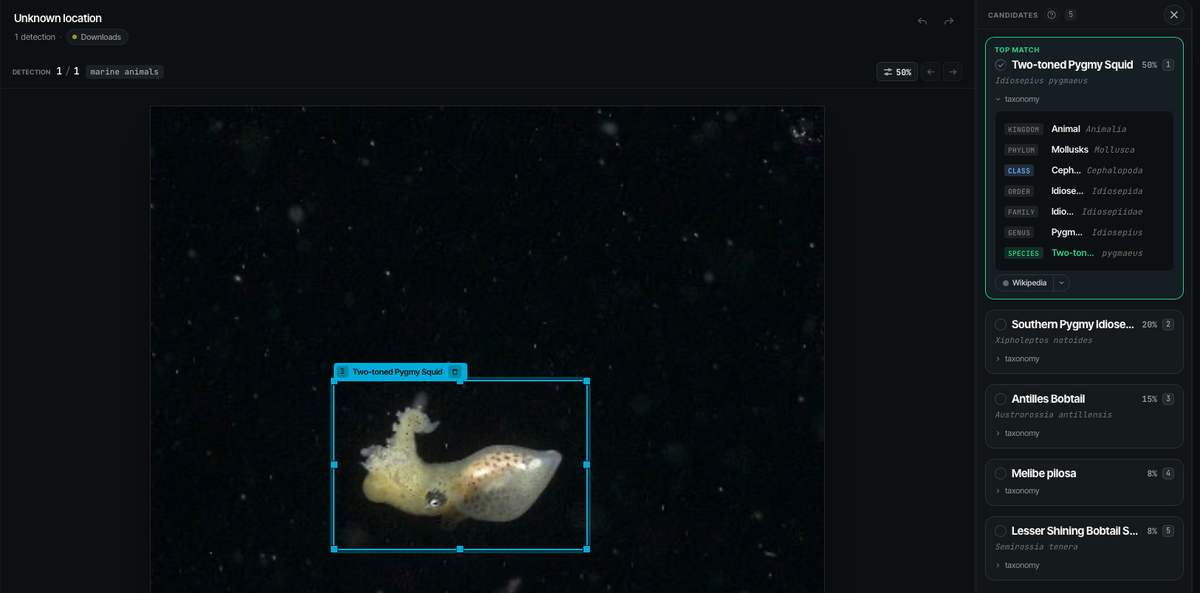
Here is what our software found for the image you dropped here :
-
Merci beaucoup ! J'ai en effet espoir que ce soit le cas, en tous cas pour l'instant les résultats sont bluffants. Je peux vous inviter à me donner plus de détails sur votre manière de travailler, et vous inviter à le tester en complétant mon petit questionnaire :) ( https://survey.zohopublic.eu/zs/U3CA15?Source=Forum&ContactOwner=hugo.foulquier@cyme.io) Aloha and thanks ! ;)
-
Merci beaucoup !
-
Hi everyone, I’ve recently joined Waterpixels and I’m curious to learn how underwater photographers manage species identification after a dive trip. When you come back with hundreds or thousands of images — fish, nudibranchs, crustaceans, corals, marine mammals — how do you identify everything and keep your archive searchable? I’m part of a small team working on an offline desktop tool that helps recognize species in wildlife and underwater photos, then lets the photographer review the results before adding common names, scientific names and taxonomy as keywords. The goal is not to replace expert knowledge, but to make large image archives easier to explore, organize and potentially reuse for education, research or conservation. We’re looking for a few underwater photographers willing to share their workflow and possibly test the beta on their own images. Would this be useful to you, or do you prefer keeping identification and keywording fully manual? If you’re interested here is a form to answer questions about it : https://survey.zohopublic.eu/zs/U3CA15?Source=Forum&ContactOwner=hugo.foulquier@cyme.io Thanks ! Feel free to reply here or message me.
-
Bonjour à tous, Je m’appelle Hugo et je travaille chez CYME, une entreprise française spécialisée dans les logiciels pour photographes. Je m’intéresse particulièrement à la manière dont les photographes sous-marins organisent, identifient et retrouvent leurs images. Nous travaillons actuellement sur Specio, une application capable d’identifier automatiquement les espèces présentes dans les photos, directement sur l’ordinateur et sans envoyer les images dans le cloud. Je rejoins Waterpixel avant tout pour découvrir vos pratiques, échanger avec des photographes passionnés et mieux comprendre les besoins spécifiques liés à la photographie sous-marine. Au plaisir d’échanger avec vous !

.jpg.857dbbfbdc4d79d9c6ebf7b4ba96ed1b.jpg)

