Not sure if anyone is still discussing these (or the X-drive II), but I'd appreciate hearing any comments on the reliability/usability from those of you who've had this for awhile. any suggestions on specific hard drive models with good reliability?
thanks.
-AC
These items are all very nice and cheap compared to what I am after,but this X drive you mentioned to start with does it always come without a hard drive or do you just have an easy option for upgrading, and can someone explain how they save it .. like is it in date / time folders or do you have to use the card details each time? or just in one great mass ? and what is the likely hood of failure ?
if i just want to be able to store stuff ... should I be looking at something without the screen ? or is hte screen a usefull thing ?
I thought it was nice just to know you had them the pic's downloaded
oh and i just found this .. slightly smaller screen .. but not brand named .. has to be the cheapest 80gb screened MM storage device .. has to be ... I think i may get it.




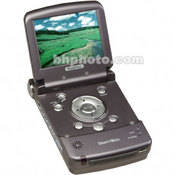 click here to see
 click here to see
