Skip to content

Photo / Video Showcase / Archived topic

Using Flickr to host images

Started by echeng ·

  • 27Posts
  • 27Replies

Read-only discussion

Using Flickr to host images

27 posts
  1. On 9/2/2018 at 7:47 AM, LyleORoss said:

    Question, can you use shutterfly to host pictures? Most of my photos are stored there and it would make things much easier for me if I didn't have to go learn flickr. I've looked a bit and will continue to search, but shutterfly does not have a good reputation for such things.

    At first Flickr is confusing but they actually improved their UX already. You can try it at Flickr. :D

  2. I havent used it in years, but now i have went back just to store some of my old good shots 

  3. Hello, Here is one from me during a trip to the philippines! 49887829547_d045a20f2b_k.jpgDSC03072 by Christian Rodriguez, on Flickr

    Edited by cee_rawd
  4. Nice pic, Christian!

  5. thank you!

  6. On 9/29/2006 at 8:13 PM, echeng said:

    Hello, guys! If you are looking for free hosting space, Flickr is a great place to start (and, it's free!). Once you have an account, you can embed Flickr-hosted images here in our forums. Also, be sure to join the Wetpixel Flickr group!


    Here's how to embed:


    1. look at an image in Flickr, and click "All Sizes" to get to a page that shows all of the accessible sizes for a given image.


    2. click on "Medium" (500 x 333), which is perfect for Wetpixel


    3. in the text box below the photo, you'll see some HTML, which is the code they want you to use to embed your image. Here's an example:

    
    <a href="http://www.flickr.com/photos/echeng/201438534/" title="Photo Sharing"><img src="http://static.flickr.com/66/201438534_363e6306b9.jpg" width="500" height="333" alt="Humpback mother and calf (Megaptera noveangliae)" /></a>


    4. since our forums don't support straight HTML, you have to convert it to bbcode. take the image location (img src) and hyperlink (a href), and convert them. Here's an example of the above image, converted into bbcode:

    
    [url=http://www.flickr.com/photos/echeng/201438534/][img=http://static.flickr.com/66/201438534_363e6306b9.jpg][/url]


    5. Test:
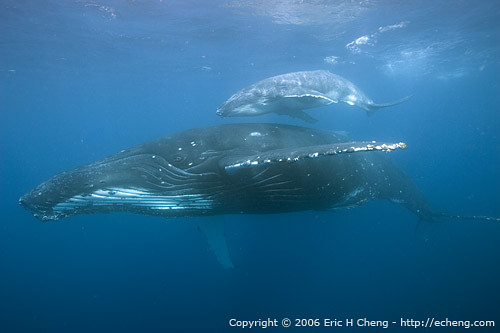


    201438534_363e6306b9.jpg

    Humpback mother and calf (Megaptera noveangliae)


    6. (I added the caption, too)


    If you embed a static image from Flickr, you MUST link back to Flickr. It is part of their Terms of Service.


    Thanks!!

  7. Trying flickr... it's not that complicated i guess! 

    Edited by Miguel Gracias
WaterPixels Store

Account

Navigation

Search

Search

Configure browser push notifications

Chrome (Android)
  1. Tap the lock icon next to the address bar.
  2. Tap Permissions → Notifications.
  3. Adjust your preference.
Chrome (Desktop)
  1. Click the padlock icon in the address bar.
  2. Select Site settings.
  3. Find Notifications and adjust your preference.



