



The new MacBook Pro with Core 2 Duo Intel processors and finally with a FW800 slot. With a speed of 2.16 or 2.33 ghz, but only a 256MB max X1600, the MBP should suffice all but the most power hungry mobile users.
Photography Gear and Technique / Archived topic
Started by Drew ·
Read-only discussion
The new MacBook Pro with Core 2 Duo Intel processors and finally with a FW800 slot. With a speed of 2.16 or 2.33 ghz, but only a 256MB max X1600, the MBP should suffice all but the most power hungry mobile users.
Quite enticing...I think the 200GB drive is a big improvement. One always wants more, but it takes it out of the toy range.
Well for $450 bucks I could slot one straight into me PC, but I'm going to wait abit and build a Core 2 Quadro..
That should give us lots of 1440/1080 res video tracks with effects and things in real time not to mention how fast rendering will be. Rendering out M2t files may be like real time or better. 
Wags you can put a laptop in your wee PC for $450?
My Macbook Pro just shipped!
Well, I have a Powerbook G4 that works just fine, but considering I just purchased a Mac Pro and put an additional 5gb of RAM in it, what do you think the odds of Apple announcing a completely new Mac Pro next week:)
Love:
-FW800
-200gb drive.
Don't love:
-200bb drive at only 4200rpms (my 100gb is 7200)
For $80 i can plug a FW800 addapter into the express slot of my current MacbookPro.
So not much reason to upgrade yet:)
No silly...., with a PC you just get the new CPU and POP in it. Takes 10 minutes, although takes that somethimes just to get it out of the packaging....
The Core2Quadro though I will need to buy a new motherboard. This thing sucks 167 watts in just idle mode.... Its like 100% more powerfull than the Core2Duo...so it's will be very good with rendering and editing HDV.
I am too busy setting my sights on getting their 30" HD Cinema Display.....I bought the original 22" Cinema Display within several week sof it coming out....that's right, this fool paid $3999 for it.....
I am waiting on Apple to start including a BlueRay burner in their MacPro's so I can burn HiDef DVD's that will be played on my Playstation 3 Blueray player hooked up to the 50" plasma TV I have.....
You know, if I produce DVD's of some dive resorts....I guess I will need to almost burn 2 double sided disks, one disk is HiDef and SD on PAL, and the other disc is HiDef and SD in NTSC.
Love:-FW800
-200gb drive.
Don't love:
-200bb drive at only 4200rpms (my 100gb is 7200)
For $80 i can plug a FW800 addapter into the express slot of my current MacbookPro.
So not much reason to upgrade yet:)
Hmmm but what about your eSATA enclosure? What if you want to backup files from your FW800 drives? Hehehe you have an either or chance, new owners like myself have the best of both worlds
Dave, if you going to mass produce, always replicate. burning is just a bad idea for distribution. Look at the problems with DVD+/-R.
The Core2Quadro though I will need to buy a new motherboard. This thing sucks 167 watts in just idle mode.... Its like 100% more powerfull than the Core2Duo...so it's will be very good with rendering and editing HDV.
Given that the Kentsfield Xeon X3220 and X3210 chips (AKA Core 2 Quadro) have expected retail prices of $851 US and $690 US, respectively, in lots of 1000, somehow I think it's going to be a while before you're dropping a Core 2 Quadro chip into your machine for $450 wagsy. But we can hope.
The Clovertown E5310 will list at $455 in lots of 1000, but is only clocked at 1.6 GHz and has a slower front side bus than the Kentsfields, but it is multiprocessor compatible.
I've been seeing rumours that everyone's favourite fruit-flavoured PC company will announce an octo-core pro workstation late November, not long after Intel starts providing the chips and chipsets necessary. Probably based on the Xeon E5345 (2.33 GHz, 1333 Mhz dual independant FSB, $851/chip). Slobber slobber
Mac Guys:
If you were to narrate your own voice to go over footage you might edit with Final Cut Pro, how would you get it into your Mac? I clearly haven't gotten that far yet in my FCP training......
octocores, eh? Reminds me of when my Apple IICX was considered a state of the art screamer....
I bought the 30" when that first came out. Had a few problems and now I only buy revision B. My MBP arrives Nov 7. Not in time for DEMA.
I know I can not get a Core2Quadro for $450 AUD but I can get a Core2duo CPU.
How does the graphic card stand up for video editing? How well does it work on a separate desktop monitor, like the apple displays?
They are shipping the ATI Mobility Radeon X1600 graphics processor, dual-link DVI support, 128MB of GDDR3 SDRAM on 2.16GHz configuration; 256MB of GDDR3 SDRAM on 2.33GHz configuration.
Seems fine for photo editing but just wondering how the video folks feel about it.
rinjani
OOOH
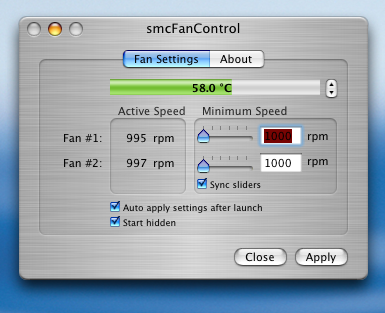
Mac users are so Lucky ... you can play with how your cooling fan operates ... I have always wanted to do that .. I am so getting a Mac .. just to up the Rev's on my Fan !
I know I can not get a Core2Quadro for $450 AUD but I can get a Core2duo CPU.
Mate the reason why Craig and I are giving you a hardtime is because we're talking about a laptop NOT a desktop. I mean for desktops there'll be octocores soon so why stop at a quad?
Rinjani
X1600 isn't the fastest card around and 256MB is probably the minimum for HD editing. The Alienware computers have 512MB and seriously fast GPU, but they are also bigger. For the size, the X1600 256MB is good enough for now
Giles, you crack me up 
Im going to get a Core2Quadtripplet with a vary fan, remote controlled by my Cellphone
Oh Wags... bluetooth control via cellphone is so 1999.
Giles, you laugh but it works... but apparently it causes the fan to fail prematurely for some people.
My MBP just shipped and will be here Thurs. So begins the partitioning etc etc. I really dislike this part of a new computer.
Rinjani,
For most editing, the MBP works just fine. The trouble is render times. Primarliy render on export and also preview render for multiple complex effects. But hey, what can you expect from a 1 inch thick computer you can edit with anywhere.
I also use the Lacie 320gb Little Big Disc which is firewire powered! For any mobile HD editor, this pricy little drive is a must have. Fast, very solid construction and no need for ext power supply. Also, doens't seem to drain much battery (just as much as my usb 40gbg drive). So with int hd, i have 420gb of mobile drive space, 2 ghz dual core processor, 256mb graphics and 2 gig of ram!
Shanw

Terms of Use Privacy Policy Guidelines We have placed cookies on your device to help make this website better. You can adjust your cookie settings, otherwise we'll assume you're okay to continue.

A worldwide community for underwater imaging.