



For those that have done large scale panoramics what lens did you use? I am thinking that the 12-24mm Nikon would be the best but I dont have one to practice with. Any help would be appreciated!
Shooting Technique, Workflow and Editing / Archived topic
Large Scale Panoramics
Started by Islandbound ·
- 56Posts
- 56Replies
Read-only discussion
Large Scale Panoramics
56 posts
-
-
For those that have done large scale panoramics what lens did you use? I am thinking that the 12-24mm Nikon would be the best but I dont have one to practice with. Any help would be appreciated!
How are you creating your panoramics? I do a lot of Quicktime VR, from which a panoramic is a "side product", but there are also special cameras designed specifically for this kind of photo. Since you're using a Nikon, it sounds like you may want to accomplish this in a single shot, or are you planning to stitch together multiple shots?
Bonnie
-
How are you creating your panoramics? I do a lot of Quicktime VR, from which a panoramic is a "side product", but there are also special cameras designed specifically for this kind of photo. Since you're using a Nikon, it sounds like you may want to accomplish this in a single shot, or are you planning to stitch together multiple shots?
Bonnie
Yes, stitching the photos is my intention. I need to cover about 400 linear feet and have been practicing the technique on the computer but need a much wider lens to take the actual bottom photos I have in mind.
-
If you're going to stitch it manually in Photoshop or using Photoshop's Photomerge option I would probably go with a 12-24 rather than using a fisheye lens. It would be easier to stitch. The software I use corrects distortion, but then puts it back in later for the virtual movie, so it may be a less desirable effect than you want. I've done some panoramas completely stitched manually in Photoshop and this is where I got the best results. Most mine were done around 20mm with a 50% overlap.
-
If you're going to stitch it manually in Photoshop or using Photoshop's Photomerge option I would probably go with a 12-24 rather than using a fisheye lens. It would be easier to stitch. The software I use corrects distortion, but then puts it back in later for the virtual movie, so it may be a less desirable effect than you want. I've done some panoramas completely stitched manually in Photoshop and this is where I got the best results. Most mine were done around 20mm with a 50% overlap.
I realize that the distance to the object will determine some of the answer to the question I am about to ask.. How many photos have you been able to stitch together successfully?
-
I realize that the distance to the object will determine some of the answer to the question I am about to ask.. How many photos have you been able to stitch together successfully?
For panoramics, I would not recommend shooing with a wide angle lens initially. It is much easier to shoot with a 50mm or higher (assuming crop sensor) as there will be far less edge distortion from the lens. Also, depending on what you are shooting, vertical shots work very well and allow for more cropping during the stitching. There are several programs which can do stitching for you, and assuming you have shot the series correctly, work quite well. I recommend Panorama Maker 4. It will stitch up to 12 shots in either TIFF or jpeg format. Much easier than the present iteration of PS.
-
I shoot them them with the 17-55mm lens. I set the lens at 24-35mm or the equivalent of 36-52.5 on a 35mm film camera.
While it would seem that wider would be better, it is not. It is better to use more images and shoot narrower. The downside is that there are more seams and every seam has the potential for distortion.
If I'm shooting stuff that moves, like scenes with people and fields of wheat swaying in the wind, I might go wider and perhaps not overlap the shot quite as much, but if the scene is static, narrow the shot and overlap more. This will reduce barrel distortion.
I've stitched as many as nine images together.
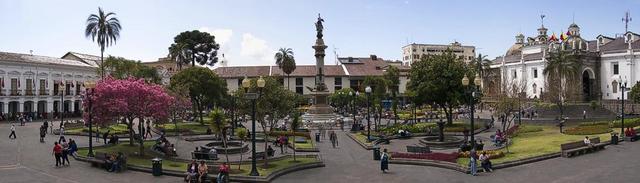
Just printed of couple of 4 footers of this one:

A couple more:

-
Those are very nice Scorpio, what software did you use for the editing?
-
I've used Photoshops Photomerge feature though it doesn't seem to allow me to edit the contrast and such like on each individual image. I ended up doing it manually to a much better result!
-
I did a 100+ image panoramic (talk about large scale) and used a 12-24.
-
Cor, was that an underwater panorama? Have you tried many underwater panorama's?
-
Yeah, that was an underwater panorama. And no, i havent done many.
-
Those are very nice Scorpio, what software did you use for the editing?
Panorama Factory
-
Cor, is there a way we (I) could see that photo? I would like to see just how it turned out.
-
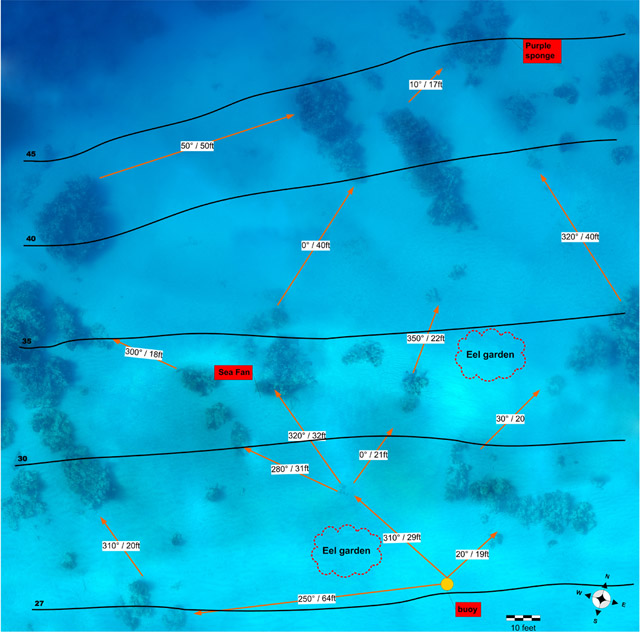
It's not that interesting, and ive posted it here before. When I did divemaster exam I went a little overboard and created a photographic underwater map as my 'mapmaking project'. All done with CS2, and i had about 600 photos to pick from. Taken from about 3 feet under the surface, straight down. I went through a grid and took images every few kicks.
-
It's not that interesting, and ive posted it here before. When I did divemaster exam I went a little overboard and created a photographic underwater map as my 'mapmaking project'. All done with CS2, and i had about 600 photos to pick from. Taken from about 3 feet under the surface, straight down. I went through a grid and took images every few kicks.
I feel pretty embarrassed now about my measly divemaster exam briefings.
Did anyone recommend OCD treatment?

-
Actually I'm kind of impressed. That would be cool to have in dive books of the sites, say in a Bonaire dive guide or whatnot.
Not to overlook the original posters, and scorpio's panoramas are pretty nice too.
-
Cor,
Now that's what I call a dedicated DM student, but where are the fish?
-
Do you guys use any tripods/ stabilizer or leveling tools for your stitched panoramics?
-
Do you guys use any tripods/ stabilizer or leveling tools for your stitched panoramics?
It's best to use a tripod, level the tripod, then the camera (using a hotshoe mount level or other such device) and have the entrance pupil of the lens at the tripod's rotatioal axis. With that said, it is possible to do it hand held if you use the lines in your viewfinder as guides but often they don't work out. Here is one from our indo trip I shot handheld off the back of the Palagian while underway using my 70 - 200, 7 shots.

Everything I have read about shooting panos recommends starting with telephoto lenses, shooting vertical and as you get better working with WA. The wider you go the more critical it is to have the lenses entrance pupil at the rotation point.



