Skip to content

Shooting Technique, Workflow and Editing / Archived topic

AVCHD native editing in NLE

Started by wagsy ·

  • 30Posts
  • 30Replies

Read-only discussion

AVCHD native editing in NLE

30 posts
  1. Yeh but how long does that process take?


    Umm, it was 5:1 on my 2GHZ, 1 drive laptop for 1080p. On a high performance machine probably closer to 10:1 or maybe 20:1 with raid. It's a re-wrap not a re-compress, so it's just writing the files.


    Based on what I am seeing, it should take about 6 minutes or less to convert an hour of video. Compared to having to render to cineform or any other intermediate codec, that's blazingly fast.

  2. But that's with XDCAM mxf footage, I can already edit 3 raw mxf streams of that at max res in realtime so not point in rewrap.


    It's AVCHD that's the problem.

    Vegas is the only one so far but just see how long you stick at editing in a very low res preview mode...impossible to see sharpness, colour corection, graphics's, just good for basic cuts with one stream.


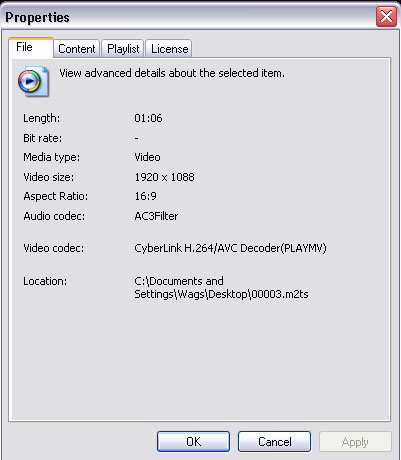
    I got my hands on some AVCHD from a Panasonic SD9 AVCHD and dumped that on the timeline...you have to be joking...1920/1080 24p 17mbps AVCHD....no way to edit it... so I converted it to a 1920/1080 24p Canopus HQ file then it flew.

    The orginal AVCHD file came in at 130 megs but once I had converted it to the Canopus HQ codec is was 557 megs...

    I could manage the clip playing back in 4 pips with a title in realtime on a single sata drive even in the 1920/1080 50i project setting.

    Here is the 720/576 24p CBR 8mbps mepg DVD m2p file I rendered out from the timleine. The grain and blur was also in the raw 1920/1080 AVCHD file as well when played outside of the NLE ?

    66 megs

    http://www.pcwags.com/HDV/24p.m2p


    Best way so far is to convert it then it's like editing DV so get use to long converting-waiting times from your instant hardrive editing camera's.

    It's also about 130 megs per minute of raw AVCHD 1920/1080 24p 17mbps so to archive raw the footage onto normal DVD disk one could get about 30-35 minutes which would take about 10 mins at safe 4x speed as using faster burning speeds can create problems.


    I sure in a few years CPU and software will improve so one can edit like DV but it's certainly not here yet.


    Anyone tried it out on the MAC with FCP?

    Edited by wagsy
  3. If you post a raw AVCHD file on your site or here then I will give it a crack.

    Edited by jonny shaw
  4. Sure here you go

    It looks like the file is still there.

    http://www.sendspace.com/file/3fo72w

    Scroll to the bottom of the page and look for Download Link: 00003.m2ts

    It's from the Panasonic SD9

  5. I'm having trouble doing anything with it... can't convert in QT, play in VLC, import in FCP, even tried to chuck it into Sorrenson but not joy....

    I must be doing something wrong... anybody any ideas?


    J

  6. Yeh it's nasty, I can however play in with Media Player Classic on the PC at full screen.

    It looks like Windows Media player can play them too.


    It does load into Procoder Express encoder but locks it up after abit.

    TMPGEnc, Super@, Flash 9, On2, Vlc, QT, nope.

    Only way so far it to use the 1.1 speed Canopus AVCHD convert to Canopus HQ then it's very easy to edit but huge files.

    post-4240-1217556081.jpg

  7. My Vegas crashes every time I try to open it.

  8. It's a bloody nightmare format..... there must be a easy solution.

  9. Guys

    The reason the Panny SD9 clips are incompatible with many players/NLE is because it has motion references in the Br-Frames. Basically they switched the formula and it caught everyone by surprise. Welcome to the world of digital editing.

  10. Just for kicks I played with some SD9 1080/24p from someone else and it transcodes to AIC via Log and Transfer of FCP 6.0.4 at 0.9x real-time. Going to Pro Res 422, it took 1.1x realtime on my MBP 2.33. This was taken direct from camera. Later I set up a SDHC 8GB Sandisk Extreme III card and d/l and it was 0.8x real-time to AIC and 1x real-time to ProRes 422. My previous experience with the HF10 was a bit faster but essentially the same speed.

    The real advantage of flash media isn't the speed but the convenience of choosing which clip to transfer and even which part of the clip. It's a faster workflow than log and capture on tape and definitely faster than logging an entire tape in to find the scenes you want.

    Once you finish the product, you can encode to what format for whatever delivery.

    The doozy? FCP can't just import from any old folder. It has to be on the desktop and in a certain format, a slight inconvenience. You just have to make sure the PRIVATE folder and all the requisite bits are copied in the desktop.

Backscatter

Account

Navigation

Search

Search

Configure browser push notifications

Chrome (Android)
  1. Tap the lock icon next to the address bar.
  2. Tap Permissions → Notifications.
  3. Adjust your preference.
Chrome (Desktop)
  1. Click the padlock icon in the address bar.
  2. Select Site settings.
  3. Find Notifications and adjust your preference.