Skip to content

Shooting Technique, Workflow and Editing / Archived topic

Burning to Blu-Ray

Started by Roger Eve ·

  • 21Posts
  • 21Replies

Read-only discussion

Burning to Blu-Ray

21 posts
  1. Hi Guys,


    I'm getting a little frustrated with downgrading my HDV to DVD and watching it on a swish HD Sony Bravo. I can play the edited video back on tape, and it looks really good, but I am conscious about wearing the heads of my camera. As prices are now dropping a little I am tempted to buy a Blu-Ray burner, and a player for my TV.


    I would appreciate any advice on how best to burn my edited video to BR, BUT please keep it simple :) I am using Edius 4.6 for editing the HDV. I am sure, Wagsy, you mentioned another program that you use to create your BR from Edius, but I cannot see the posting. Also if others have experience with BR burners/players (especially external) I would appreciate your opinions.


    Thanks for your help.


    Cheers


    Roger

  2. Hi Roger...I'm just off to bed here but I used DVDit® Pro HD.

    I made the video files with Procoder Express straight from the timeline them made the Ac3 audio tracks from it.

    It's was pretty straight forward to make and you can make both a normal DVD or Blu_Ray from it.


    More later......

  3. Thanks mate - sleep well :)

  4. Hey Roger, have you had success yet?

  5. Hi Wagsy,


    Not yet, I still have to get the program and the hardware!! Really just researching the way to do it. I would be grateful if you could describe the process step by step. Do it on a PM if you prefer. e.g. what video files do you produce from the timeline (mpeg?) with Procoder Express, and what is an Ac3 audio file. Sorry about my ignorance but this is all new to me :drink:


    Cheers


    Roger

  6. Sure


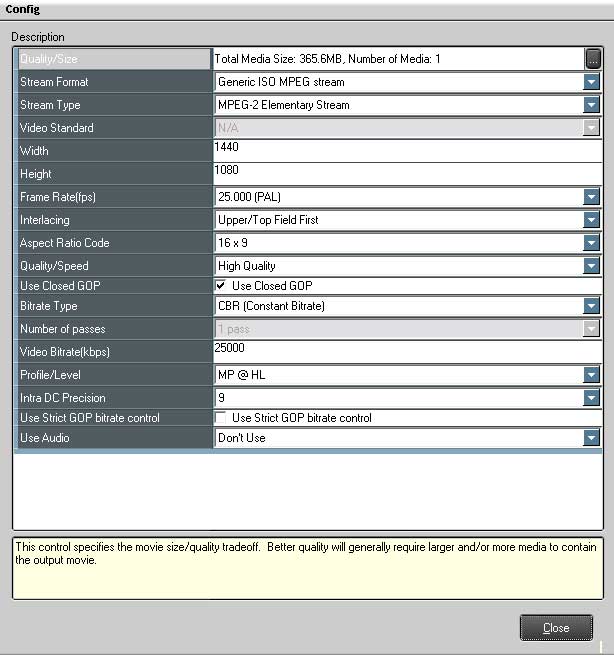
    1. Just fire up Procder Express and encode straight out from the time a 1440/1080 CBR 25mbps Mpeg2 Elementary stream.

    2. Make sure you set it to no audio.... and once you have your video m2v file you can render out your ac3 audio tracks from the timeline using the Ac3 export setting.


    3. Fire up DVDit® Pro HD import your m2v and ac3 audio tracks, author then compile it to a folder on your hardrive to test or burn straight to a disk. DVDit® Pro HD will not re encode the files when compiling so it makes a Blu_Ray really quick.


    4. You can make H.264 ones as well but it takes more power for a computer to play them than normal MPEG.


    5.Ac3 is just another type of fancy audio compression codec.


    Good luck...


    post-4240-1218371998.jpg

    Edited by wagsy
  7. Hi Wagsy,


    Absolutely brilliant, just what the doctor ordered :) Thank you so much.


    Now all I have to do is get the hardware passed "her indoors" :drink:


    Roger

  8. Hi Roger.

    Found some time this arvo.... so I knocked this little video clip up for you on how to render out the files from a EDIUS 1440/1080 HDV timeline that the Blu_Ray authoring program will take without it re encoding them.

    There are other ways as well but this way you can do it very fast straight from the timeline.


    (broadband needed)

    http://www.hdvunderwater.com/blue/blue.htm


    Hope ya like it. :drink:

    Edited by wagsy
  9. :goodpost: Cheers Wagsy,


    Thanks for taking the time out to do that. I hope others here will also get the benefit. You made it very simple, and although I thought that is what I had done before :o I followed your words to the letter and it worked perfectly. Many many thanks.


    Hopefully my last question. Does Procoder Express encode ALL the audio tracks on the timeline as one Ac3 file? I usually have BGM and a narrative track.


    Thanks again


    Roger :chatterbox:


    BTW, I shouldn't have any problem getting the hardware passed the missus she has just bought a Nikon D300 :angel:

  10. No worries, glad to help.


    Lets say you have 3 audio tracks that you want to put into your Blu-Ray.

    1 music

    2 narration

    3 music/narration


    Just turn the tracks off and render out the ones you want each time or leave BGM / narrative on if they are mixed together for example.


    QT H.264 take longer to make but they are much harder for computers to play and beside at 25mbps there is no quality difference between H.264 and MPEG.

    I'm playing with another encoder here now that can render out QT H.264 clips in realtime from a 1440/1080 m2t file....pretty cool..


    Make sure you get a re write disk to practice on as Blu_Ray disk are $$$ or you can make some small tests one on normal DVD-r disks first.

    Well a burner and some software is much cheaper than a D300.... :chatterbox:

  11. Just turn the tracks off and render out the ones you want each time or leave BGM / narrative on if they are mixed together for example.

    Thanks again,


    When you say "turn them off". Do you mean lock or mute or just "activate" the track to render by highlighting the track on the far left of the timeline? Presumably I treat the VA1 audio track in the same way?


    Thanks for your support re the hardware costs :chatterbox:


    Cheers


    Roger

  12. Yes mute the tracks that you don't want rendered out.

  13. Thanks Wags,


    I will shut up now :chatterbox:


    Roger

  14. Hey Roger

    Straight out of EDIUS, MPEG 1440/1080 25mbps - AC3 and into DVDit® Pro HD and out as a ISO file.

    Then used normal DVD burning software and burnt the ISO file to a normal DVD-R disk.

    Don't know if it will play in a lounge room based Blu_Ray player though.


  15. G'Day Wagsy,


    That is fascinating, something I really will try. Thanks for the very clear video tutorial :goodpost:


    Wendy & I are off to Calgary next week for a train ride over the Rockies and then a cruise along the Inner Passage of Alaska. Not diving, but lots of scenery, mountains, glaciers and hopefully some animal/whale watching. It will be nice to be able to Blu-ray some of the footage from that trip. We are celebrating our 40th Wedding anniversary! Someday we will have to come out to your part of the world to see those whale sharks :chatterbox::o


    Cheers


    Roger

  16. No worries, I'll try and test out the DVD-r disk in a few players if I can.

    Anyhow you just need a copy of DVDit pro HD and you can try yourself.

    There does not look like there is too many Blu_Ray authoring programs around the place yet.


    I'll do a H.264 one but I suppose it will take longer to render out with no quality improvement over 25mpbs MPEG2 and H.264 will take more CPU to playback anyhow.


    Well that sounds like a nice trip...a trick with HDV is to shot like a still camera as you get the best image quality then, panning or zooming you will get quality drop as there is just too much information to compress down to that 25mbps stream so it dumps some res to keep up.....take a small tripod if you can.

  17. Thanks Wags, really interesting.


    Cheers


    J

  18. Does anyone have any experience with how well (or not) Sony Vegas's DVD Architect 5.0 works for authoring Blue-Rays? I've seen they have this version released which is supposed to support blurays.. but I am curious to know if anyone has had any actual success with it?

  19. Me too, I'll like to know also, heard great reports.

  20. I'll be cutting a blu-ray to an ISO from DVDA next week. I'll let you guys know.

Scuba.com

Account

Navigation

Search

Search

Configure browser push notifications

Chrome (Android)
  1. Tap the lock icon next to the address bar.
  2. Tap Permissions → Notifications.
  3. Adjust your preference.
Chrome (Desktop)
  1. Click the padlock icon in the address bar.
  2. Select Site settings.
  3. Find Notifications and adjust your preference.