



This is really sad, but where do you stick the CD in the Mac Pro? It says I have an optical drive, I see no place to insert the stinking disc.
- 21Posts
- 21Replies
Read-only discussion
Ignorant Mac question
21 posts
-
-
Press eject on the keyboard. The drive will appear.

It is the two slots on the front at the top (the new ones have 2 superdrives) left hand image.
-
Duh! Thanks. Can we erase this thread?
-
Sorry... we're keeping this as blackmail material.
 RTFM prime material!
-
Duh! Thanks. Can we erase this thread? Macs are so much fun to learn. You feel like a 3 year old, only they are much smarter. I'm really proud of my ability to learn how to use my DVR while my teenager was away for the summer. In fact, I probably learned better without him around because he never lets me have the remote, or grabs it in frustration when I can't do something right the first time.
-
Good thing you never had a Mac with OS9; They used to come up with funny spoken error messages like 'It's not my fault'.
-
Good thing you never had a Mac with OS9; They used to come up with funny spoken error messages like 'It's not my fault'.
I don't know if it was OS9, but I had a Mac 'Performa' that I literally threw out of a window ...
-
Thank you, scorpio_fish for a good LOL this morning. Its amazing how a new computer can make intelligent people feel like an idiot. I had the same question when I bought a similar Mac several years ago, but stayed up all night trying to figure it out before looking it up in the user manual.
-
This is really sad, but where do you stick the CD in the Mac Pro? It says I have an optical drive, I see no place to insert the stinking disc.
You might try putting the CD the Mac's cup holder.
-
This is really sad, but where do you stick the CD in the Mac Pro? It says I have an optical drive, I see no place to insert the stinking disc.
ROTFLMAO
Thanks for having the guts to ask. Made my morning. I've been upset with myself because I can't get the new LR 2.0 to work. It made me feel better knowing I wasn't the only one to struggle. It says something about the design of the system if you couldn't see what should be obvious. Steve
-
Took me 3 days to press the eject button to find the drive. But I did not have a need for it...
-
Gee, now I don't feel so bad. I couldn't figure it out either on my MacBook Pro. Finally, in desperation, I called one of my friends who is an acknowledged Mac expert and he educated me on where to find it. They really should label it better so we brilliant folks can find it
Ellen
-
This thread just won't die.
At least I put the Dremel away. I knew it was behind that metal plate.
If I use my pinky instead of my index finger, is it the same as a right click?
Why does the delete key act like a backspace key instead of deleting what's in front of it?
I spent 3 days in a Final Cut Pro class. The instructor was "bilingual" and knew I was a PC guy. He kept tossing me clues when I had that look on my face.
-
Tips:
1. fn-Delete is forward delete.
2. Return is rename. You will hate it in the beginning, but it starts to make sense after the koolaid starts taking effect.
3. Command-down arrow is launch whatever you have highlighted in the finder (like Return on XP)
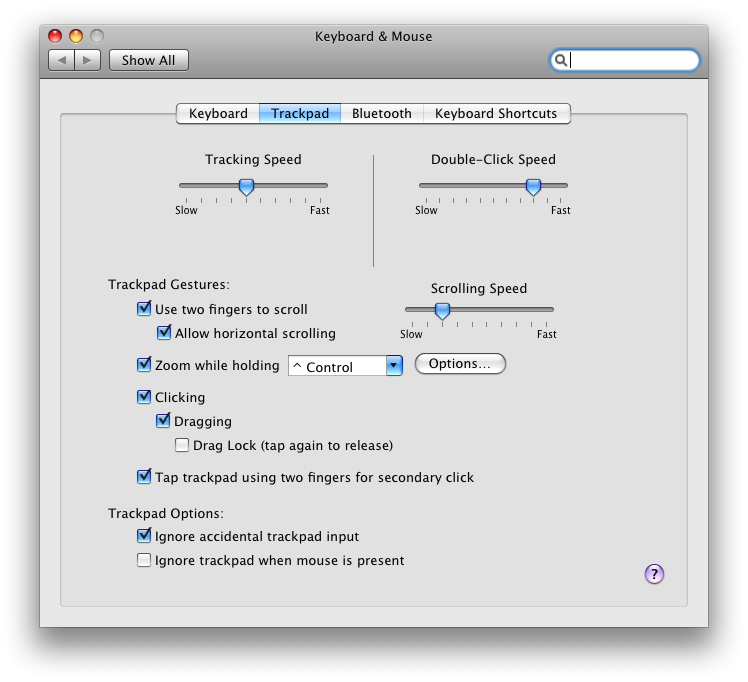
4. Right click is Control-Click, or (what I use), two fingers on trackpad plus click. But you need to enable this in System Preferences -> Keyboard and Mouse -> Trackpad:
-
Thanks, this made my day.
Having grown up with Mac's it's the PCs that drive me crazy at work. What is the 2nd button on the mouse for anyway. Also which key is the "any"
key?
-
Dave, seriously, that mouse button discussion is over, and mac lost. Even macs nowadays built in right mouse button context menus. I guess they figure they were wrong all along, just dont want to admit it
Even the Mighty Mouse (the worst mouse ever made, by far) has multiple buttons. I have both now, and they both have their good and bad points. Macs just seem to have fewer bad points. -
Whoa, Cor...now it's war... Mighty mouse is good... if it were more precise like the Space Navigator, it'd be great. Now if you have really big hands, then it's not that easy to use.
And Dave, Cor is right. The single button mouse is about as useful as my input in this thread.
-
Cor said it. Mighty Mouse...worst mouse ever!
My hand hurts just thinking of using it.
-
This thread just won't die.
At least I put the Dremel away. I knew it was behind that metal plate.
If I use my pinky instead of my index finger, is it the same as a right click?

Why does the delete key act like a backspace key instead of deleting what's in front of it?

I spent 3 days in a Final Cut Pro class. The instructor was "bilingual" and knew I was a PC guy. He kept tossing me clues when I had that look on my face.
I can soooo relate. That "delete" key thing even drove me to finally opening up the manual. -
Another ignoramus chips in.... I've just switched to a Mac too from a PC. Oy vey! Its like having half your brain erased. I can't wait for the CoolAid to kick-in. (Good tip, Eric, thanks) I struggled over getting a CD to eject. And as for that fn-delete thing....... Folks tell me once I get used to a Mac, there ain't no going back. The sad, sympathetic looks the very nice people give me at the Apple store make me not want to go back there for sure.... hee hee.

