Skip to content

The Galley: General Chat / Archived topic

MarineLife Keyword List

Started by echeng ·

  • 35Posts
  • 35Replies

Read-only discussion

MarineLife Keyword List

35 posts
  1. Hey guys -- we just launched a new product here at Wetpixel!


    Renowned underwater photographer and educator Marty Snyderman, Dive Training's Contributing Editor Barry Guimbellot and Wetpixel's Eric Cheng have teamed up to create an importable keyword list designed for underwater photographers using Adobe Lightroom or Apple Aperture. The MarineLife Keyword List features keywords for over 12,000 species of marine wildlife, including common names, scientific names, and full taxonomy.


    More information at:

    http://wetpixel.com/keywords

    ($5 discount for Wetpixel readers)


    Here's a video of me working with the keyword list:


    Several people have contacted me to learn how to find images that either 1. do not have keywords attached or 2. images that have keywords, but none of our MarineLife species keywords.


    In Lightroom, go to the Library module and activate the "Filter" feature above the grid image view. Use these following criteria for finding images without any keywords: TEXT--Keywords>Doesn't Contain>a,e,i,o,u.

    This combination of criteria will show all images without any keywords.


    To find an image that doesn't contain a species from our MarineLife Keyword list, use the following criteria to search: TEXT--Keywords>Doesn't Contain> :. (The last qualifier is a colon, without the period). Since our common name species keywords are "attached" to their genus and species with a colon, this combination of qualifers will show all images that have not had one of our MarineLife Keywords attached.


    We hope this helps users find images that need keywords assigned.


    Barry

  2. Q for all LR (v2.3) users...


    Not sure if this a LR quirk or (more likely) a user quirk :)


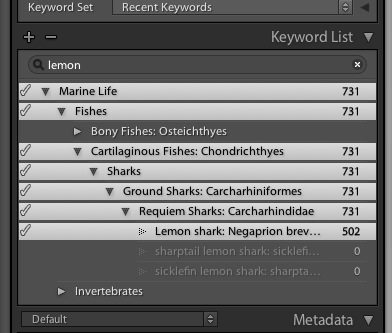
    Once I have found my keyword, I have to manually select the full hierarchy (i.e. click each keyword one-by-one) instead of selecting the full hierarchy using the shift key - is there a better way I can do this like you can in Aperture?


    For example - searching for "lemon sharks"...


    post-4657-1250387859.jpg


    If I select all using the shift key, LR will also add "bony fishes" to the keywords which I do not want. As such, my only work around is to click each keyword manually. Is this a LR thing?


    Appreciate any help :)

  3. So when is V2.0 coming out? You know - the one with image recognition built in that automatically recognises the species in the image and adds the keywords automatically :)

  4. Once I have found my keyword, I have to manually select the full hierarchy (i.e. click each keyword one-by-one) instead of selecting the full hierarchy using the shift key - is there a better way I can do this like you can in Aperture?


    If I select all using the shift key, LR will also add "bony fishes" to the keywords which I do not want. As such, my only work around is to click each keyword manually. Is this a LR thing?


    If I want all the different lines then I do it manually. It only takes a couple of seconds to click on two or three lines, each time I do it I think of how much time I am saving not typing! Makes the clicking feel good.


    The good thing is that one they are all highlighted they stay that way, even if you go into the library and start clicking on picture, making it easy to add them too all the shots you have of that subject very quickly.


    So I don't have a solution for that one - but mainly because I haven't been looking for one.


    Alex

  5. Another vote for Photo Mechanic.

    Also Nikon Capture NX2


    Ellen


    Yet another vote for Photo Mechanic

  6. Vote for C1 Pro.

  7. Q for all LR (v2.3) users...


    Not sure if this a LR quirk or (more likely) a user quirk :blink:


    Once I have found my keyword, I have to manually select the full hierarchy (i.e. click each keyword one-by-one) instead of selecting the full hierarchy using the shift key - is there a better way I can do this like you can in Aperture?


    For example - searching for "lemon sharks"...


    post-4657-1250387859.jpg


    If I select all using the shift key, LR will also add "bony fishes" to the keywords which I do not want. As such, my only work around is to click each keyword manually. Is this a LR thing?


    Appreciate any help :)


    Collin's problem in Lighroom was that he was not initially seeing his Marine Life Keyword heirarchy showing in the "Enter Keywords" box, but when he changed the view to "Keywords and Containing" he could then see his heirarchy of keywords. Not seeing the heirarchy is by design of Lightroom to keep the "Enter Keywords" box from becoming too large.


    He also had the problem that his Lightroom version 1 keywords were not showing in the "Keywords and Containing" dialog box after upgrading to version 2.XX. I pointed him to the Adobe website to download a script that solves the bug of version 1 keywords not showing in the "Keywords and Containing" box. After installing and running the script, Collin's issues with keywords were solved.


    I hope this post helps someone having the same issues with Lightroom.


    Barry

  8. Collin's problem in Lighroom was that he was not initially seeing his Marine Life Keyword heirarchy showing in the "Enter Keywords" box, but when he changed the view to "Keywords and Containing" he could then see his heirarchy of keywords. Not seeing the heirarchy is by design of Lightroom to keep the "Enter Keywords" box from becoming too large.


    He also had the problem that his Lightroom version 1 keywords were not showing in the "Keywords and Containing" dialog box after upgrading to version 2.XX. I pointed him to the Adobe website to download a script that solves the bug of version 1 keywords not showing in the "Keywords and Containing" box. After installing and running the script, Collin's issues with keywords were solved.


    I hope this post helps someone having the same issues with Lightroom.


    Barry


    Barry / Alex


    Many thanks for all your help - all is well now :)


    Keywording is so much easier now!


    Cheers!

  9. Hey guys -- we just launched a new product here at Wetpixel!


    Hello Everyone,

    A Marine Life Keyword List user asked a question that some other people may also find confusing.


    The question was why there are some multiple entries of certain species names.


    For instance, in our list we have;

    spot tail moray: spotted-tail moray: spotted tail moray: Gymnothorax equatorialis

    spotted tail moray: spot tail moray: spotted-tail moray: Gymnothorax equatorialis

    spotted-tail moray: spot tail moray: spotted tail moray: Gymnothorax equatorialis


    These multiple entries are correct and do not need to be deleted from your list.


    The entries above are all for the same species, a Gymnothroax equatorialis. If you notice, each entry starts with a different common name of the same animal.

    Lightroom only "sees" the first word in a line of keywords when autofilling in the Enter Keywords box. Therefore Lightroom would not autofill the "add keyword tag line" if the species keyword was only in our list starting with spot tail moray and the user typed spotted-tail moray. You would then feel our list is incomplete.


    It is our desire for users to be able to use as many of the accepted common names for an animal as we could find. We could never add EVERY possible common name for every species, especially considering how many common names are only regional, but we did make a good try to do so.


    We hope this explanation helps you understand why we have redundant listings of several species.


    Thanks to all of you that have purchased or responded about the list.


    Happy Holidays,

    Barry Guimbellot

  10. Hey guys -- we just launched a new product here at Wetpixel!


    Renowned underwater photographer and educator Marty Snyderman, Dive Training's Contributing Editor Barry Guimbellot and Wetpixel's Eric Cheng have teamed up to create an importable keyword list designed for underwater photographers using Adobe Lightroom or Apple Aperture. The MarineLife Keyword List features keywords for over 12,000 species of marine wildlife, including common names, scientific names, and full taxonomy.


    Eric just informed Marty and me that our keyword list will now work with Photo Mechanic. This information is great because we know several of you are using Photo Mechanic and are interested in the list.


    Barry G.

    www.marinekeywords.com

  11. Hey guys -- we just launched a new product here at Wetpixel!


    Renowned underwater photographer and educator Marty Snyderman, Dive Training's Contributing Editor Barry Guimbellot and Wetpixel's Eric Cheng have teamed up to create an importable keyword list designed for underwater photographers using Adobe Lightroom or Apple Aperture. The MarineLife Keyword List features keywords for over 12,000 species of marine wildlife, including common names, scientific names, and full taxonomy.


    Hi Everyone,


    I have been trying out a Lightroom plug-in, called Any Tag, for keywording in Lightroom, that is fantastic. I luckily found the plug-in on the Adobe Exchange page, so Adobe has done the testing first.


    When adding keywords in a Windows based Lightroom, one may want to assign "blue spotted jawfish" to an image , but when one hits the spacebar after blue, Lightroom starts searching all over again with the "s" letter for spotted. This feature to me is a Windows bug in Lightroom, which means users have to scroll all the way down through all their "blue" keywords until the blue spotted jawfish keyword is found.


    As you can imagine, since I have over 54,000 keywords in Lightroom, there are a lot of "blue" keywords to scroll through including, “MarineLife keywords”, "Birds of North America", “Birds of the World” and soon to be released “Mammals of the World”, to find my blue spotted jawfish.


    Now, all anyone has to do is type "bl" (space) "jaw", with the quotation marks omitted, and they will see Any Tags' suggestions for the proper keywords, of which there were only 3 suggestions on my machine; blue spotted jawfish, bluespotted jawfish and bluebar jawfish. Is this feature fantastic or not?


    There are more features that I have yet to explore, including a very fast and accurate "Find" filter feature and letting you know you are adding a new keyword by turning the letters red for the new keyword.


    Any Tag may be downloaded as a free trial at http://www.johnrellis.com/lightroom/anytag.htm and will make keywording even easier with those using our extensive lists.


    I highly recommend the plug-in with our keyword lists.


    I have no monetary gain to suggest this plug-in, I just think it a great product to make keywording easier for everyone.


    Barry

    http://www.creativeillusionsphoto.com

    http://www.keywordworkflow.com

  12. Thanks Barry!

  13. Hi Everyone,


    I have been trying out a Lightroom plug-in, called Any Tag, for keywording in Lightroom, that is fantastic. I luckily found the plug-in on the Adobe Exchange page, so Adobe has done the testing first.


    I have been so excited about how easy the Any Tag plug-in makes keywording, I made a YouTube video showing some of the key features.


    The video may be found here


    I have no monetary interests with Any Tag, I just believe in the plug-in when working with the MarineLife Keyword List and want everyone's keywording to be easier.


    Barry

    www.creativeillusionsphoto.com

    www.keywordwordflow.com

  14. For instance, in our list we have;

    spot tail moray: spotted-tail moray: spotted tail moray: Gymnothorax equatorialis

    spotted tail moray: spot tail moray: spotted-tail moray: Gymnothorax equatorialis

    spotted-tail moray: spot tail moray: spotted tail moray: Gymnothorax equatorialis


    These multiple entries are correct and do not need to be deleted from your list.


    The entries above are all for the same species, a Gymnothroax equatorialis. If you notice, each entry starts with a different common name of the same animal.

    Lightroom only "sees" the first word in a line of keywords when autofilling in the Enter Keywords box. Therefore Lightroom would not autofill the "add keyword tag line" if the species keyword was only in our list starting with spot tail moray and the user typed spotted-tail moray. You would then feel our list is incomplete.

    I believe this issue is avoided if one uses the "Filter Keywords" search option (Alex's method #2) under Keyword List. In the same way that keyword entries are not duplicated to put Latin species names first, it's probably cleaner to have single entries rather than triplicate for multiple common names.

  15. Tim - I should have a trial version online within a week, so you can give it a try before buying. Also, we're working on versions for Adobe Bridge, Microsoft Expression Media, BreezeBrowser, and Portfolio.


    Any other platforms photographers out there might be interested in?


    I'd be interested in a Lightroom and Bridge version. Never used Aperture myself.

    Steve

Backscatter

Account

Navigation

Search

Search

Configure browser push notifications

Chrome (Android)
  1. Tap the lock icon next to the address bar.
  2. Tap Permissions → Notifications.
  3. Adjust your preference.
Chrome (Desktop)
  1. Click the padlock icon in the address bar.
  2. Select Site settings.
  3. Find Notifications and adjust your preference.