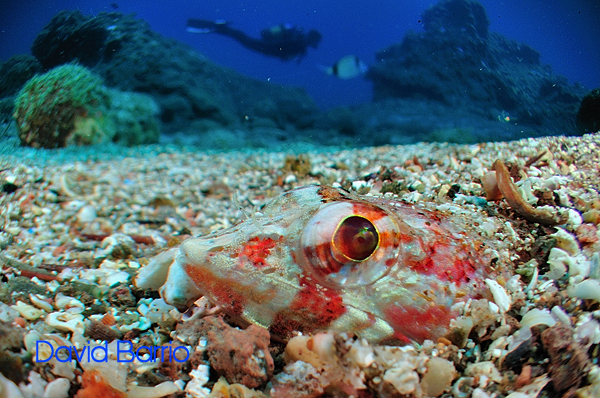
Eric, do you by any chance know, how to find out, which Insdect Eyes are the rec alled ones (serial numbers or contact information) ... because i finally have my Insect eye (with original port on original INON housing) and am absolutely unable to get sharp images. My shots are just fully blurry ... and i can only get something that you can compare to focus, when i come closer that 1cm to the subject (which equals touching ...).
Serge
I have done tryouts with a lot of different combinations (50mm, 60mmAFD, 60mmAFS with and without teleconverters, ext rings for both the lens and housing etc...) and the thing that you have to be most careful about is having the lens perfectly centered! My camera has some play inside the housing so, what I do, (this is my recommendation) is to mount first the lens on the housing, then the camera without the back. Take a picture on air at close focus and small aperture (f22 or higher) and see if the vignetting is symmetric (four corners of equal size) if it is not, play with the camera until it is or you will have blurry images no matter what. That is why I asked Eric about a picture with his setup on air to see how was his vignetting compared to mine.
I am starting to have good results with this lens on nikon and will try to post some pics tonight.
Hi David,
this is what i also realised on my setup ... the vigneting on land is not symetric ... i also disassembled my housing and put it back together. but unchanged. unfortunately i have no play on my housing to play with. i will try to figure out something ...
what I do, (this is my recommendation) is to mount first the lens on the housing, then the camera without the back.
how do you mean that? how can you put the lens without the housing?
serge
Hi David,
this is what i also realised on my setup ... the vigneting on land is not symetric ... i also disassembled my housing and put it back together. but unchanged. unfortunately i have no play on my housing to play with. i will try to figure out something ...
how do you mean that? how can you put the lens without the housing?
serge
Hello Serge,
I meant putting the lens on the housing and then playing with the camera and shooting until the vignetting is right.
Here is an uncropped pic:
Ahh ok ... i understand. I thought you mean the 60mm lens ... but you meant the fisheye
I now made some modifications on my housing try and will check the results tomorrow in the water ... hopefully it works.
Thanks for the tips ...
serge
That's exactly the issue I had, only I was unable to point the camera at the center of the insect eye lens because both the INON and Nauticam trays had the cameras mounted too high. I need to write a review still, but I haven't had time to do so. Sorry.
Hey everyone,
Just posted a trip video from Lembeh:
[vimeohd]10482441[/vimeohd]
I used Aperture 3 to create this video. The addition of video/ audio cataloging capability, plus the ability to build and output slideshow/ videos, are two of the new features announced with Aperture 3.
In the course of putting this together, I figured out what works and what doesn't.
I'm aiming to write up my experience using Aperture 3 to build this presentation over the next week or so and post to my blog.