



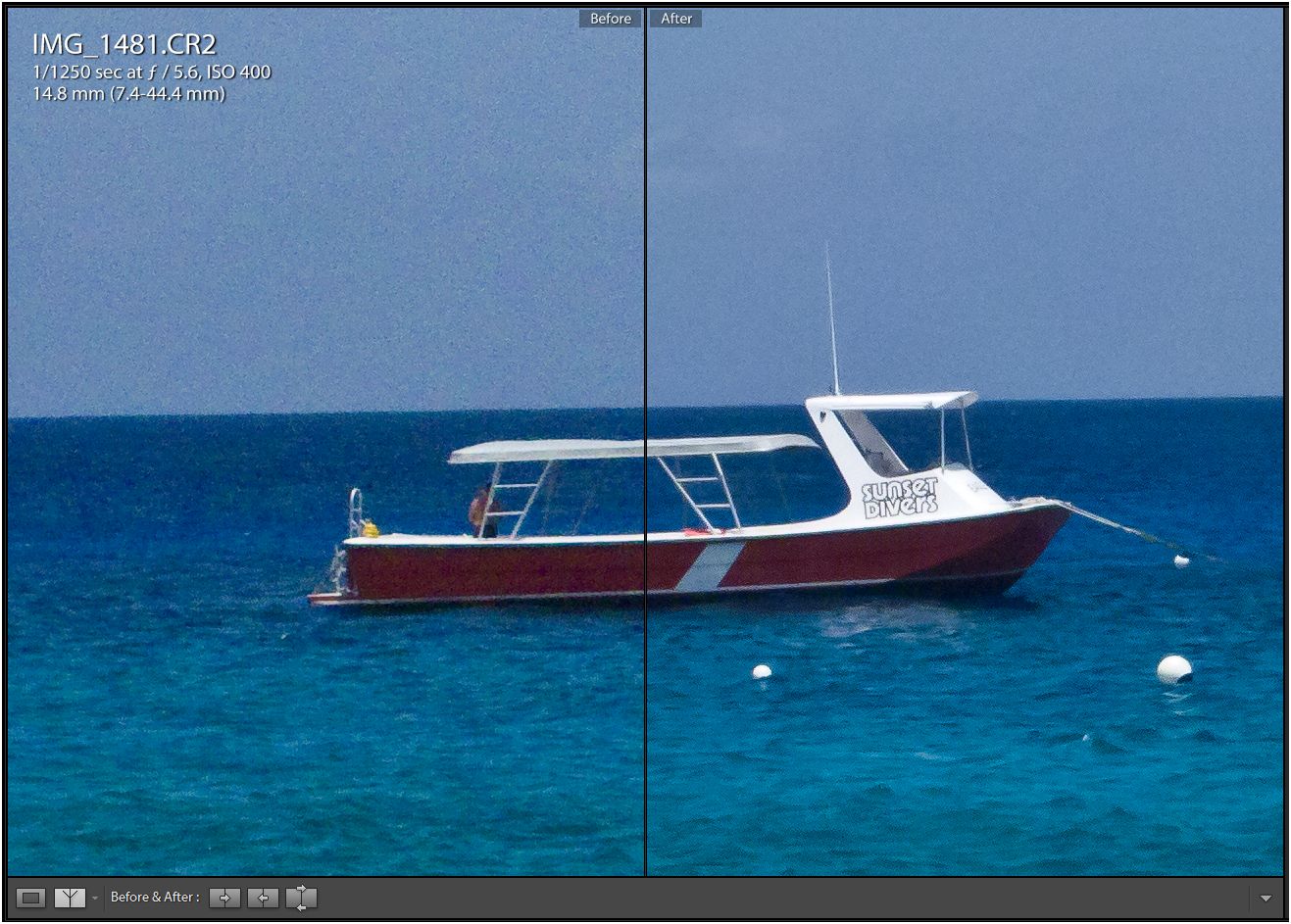
I can get much, much better results from the new Lightroom beta on my G9 RAWs shot at ISO 400 ...
Here's an example ... the before is the old pipeline as best I could ... the after is the new pipeline.
Shooting Technique, Workflow and Editing / Archived topic
Started by jeremypayne ·
Read-only discussion
I can get much, much better results from the new Lightroom beta on my G9 RAWs shot at ISO 400 ...
Here's an example ... the before is the old pipeline as best I could ... the after is the new pipeline.
Are you bringing the new luminance slider into play or are you talking about the RAW converter by itself?
Steve
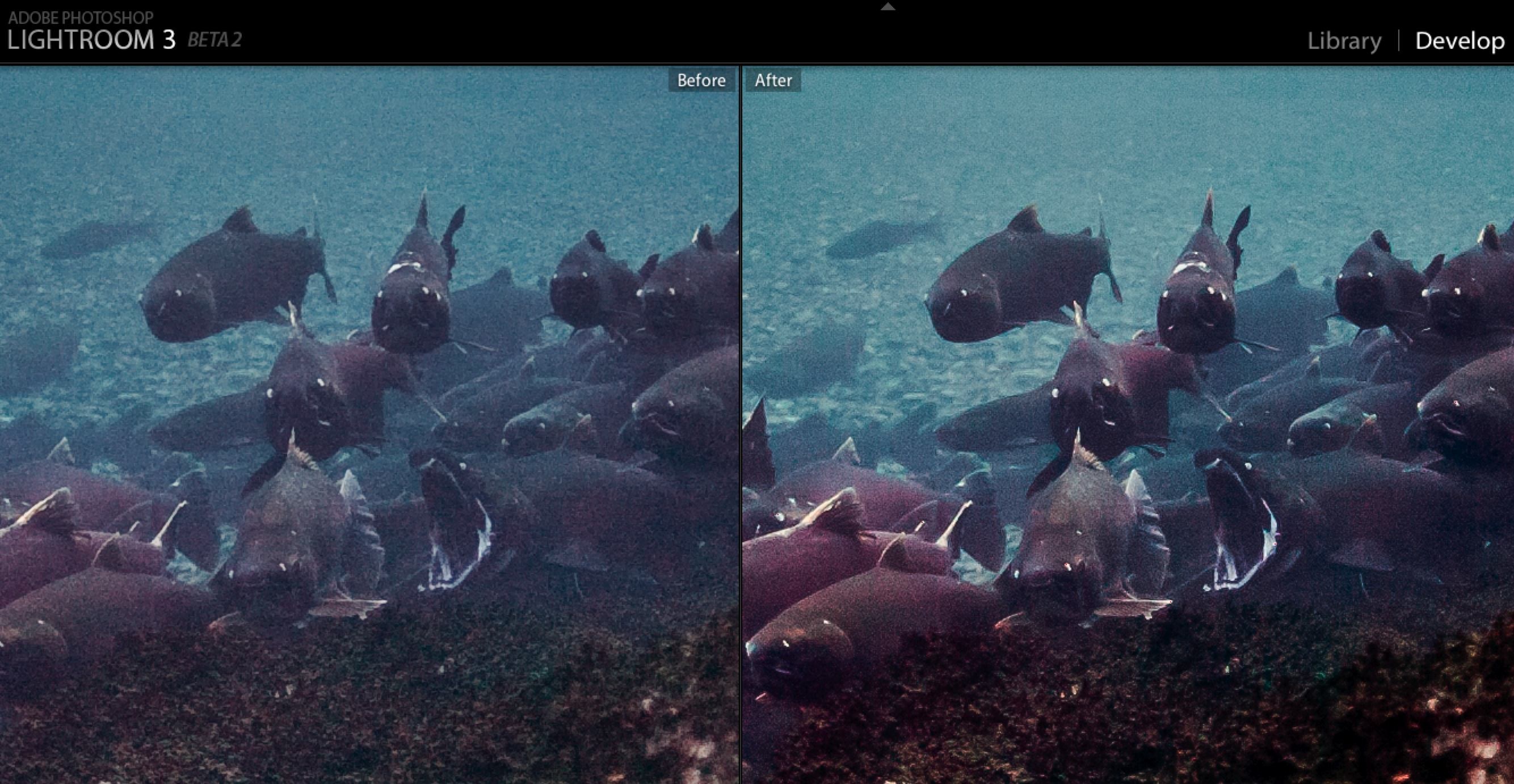
I have spent some time as well working with LR3B2.  Here is a 100% before and after screen grab. I had to compress the jpeg in order to post. I made use of the point curve to better separate the low values as well as the new noise reduction. This was a 500 ISO D2H shot done with the sigma 20/1.8 shot at max aperture last fall. Coho salmon.
I've found similar improvements when working with my images. It's like a universal camera upgrade!
This is a good reason to always shoot in RAW -- when software improves, *all* of your images suddenly get better.
I posted on the LR3 beta list a few months ago when I found a reproducible problem that introduces significant amounts of noise in images. Had to do with converting/exporting images to 8bit jpgs from 16bit tiffs. In the end it seemed there was some quantization error in the routines doing the conversions. Maybe that same problem existed elsewhere. Major difference there in the images above.
I've found similar improvements when working with my images. It's like a universal camera upgrade!
This is a good reason to always shoot in RAW -- when software improves, *all* of your images suddenly get better.
I also think we should be diligent about just accepting the RAW convertors provided to us in this case by Adobe, but also by Apple in the case of Aperture.
Nikon shooters have known ( or should have known) for some time that Nikon's proprietary software NX2 is the standard by which other RAW convertors should be judged. I can't speak for Canon.
So it's not really a camera upgrade in the case of LR or Aperture, we've just been using second rate software and accepting it.
...... Nikon's proprietary software NX2 is the standard by which other RAW convertors should be judged. I can't speak for Canon...
Similarly, Canon's DPP is by far the best way to get a great quality file from a Canon .CR*
It's just such a dog of a thing to run... if only their processing engines could be put into some kind of decent workflow program like LR or Aperture.
Are you bringing the new luminance slider into play or are you talking about the RAW converter by itself?
Yes - NR was applied in both cases ... it just works much better now.
I processed the 'before' as completely as I could with the tools provided in the 2.x pipeline. That was the best I could get out of that file ... and it kinda sucked I think. When I was using the G9 a lot, I came to the conclusion that ISO 400 and above were essentially useless - particularly for color work.
The 'after' is my attempt using the new tools. I find the result actually usable now ... especially printed.
Here's what Adobe changed as I understand ...
They took pretty much all of the 'hidden' noise reduction out of the demosaicing algorithm and improved the noise reduction dramatically - particularly the color/chroma NR.
Now when you bring in an image with all the sliders at zero, it is slightly noisier and slightly sharper ... but you can ultimately get to a MUCH better result - particularly with fine detail and higher ISOs. Low ISO sunset shots aren't gonna benefit much ...
With my D700, I find the new results as good as Capture One and NX2 after doing my own side-by-side testing ... YMMV.
I agree Jeremy, I'm not sure what they did in the code but it works. I've looked at a few images with some noise in the blue water backgrounds and the luminance slider they turned on the beta 2 just wipes it out. I'm interested to print a few and see where the sweet spot is.
Steve
...With my D700, I find the new results as good as Capture One and NX2 after doing my own side-by-side testing ... YMMV...
that's good news... is it in all areas ... tone, colour etc... or just noise you are talking about?
that's good news... is it in all areas ... tone, colour etc... or just noise you are talking about?
In the detail vs. noise trade-off ... but that was my biggest complaint about LR. In LR2, the starting point is just softer than NX2; subtly, but noticeably so.
This is the second set of tests I've done.
The first time, I compared LR 2 to NX2 ... and NX2 had some advantages ... "sharper" starting point, automatic CA and vignetting adjustments and better high ISO processing. I didn't compare Capture One at that time.
That said ... the best I was able to get out of LR 2 was pretty darn good and it had its own advantages. I stuck with LR as I had been using it before I bought the D700.
This time, I looked at 25 images in C1, LR3 (first beta) and NX2 and was impressed ... LR has caught up ...
Taking the NR out of the demosaicing step and giving us the full trade-of between noise and detail has made a big step forward in my opinion.
the luminance slider they turned on the beta 2 just wipes it out.
That slider alone to me is worth the upgrade based on the images I have played with, really blown away by it.
One needs to be careful and not overdo the noise reduction. Slide the color noise filter too far to the right and colored spots will disappear off your fish! Do the same with the luminance noise filter and your photo begins to look more like a painting - the effect can be interesting - my present 30" desktop image is one like this. But make sure that is what you want. 
So am to understand that the actual noise reduction improvement is not in the actual original RAW conversion, but just the implementation of new and better noise reduction tools, with similar pitfalls of detail reduction etc as with other noise reduction tools?
So am to understand that the actual noise reduction improvement is not in the actual original RAW conversion, but just the implementation of new and better noise reduction tools, with similar pitfalls of detail reduction etc as with other noise reduction tools?
Here's what changed, as I have been lead to understand and have gathered from lots of playing ...
A) The demosaicing algorithm has been re-written ... with the most notable change being the removal of some 'hidden' noise reduction from this step - resulting in sharper, but noisier starting point
B) The color noise reduction was VASTLY improved
C) The luminance NR was improved, too
D) The sharpening is basically the same, but given A, B, C it works differently at the same slider values - you need less all else equal
E) The combination of A, B, C seem to make the recovery slider work more effectively, although that could be a direct improvement and not a knock-on
Reports state that the RAW engine is completely new. My images look different, so this seems plausible.
Here's what changed, as I have been lead to understand and have gathered from lots of playing ...
A) The demosaicing algorithm has been re-written ... with the most notable change being the removal of some 'hidden' noise reduction from this step - resulting in sharper, but noisier starting point
B) The color noise reduction was VASTLY improved
C) The luminance NR was improved, too
D) The sharpening is basically the same, but given A, B, C it works differently at the same slider values - you need less all else equal
E) The combination of A, B, C seem to make the recovery slider work more effectively, although that could be a direct improvement and not a knock-on
OK, thanks. So better RAW plus better tools, but interesting that you have a noisier starting point. When I have a noise problem these days, I'm happier using selective noise reduction tools like Nik Define plug-in which is great. Can you selectively apply this in Lightroom say with brushes like in the new Aperture. Even though I have this ability in Aperture now, I still like Define.
OK, thanks. So better RAW plus better tools, but interesting that you have a noisier starting point. When I have a noise problem these days, I'm happier using selective noise reduction tools like Nik Define plug-in which is great. Can you selectively apply this in Lightroom say with brushes like in the new Aperture. Even though I have this ability in Aperture now, I still like Define.
In LR one has to apply NR to the whole image. There are plus-ins for LR as well. I have only used Genuine Fractals Pro with LR. It works by going into PS creating a new file like working in PS out of LR.
OK, thanks. So better RAW plus better tools, but interesting that you have a noisier starting point. When I have a noise problem these days, I'm happier using selective noise reduction tools like Nik Define plug-in which is great. Can you selectively apply this in Lightroom say with brushes like in the new Aperture. Even though I have this ability in Aperture now, I still like Define.
Nah - you'd have to make a round trip to photoshop to selectively apply it.
As far as how good it is ... it seems about as good as Define to my eye - which I like.
Nah - you'd have to make a round trip to photoshop to selectively apply it.
Nice new Aperture feature is selective application of edits, similar to using masks etc.
http://aperture.maccreate.com/2010/03/31/a...-in-aperture-3/

Terms of Use Privacy Policy Guidelines We have placed cookies on your device to help make this website better. You can adjust your cookie settings, otherwise we'll assume you're okay to continue.

A worldwide community for underwater imaging.
