Skip to content

Photo / Video Showcase / Archived topic

Hanifaru Manta rays

Started by Scubysnaps ·

  • 25Posts
  • 25Replies

Read-only discussion

Hanifaru Manta rays

25 posts
  1. http://www.scubysnaps.com/uk/Gallery/Pages/Manta_Rays.html


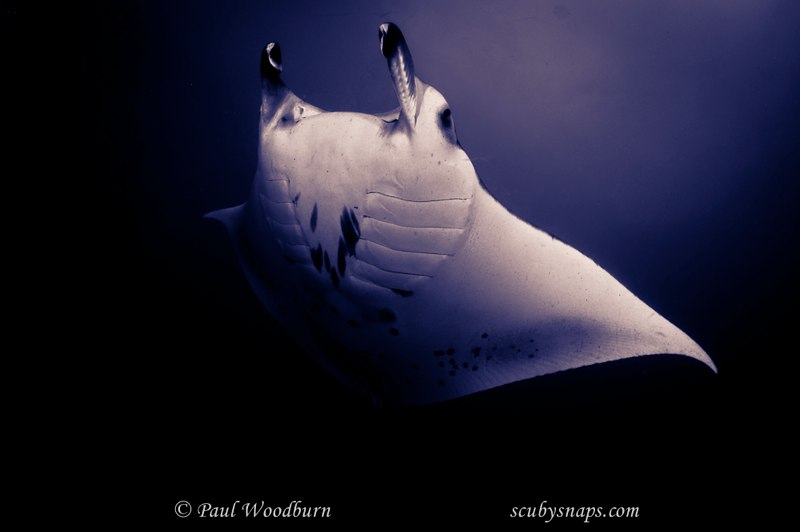
    Please take a look at the above Manta images from last week at Hanifaru Maldives and if you could spare the time, please let me know your favourite so I could try and narrow the collection down from 45, its been hard to get this far! I know there are a few problems with a couple of the shots, if you could help me on how to improve them please also let me know, thanks ever so much

  2. What a great show your mantas put on!


    My favourites are 3517, 3822 and 4106.


    My monitor spoiled the images with a pink/purple cast and too much contrast, so I may be misinterpreting your images but you seem to have had the same problems that I had in Mexico earlier in the year: in turbid water you lose sharpness when trying to stay back and fit the whole manta into the frame, the mantas just love annoying bubbles, and you never seem to get just the right angle. I couldn't get a head-on shot (either because I'm too frightening, or because the vis. meant that sharp focus was only achieved as the mantas were sliding off to the side). It's pretty obvious that my opinion is to use the widest lens that you've got, but that doesn't help once you're home. I find that desaturated images work quite well, emphasizing the shape and markings of the mantas, and, although you need good contrast, the manta needs to be separate from the water, which wasn't the case on my monitor.


    Tim


    :D

  3. Hi Paul,

    Boy that's a tough assignment, hard to choose. Your having too much fun. I like a bunch of them like 3237, 3517,3553, 3554, 3601 and others. I noticed the same purple issue and lack of clarity as Tim on a few. I think you have some more detail you can pull out of the darker areas on a couple that would be worth playing with. You did shoot RAW right?


    post-4526-1282513339.jpg post-4526-1282513242.jpg


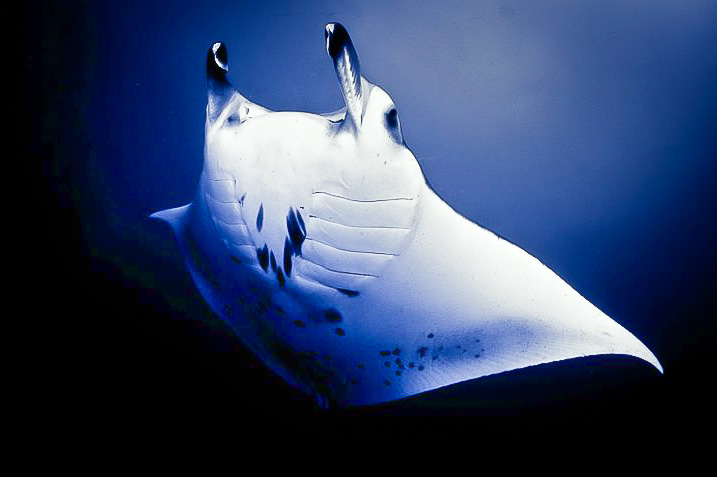
    The WB looked a tad off and I increased the midtone contrast with the Clarity slider in LR a touch. I used the graduated filter to increase the exposure on the bottom left hand third of the frame to bring out the mantas starboard fin that was hiding in the dark. Also reduced the noise. I over cooked it some so you could see it on the small jpg file. There is a ton of potential in this set.


    I'm so jealous! This must have been a mind blowing det of dives.


    Cheers,

    Steve

  4. Hi Tim/Steve,

    Thanks for that, The purple wasnt an issue, it was an effect I was just playing with as I had so many shots I wanted some to look a bit different to others, I had 1500 shots to narrow sdown to these 45, so spending a lot of work on each one in a week was really hard to do, but I didnt want to leave them too long (as Alex and others will be back next week with their collections!!)

    You did a great job there, thanks, but I darkened it on purpose just for an effect, I like the sharpness you've brought out on it, thanks, I will play with that one some more, I will have to work on my sharpness skills :D I think the focus maybe homing in on the plankton at times, instead of the manta.... I also have my whale shark ones to work on too (one on my home page for now)! and a few "normal" shots!

    Thanks both for your choices too :P

  5. Steve!

    Can I ask how you extracted that photo from my site!? and also double the size of it? I'd be interested on your sharpness technique too, expecially on a small file like that?

  6. Steve!

    Can I ask how you extracted that photo from my site!? and also double the size of it? I'd be interested on your sharpness technique too, expecially on a small file like that?


    Hey Paul,

    All I did was right click the slide show image and "Save picture as".. They came across as jpegs at about 800 x 532 pixels. (120k files) I notice that if I try it now they are either small gifs or smaller jpegs. You have some of both. I don't think I changed the size that's just the way they came over. Only thing I can figure is that your site was still processing the files in some way when I jumped on? Just guessing, The good news is that I can't do it now.


    If I remember correctly I added a bit of sharpness with the sharpness slider in LR,(too easy) increased the brightness a touch, and added some mid tone contrast with the Clarity slider. Clarity has the visual appearance to some folks of increasing sharpness but it's not really the same thing. I also used the new LR 3 noise reduction capability which may be one reason the small file looked somewhat reasonable. It really is amazing when you start working with it.


    Hope that helps,

    Steve

  7. Hey Paul,

    All I did was right click the slide show image and "Save picture as".. They came across as jpegs at about 800 x 532 pixels. (120k files) I notice that if I try it now they are either small gifs or smaller jpegs. You have some of both. I don't think I changed the size that's just the way they came over. Only thing I can figure is that your site was still processing the files in some way when I jumped on? Just guessing, The good news is that I can't do it now.


    If I remember correctly I added a bit of sharpness with the sharpness slider in LR,(too easy) increased the brightness a touch, and added some mid tone contrast with the Clarity slider. Clarity has the visual appearance to some folks of increasing sharpness but it's not really the same thing. I also used the new LR 3 noise reduction capability which may be one reason the small file looked somewhat reasonable. It really is amazing when you start working with it.


    Hope that helps,

    Steve

    Thanks Steve, thru slideshow right ok, thought you were doing some unusual way as thru the normal picture view all I gwet is a transparent image, I generally always sharpen at 1:1 with the alt key down so it shows it in black and white to you can pick up the edges better while adjusting but may have missed this one, I also use the clarity, I tend to find that improves the pic more noticeably than the sharpness too.

    I've looked at the LR3 noise reduction but not sure if I've sussed how to use it yet, it seems disabled when I have tried, to reduce the noise or backscatter I've used the local adjustments, shaded the required area in and knocked the clarity and sharpness right down

  8. I would go for 2665 - 3238 - 3517 - 3608 - 4078 - 4112 - 4204 - 4222 - 4229 - 4230 - 4256 as an amount to use if I was putting together a slide show for a few friends to look at. Obviously i do not have the RAW files, but I might use different PP on them.


    3517 is my favourite though.


    All good stuff though


    stew

  9. Thanks Stew, when I get round to it, I shall spend more time on all the favourites mentioned here :) Off to St Abbs tomorrow tho, so maybe next wek, nearly got my 2nd batch done now of the Whalshark and other marine life.

    Whats PP?

  10. Whaleshark shots on the same link for now....


    More non Manta shots from the Maldives, including a whale shark :)


    Whaleshark shots on the same link for now....

  11. 3841!!


    I am sooooo jealous...


    Tim


    :)

    Edited by tdpriest
  12. Whats PP?


    post processing


    Stew

  13. Right! here we go again ...started a few from the beginning in lightroom and also some work in photoshop etc, I have had to use photoshop a lot in some places to erradicate the plankton, I feel its not spoilt the image, just made the best of it, with my limited PS skils....Drastically cut down to 11....please let me know of any that shouldnt be there and why, or your faves, if you wish


    1

    8b797220.jpg

    2

    997eb37e.jpg

    3

    32ab51ba.jpg

    4

    769811cc.jpg

    5

    129d1de4.jpg


    They are also all on my newly updated site www.scubysnaps.com

    or to go straight to the Mantas

    http://www.scubysnaps.com/uk/Maldives/Pages/Sea.html

    If I've missed any out here that are on my site please also let me know


    6

    e92bf523.jpg

    7

    ab23fdaf.jpg

  14. 8

    938961a4.jpg

    9

    1dbd8fdd.jpg

    10

    c58cf693.jpg

    11

    bb543aba.jpg

    Edited by Scubysnaps
  15. Awesome! 3 and 9 for me.


    Phil

  16. I'm with Phil here! #3 and #9 are the best of them IMO.


    Would lose #10 - does not seem sharp on my screen.

    #5 and #7 manta wing or tail is cut of - not really working for me.


    Great job Paul!


    Cheers

    Karel

  17. Thanks Phil. Karel, well spotted, I'm terrible at narrowing them down, all that work its taken me and I spend 5 minutes picking out my faves, I've changed #10 for a similar one, still nott oo sharp tho, dont you think #9 is too photoshopped? Its always been my fave too but with getting rid of all the plankton its lost any detail/texture of the bodies, I love #5 & #7 too, despite them not being all in, thanks tho ^_^

  18. dont you think #9 is too photoshopped? Its always been my fave too but with getting rid of all the plankton its lost any detail/texture of the bodies


    Looks great to me. Even if You have lost some detail, the shot still stands out from the rest.

    Defenetly a shot You could consider sending to Eliat ^_^


    Cheers

    Karel

  19. ^_^ Thanks Karel!

    I have a trip report from Hanifaru too, all done on my website

  20. Awesome! 3 and 9 for me.


    Phil


    As Phil says mate.


    Stew

Keldan

Account

Navigation

Search

Search

Configure browser push notifications

Chrome (Android)
  1. Tap the lock icon next to the address bar.
  2. Tap Permissions → Notifications.
  3. Adjust your preference.
Chrome (Desktop)
  1. Click the padlock icon in the address bar.
  2. Select Site settings.
  3. Find Notifications and adjust your preference.