Skip to content

Photography Gear and Technique / Archived topic

Sigma 15mm FE w/ikelite 8" dome on full frame?

Started by SouthFla ·

  • 24Posts
  • 24Replies

Read-only discussion

Sigma 15mm FE w/ikelite 8" dome on full frame?

24 posts
  1. Hello,
     
    I bought an ikelite 5110.45 8" dome with the 5510.11 extension for an old D750 transparent housing fl port system.
    It is to use with the sigma 15mm fisheye f2.8 so conform with your chart https://docs.ikelite.com/reference/port-chart-fl-system.pdf and I read some of you use this system (5510.45 + 5510.11)
     
    But I can't mount them on the housing. 
    First try : I screw the dome on the extension. I can not insert the extension in the housing because the fixation system is in his high position and they block the insertion. And even if I could, after I will not have access to the fixing system to block it.
    Second try : I fix the extension in the housing and I screw after the dome on the extension. But know I can not screw it at his maximum because the fixation system in his low position block again. I know it is not screw enough because I can unscrew with a little finger. Moreover I try too take a photo and the sun visor is horibly visible on the shot.
     
    How do you assembly this system on your housing ?
     
    Thanks for your help.
  2. This is the reason I switched from Ikelite to Nauticam. The old four lock system did not work well with wide FF ports and lenses.

    Ikelite has since redesigned their housings and ports, so this may work on the new systems.

  3. 2 hours ago, ManuV said:
    Hello,
     
    I bought an ikelite 5110.45 8" dome with the 5510.11 extension for an old D750 transparent housing fl port system.
    It is to use with the sigma 15mm fisheye f2.8 so conform with your chart https://docs.ikelite.com/reference/port-chart-fl-system.pdf and I read some of you use this system (5510.45 + 5510.11)
     
    But I can't mount them on the housing. 
    First try : I screw the dome on the extension. I can not insert the extension in the housing because the fixation system is in his high position and they block the insertion. And even if I could, after I will not have access to the fixing system to block it.
    Second try : I fix the extension in the housing and I screw after the dome on the extension. But know I can not screw it at his maximum because the fixation system in his low position block again. I know it is not screw enough because I can unscrew with a little finger. Moreover I try too take a photo and the sun visor is horibly visible on the shot.
     
    How do you assembly this system on your housing ?
     
    Thanks for your help.
    The manual says you should screw the extension on first - lubricating lightly the threads / o-ring.   The four locks when unlocked can slide back out of the way and they pop up.  Next step is to press and hold the port in, then slide the locks back into place.  It is a very short extension so I can see how it might be tricky to install. 

    I did some searching and found that you need to use low profile port locks with 5510.11:

    https://www.bhphotovideo.com/c/product/660594-REG/Ikelite_5510_11_Superwide_Mounting_Body_f.html

    This is the low profile port lock:  https://www.bhphotovideo.com/c/product/441871-REG/Ikelite_9072_24_Low_Profile_Port_Lock.html

    they seem to be available from a number of retailers.  Read the description on the B&H site about how it is meant to be used.

  4. Thank you for your help.

    Finaly I asked to Ikelite and they answered to me very quickly. I copy/past the answer, maybe it will usefull one day for an other one.

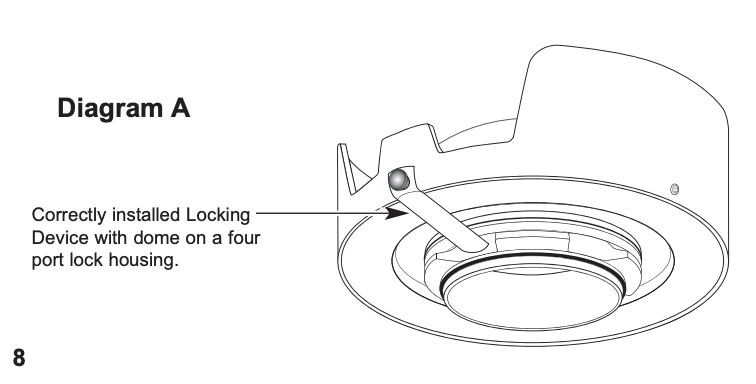
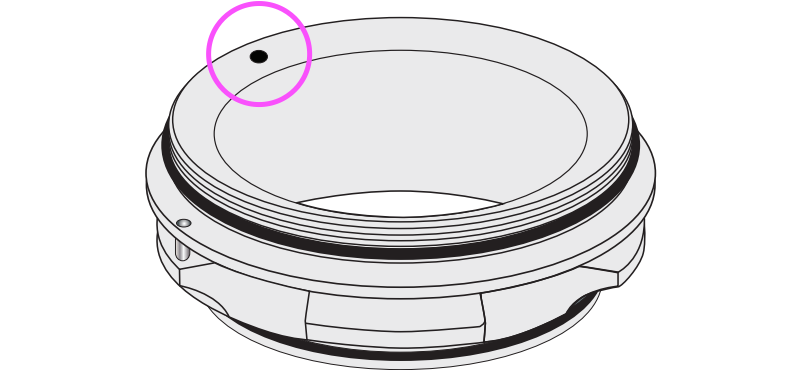
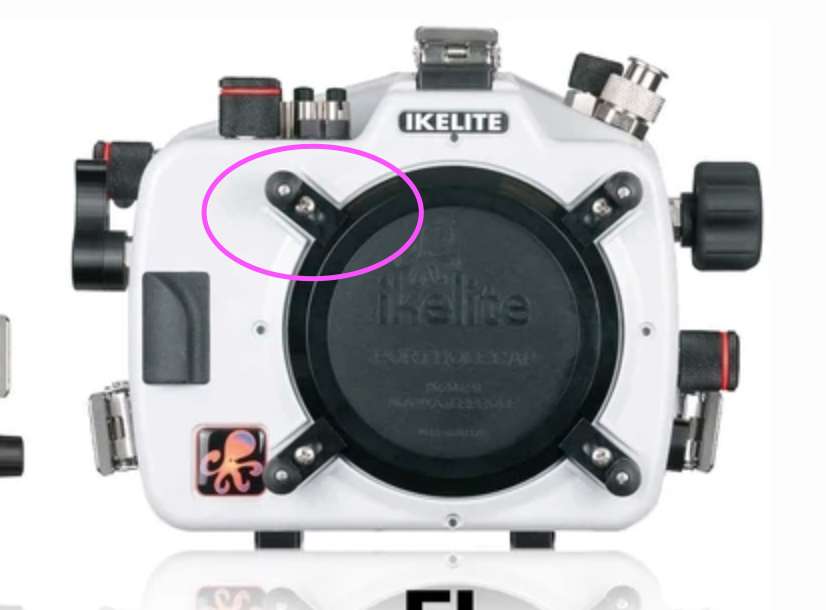
    The extension has a bayonet mount. When you look into the dome you will see a small hole in the extension. Line this up with the upper left port lock on the housing. 
    image.png.66218511cb0ab13675f19834c7e7d03c.pngimage.png.8ef1dfcfb68246d221df55e0658e8834.png
     
    Push the port onto the housing and then rotate clockwise until it stops. 
     
    Then install the L-shaped lock piece to prevent it from rotating. 
    image.png.a66d723770a2dab7651119bf3efeb4a7.png
     
    If after rotate clockwise until it is stop, the thread is not at 3 o clock you will need to loosen and re-align the shade so that the post for the lock is at 3 o’clock.
Backscatter

Account

Navigation

Search

Search

Configure browser push notifications

Chrome (Android)
  1. Tap the lock icon next to the address bar.
  2. Tap Permissions → Notifications.
  3. Adjust your preference.
Chrome (Desktop)
  1. Click the padlock icon in the address bar.
  2. Select Site settings.
  3. Find Notifications and adjust your preference.