Skip to content

Shooting Technique, Workflow and Editing / Archived topic

.MTS AVCHD file import and editing into Final Cut/Mac

Started by Joseph ·

  • 21Posts
  • 21Replies

Read-only discussion

.MTS AVCHD file import and editing into Final Cut/Mac

21 posts
  1. Not sure if this is now the right thread to ask but......


    Used FCPX to import AVCHD files in ProRes 422. Could then happily edit in FCP 7 (key goal) using those files from X.


    Also used MTS2MOV using BroSoft and PavTube as well as 5dtoRGB


    File sizes were as follows:


    Original AVCHD - 141MB,


    BroSoft MOV 884MB


    PavTube 884MB


    5dtoRGB - 1.81 GB


    FCPX - 1.17GB


    Is there a better way to do this?

    Edited by Joseph
  2. Who is using what to convert MTS to MOV? If this is in another thread please let me know as I could not find anything in WP.


    After running some tests I love the AVCHD quality for low light but this is unusable in FCP7


    Have done the following 4 Prores 422 conversions from a 40 second AVCHD file 142MB size.


    1 - 5DtoRGB = 1.8GB 2 - Brosoft MTStoMOV = 884MB 3 - PavTube MTStoMOV = 564 MB 4 - FCPX import = 1.2GB


    At a glance all 4 apear similar in quality. Are there better ways to get the MTS to a MOV?


    The fact that FCP gives the file name a time code (2013-07-19 19_53_36 (id)) is a beautiful thing for me. I'd like my final solution to incorporate this.


    Note - I will do almost anything to keep editing in FCP7.

  3. Shoot in .mov. Should be able to edit in FCP7 without transcoding. Haven't tested it though.

  4. Shoot in .mov. Should be able to edit in FCP7 without transcoding. Haven't tested it though.


    Can use mov files shot with GH3 but not as efficient as AVCHD transcoded to prores 422 with X. Also AVCHD tests were much better in low light.

    Edited by Joseph
  5. I have downloaded the 5dtoRGB lite as a trial.


    The change from 141MB to 1.*Gb file concerns me.


    Any opinions as to a better choice?

  6. There's a reason why interleaved AVCHD didn't play well natively with computers until a few years ago. Efficiency means heavy lifting on the CPU/GPU. Editing codecs tend to be big to counter that. The Intra .mov may have a bit more noise, but it can be edited natively. Pick your poison. :)

    The problem with 5D2RGB is that it's not multi-core active, so it uses only 2 cores. Try converting to ProRes LT, which is fine for a DSLR's IPB alternative, not so much for raw.

  7. There's a reason why interleaved AVCHD didn't play well natively with computers until a few years ago. Efficiency means heavy lifting on the CPU/GPU. Editing codecs tend to be big to counter that. The Intra .mov may have a bit more noise, but it can be edited natively. Pick your poison. :)


    The problem with 5D2RGB is that it's not multi-core active, so it uses only 2 cores. Try converting to ProRes LT, which is fine for a DSLR's IPB alternative, not so much for raw.

    When converting to ProRes LT do you recommend FCPX or another converter?
  8. I haven't done transcoding tests in a while since I can edit native on most formats. So someone else will have to help you with that. Since you like FCP7, you may wish to get CS6 Premiere Pro, which is closer to FCP7 in layout and function, but functions as 64bit native editor (with the right computer). Told you getting a new camera doesn't just stop there! :)

  9. Hey People - Posted this in a different thread but do not seem to be getting answers - hope it may get a better response here.


    Who is using what to convert MTS to MOV?

    After running some tests I love the AVCHD quality for low light but this is unusable in FCP7.

    Have done the following 4 Prores 422 conversions from a 40 second AVCHD file 142MB size.

    1 - 5DtoRGB = 1.8GB 2 - Brosoft MTStoMOV = 884MB 3 - PavTube MTStoMOV = 564 MB 4 - FCPX import = 1.2GB

    At a glance all 4 apear similar in quality. Are there better ways to get the MTS to a MOV?

    The fact that FCP gives the file name a time code (2013-07-19 19_53_36 (id)) is a beautiful thing for me. I'd like my final solution to incorporate this.

    Note - I will do almost anything to keep editing in FCP7.

  10. Hey People - Posted this in a different thread but do not seem to be getting answers - hope it may get a better response here.


    Why are you posting your question here in this thread? If and when you get valuable answers, wouldn't it be better to be an independent thread that can be located by others as well instead of being a subtopic #76 of a completely different topic?

  11. Why are you posting your question here in this thread? If and when you get valuable answers, wouldn't it be better to be an independent thread that can be located by others as well instead of being a subtopic #76 of a completely different topic?

    I am very much a beginner with WetPixel so excuse my ignorance.


    2 Reasons I posted here.


    First - I posted this in Wetpixel :: Underwater Photography Forums


    Second - I started this post and was hoping those that participated may be able to help.I actually did post this in another thread and only got 1 response.


    Should I have asked in a different forum / thread / section?

  12. Who is using what to convert MTS to MOV?


    If you’re on a MAC, and I assume you are as you’re using FCP7 and FCPX; I have found two apps that does this easily for you. I use one of them all the time, and just love it.


    These apps Re-Wraps the h.264-file from the AVCHD-codec into a independant .MOV-file with no rendering, converting or loss of quality. The information in the file is not changed, only the «wrapping» is changed. And the other great benefit is that it only takes 1-10 seconds per file, and the size of the file does not change either. It is really fast, and you’re left with a usable .MOV-file in the h.264 format.


    The best one I have found, and the one I use, is free and is called Media Converter.

    To have this app do what you want it to do, you also need to download a set of settings for it.


    Step-by-step getting it and installing:

    -Download the Media Converter-app here and install

    -Go to http://media-converter.sourceforge.net/presets.html and download "Re-wrap AVCHD for Quicktime with uncompressed audio".

    -Open "Re-wrap AVCHD for Quicktime with uncompressed audio" that you just downloaded


    Using Media Converter:

    -Open Media Converter

    -In the "Convert To:"-drop-down menu you choose "Re-wrap AVCHD for Quicktime with uncompressed audio"

    -Select the .MTS-file(s) in a Finder-window that you want to convert, and drag-n-drop them onto the Media Converter app where it says "Drop files here"

    -Choose a place to save the new .MOV-file(s) and you’re done.

    -Wait for it to finish and enjoy your .MOV-files.


    Alternative number two is $50, and is called Clip Wrap

    This app has everything you need ready to go. If you want to Re-Wrap a .MTS-file to .MOV you choose "Rewrap (Don’t alter video samples)" on the drop-down menu under Output format.


    I myself always keep my original AVCHD-files as well as the Re-Wrapped ones just in case. But I would like a camera that just records to .MOV directly and save me the trouble.

    Edited by Raptor^
  13. The AVCHD files are not very suitable for editing, so you might want to convert them into a .MOV for more trouble free playback and editing.

    I have found two apps that does this easily for you if you’re on a MAC. I use one of them all the time, and just love it.


    These apps Re-Wraps the h.264-file from the AVCHD-codec into a independant .MOV-file with no rendering, converting or loss of quality. The information in the file is not changed, only the «wrapping» is changed. And the other great benefit is that it only takes 1-10 seconds per file, and the size of the file does not change either. It is really fast, and you’re left with a usable .MOV-file in the h.264 format.


    The best one I have found, and the one I use, is free and is called Media Converter.


    To have this app do what you want it to do, you also need to download a set of settings for it.


    Step-by-step getting it and installing:

    
-Download the Media Converter-app here and install
.

    -Go to http://media-converter.sourceforge.net/presets.html and download "Re-wrap AVCHD for Quicktime with uncompressed audio".


    -Open "Re-wrap AVCHD for Quicktime with uncompressed audio" that you just downloaded
.


    Using Media Converter:


    -Open Media Converter

    
-In the "Convert To:"-drop-down menu you choose "Re-wrap AVCHD for Quicktime with uncompressed audio"


    -Select the .MTS-file(s) in a Finder-window that you want to convert, and drag-n-drop them onto the Media Converter app where it says "Drop files here"

    
-Choose a place to save the new .MOV-file(s) and you’re done.

    
-Wait for it to finish and enjoy your .MOV-files.


    Alternative number two is $50, and is called Clip Wrap


    This app has everything you need ready to go. If you want to Re-Wrap a .MTS-file to .MOV you choose "Rewrap (Don’t alter video samples)" on the drop-down menu under Output format.


    I have found that with Media Converter the .MOV-file is only 0.1 - 0.3 MB smaller than the original .MTS-file. With Clipwrap the files become a few MB bigger. Why this is happening I don’t know, but I much prefer Media Converter myself.


    Both these apps also convert all kinds of movie files into other types of movie files, making them smaller or changing the format for your iPad, iPhone, emailing and whatnot.


I always keep my original AVCHD-files as well as the Re-Wrapped ones just in case. But I would better yet prefer a camera that just records direclty to .MOV directly and save me the trouble.


    Edited by Raptor^
  14.  

    If you’re on a MAC, and I assume you are as you’re using FCP7 and FCPX; I have found two apps that does this easily for you. I use one of them all the time, and just love it.


    I myself always keep my original AVCHD-files as well as the Re-Wrapped ones just in case. But I would like a camera that just records to .MOV directly and save me the trouble.

    Thanks Brine,


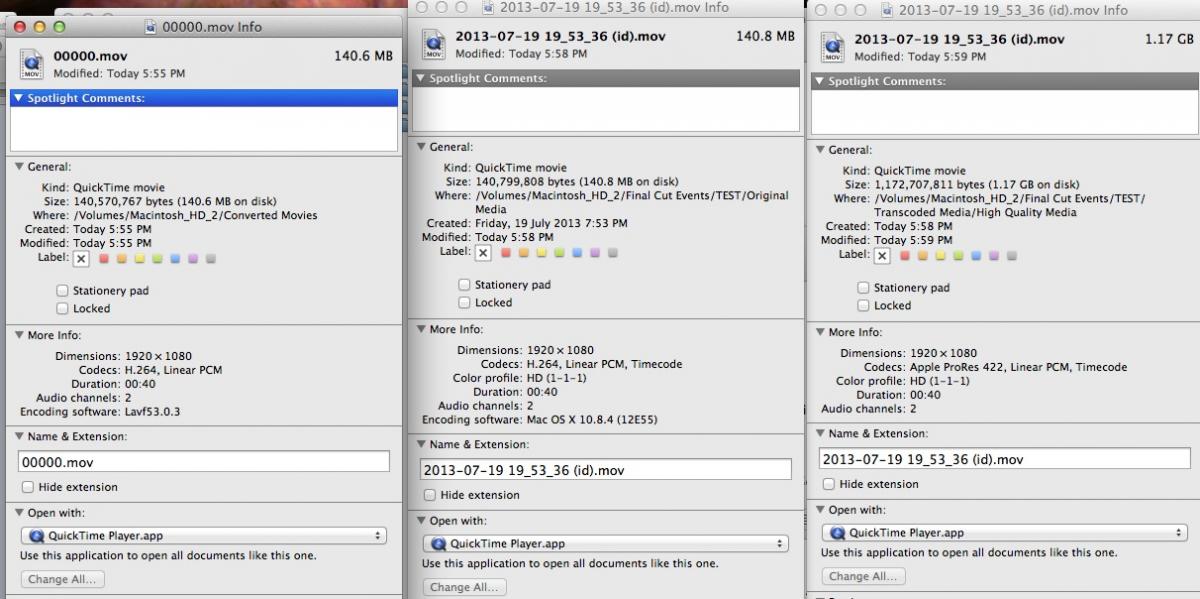
    Thanks for this but am not sure if I have actually achieved anything compared to FCPX as X does 2 versions of the conversion. See Pic attached with info of a lll 3 files..


    Did exactly as per your instructions. My AVCHD141.6MB file was converted by Media Converter to a 140.6MB .mov with a file name 00000.mov


    However:


    First - The draw back for me is that when I use FCPX, I get a file name with a time code e.g. 2013-07-19 19_53_36 (id). This is great as I can go back through my log book to confirm which dive I was on etc.


    Second - FCPX is already creating the same copy (sized) as the Media-Convert file.


    Do the following test.


    Convert 1 file using Media Converter as well as FCPX (Call the event TEST).


    In Finder, go to your converted file and check the file size from the Media Converter.


    Then compare your file sizes in Finder with FCPX


    Final Cut Events / TEST (folder just created) / Original Media. There will be a file similar in size as the version using from the Media Converter.


    Final Cut Events / Test / Transcoded media. Here will be the uncompressed full ProRes 422.


    My presumption is the files are of similar quality. Please correct me if I am wrong.


    post-20283-0-77788000-1374403588_thumb.jpg

    Edited by Joseph
  15. I haven't done transcoding tests in a while since I can edit native on most formats. So someone else will have to help you with that. Since you like FCP7, you may wish to get CS6 Premiere Pro, which is closer to FCP7 in layout and function, but functions as 64bit native editor (with the right computer). Told you getting a new camera doesn't just stop there! :)

    CS6 - Had the same though re CS6 Premier. Great minds or Fools LOL


    Having fun with the new unit. Great in low light (obviously).


    From research I have done I think FCPX and ProRes seems to be the best option albeit big files. Other converters make smaller or bigger files but they do not seem better.

  16. As stated in another thread compare the FCPX Original Media VS FCP Transcoded media Vs Media Converter.

    Files used for comparison as follows

    Original AVCHD 141.6MB / FCPX Original Media 140.8 MB / FCP High Quality 1.17GB / Media Converter 140.6MB


    Media converter is quicker but just does the same as the low res import in FCPX from what I see.

  17. I'm not sure about the Prores 422 format. Following the steps above you get the file released form the AVCHD-codec and turn it into a .MOV which is a lot easier to work with, but it remains h.264. Converting that further into Prores 422 I know little about.

  18. Ok, have merged everything into one thread about AVCHD/.MTS import into Final Cut/Mac. By cross posting into 2 different threads, it's not only easier for those looking to help, but also for those looking FOR help. So please try to stay in this one topic.


    As for Joseph's issue, Panasonic did alleviate the issue of .MTS with files with .mov files on the GH3 (only). If you don't like the noise of the 72mbps .mov ALL-I, then go with the 50mbps IPB .mov. No need to rewrap or transcode. Rewrapping works for mac in allowing the OS to recognize the file contents. However, it doesn't help with the native editing in real time if your computer can't handle the AVCHD code.

    Edited by Drew
  19. A very good evening to all (or morning if your on the wrong side of the world). :mocking:


    If anyone knows of another thread relating to efficient codecs / formats / Work Flows for FCP7 please post.


    From everything I've read in this thread I may have to bight the bullet and swap over to FCPX or CS6.


    Whilst in Bikini Atoll (what an awesome trip BTW) I used the AVCHD FHD/50P setting for 2 Reasons.


    A - Recommendation for use in low light


    B - My Class 10 Micro SD Card could not write the FHD/50p .MOV after as little as 15 seconds of shooting.


    My work flow is as follows


    1 - Import using FCPX which re-wraps the file to a .MOV of an almost exact same size. FCP also make a ProRes422 version at the same time

    2 - Use iMovie 11 to import the re-wrap from X. This gives me a Apple Intermediate Codec file 60% the size of the ProRes file

    3 - Use FCP7 for all editing


    I am keeping the ProRes files for the moment just in case


    File/Folder Size Comparison: FCPX ReWrap mov = 96GB FCPX ProRes = 780 GB iMovie 11 Apple intermediate = 475 GB


    I also have my Sony A1p Footage imported via iMovie 11 and GoPro footage converted using Cineform (no laughing please).


    This is all for the small screen. No Indie films etc.

    Edited by Joseph
  20. Why would you use a Micro SD card?

Turtle

Account

Navigation

Search

Search

Configure browser push notifications

Chrome (Android)
  1. Tap the lock icon next to the address bar.
  2. Tap Permissions → Notifications.
  3. Adjust your preference.
Chrome (Desktop)
  1. Click the padlock icon in the address bar.
  2. Select Site settings.
  3. Find Notifications and adjust your preference.