Wow that is not something I could afford to do on a regular basis but then I suppose you could shoot another fan lol. Maybe a less powerful diopter would be fine too and if you need some clear image zoom or whatever panasonic calls it loose bit of quality but keep working distance reasonable
Wow that is not something I could afford to do on a regular basis but then I suppose you could shoot another fan lol. Maybe a less powerful diopter would be fine too and if you need some clear image zoom or whatever panasonic calls it loose bit of quality but keep working distance reasonable
I have some footage with less powerful wet lens. I'll try to post GH4 highlight video (WA + Macro) when I'll be back from Indonesia.
BTW, Ex Tele mode (in-camera zooming effect?) not working when 4K mode.
I saw twelve of them
I could spot only 7.
I have some footage with less powerful wet lens. I'll try to post GH4 highlight video (WA + Macro) when I'll be back from Indonesia.
BTW, Ex Tele mode (in-camera zooming effect?) not working when 4K mode.
:
Ah of course it would mean cropping the actual frame and scaling back
Ok will look forward to your video
I have some footage with less powerful wet lens. I'll try to post GH4 highlight video (WA + Macro) when I'll be back from Indonesia.
BTW, Ex Tele mode (in-camera zooming effect?) not working when 4K mode.
Not to hijack this thread...
I'm completely ignorant about macro shoot techniques... Diopters... wet lens....
Could someone suggest me some useful resource on this topic? Tutorial, book, (for video I have those of EunJae )
I have a PanaLeica 45mm f2.8 but I never bought its port. My dive buddies would kill me even if I think to shoot macro, but some day maybe...
Byeeee
Nice shot! While we're at the subject of Pygmy seahorse, how do you get it to face the camera with video light? During my encounter of pygmy seahorse, they always have their back facing me, turn to look at the camera once in a while, very shy so I can only take picture and not video.
Remarkable...
Superb. Well done!
Wow, fantastic footage! I have been to that same spot many times (Kirby's Rock, about 26m, right?) and shot many stills of pygmys at that fan, but have to say that I can see the little bugger far better in your video that I can in person. Well done.
I too would like to know why it doesn't keep its back turned when the light is on. I have to turn off my focus light to get them to look my way
Thanks all for the comments.
I usually don't bother to shoot bargibanti but I was surprised to see one just look at the camera.
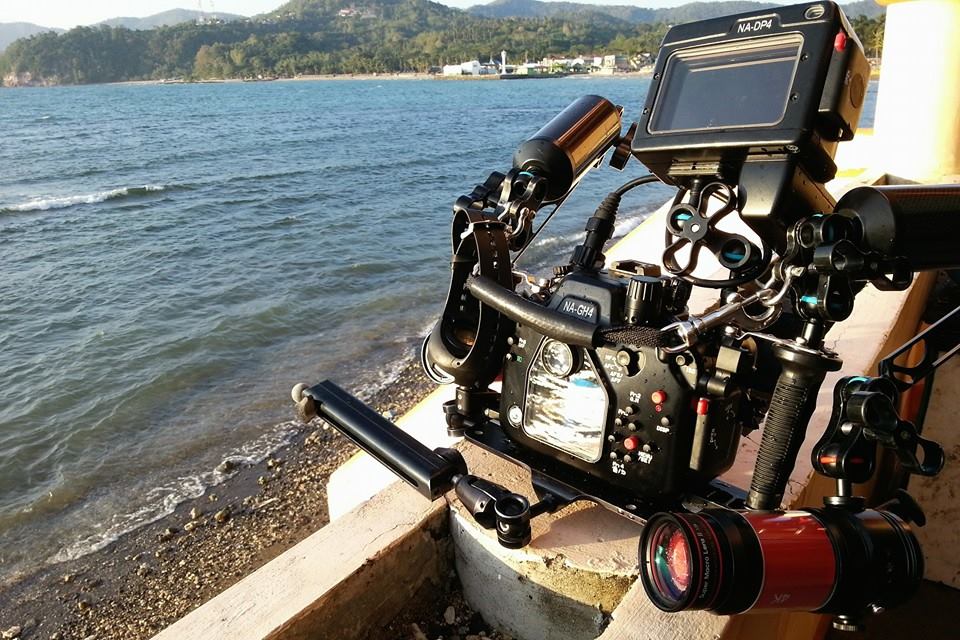
FYI, I was shooting with a smallhd dp4 external monitor and it's works well and syncing faster then my other Canon DSLRs.
Nice. What does "by wire" mean?
Nice. What does "by wire" mean?
It means that there is not a direct mechanical connection between the focus control and whatever lens elements move to focus the image on the sensor. Instead the control tells the camera's internal controller and motors to move the lens elements.
Nick did you pull the trigger on this camera yet?
Bye
FYI, I was shooting with a smallhd dp4 external monitor and it's works well and syncing faster then my other Canon DSLRs.
I see you have a little arm attached on your tray. Do you handle the entire rig with that for wide shots? Does it mean that the rig is neutral buoyancy?
I see you have a little arm attached on your tray. Do you handle the entire rig with that for wide shots? Does it mean that the rig is neutral buoyancy?
Normally I don't use tripod/tray for wide shot except If I planning to shoot WA lock shot.
I set mine negative without tripod for wide or macro so It's very negative with tripod & legs.
I prefer neutral only when I'm shooting photo.
Nice. What does "by wire" mean?
It's completely different feel from mechanical manual focus lens (Canon 100mm and 60mm in my case).
I think because the focus motor does not 100% follow my pulling speed.
Nick did you pull the trigger on this camera yet?
I did indeed, and I have 7 lenses for it already. Didn't order a housing yet, as I've been involved in other things. Watching others' experiences closely. Have only used it a little topside.






 )
)