



My last dive was one of an epic lightbulb moment, when I finally understood that exposure is absolutely critical to image sharpness. I had suffered from some image softness and was worried about equipment when in reality it was purely technique related. So any one starting out like I am, I cannot understate the relationship between good exposure and image sharpness! Happy shooting.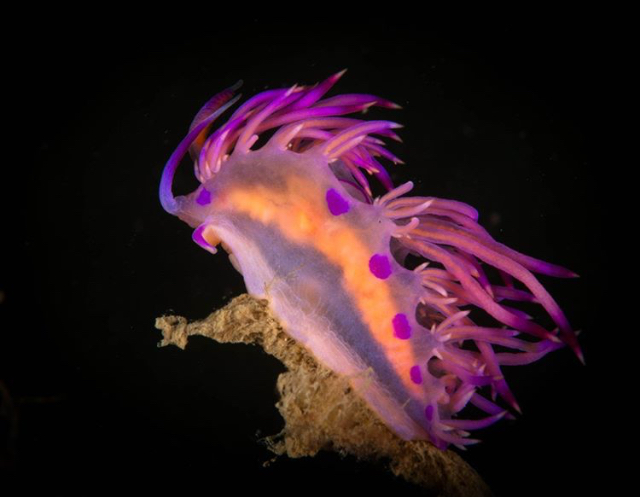
Photography Gear and Technique / Archived topic
The relationship between exposure and sharpness
Started by Chris Kippax ·
- 24Posts
- 24Replies
Read-only discussion
The relationship between exposure and sharpness
24 posts
-
-
That’s one cracking image, Chris!
-
well in general proper exposure is a good thing. But if you are shooting for high key for example, with lots of white stuff in the frame then I think a bit of underexposure will help preserve details better than perfect exposure.
Bill
-
I'm not sure I understand the OP. I get how over or underexposure might obscure some details, but not how sharpness is related to exposure. Is the point that too small an aperture reduces sharpness (i.e., diffraction), or that some lenses are only sharp at midrange apertures? Can someone explain the physics to me? Thanks!
-
I suspect it's more a contrast thing, good contrast makes a photo pop, it's always easier if you get it right up front but you can usually process it to this if its a bit off and you're using low ISO.
-
These Flabellina Rubrolineata are very common at my local dive site. I have always struggled with getting sharp images of them. So on my last dive I took several images of this specimen from memory (F20,160th, iso 100 strobe power full but with double diffuser's on, Canon 100mm macro lens with no diopter.
I reviewed the LCD screen and again looked great but as I have had before they look great on the tiny LCD screen but not so great on my computer screen. So I pushed the ISO to something like 320 on the verge of blowing out the highlights and the level of difference of detail in the images at the different ISO settings is massive. The high ISO shot has so much crisper detail that the image appears much sharper. The photo I attached is a screen shot from my phone from my instagram so probably not the best example. This is only my amateur take on things so plenty of room for debate. Images I have taken of the same critter with the same settings but lower ISO are much muddier and lack the fine edge detail.
Thanks Tim I was very happy with how it turned out and justified my decision to house an SLR albeit an old one. I firmly believe great exposure is a key element to sharp images.
-
Can someone explain the physics to me?
If it was a simple, single reason then this wouldn't be a problem. 'Sharpness' is in itself a non-technical and rather wooly term, so firstly you would need to define what exactly you mean by it. Then there are numerous factors which affect our perceived degree of 'sharpness' in an image, some relatively easily defined (poor exposure leading to noise, use of too small an aperture resulting in diffraction limitation, etc.) but others are not (lighting, point of focus, etc.). So its not easy to explain the physics.
-
if you are shooting raw you should be able to get the same effect by pushing the exposure and setting the black and white points by channel, working in 16 bit colour. All ISO does is boost the gain on the image.
Sharpness is about contrast as much as anything, USM works by detecting edges and making highlight side of the edge brighter and the shadow side darker. Before your images look punchy you need to get a good histogram, once you have that a touch of USM will complete the picture.
-
Chris makes some good points.
Have you tried playing with the Dehaze and Clarity in LR? I find that can make a huge difference to what appears to be Sharpness. Those two can really make an image pop.
-
I use LR 5 so no dehaze slider (from what I can see), the Canon 5dmk2 does not respond overly well to certain adjustments in LR in comparison to later model bodies, opening up shadows results in added noise rather rapidly. I am a rank amatuer at LR so this discussion is more than helpful, all valid points that I will be trying. I always add a touch of clarity but try to use it sparingly as I think it can make the image look "overcooked" when too much is added.
-
Here's some things you should look at for your processing:
- Shoot Raw
- In Camera raw set you black and white points and make sure you are working in 16 bit
- clarity to taste, default minimum sharpening
- Small tweak on the temperature and tint if required.
- The only tools I use in raw are temperature, tint, exposure, whites, blacks, clarity and vibrance
- If you open up shadows, go back to reset the black point a "good" photo should generally have a full tonal range from pure black to pure white on the histogram.
- Turn on lens profile corrections if desired.
- In Lightroom, first adjust the levels. I do do it one channel at a time and it sets the colour balance.
- See this for levels: https://digital-photography-school.com/using-levels-photoshop-image-correct-color-contrast/ it goes on a bit but the basic concept is there.
- Curves - an "s" curve is almost always a good thing
- Sharpen after you resize
On the ISO thing it really sounds like your image is underexposed, you can boost the ISO but if it were me I'd keep the ISO lower and boost in post or try removing a diffuser to get more flash power. If you have a subject that is bit larger for example so less light loss to magnification. you get the advantage of the low ISO.
-
I use LR 5 so no dehaze slider (from what I can see), the Canon 5dmk2 does not respond overly well to certain adjustments in LR in comparison to later model bodies, opening up shadows results in added noise rather rapidly. I am a rank amatuer at LR so this discussion is more than helpful, all valid points that I will be trying. I always add a touch of clarity but try to use it sparingly as I think it can make the image look "overcooked" when too much is added.
I can't recall now whether Dehaze was added in LR5 or LR6. In the earlier versions (ie before LR7) it was in the Effects dropdown.
-
I added dehaze as a plugin to my LR6. It does an amazing job. As a plugin, it is inconvenient to use, but worth it. I go to Develop/Help/Plug-in Extras.
-
I added dehaze as a plugin to my LR6. It does an amazing job. As a plugin, it is inconvenient to use, but worth it. I go to Develop/Help/Plug-in Extras.
Interesting. Yeah, I agree with you, tursiops, I think it works like a charm for a lot of u/w pics.
-
I've got LR6 but the stand-alone version because I really hate the subscription model (even if it is inevitable) and so there is no dehaze option anywhere. This post led to a search for a plugin option and I see that there are a few. Thanks for the tip!
-
The dehaze filter for LR6 is here:
https://cutthruthefog.wordpress.com/lrhazefilters-dehaze-controls-for-lightroom-6/
-
I agree with many that there is no strong correlation between proper exposure and "sharpness". One setting that does pop out to me that will affect the resolving power of your system is "f/20". Except for the finest macro lenses, and even then sometimes, you will start to see diffraction-limited decrease in resolving power as you head smaller than f/16.
In general, I find the things that limit my sharpness are focus accuracy and subject movement. Proper exposure affects other things but not sharpness. Shoot RAW, expose to the right, and all will be good.
Regards,
Dan
-
Proper exposure affects other things but not sharpness. Shoot RAW, expose to the right, and all will be good.
Incorrect exposure increases noise and thus affects perceived 'sharpness'. Exposing to the right also, from my testing over many years, is, in effect, often incorrectly exposing the image (or effectively parts of it to be more accurate), and depending on specifics can have a similar effect to incorrect exposure in that noise levels can marginally increase in some areas. I am an advocate in shooting 'within latitude' and this 'latitude' needs to be assessed for each camera - some have greater 'latitude' in terms of exposure than others. All that said, choice of apertures, movement (even with flash/strobe illumination at times) and precise point of focus are usually more significant.
-
I am not sure about the real question of this post. Exposure though it can be automatically calculated is subjective.
It is hard many times to expose correctly the whole frame so cameras work with averages.
Now if your shutter speed is too low you will have motion blur if your aperture is too wide you may have part of the frame in focus and part blurred.
If you are talking about an ideal target like a resolution chart you will find a relationship between aperture and sharpness for a given lens which is the highest achievable for that lens and body. Even with that your picture may not be sharp across the frame although the histogram is in check.
Now assuming your subject is in focus you can make things worst blowing the highlights or crushing the shadows.
Or you can have a completely well exposed puncture in focus that lacks contracts and appears not to be sharp.
The human eye is more sensitive to contrast and colour than it is to resolution so the concept of sharpness of a resolution chart is just the starting point
Your image is the perfect example you have contrast and color and some good detail and the combination of the 3 gives a good picture.
If you relied on the camera metering this image would have been a mess therefore you never shoot using automatic modes on a camera with some exemptions of course for landscapes
Sent from my iPhone using Tapatalk
-
Incorrect exposure increases noise and thus affects perceived 'sharpness'. Exposing to the right also, from my testing over many years, is, in effect, often incorrectly exposing the image (or effectively parts of it to be more accurate), and depending on specifics can have a similar effect to incorrect exposure in that noise levels can marginally increase in some areas. I am an advocate in shooting 'within latitude' and this 'latitude' needs to be assessed for each camera - some have greater 'latitude' in terms of exposure than others. All that said, choice of apertures, movement (even with flash/strobe illumination at times) and precise point of focus are usually more significant.
Paul, underexposing does not in itself cause noise; only trying to correct that in postprocessing does (by amplifying shadow noise in underexposed areas). Maybe it's a semantic difference, but I feel it's an important one.
I am not sure what you mean about "shooting to the right incorrectly exposes an image". If you shoot to the right taking care to not blow out any highlights, you are maximally using (getting the highest possible signal to noise ratio from) your digital sensor. You can of course decrease the exposure in postprocessing a bit, without adding any noise.
In general, sharpness is not a function of exposure, within a wide range of reasonable parameters.
Regards,
Dan


