



Skip to content

Video Gear and Technique / Archived topic

Nauti Mouistute & Pressure alarm circuit

Started by Etc ·

  • 8Posts
  • 8Replies

Read-only discussion

Nauti Mouistute & Pressure alarm circuit

8 posts
  1. Hi guys.

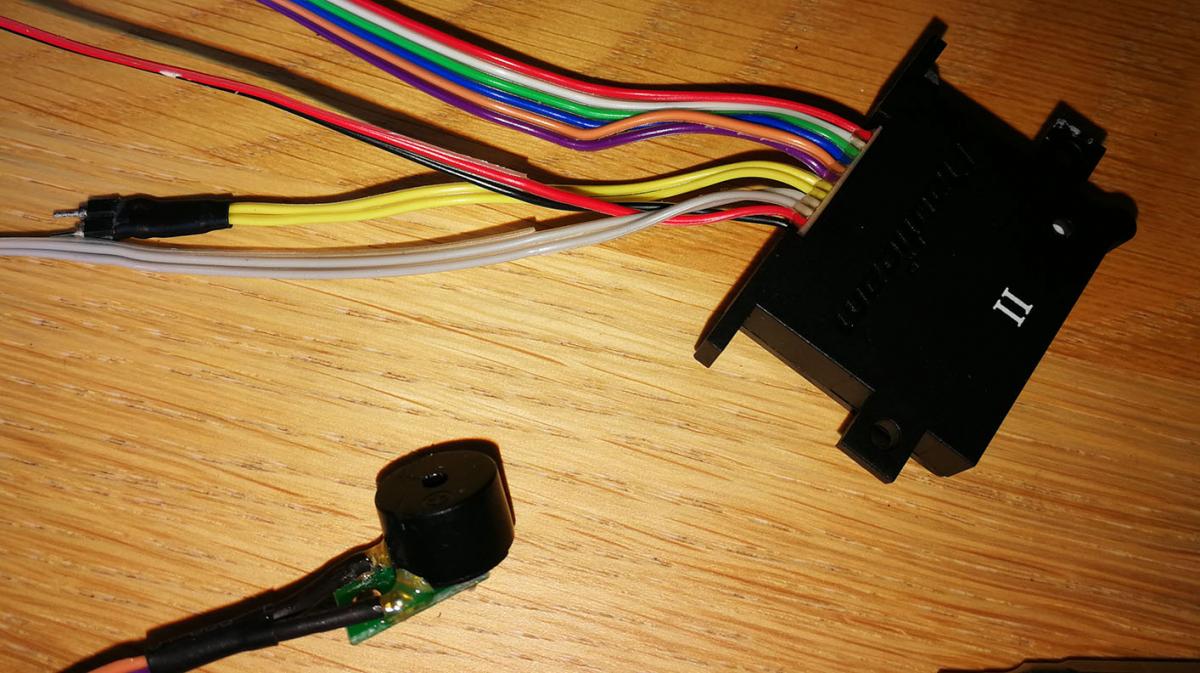
    Can you take a look at the picture?

    Can you confirm? :

    The two pin sensor detects water or high amount of humidity

    The cinlinder sensor is for pressure

    The rectangular piece is the main circuit.


    Some water (very little) came in. Although I dried everything well and pulled out the battery, the red and noise alarm keep going on everytime I turn on the circuit.

    I'm pretty sure no water touched the circuit, so I guess the only thing that can be wrong is the moisture detector.

    Does any one know how can I get a new one and replace it?

    post-21567-0-59957500-1536405496_thumb.jpg

  2. The cylinder is the audio buzzer that sounds in the event of moisture bridging the 2 pin sensor.

  3. Ups.

    So, where is the pressure sensor?

    Anyway I'm afraid what I have to replace is the moisture sensor. But I'm not sure if I can find a spare one anywhere.

  4. Ups.

    So, where is the pressure sensor?

    Anyway I'm afraid what I have to replace is the moisture sensor. But I'm not sure if I can find a spare one anywhere.

    Just send it to nauticam and they will do it for u
  5. Cut the heat shrink off the wire leading to the two pin sensor and see if you have corrosion in there bridging the gap.

  6. Right, but what if it is bridged?. Just clean and join the wires again?

  7. Hi Etc,


    I had the same problem with my Nauticam moisture alarm, even without water coming into the housing (http://wetpixel.com/forums/index.php?showtopic=60610&hl=). I disassebled the contacts (heat shrink/yellow wires in your pictures), covered with heat shrink and soldered again. Helped temporarily. After the alarm made problems again in the cabin of a safari boat (high humidity), I completely clipped off the "sensor" from the yellow wires and until now it works fine (vacuum system is far more important, prevented already 2x that I went into the water with not perfectly sealed housing. In addition the blank endings of the yellow wires do exactly the same job as the "sensor")...


    Wolfgang

  8. Hi Etc,


    I had the same problem with my Nauticam moisture alarm, even without water coming into the housing (http://wetpixel.com/forums/index.php?showtopic=60610&hl=). I disassebled the contacts (heat shrink/yellow wires in your pictures), covered with heat shrink and soldered again. Helped temporarily. After the alarm made problems again in the cabin of a safari boat (high humidity), I completely clipped off the "sensor" from the yellow wires and until now it works fine (vacuum system is far more important, prevented already 2x that I went into the water with not perfectly sealed housing. In addition the blank endings of the yellow wires do exactly the same job as the "sensor")...


    Wolfgang

    :sorry: I couldn't fin that topic, otherwise I woudn't have started this new one!


    Actually, I solve the proble just raplacing :lol2: the battery!!!

    Thanks

Nauticam

Account

Navigation

Search

Search

Configure browser push notifications

Chrome (Android)
  1. Tap the lock icon next to the address bar.
  2. Tap Permissions → Notifications.
  3. Adjust your preference.
Chrome (Desktop)
  1. Click the padlock icon in the address bar.
  2. Select Site settings.
  3. Find Notifications and adjust your preference.

