Skip to content

Video Gear and Technique / Archived topic

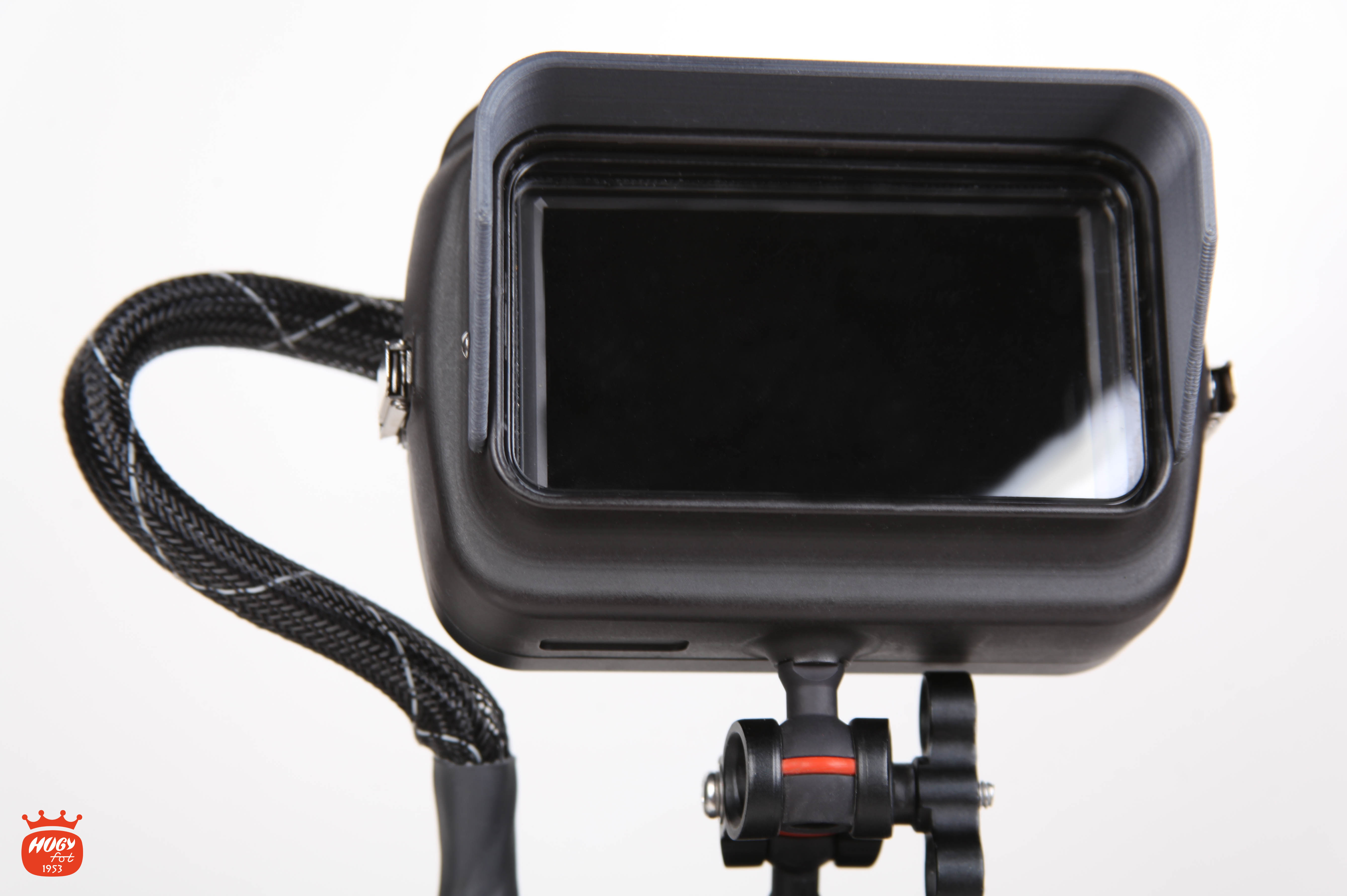
Hugyfot Vision XS - External Monitor

Started by Davide DB ·

  • 33Posts
  • 33Replies

Read-only discussion

Hugyfot Vision XS - External Monitor

33 posts
  1. 13 hours ago, Davide DB said:

    I saw since January there is a new kid on the block:

    https://www.hugyfot.com/housings/vision-xs-monitor/vision-xs-monitor.html

    inside monitor is a well regarded Feelworld F5 4K cheap monitor. It's complete of all monitoring tools.

    What do you think guys?


    monitor_logo_6.jpg


    have you noticed the housing has no buttons?

  2. 1 hour ago, Interceptor121 said:

    have you noticed the housing has no buttons?

    Have you noticed that buttons are on the top?

  3. 10 minutes ago, Davide DB said:

    Have you noticed that buttons are on the top?

    No i have not seen any buttons from the pictures. It seems just like a shoe box. I have the feelworld fw568 but the hugyfot is only a box it seems

  4. Massimo, Hugyfot website is down now.

    From the user manual: 

    From left to right 8 controls are offered: F1 F2 Left Right Menu Down Up Power

    In the user manual there is a photo which shows the buttons. From the website you can clearly see the red power on/off button and the grey buttons (out of focus)

    Edited by Davide DB
  5.  

  6. Massimo, Hugyfot website is down now.
    From the user manual: 
    From left to right 8 controls are offered: F1 F2 Left Right Menu Down Up Power
    In the user manual there is a photo which shows the buttons. From the website you can clearly see the red power on/off button and the grey buttons (out of focus)

    I use a feelworld on land the one I have is 500 nits with a hood is fine
    1995 tho for this set up is not competitive
    You can get a ninja for 2400 and is bright
    Anglerfish $1499 seems more reasonable


    Sent from my iPhone using Tapatalk
    • The Anglerfish is 1550 USD in USA, here in Europe, where I live, I found just one site at 1800 euro, so more or less same price. Of course you will get some discount.
    • Never heard of this brand while Hugyfot is a well renowned brand and I have a customer support here in Italy.
    • The Anglerfish seems to have exactly the same IPS panel as Feelworld, just 0,7" bigger. Exactly the same software,  same controls. I'm not sure that bigger is better for an underwater setup.
    • Atmos Ninja V and Nauticam housing about 2600€. Of course another league.

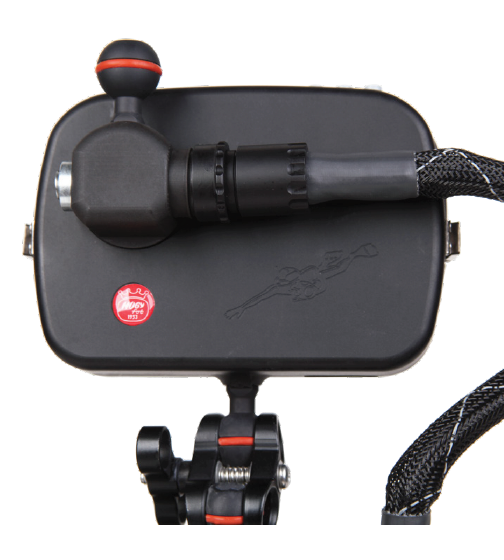
    Here a photo of Hugyfot monitor housing


    hugyfot-xs-monitor.thumb.PNG.44a978e2ef276046a69a97900e7c8aa4.PNG

  7. Hugyfot is a housing anglefish is an integrated product. I would prefer the latter. Also the F5 panel is 450 nits the 5.7" is 500

    I think hugyfot may be interesting if you plan to use the monitor on land so you can take it out

  8. The problem I see with these two monitors is the armball at the bottom. 

    While you can flip the image on the display, I'm not use the sunshade is reversible and you would get control buttons on the bottom. Nauticam has controls on the front.

    You cannot get this configuration easily

    7e3013e8-7d0d-486f-ae9c-27c7a8781950.thumb.jpg.35618211c74df8bfe282f3c5f1b17f4d.jpg


    On the GH5 I could use the rear tripod armball to attach the display but I would have a limited movement.

    The Hugyfot has an extra armbal on the top that could be used to get the above configuration

    hugyfot-xs-monitor-2.PNG.609bd4af010a5d03e8602fd7fdb8242b.PNG


  9. For me is extremely important being able to have two configurations:

    1. monitor on top for sort of macro shots so I'm not obliged to lay down on the mud
    2. monitor behind the camera while scootering 

    I've never used a monitor but unfortunately, age is advancing and even contact lenses are beginning to be insufficient. I also bitterly regretted not having a monitor for my latest project.


  10. Just now, Davide DB said:

    For me is extremely important being able to have two configurations:

    1. monitor on top for sort of macro shots so I'm not obliged to lay down on the mud
    2. monitor behind the camera while scootering 

    I've never used a monitor but unfortunately, age is advancing and even contact lenses are beginning to be insufficient. I also bitterly regretted not having a monitor for my latest project.


    I have designed mine we have had several delays so it has not come out yet and now covid is not helping exactly for the reason you mention

    It needs to be flipped and also there is a challenge with screens when you put an LCD in a housing it reflects and most screens are plastic with no antireflection treatment


  11. Two questions for ext. monitor use:

    1. Do you use clean HDMI so you check settings on camera display or you mirror the camera display?
    2. If you mirror camera display, the focus peaking monitor display get fooled by camera controls on the image?


  12. 7 minutes ago, Davide DB said:

    Two questions for ext. monitor use:

    1. Do you use clean HDMI so you check settings on camera display or you mirror the camera display?
    2. If you mirror camera display, the focus peaking monitor display get fooled by camera controls on the image?


    Typically I use clean output on the monitor because it has its own focus and exposure tools and put the LCD to settings screen

    If you use full info everything works normally however some of the monitor tools may have an issue with the additional info displayed


  13. Hogyfot always bring their own style to things eh!

    I like it. From the top mount to the heavily padded cable.

    From a purely monitor standpoint- don’t DiveSee do some nice compact/ cheaper options also?

    Needs to be > 500nits I feel to make it easy to see.

    I had my Inferno mounted behind my GH5 like that photo- but I had the opposite issue with my eyes - the screen was too close and hard to see!


    Sent from my iPhone using Tapatalk

  14. there is a challenge with screens when you put an LCD in a housing it reflects and most screens are plastic with no antireflection treatment


    This is a big issue for me also. I tried putting an anti glare cover on the internal screen, which helped. But then the push through buttons no longer worked [emoji1743]


    Sent from my iPhone using Tapatalk
  15. 1 hour ago, thetrickster said:

    From a purely monitor standpoint- don’t DiveSee do some nice compact/ cheaper options also?

    Needs to be > 500nits I feel to make it easy to see.

    I had my Inferno mounted behind my GH5 like that photo- but I had the opposite issue with my eyes - the screen was too close and hard to see!


    Sent from my iPhone using Tapatalk

    I have the 5.5” DiveandSee and I am happy with it. it is agood size for Gh5. They claim it is 450nits. I like the fact that I just charge and go. no second housing or batteries or vacuum to worry about :)  

  16. At depths where I usually work, 500 nits should be enough. Actually the DiveSee costs like a Ninja V + Nauticam housing but I agree that is the most compact of the row.

  17. On 4/29/2020 at 9:49 PM, Davide DB said:

    Two questions for ext. monitor use:

    1. Do you use clean HDMI so you check settings on camera display or you mirror the camera display?
    2. If you mirror camera display, the focus peaking monitor display get fooled by camera controls on the image?


    Davide if you mirror the camera display this will be also recorded if we are talking about a monitor recorder so you have to turn on/off not practical. My experience with the monitor on the rear tripod ball is the same, you have to move it to change settings on the camera so again for me not practical. When scootering you are not really going full speed while camera is rolling so having it on top is not really an issue. For traveling between areas where you go fast I just lay the monitor down and it is fine. 

  18. 2 hours ago, Lionfi2s said:

    Davide if you mirror the camera display this will be also recorded if we are talking about a monitor recorder so you have to turn on/off not practical.

    Yes, of course. Actually I was thinking about plain monitors. 

    Quote

    My experience with the monitor on the rear tripod ball is the same, you have to move it to change settings on the camera so again for me not practical. When scootering you are not really going full speed while camera is rolling so having it on top is not really an issue. For traveling between areas where you go fast I just lay the monitor down and it is fine. 

    Ok, good suggestion. In the end I went for the Hugyfot. 

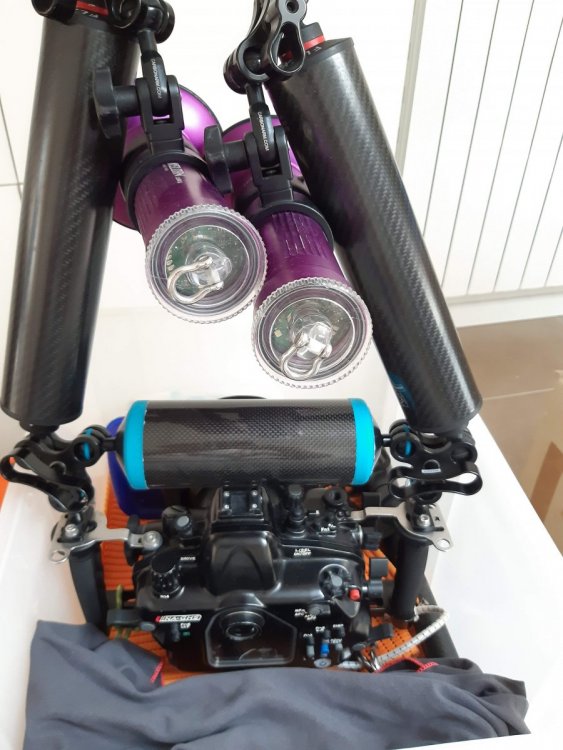
    Just the thought that I'll have to do the weighing all over again and especially the camera trim makes me cry.
    I had just found the perfect trim using a floating arm above the camera. Now there's no room for the ball holding the monitor.

    On the scooter it's only important to make the housing neutral, but if you shoot by hand, the trim is essential, otherwise you just need the tension on your wrists to make the flickering footage.

    20200501_111027.thumb.jpg.a8f0e2a96166f4593a67c10a8e308043.jpg

Ultralight Control Systems

Account

Navigation

Search

Search

Configure browser push notifications

Chrome (Android)
  1. Tap the lock icon next to the address bar.
  2. Tap Permissions → Notifications.
  3. Adjust your preference.
Chrome (Desktop)
  1. Click the padlock icon in the address bar.
  2. Select Site settings.
  3. Find Notifications and adjust your preference.