In this episode of Wetpixel Live, @Alex_Mustard explains the steps of his imaging workflow, from offloading camera cards through to providing images to magazine editors. It is important to stress that he does not chat about editing specifically and we stress that the best place to get detailed tutorials about editing is Erin Quigley's site: (https://www.goaskerin.com
Shooting Technique, Workflow and Editing / Archived topic
Wetpixel Live: Workflow for Underwater Photographers
Started by adamhanlon ·
- 33Posts
- 33Replies
Read-only discussion
Wetpixel Live: Workflow for Underwater Photographers
33 posts
-
-
13 hours ago, adamhanlon said:In this episode of Wetpixel Live, @Alex_Mustard explains the steps of his imaging workflow, from offloading camera cards through to providing images to magazine editors. It is important to stress that he does not chat about editing specifically and we stress that the best place to get detailed tutorials about editing is Erin Quigley's site: (https://www.goaskerin.com
Nice one. @adamhanlon I have recently subscribed to Adobe Photography Plan and started exploring photoshop
I have come across Adobe Bridge that is much faster than lightroom at handling previews then I have my RAW Editing in DxO PhotoLab and finally if and when required and never done it so far for underwater images Photoshop
I understand the power of lightroom in keywords as I have also lightroom but I found that when I edit my images on laptop on the trip first the colors are not correct and second the migration to my other computer cannot be done unless I create another library so I have started bypassing it entirely
Is there a workflow issue there? And what consideration there is of Adobe Bridge as alternative to PhotoShop if you don't want to use lightroom as raw editor?
-
Bridge is an image browser with some metadata editing abilities. It is not an editing tool. I uses ACR as a RAW rendering tool, which is ultimately very similar in terms of speed and accuracy as Lightroom's
Adobe's workflow would be to use Lightroom as a tool to import/sort/rate and do initial edits.
Any additional edits would then be done in Photoshop (selective edits primarily, with perhaps some sharpening)
At this pint, Alex exports images to a folder of "finished" photos that he browses using Bridge.
I don't do the same...but that will be for a future episode...
Lightroom's color management is ProPhoto RGB, and renders colors perfectly, but you should avoid doing color critical work on a laptop.
I'm not sure what you mean by an additional catalog you just import the "trip" catalog to your "main" one...here is my workflow for trips...https://wetpixel.com/articles/tutorial-lightroom-field-workflow -
30 minutes ago, adamhanlon said:
Bridge is an image browser with some metadata editing abilities. It is not an editing tool. I uses ACR as a RAW rendering tool, which is ultimately very similar in terms of speed and accuracy as Lightroom's
Adobe's workflow would be to use Lightroom as a tool to import/sort/rate and do initial edits.
Any additional edits would then be done in Photoshop (selective edits primarily, with perhaps some sharpening)
At this pint, Alex exports images to a folder of "finished" photos that he browses using Bridge.
I don't do the same...but that will be for a future episode...
Lightroom's color management is ProPhoto RGB, and renders colors perfectly, but you should avoid doing color critical work on a laptop.
I'm not sure what you mean by an additional catalog you just import the "trip" catalog to your "main" one...here is my workflow for trips...https://wetpixel.com/articles/tutorial-lightroom-field-workflowI use PhotoLab not even camera RAW as it performs better than adobe
I will check out that link!
-
Well...at the risk of being argumentative...
DxO PhotoLab performs better than Adobe? Which Adobe app and at what?
-
1 hour ago, adamhanlon said:
Well...at the risk of being argumentative...
DxO PhotoLab performs better than Adobe? Which Adobe app and at what?
Photolab is a RAW converter it performs better for my set up because it has a database of camera and lenses that is optimised by DxOLabs (see DxOMark website)
Because the MFT system is self corrected the lens profiles are embedded into RAW files so adobe approach is simply to apply the manufacturer corrections on the import. Those involve distortion (not a small issue in MFT wide angle lenses) and chromatic aberration. Photolab also correctes lens vignetting and sharpness on the specific lens at various aperture settings.
In addition it has proprietary demoisaicing algorhytms and AI for handling of exposure and saturation. One area that is also very strong is color rendering where photolab maps out of gamut colors much better than lightroom for export in AdobeRGB and/or sRGB.
In terms of noise reduction it also has an incredibly powerful engine so you don't need Topaz denoise or other stuff
In many cases lightroom or adobe camera raw do a decent job but sometimes it is worth going through photolab as it does improve the IQ this then creates a 16 bit TIFF that you can process in photoshop
What is not so good in photolab are the local adjustments gradual filter and control points are good but brushes are nowhere near lightroom but you can deal with those in photoshop anyway
The integration with lightroom is total as it also saves DNG in case you want to use lightroom for local adjustments for example
The final point is that is a permanent license not subscription on 3 machines and is cost effective
I am now on 4 months of free photoshop and I use it mostly for land images but I also have used GIMP and I have to say is pretty decent but not as smart
Where photolab is not good is metadata so it is not a lightroom replacement is more a side product if you like
So you can run bridge, photolab and GIMP with mostly free software and have decent results
I have seen a noticeable improvement in performance especially with rectilinear lenses and domes with this set up I cannot generalise if this would apply to any camera but for sure it works well with my Olympus and Panasonic
I have been using adobe products for many years and I will keep using them but I find Photolab adds a lot of value to certain images.
I am definitely not saying is better than lightroom or camera raw in absolute terms but it does a great job on all the images I have processed since I have it
-
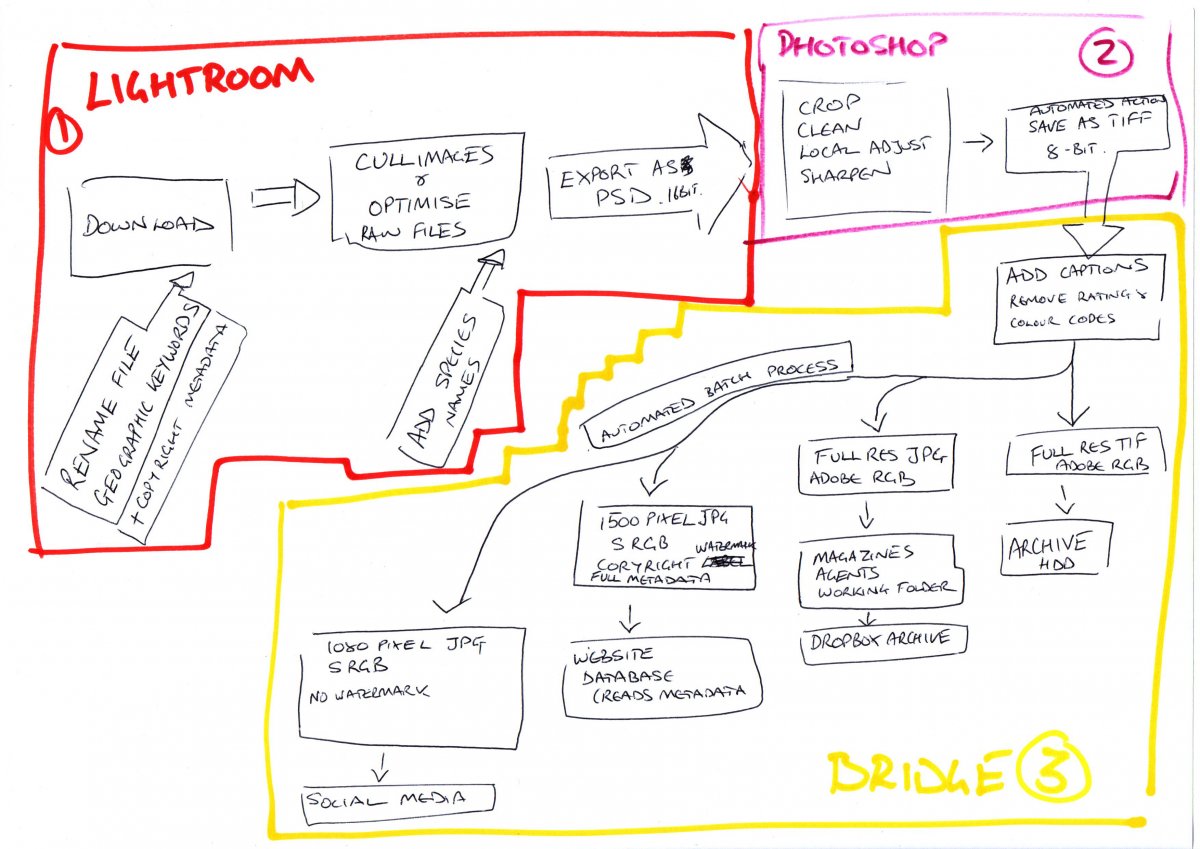
I just sketched this to summarise my standard workflow. I definitely have a one way system through the software. Images start in Lightroom and once exported never come back. Then into Photoshop (I never crop or remove scatter/distractions in Lightroom). And then use Bridge for typing in captions (description and title), making sure my copyright and contact details are correct, and then batch processing them for my four main uses.
I have this process so that everything only has to be processed once and is done properly at that time (including species names and captions). And that information is then embedded in all versions of the file - making them fully searchable.

-
1 minute ago, Alex_Mustard said:
I just sketched this to summarise my standard workflow. I definitely have a one way system through the software. Images start in Lightroom and once exported never come back. Then into Photoshop (I never crop or remove scatter/distractions in Lightroom). And then use Bridge for typing in captions (description and title), making sure my copyright and contact details are correct, and then batch processing them for my four main uses.
I have this process so that everything only has to be processed once and is done properly at that time (including species names and captions). And that information is then embedded in all versions of the file - making them fully searchable.
Thank you Alex very useful. I particularly like the 'automated batch process' in bridge. So in essence you use Lightroom for tagging and RAW conversion and selection.
I find lightroom being very slow with that and hence I am using bridge. I was under the impression that lightroom keywords are in the library not in the single file but obviously they travel to photoshop from this diagram
-
27 minutes ago, Interceptor121 said:
Thank you Alex very useful. I particularly like the 'automated batch process' in bridge. So in essence you use Lightroom for tagging and RAW conversion and selection.
I find lightroom being very slow with that and hence I am using bridge. I was under the impression that lightroom keywords are in the library not in the single file but obviously they travel to photoshop from this diagram
Yes, keywords are transferred across when you export as either a catalogue (to read into another Lightroom catalogue) or as individual files. Although the Bridge stuff takes up most of the space on my diagram the Photoshop and Lightroom parts take up much more of the time!
Alex
-
Alex, do you not do global color and exposure corrections (as required) in LR?
PS definitely has better selection tools and arguably the implementation of anything Content Aware is more accurate, but to do global corrections non destructively, you need to either do it in layers, or ACR? Either way is more complicated/time consuming than using LR?
Years ago, I used to convert to DNG, but found that the conversion process produced some really nasty artifacts.
Lightroom and Bridge are different tools for different things, so comparing their speed doesn't really make sense. Bridge is an image browser that allows for metadata editing. LR is a DAM that stores not only the location of an image within a computer's file hierarchy, but also the RAW file, metadata, EXIF data and any edits carried out within Lightroom. To do this, it needs to generate preview files, which does take some time. Bridge (in Alex's and your use case) only deals with processed images, so does not need to do any processing in order to display an image.If speed is your goal for browsing, Photo Mechanic is way faster than Bridge and allows for very sophisticated and automated metadata management.
-
11 minutes ago, adamhanlon said:
Alex, do you not do global color and exposure corrections (as required) in LR?
Yes - all that moving of sliders, grad filters etc is under Optimise RAW Files in Lightroom.
Alex
-
8 minutes ago, adamhanlon said:
Alex, do you not do global color and exposure corrections (as required) in LR?
PS definitely has better selection tools and arguably the implementation of anything Content Aware is more accurate, but to do global corrections non destructively, you need to either do it in layers, or ACR? Either way is more complicated/time consuming than using LR?
Years ago, I used to convert to DNG, but found that the conversion process produced some really nasty artifacts.
Lightroom and Bridge are different tools for different things, so comparing their speed doesn't really make sense. Bridge is an image browser that allows for metadata editing. LR is a DAM that stores not only the location of an image within a computer's file hierarchy, but also the RAW file, metadata, EXIF data and any edits carried out within Lightroom. To do this, it needs to generate preview files, which does take some time. Bridge (in Alex's and your use case) only deals with processed images, so does not need to do any processing in order to display an image.If speed is your goal for browsing, Photo Mechanic is way faster than Bridge and allows for very sophisticated and automated metadata management.
I work on the basis of experience. RAW files have an embedded jpeg bridge only requires copying and the thumbnails I get are good enough for culling at least for me. Lightroom works well if you have a sidecar jpeg otherwise wants to rebuild the embedded jpegs somehow and does not show them in the preview at the import so at the end I have to import all
I have used photomechanic too but at the end Bridge is sufficient for what I do I also want to add bridge works very fast directly from a memory card with quality preview that can even avoid entirely the copy I do that for birds in flight shots where I have 1000+ shots photomechanic wants you to import them all and this was not practical
I am happy with my current process I just need to get a better understanding of the keywords but am pretty rubbish at it so the tips here are very useful
-
Get a Loupedeck CT, chaps! REALLY speeds things up!
-
Just now, Interceptor121 said:
I am happy with my current process I just need to get a better understanding of the keywords but am pretty rubbish at it so the tips here are very useful
Have you had a look at Wordroom for keywording? I've been using it for about 6-8 months and really like it for quick working. It's free.
-
3 minutes ago, TimG said:
Have you had a look at Wordroom for keywording? I've been using it for about 6-8 months and really like it for quick working. It's free.
I had it on my list. Does it work on plain files? That would be the missing link in my process
-
You can browse and select images on a card (pre-import) in PM. So you could select your images via PM or import without offloading the whole card.
The App actually only uses the embedded preview jpg files within the raw files, so is super fast.
You can also set Lightroom to do the same. The setting is within the Lightroom import screen and if selected, Lightroom does not build preview files and you just view the embedded jpgs. Similarly, you can also view and select the files on the card (pre import) and it is faster than Bridge...
If required, Lightroom builds preview files so that you can view and edit files at full resolution. Lightroom is a parametric editor. It doesn’t change the original photo file in any way. Instead, it keeps a record of any changes made to the photo in the Catalog. As the original photo is unchanged, Lightroom needs to generate previews to show you how your photos look after you have edited them.
Like you, I sometimes shoot many thousands of files in one shoot. Lightroom can cope with this fine! If I am up against a hard deadline, I do import via PM, but this is a topic for another video... -
17 minutes ago, adamhanlon said:
You can browse and select images on a card (pre-import) in PM. So you could select your images via PM or import without offloading the whole card.
The App actually only uses the embedded preview jpg files within the raw files, so is super fast.
You can also set Lightroom to do the same. The setting is within the Lightroom import screen and if selected, Lightroom does not build preview files and you just view the embedded jpgs. Similarly, you can also view and select the files on the card (pre import) and it is faster than Bridge...
If required, Lightroom builds preview files so that you can view and edit files at full resolution. Lightroom is a parametric editor. It doesn’t change the original photo file in any way. Instead, it keeps a record of any changes made to the photo in the Catalog. As the original photo is unchanged, Lightroom needs to generate previews to show you how your photos look after you have edited them.
Like you, I sometimes shoot many thousands of files in one shoot. Lightroom can cope with this fine! If I am up against a hard deadline, I do import via PM, but this is a topic for another video...Lightroom when I select minimal uses the small thumbnail jpeg not the large one unless it has sidecar files and in that case it uses the jpeg. I do not know why it does that but is not useable at all
I do not see differences between photomechanic and adobe bridge they do the same thing
Photolab has sidecar files only for those you edit which is the same approach of camera raw/bridge so there is no catalog and you just drag and drop the folder
I have used lightroom a lot but since I have been shooting birds I have moved away from it because it is slower than the other set up. Perhaps I will give it another go but right now the only thing is keywords if I can use it for keywords and they stay with the files I can then just copy the files instead of the catalog need to work that out
-
40 minutes ago, Interceptor121 said:
I had it on my list. Does it work on plain files? That would be the missing link in my process
Not sure what you mean by "plain files" but it seems to be able to read most of the usual formats. Certainly RAW and JPG.
-
2 minutes ago, TimG said:
Not sure what you mean by "plain files" but it seems to be able to read most of the usual formats. Certainly RAW and JPG.
I meant do I need to use lightroom and the answer is yes. I would like to avoid lightroom altogether and its catalogue
-
1 hour ago, Interceptor121 said:
I meant do I need to use lightroom and the answer is yes. I would like to avoid lightroom altogether and its catalogue
Oh right. No, it needs LR. It’s a plug-in to LR