Skip to content

Photography Gear and Technique / Archived topic

Fujifilm X-T3 + Nauticam NA-XT3 experience

Started by froop ·

  • 37Posts
  • 37Replies

Read-only discussion

Fujifilm X-T3 + Nauticam NA-XT3 experience

37 posts
  1. Rather than continuing to hijack another Fujifilm XT-3 thread, I'm creating a new for my experiences with my Fuji, and hopefully include some better and better pics as I get used to it!

    First a couple of pics of the housing, with some of the things I was curious about before buying it.

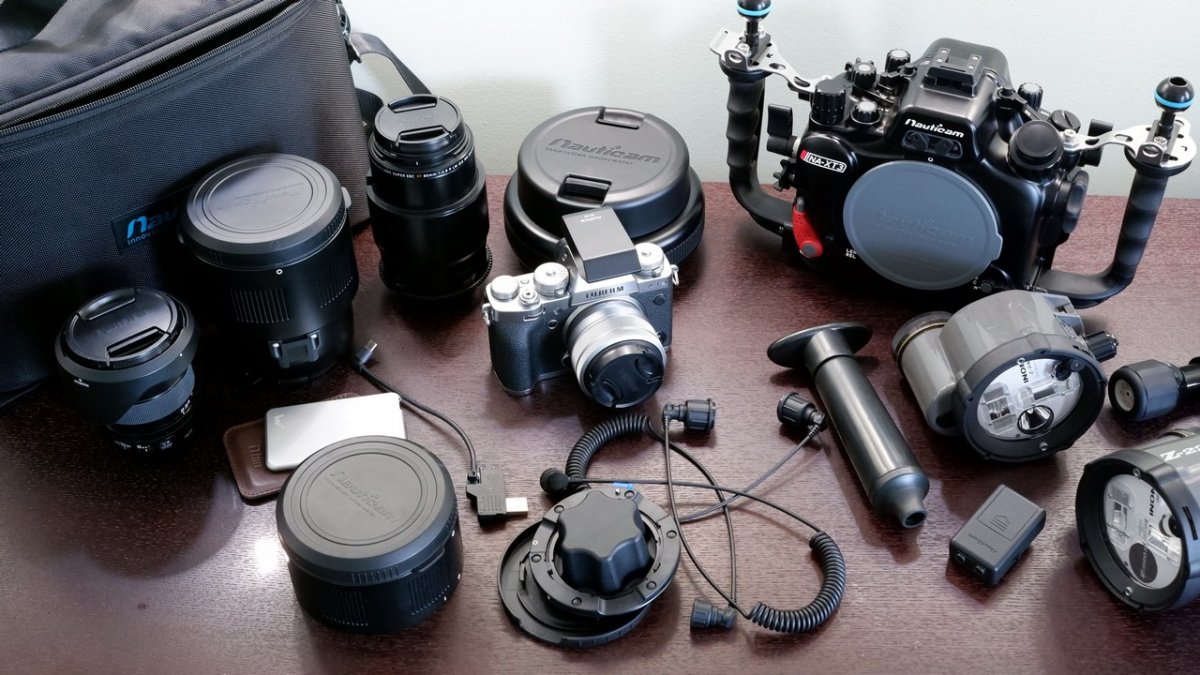
    This is most of my gear so far (strobe arms not pictured). One Inon Z-220S, one Z-240. A 10bar focus light on the right there. All lighting over 10 years old, but still seems to do the trick! I'm still waiting on the port for my 15-45 (the lens on the camera), so the only lens/port I can use until that arrives is the 80mm macro.
    2021_0319_14175000.thumb.jpg.f0d9e7f81f4862477a02d82171ffef24.jpg


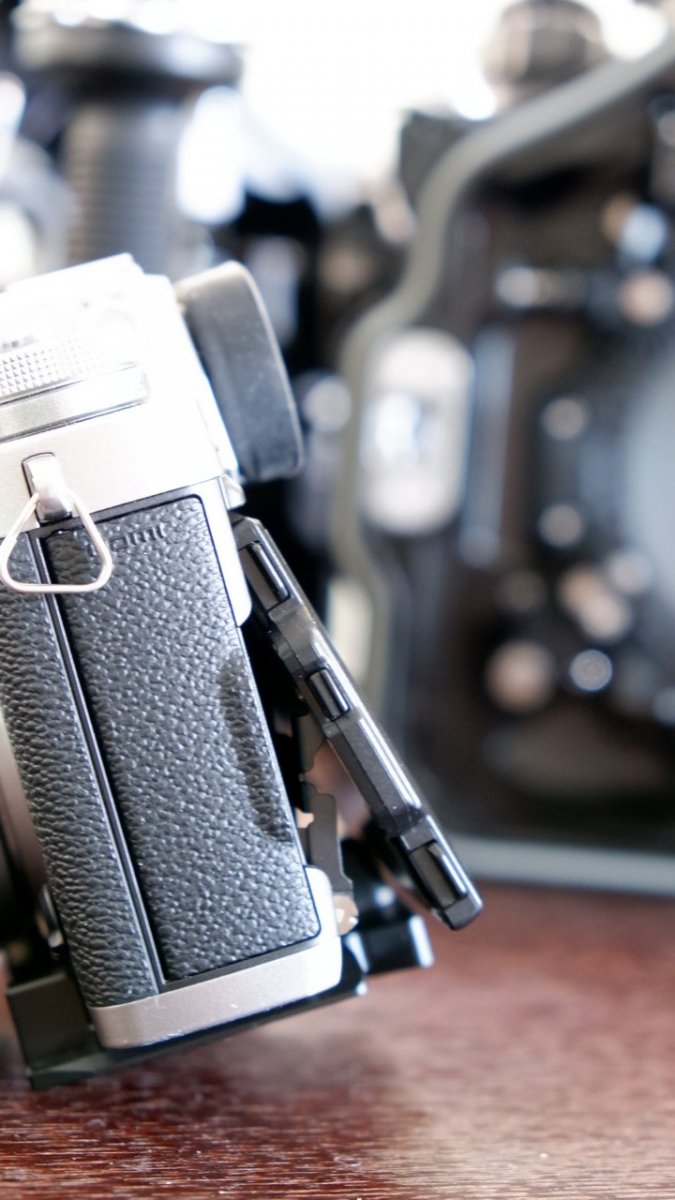
    From what I could find on the net, it wasn't quite obvious if or how much the LCD tilted when in the housing. Here is a how it sits when the camera is attached to the mounting plate - the plate forces it to sit a little out from flat. It can be tilted about 3-5mm further out before the housing will push it when closed.
    2021_0319_14233300.thumb.jpg.30b178466cce354a348fd27e286f3b1c.jpg


    The little angled piece in the hot-shoe part of the housing is designed for Fuji's EF-X8 mini hot-shoe flash. The mini flash turns off when it's flipped down, and turns on when it's opened up. The angled piece in the housing holds the flash just enough open to turn on, and direct the flash out of the front of the housing. Leave the piece in, and use the EF-X8 for TTL shooting.
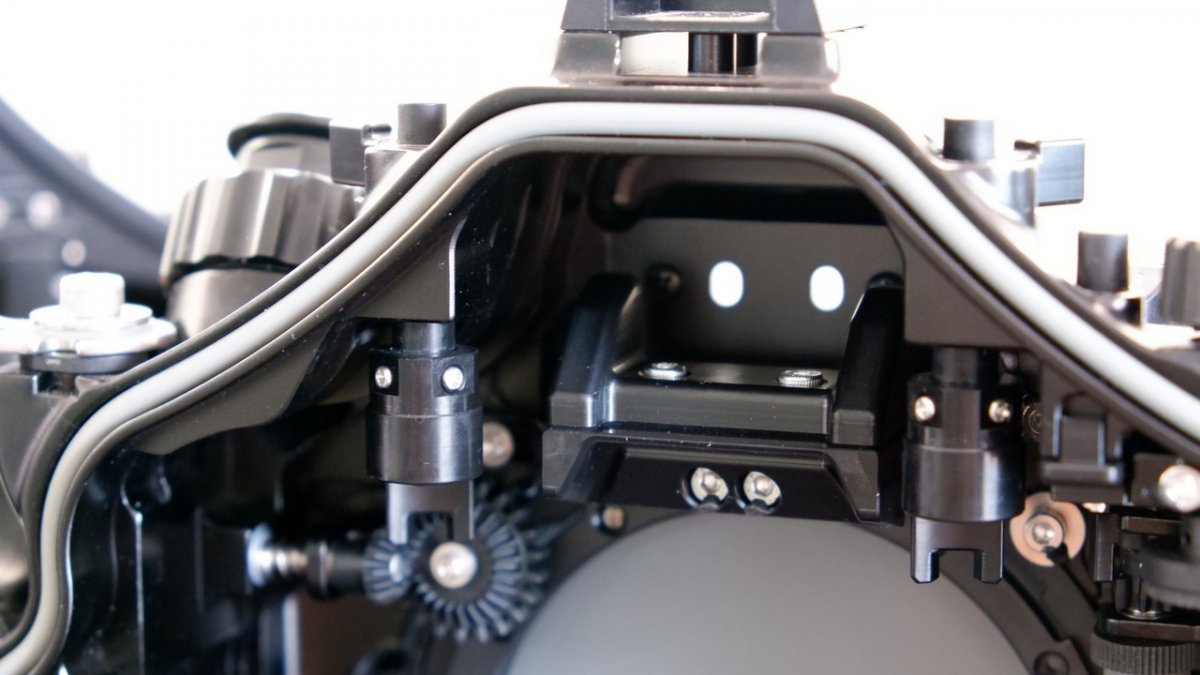
    2021_0319_14242500.thumb.jpg.74c8c4e48e106224709eec53a2a48d5f.jpg


    The piece can be removed, leaving space for Nauticam's external flash trigger. Use this for manual flash operation, increasing flash recycle time and reducing camera battery use.
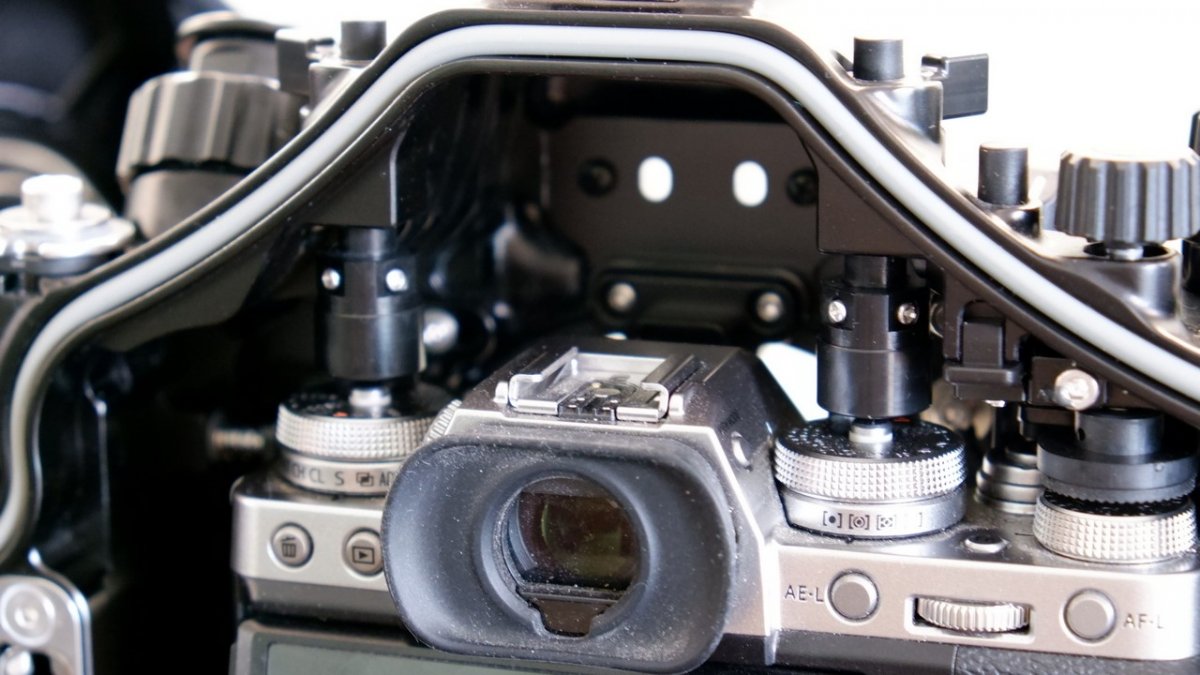
    2021_0319_14282300.thumb.jpg.184c7cdddcc5083b4e4cdef2e1b952d8.jpg


    No photos of it, but something I noticed with the 80mm macro - when the focus gear is installed on the lens, and then mounted on the camera, it's almost impossible to reach in behind the focus gear to release the lens from the camera body! I had to use a flat piece of hard plastic to do it. While in the housing, if the port is removed, the lens release trigger on the housing works a treat. So just an inconvenience to remove the lens from the camera after removing the camera from the housing.
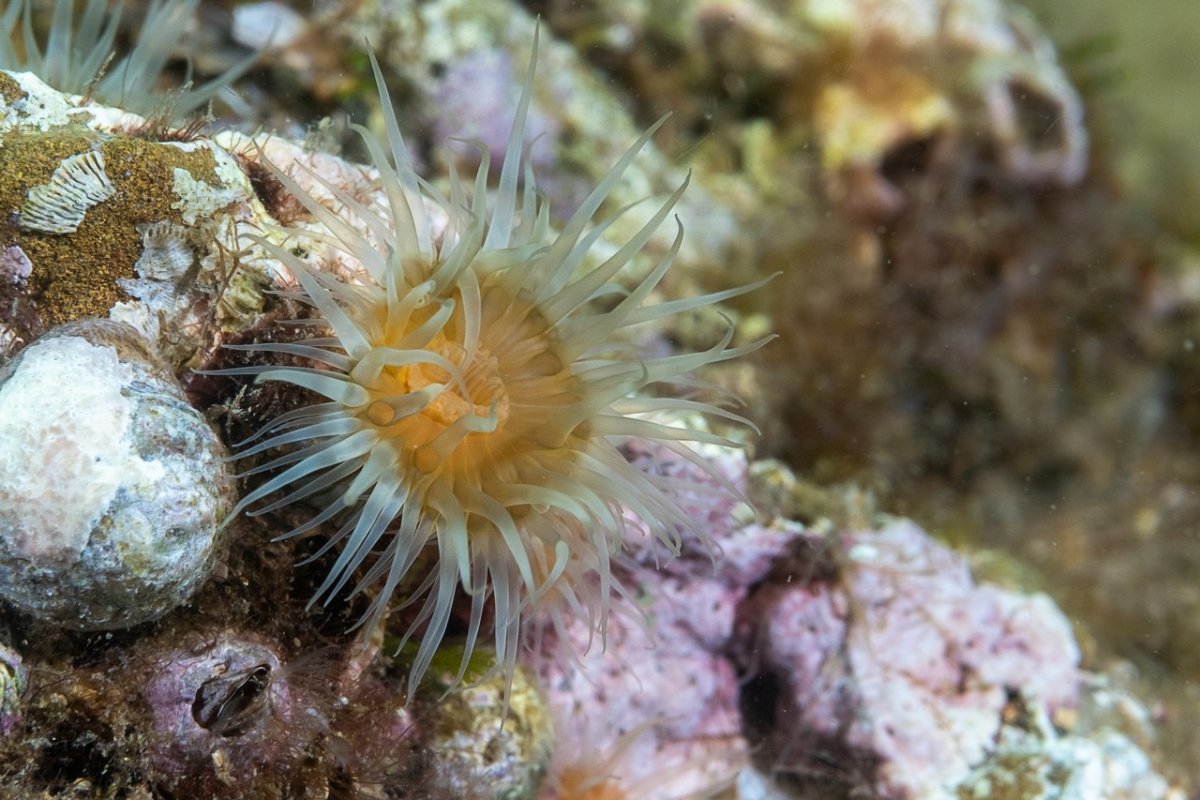
     

  2. First outing with my Fuji X-T3 today. Took the 80mm macro out on a shallow (4m) dive on a bright day trying to find little things to shoot. I didn't have my focus light (still waiting on a part to mount it), and I think I need to play with the camera in low light macro situations above ground a bit.

    I had the camera in manual focus, with the AF-L button (which the Nauticam maps to the right thumb lever) set up for back button focus. Quite convenient, with my right thumb on the level to focus, left fore finger to shoot. Even though I have the focus ring installed, I solely used AF today.

    I was adjusting aperture mainly between f8 and f16, and noticed that sometimes when I focused, the camera would open up the aperture to give me a clear view in the rear LCD, but sometimes it would get a focus lock on almost a pitch black image. Switching to EVF seemed to have better results. But more playing necessary.


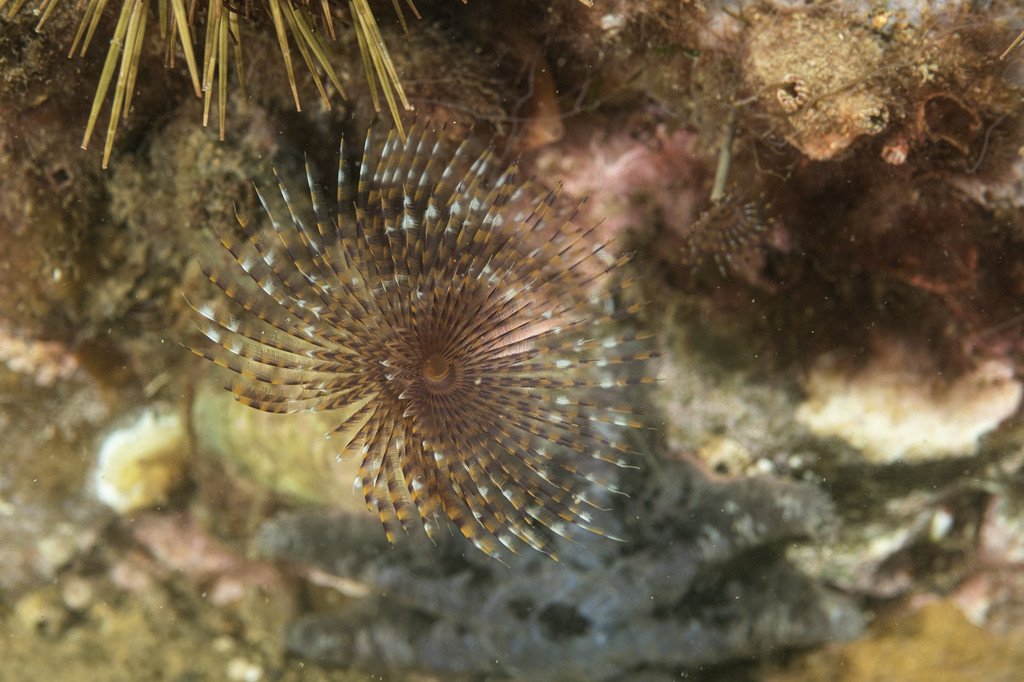
    DSCF0672.thumb.jpg.3499fb52c7440593165a31535e7b7ad7.jpg


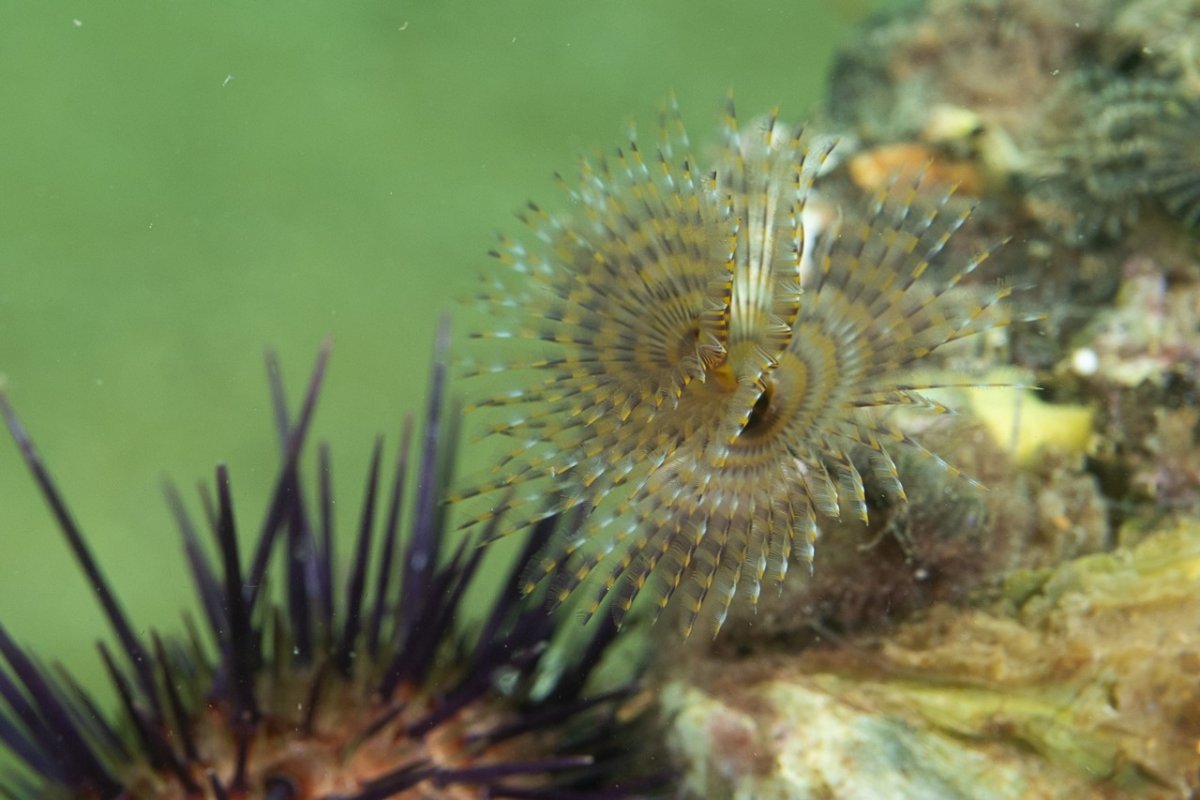
    I struggled to get this feather duster in focus. Little bit of surge, and me trying not to get too close to send it back into its tube.

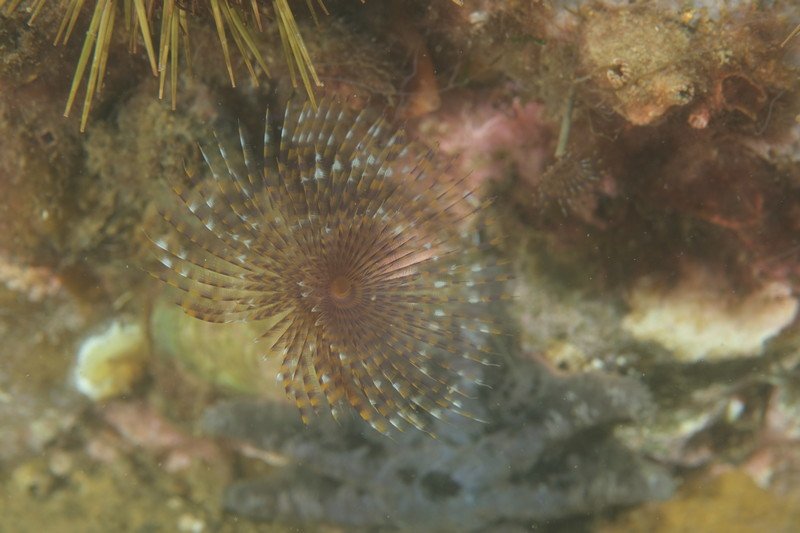
    DSCF0673.thumb.jpg.2c7127a1ee3fdb576bfd9102ec47a7cd.jpg


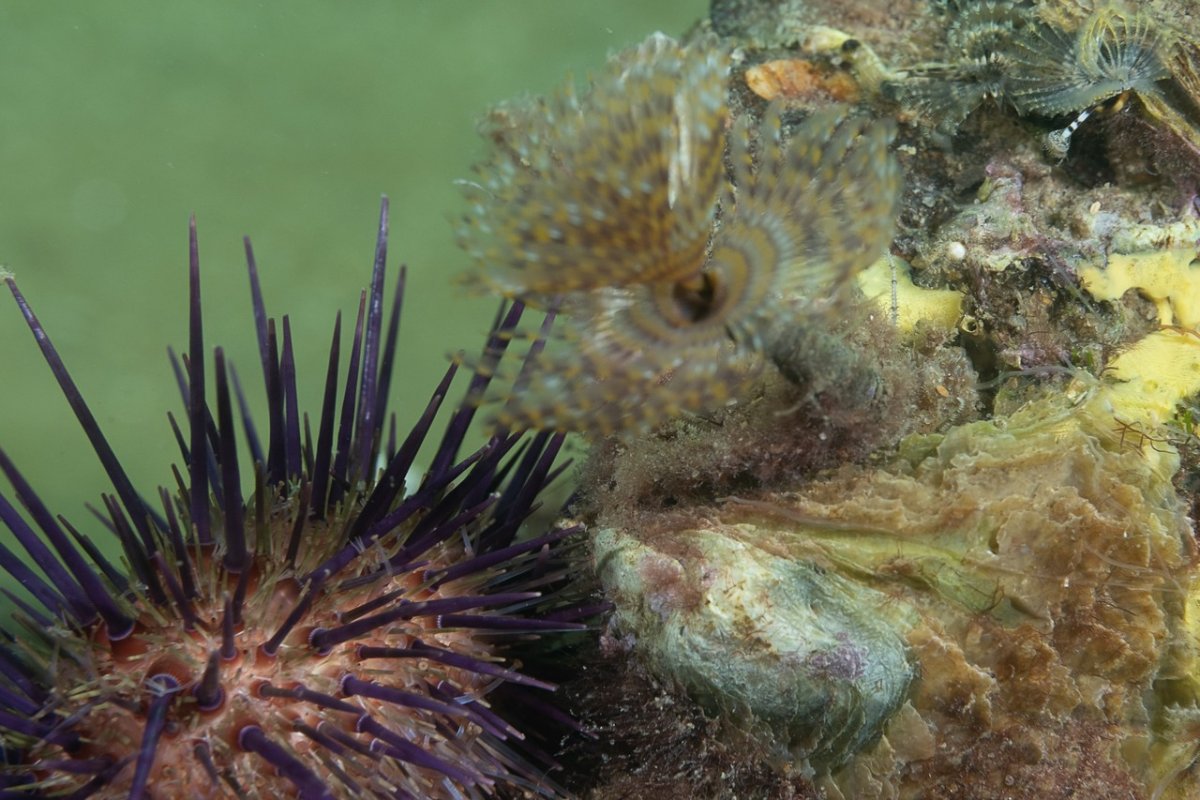
    Second (or maybe the third or fourth :) ) try a bit better. This was f10 at 1/250 with strobes on manual. I think I had enough DOF (the shot above was also f10 @ 1/250, and most of the sea urchin is in sharp focus. I think with this shot I just missed the mark, and focus was a touch too close, getting only the nearest part of the feather duster.

    DSCF0675.thumb.jpg.717302a3859ee5013bf8b9ea2704a85b.jpg


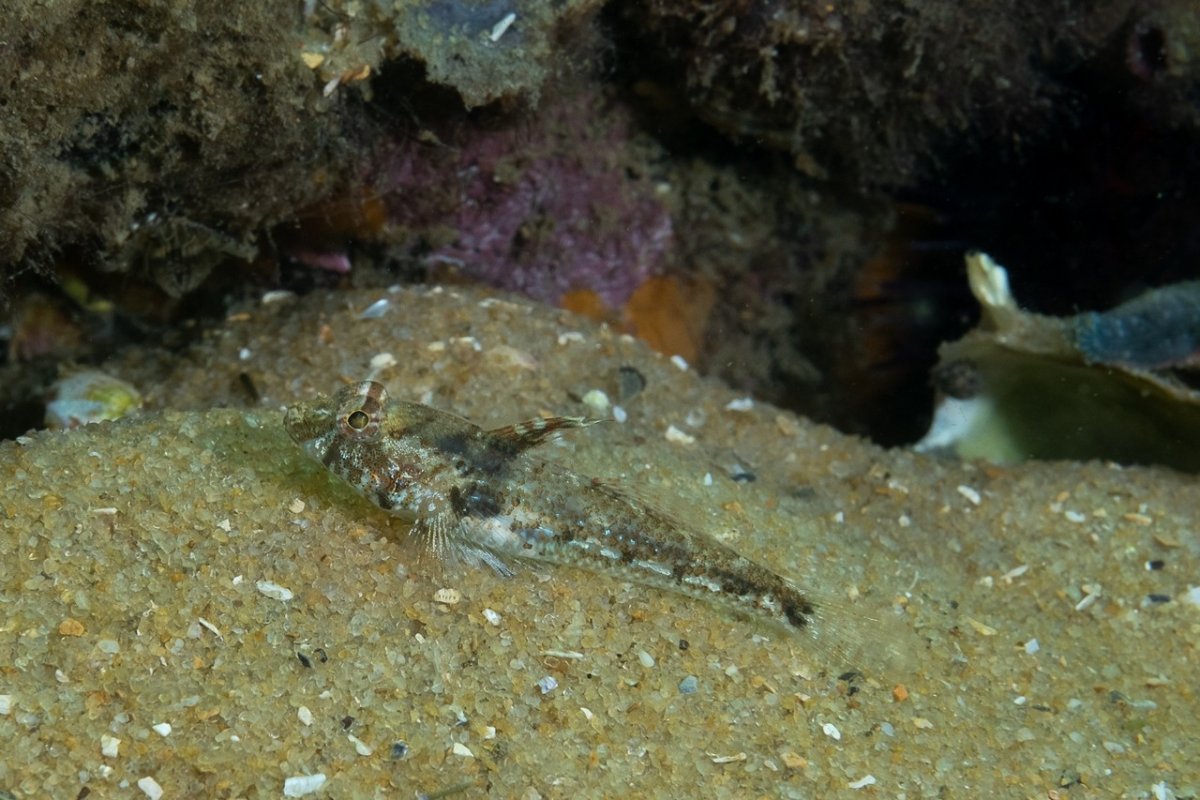
  3. And one more that I couldn't add on the previous post. This one shot at f14 @ 1/250 (ISO 320)

    DSCF0686.thumb.jpg.26b09c58839ef44dec88b3c39559a7f1.jpg


    Having taken this camera and housing underwater for the first time, and not really had too much experience with handheld macro in surge, I think I'll call this a successful dive - in fact any dive taking a new housing out for the first time and bringing it back dry I'd consider a success :)

    With the 80mm macro and standard ULCS arms and no floats, my rig was quite negative, and front heavy. I can't wait to receive the port for the 15-45, and take it out with the WWL-C.


    Edited by froop
  4. 16 hours ago, froop said:

    I was adjusting aperture mainly between f8 and f16, and noticed that sometimes when I focused, the camera would open up the aperture to give me a clear view in the rear LCD, but sometimes it would get a focus lock on almost a pitch black image. Switching to EVF seemed to have better results. But more playing necessary.

    There should be a setting somewhere in the menus with a name like live view boost- designed for taking flash photos in dark conditions and it will boost viewfinder brightness levels when taking flash images in low light - but is not representative of the actual exposure of the image. 

  5. 12 hours ago, ChrisRoss said:

    There should be a setting somewhere in the menus with a name like live view boost- designed for taking flash photos in dark conditions and it will boost viewfinder brightness levels when taking flash images in low light - but is not representative of the actual exposure of the image. 

    Thanks @ChrisRoss,

    It seemed a bit funny to me that it sometimes seem to turn up setting or something .. sometimes..

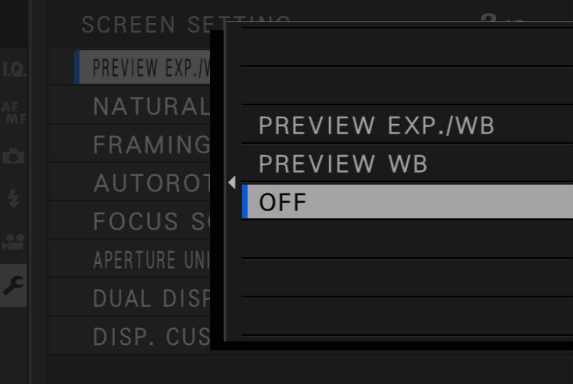
    But after a bit of searching through the menus, I finally found what I'm looking for. There is a setting to configure white balance / exposure preview in manual mode.

    Under Setup > Screen Set-Up, there's an option "Preview Exp./WB in Manual Mode", which by default is set to "Exp/WB". I've set that to "Off" which makes things much easier to focus in low light!

    I got stuck trying to find a setting in the "Photo" or the "AF/MF" menu.

    preview_exp_wb.png

    Edited by froop
  6. How is the focus speed on the 80mm? Fuji touts it as the fastest focus macro lens ever; any truth to that claim with regards to underwater shooting?

  7. 23 minutes ago, Barmaglot said:

    How is the focus speed on the 80mm? Fuji touts it as the fastest focus macro lens ever; any truth to that claim with regards to underwater shooting?

    It's impressively fast. A few times I felt I had to refocus 3 or 4 times just because it got a focus lock way faster than I was expecting it to. Even with no focus light.

    Most of my framing was with subjects close to the background, but if I mis-aimed into a sandy bottom in the murky distance it did do a bit of hunting. The specs say minimum focus distance is 25cm, which equates to about 10cm from the front of the lens. If the subject is any closer, it does hunt to infinity and back, so can find itself at the long end if I don't catch it in time.

    It has a focus limiter that can be switched to off / 0.5m - infinity / 0.25m - 0.5m, which obviously can't be changed while in the housing. I left the focus limiter off.

  8. I am glad to hear about your successfull dive!!

    8 hours ago, froop said:

    It has a focus limiter that can be switched to off / 0.5m - infinity / 0.25m - 0.5m, which obviously can't be changed while in the housing. I left the focus limiter off.

    Be carefull with that switch!! I allways check it after a dive having it  in the wrong possition. Very frustrating not to be able to focus something closer to 0,5m!!!

    On 3/20/2021 at 8:30 AM, froop said:

    Switching to EVF seemed to have better results. But more playing necessary

    Due to my old (50) eyes I allways use the viewfinder. Moreover, i have set "Image display" in continous. This way I can check the result quite accuratelly while the strobe is recharging. Then half press the shutter and I am ready for the next shot. I dream of a 45° viewfinder!!


    On 3/21/2021 at 12:43 PM, froop said:

    I got stuck trying to find a setting in the "Photo" or the "AF/MF" menu.

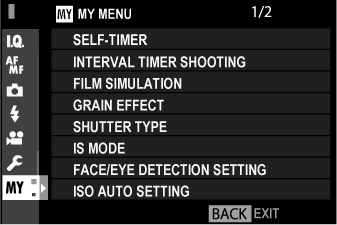
    I have this, and the rest of things I have to change when the camera goes to "dive" mode, in "My Menu". This way I never forget to change any important settings.

    On 3/20/2021 at 8:13 AM, froop said:

    eave the piece in, and use the EF-X8 for TTL shooting.

    You can use the EF-X8 in manual flash too. Here some pics taken with the Backscatter Mini Flash (manual only)

    _DSF5324_3.jpg?dl=1

    _DSF5636_in.jpg?dl=1

    _DSF7337_in.jpg?dl=1


    _DSF7333.jpg?dl=1

    Hope this helps!!

  9. 9 hours ago, Elipe said:

    Due to my old (50) eyes I allways use the viewfinder. Moreover, i have set "Image display" in continous. This way I can check the result quite accuratelly while the strobe is recharging. Then half press the shutter and I am ready for the next shot. I dream of a 45° viewfinder!!

    It is convenient to use the LCD, but I do find the EVF more natural and quite a bit clearer. I agree, the 45º viewfinder would be a great Xmas present! :D .  I prefer just the short image review - enough for a quick glance to see that exposure is in the right ball park. For a proper review I'll hit the playback (I love that it's a thumb lever and not a button!) and then press the back command dial button to zoom in on the focus point.


    9 hours ago, Elipe said:

    I have this, and the rest of things I have to change when the camera goes to "dive" mode, in "My Menu". This way I never forget to change any important settings. 

    The IQ menu is great to be able to have 7 different options .. but mostly useless to me. I would much rather be able to use that IQ to shortcut a whole selection of options. It'd be great to to IQ > Underwater and have it apply a whole heap of camera settings, rather than just image processing settings.

    Those are some great macros. Were those also using the XF80?


  10. Hello froop!!

    8 hours ago, froop said:

    The IQ menu is great to be able to have 7 different options .. but mostly useless to me. I would much rather be able to use that IQ to shortcut a whole selection of options. It'd be great to to IQ > Underwater and have it apply a whole heap of camera settings, rather than just image processing settings.

    I was talking about My Menu, not IQ menu. You can find it in USER SETTING >>> MY MENU SETTING. 

    http://fujifilm-dsc.com/en/manual/x-t2/shortcuts/my_menu/index.html

    When you set it, you have a custom tab with your prefered menu options.

    And yes, I took those pics with the 80mm macro, it is my only underwater setup right now. Still trying to decide my wide setup.

    Best Regards!!

    image.png

  11. 57 minutes ago, Elipe said:

    I was talking about My Menu, not IQ menu. You can find it in USER SETTING >>> MY MENU SETTING.

    Hi Elipe,

    Yep, I'm aware of the MY menu, and have now added the PREVIEW EXP option to it. I was more lamenting the missed opportunity of having a single shortcut/macro to change more settings than  just the limited set of IQ adjustments

  12. On 3/23/2021 at 10:19 AM, froop said:

    I was more lamenting the missed opportunity of having a single shortcut/macro to change more settings than  just the limited set of IQ adjustments

    Ok, then I misunderstood you!!:D

    It could be nice for video, too.

    By the way, are you planning to pair the 15-45 with any wet diopter, or just WWL??

  13. 10 hours ago, Elipe said:

    By the way, are you planning to pair the 15-45 with any wet diopter, or just WWL?? 

    At this stage just the 80mm for macro, and the 15-45 + WWL-C for wide angle. I haven't got the ring and port for the 15-45mm yet, but once I do get it I'll have plenty to play with before thinking about extending my options any further!


  14. On my Olympus I can store almost all the settings in a custom menu which I can recall by just turning a dial to C1/C2/C3, it seems the equivalent on Fuji is to bring up a custom settings bank.  The key things I want to store are manual exp mode,  WB option, flash to manual and 1/64, drive mode, AF mode and it also stores the SS/aperture/ISO that was current at the time. 

  15. 23 hours ago, ChrisRoss said:

    On my Olympus I can store almost all the settings in a custom menu which I can recall by just turning a dial to C1/C2/C3, it seems the equivalent on Fuji is to bring up a custom settings bank.  The key things I want to store are manual exp mode,  WB option, flash to manual and 1/64, drive mode, AF mode and it also stores the SS/aperture/ISO that was current at the time. 

    The Fuji X series custom settings bank is only for image quality/processing settings (film type simulation, grain effect, WB, highligh/shadow tone, sharpness, dynamic range, etc. It does not store camera operation settings.

    Pretty much every button and dial on the camera can be reprogrammed to a different function. Eg, the 4-way keypad buttons factory settings are to change AF mode / WB / performance boost / film simulation. I can change each of those to adjust almost any other single setting on the camera. But I can't make a single button press recall a set of camera operation settings.

  16. 3 hours ago, froop said:

    The Fuji X series custom settings bank is only for image quality/processing settings (film type simulation, grain effect, WB, highligh/shadow tone, sharpness, dynamic range, etc. It does not store camera operation settings.

    Pretty much every button and dial on the camera can be reprogrammed to a different function. Eg, the 4-way keypad buttons factory settings are to change AF mode / WB / performance boost / film simulation. I can change each of those to adjust almost any other single setting on the camera. But I can't make a single button press recall a set of camera operation settings.

    That makes life difficult for UW, you might need to resort to having a checklist to go through before you put the camera in the housing, last thing you want to do is have to menu dive when UW.

  17. 13 minutes ago, ChrisRoss said:

    That makes life difficult for UW, you might need to resort to having a checklist to go through before you put the camera in the housing, last thing you want to do is have to menu dive when UW.

    On the plus side there is only one control on the entire camera that isn't transferred through the housing.

    ISO, SS and aperture are always available via dedicated controls, along with shooting mode,  AF/MF, AF mode and exposure compensation, in and out of the housing. . One of the many things I love about this camera!

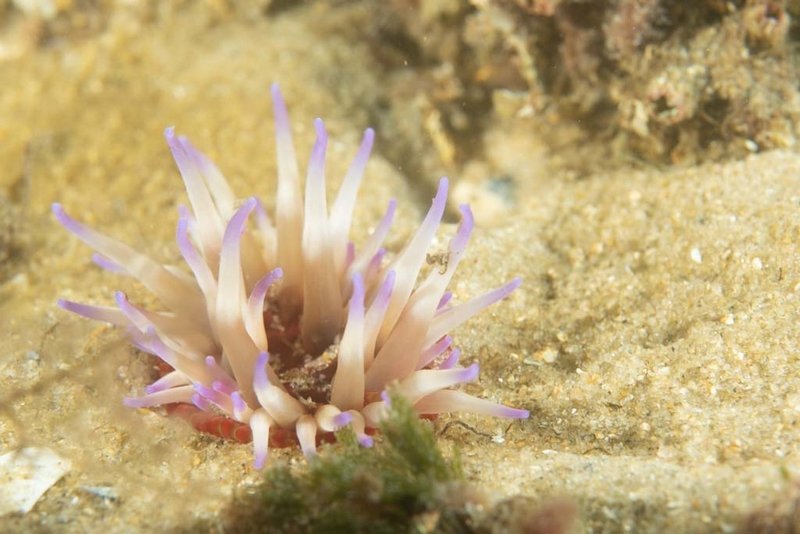
  18. After being away for a few weeks, managed to get out again at the same site as my previous photos. This time with the Exposure/WB preview turned off, and also with the addition of my focus light now that I have a mount for it.


    Got this one a bit sharper than the last time!

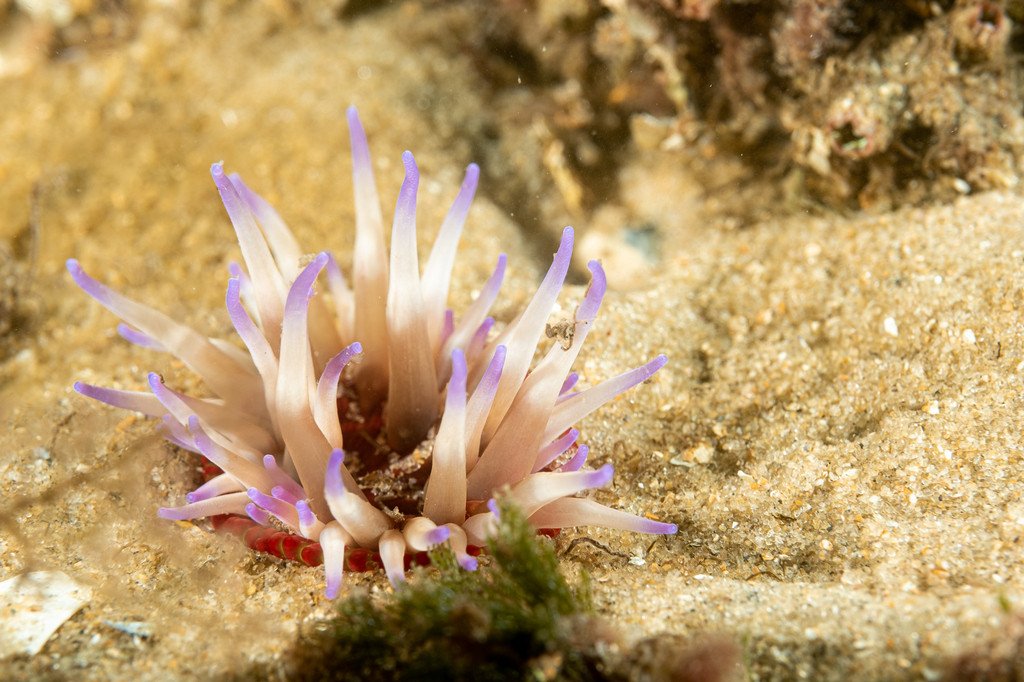
    DSCF1222.thumb.jpg.9503f2b019e6c0c1e62a31bdd02d3250.jpg


    I would love this one to have a bit more "pop" out of the background. Shot at f9, ISO200, ss250. It was also only about 2.5m deep, so a lot of natural light.

    DSCF1256-2.thumb.jpg.b8709330642d4d2f01bf0cdce116ab91.jpg


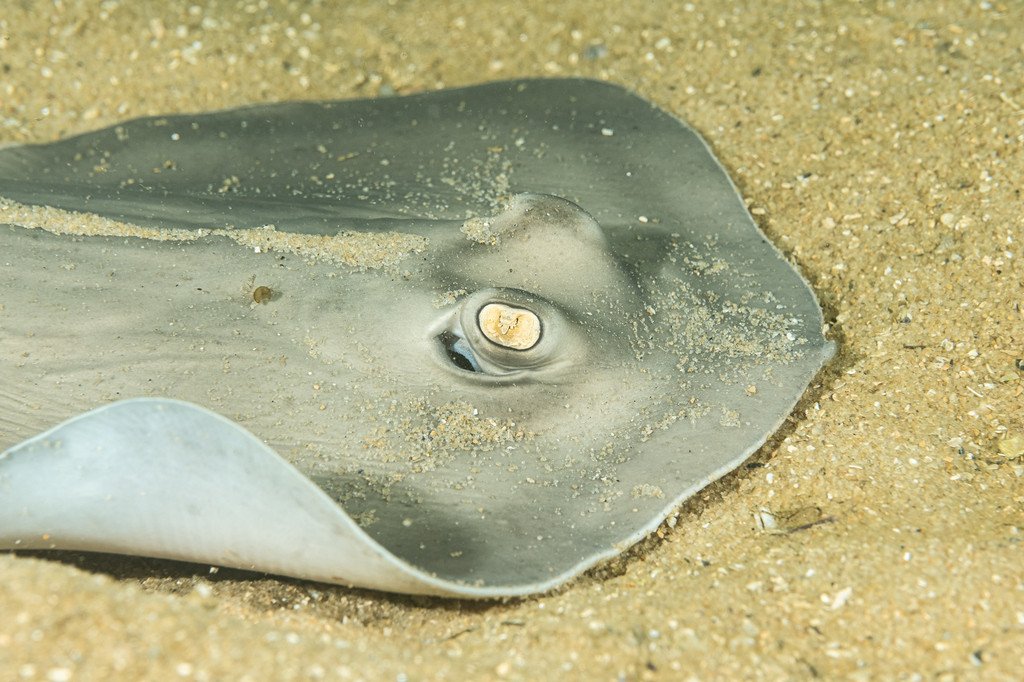
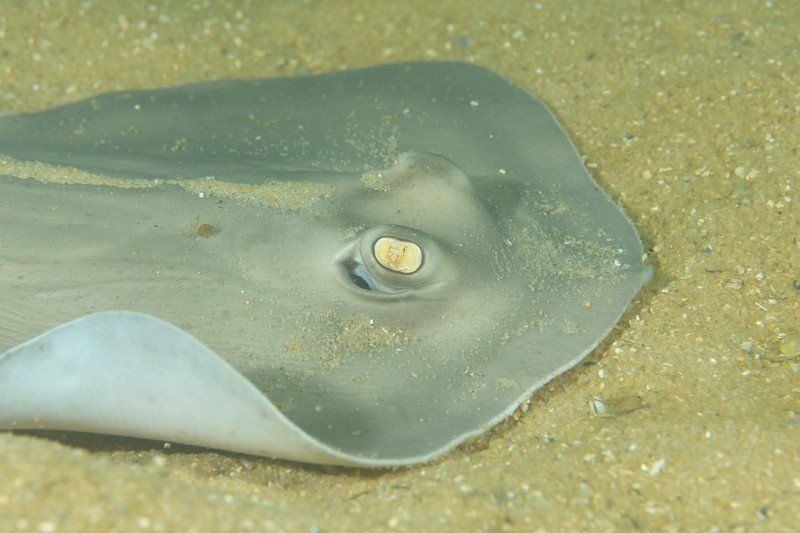
    Wasn't expecting too many large subjects at this site. Lucky this guy was only about the size of a dinner plate so managed to a few keepers with the 80mm.

    DSCF1246.thumb.jpg.001e619bed88bc40cc49ae18811634b7.jpg


    After taking a few photos I also flicked the camera to video mode and shot this video (YouTube link: https://www.youtube.com/watch?v=PCZTF5u_Vlk). No lights, and just some very much amateur processing in Davinci Resolve


  19. Hi Froop!!

    Did you process the pictures in LR or C1, or are they plain jpgs?? Are you using some film simulations??

    Cheers!

  20. Taken in raw, processed in LR.

    I shoot Raw+JPG, with no film simulations. As a comparison, below are the jpgs as taken straight from the camera before processing in LightRoom.

    DSCF1222.jpg.54df7fbb80b027d44ab1bfd503f0933c.jpg


    DSCF1256-2.jpg.7d5ce747c2db3f473a45d743c3e9aa87.jpg


    DSCF1246.jpg.2251ba9861a9c0862b38d2c8278f0a80.jpg

    Edited by froop — Added attachments
Backscatter

Account

Navigation

Search

Search

Configure browser push notifications

Chrome (Android)
  1. Tap the lock icon next to the address bar.
  2. Tap Permissions → Notifications.
  3. Adjust your preference.
Chrome (Desktop)
  1. Click the padlock icon in the address bar.
  2. Select Site settings.
  3. Find Notifications and adjust your preference.