Hi,
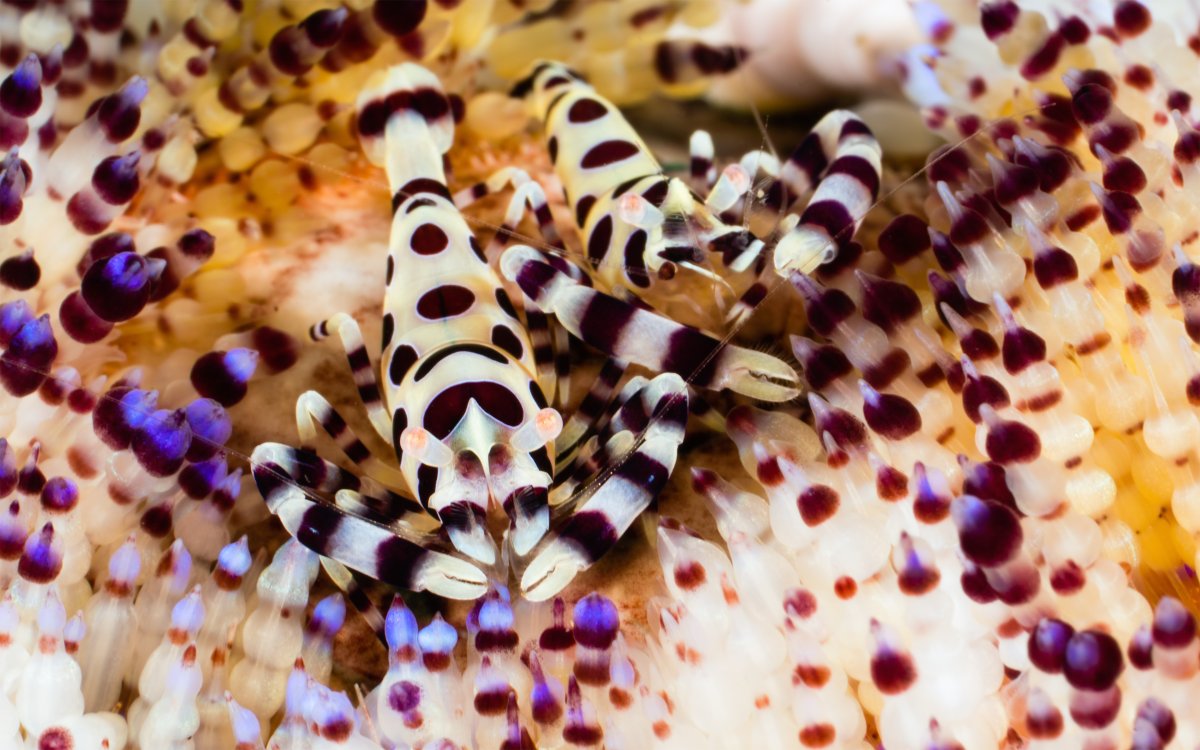
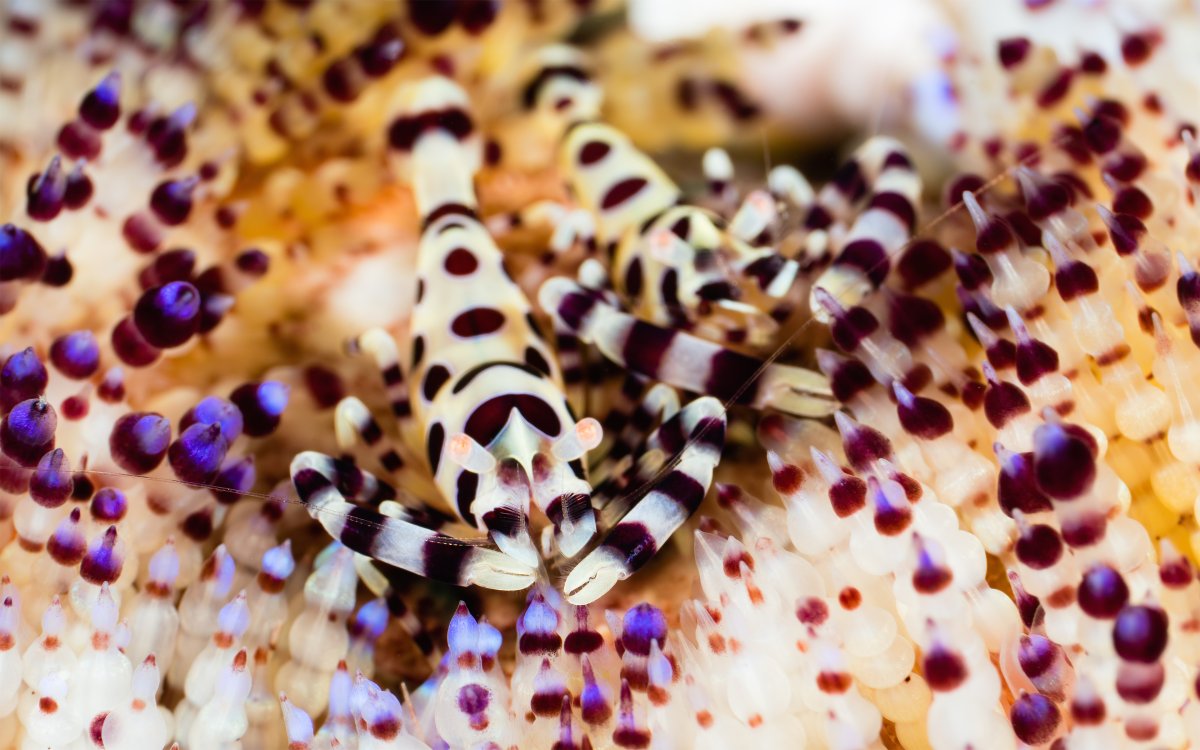
Here are two recent pictures from Lembeh (thanks NAD), both taken with same equipment, same angle, and same shutter speed.
First is F22, second is F11 so second has limited DOF.
Which do people prefer?
Read-only discussion
Hi,
Here are two recent pictures from Lembeh (thanks NAD), both taken with same equipment, same angle, and same shutter speed.
First is F22, second is F11 so second has limited DOF.
Which do people prefer?
The only real difference is that the f22 version shows more depth of field with more of the right hand shrimp, especially, in focus. Im not sure that makes very much difference to the composition or impact.
In this case f22 looks better.
Not much difference here, but F22 slightly more desirable.
Agree with phxazcraig, in the F11 the small shrimp is a bit fuzzy and I find this distracting, while the sharper focus of the F22 allows one to enjoy both shrimps.
Plus, the larger shrimp is Big Mama and the small guy is Papa, and that calls for equal, democratic, sharp focus, right?
I had another thought on this: tempting to have got a bit lower, head-to-head, and shoot them at, say f8 - actually reduce the DOF - and highlight the eyes and head of the big 'un..
Not of course what BigJeff was asking......
So my take (and I should stress this is inline wit my creative vision) is as follows:
If the subject has a pleasing and non-distracting background, incorporate it into the image.
If the background detracts from the subject, or is unpleasant, use a shallow depth of field (or other technique) to reduce its impact on the image.
The fire urchin is very beautiful, so I prefer the f/22 version in this instance!
OK, I am convinced.
The F22 goes in the trip report.
Stopping down to f/22 significantly reduces sharpness/resolution due to diffraction. If you only ever intend to present the images at a small size, then that doesn’t matter, and the increased depth of field of f/22 can be beneficial. But if the images will be viewed/printed at a large size, then nothing in the f/22 image will truly be sharp, and f/11 will look better.
from my research with my D810 and 105mm lens, F22 is where diffraction theoretically begins but practically the effect is extremely difficult to notice, even when pixel peeping.
In this case I like the F22 better but if both shrimp were lined up and all 4 eyes could be in the focal plane of an F11 shot, that might be even better!
7 hours ago, rwb500 said:from my research with my D810 and 105mm lens, F22 is where diffraction theoretically begins but practically the effect is extremely difficult to notice, even when pixel peeping.
Diffraction begins to degrade sharpness a tiny bit even at f/8:
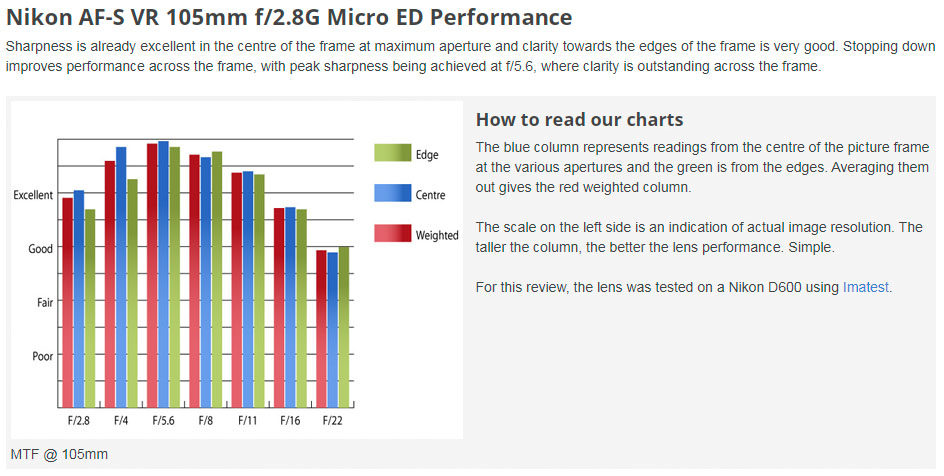
Source: https://www.ephotozine.com/article/nikon-af-s-105mm-f-2-8g-ed-if-vr-micro-lens-23446
In my real world underwater photos, I can notice the small drop in sharpness from f/8 to f/11, though I still find f/11 acceptable if I want a little more DOF.
If some are having difficulty detecting the obvious loss of sharpness/resolution at f/22 when viewing images at 100%, then it could be due to the use of high resolution monitors, which are terrible for evaluating image sharpness.
8 hours ago, Isaac Szabo said:Diffraction begins to degrade sharpness a tiny bit even at f/8:
a minute after i wrote that post, I knew someone would say this. I guess it does. But the real world tests I've seen make me not worry about diffraction until at least F22.
https://www.uwphotographyguide.com/diffraction-test (used a D300 - maybe not relevant anymore?)
https://richardhaw.com/2016/01/24/study-diffraction-on-the-105mm-vr/
Interesting that a high resolution monitor would make it harder to evaluate sharpness - never heard that before.
3 hours ago, rwb500 said:a minute after i wrote that post, I knew someone would say this. I guess it does. But the real world tests I've seen make me not worry about diffraction until at least F22.
https://www.uwphotographyguide.com/diffraction-test (used a D300 - maybe not relevant anymore?)
https://richardhaw.com/2016/01/24/study-diffraction-on-the-105mm-vr/
Interesting that a high resolution monitor would make it harder to evaluate sharpness - never heard that before.
I realize it can be counterintuitive that a high resolution monitor (in terms of pixel density) makes it harder to evaluate sharpness, but I think this is a simplified way to kind of explain it: the higher the resolution of the monitor, the smaller the images are displayed. For example, an image that is 1920 x 1080 pixels will take up the whole screen of a 1080p monitor but only 1/4 the screen of a 4k monitor. So if you're trying to evaluate the sharpness of an image at 100%, you will have a larger view of the details on a lower resolution monitor and a smaller view of the details on a higher resolution monitor. That's why some people with high resolution monitors resort to zooming in to 200% or more to try to evaluate sharpness (which can help slightly but is still flawed).
Anyway, there's nothing wrong with stopping down past the sharpest apertures if you value depth of field over sharpness. I just think it's helpful to be aware of the tradeoff when making that decision.
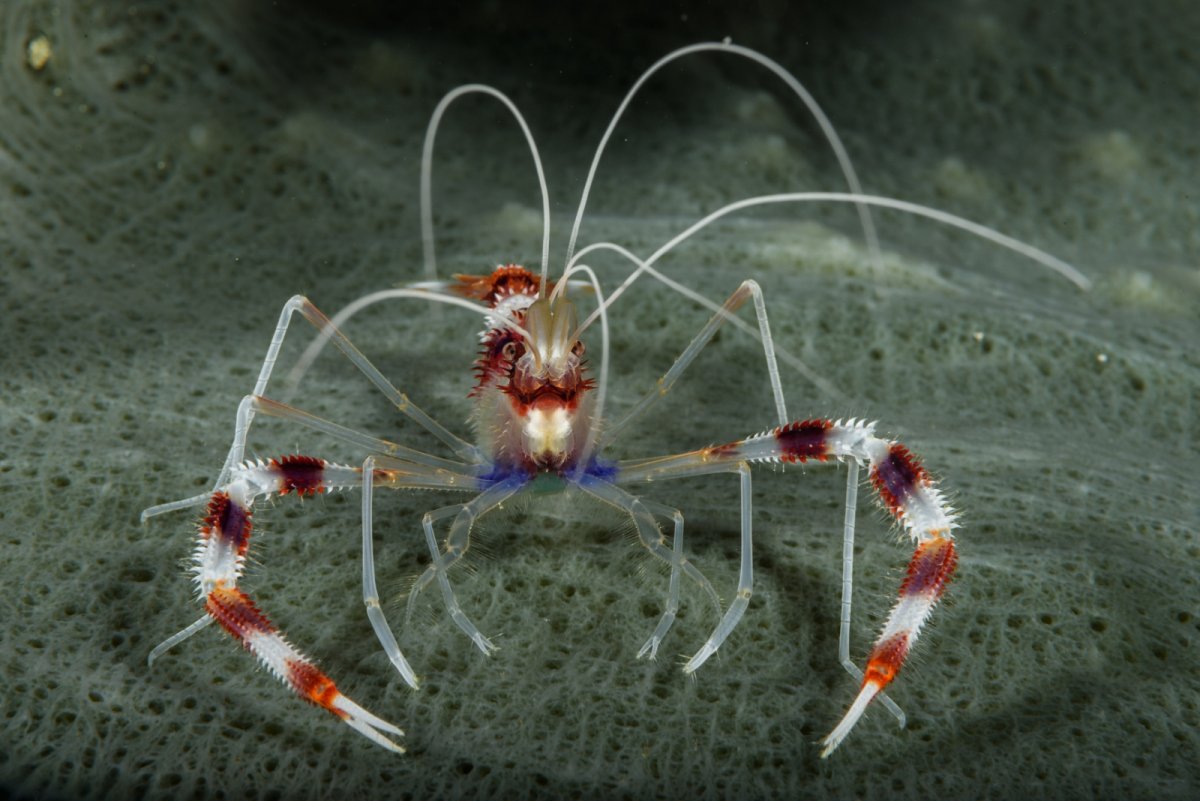
Here is an example of an F29 shot, done for DOF. It may have lost sharpness, but there is a lot left. One shot is a crop from the other.
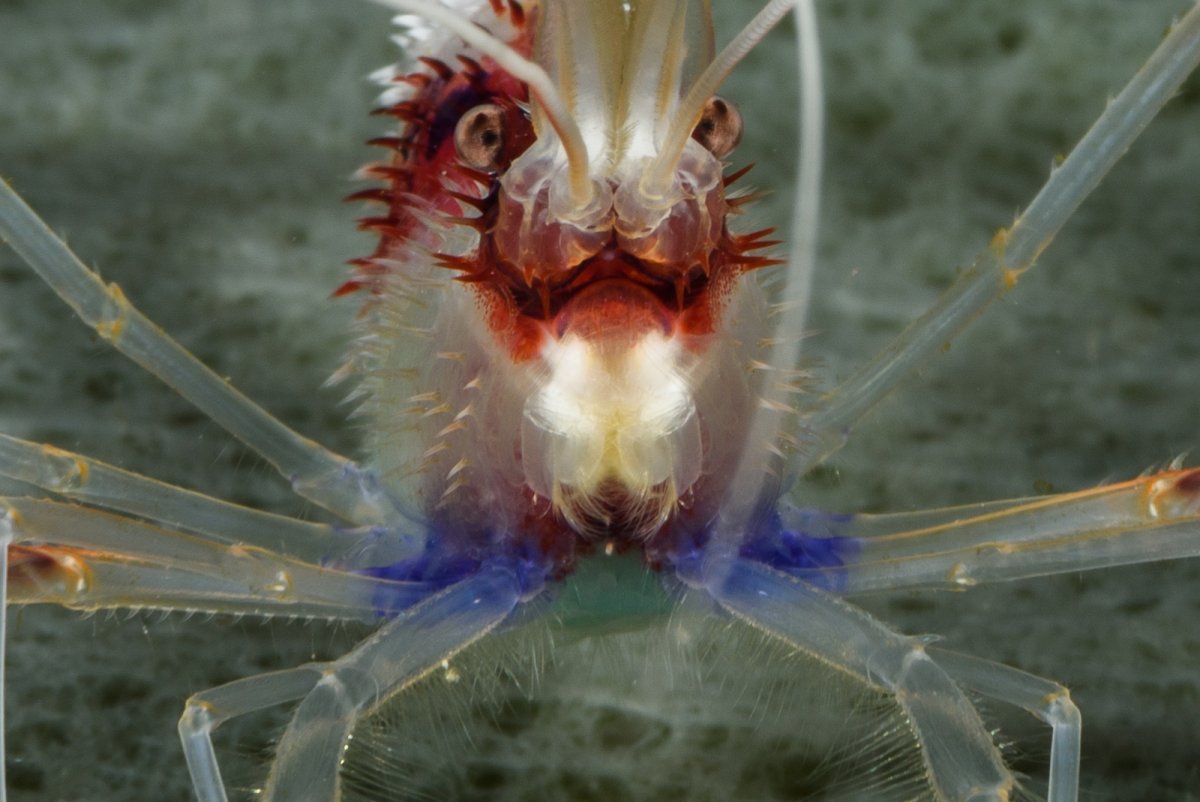
Looking at my past pictures’ diffraction is a real thing, however in the underwater environment the effect is small and very rarely visible compared to the other negatives from shooting through different refractive index i.e., chromatic aberration.
23 hours ago, phxazcraig said:Here is an example of an F29 shot, done for DOF. It may have lost sharpness, but there is a lot left. One shot is a crop from the other.
Nice shot! If you want its sharpness to be critically evaluated you would need to share the full resolution image or a 100% crop (not that I'm asking you to go to the trouble of doing that). But like I said earlier, there's nothing wrong with choosing to shoot at f/29 if you value DOF over sharpness for a particular shot or if the image won't be used at a large size.
19 hours ago, BigJeff said:Looking at my past pictures’ diffraction is a real thing, however in the underwater environment the effect is small and very rarely visible compared to the other negatives from shooting through different refractive index i.e., chromatic aberration.
I can see diffraction softening in my underwater images starting around f/11, but I'm a pixel peeper. If you're happy with what you're getting at smaller apertures, then that's all that matters. After all, sharpness isn't the only factor to consider when choosing what settings to use, and increased DOF can be more important for some images.
On 8/2/2022 at 2:10 AM, Isaac Szabo said:I realize it can be counterintuitive that a high resolution monitor (in terms of pixel density) makes it harder to evaluate sharpness, but I think this is a simplified way to kind of explain it: the higher the resolution of the monitor, the smaller the images are displayed. For example, an image that is 1920 x 1080 pixels will take up the whole screen of a 1080p monitor but only 1/4 the screen of a 4k monitor. So if you're trying to evaluate the sharpness of an image at 100%, you will have a larger view of the details on a lower resolution monitor and a smaller view of the details on a higher resolution monitor. That's why some people with high resolution monitors resort to zooming in to 200% or more to try to evaluate sharpness (which can help slightly but is still flawed).
Anyway, there's nothing wrong with stopping down past the sharpest apertures if you value depth of field over sharpness. I just think it's helpful to be aware of the tradeoff when making that decision.
it sounds like what you are saying is a smaller pixel pitch is worse for evaluating sharpness. I have a 4k 32" monitor and good eyesight and I feel zooming to 200% in photoshop hardly ever (maybe never?) shows me anything I can't see at 100%. I guess if you are working with a tiny monitor, higher resolution would force you to zoom in, but that's kind of common sense and I believe everyone would naturally do that. I just don't agree with your initial statement that high resolution monitors are terrible for evaluating image sharpness.
Diffraction begins to degrade sharpness a tiny bit even at f/8:
Source: https://www.ephotozine.com/article/nikon-af-s-105mm-f-2-8g-ed-if-vr-micro-lens-23446
In my real world underwater photos, I can notice the small drop in sharpness from f/8 to f/11, though I still find f/11 acceptable if I want a little more DOF.
If some are having difficulty detecting the obvious loss of sharpness/resolution at f/22 when viewing images at 100%, then it could be due to the use of high resolution monitors, which are terrible for evaluating image sharpness.
18 hours ago, rwb500 said:it sounds like what you are saying is a smaller pixel pitch is worse for evaluating sharpness. I have a 4k 32" monitor and good eyesight and I feel zooming to 200% in photoshop hardly ever (maybe never?) shows me anything I can't see at 100%. I guess if you are working with a tiny monitor, higher resolution would force you to zoom in, but that's kind of common sense and I believe everyone would naturally do that. I just don't agree with your initial statement that high resolution monitors are terrible for evaluating image sharpness.
Yes, a small pixel pitch (i.e. high pixel density) is worse for evaluating sharpness. Your 32" 4K monitor has a pixel density of only 138 ppi (pixels per inch), which is a the low side. It will be good for evaluating sharpness, though a monitor with a ppi closer to 100 would make it even slightly easier. And yes, when you're using a low ppi monitor like yours, zooming into 200% offers no advantage. Even with high ppi monitors it's a flawed approach (the image is being interpolated, etc).
By high resolution (again, in terms of pixel density), I'm talking about monitors with a ppi in the 200+ range. They are very common these days. I have a 15.6" 4K laptop (282 ppi) and an older 15.6" 1080p laptop (141 ppi), and it's impossible to see sharpness differences on the 282 ppi screen that are immediately apparent on the 141 ppi screen. The high ppi screen is terrible for evaluating sharpness. I also have a 27" 2.5K NEC monitor (109 ppi), and not surprisingly it's excellent for evaluating sharpness.
Have you ever done a side by side comparison evaluating sharpness at 100% on high ppi and low ppi monitors? If not, give it a try. You may be surprised by the results.
I'm not sure why people are getting hung up on the diffraction issue. It's common knowledge. There are numerous sources explaining it on the web, as well as hundreds if not thousands of lens tests confirming it. And if you don't trust them, it's very easy to test yourself.
In any case, here's a quick f/8 versus f/22 comparison I just shot. A7R II with Sony 90mm macro. Subject is a feather. Shot indoors on a tripod with no camera/subject movement. All settings the same except for aperture and shutter speed. Identical post processing. This is a 100% crop (actual pixels):
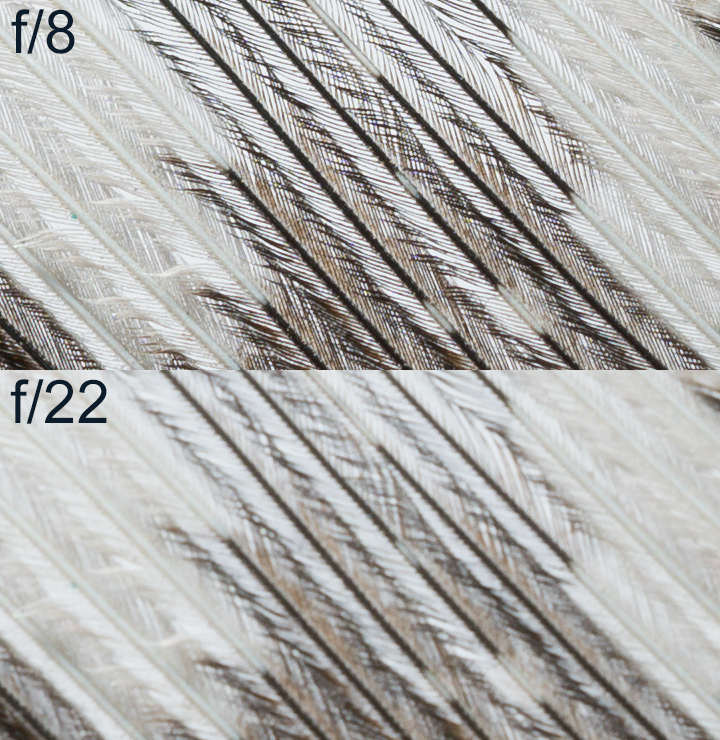
For my eyes on my monitor, the difference is dramatic. And yes, I see this same effect with underwater photos. If you can't see the very obvious loss of sharpness/resolution, then you might be using a monitor with too high pixel density. If anyone wants to see the full resolution images, here are links to them: diffraction test f/8, diffraction test f/22. If you don't trust my results, it's easy to do your own test.

Terms of Use Privacy Policy Guidelines We have placed cookies on your device to help make this website better. You can adjust your cookie settings, otherwise we'll assume you're okay to continue.

A worldwide community for underwater imaging.