Skip to content

Trip Reports and Travel / Archived topic

Could someone show me their Pelican layout?

Started by phxazcraig ·

  • 11Posts
  • 11Replies

Read-only discussion

Could someone show me their Pelican layout?

11 posts
  1. I just had a bright orange Pelican 1615 Air delivered to me today.   Heavier than I expected, but if I can get 30 pounds of camera gear into it, I'll eliminate a huge carryon headache for me.

    I got the pre-scored foam with it.

    I have to get at least the 230mm dome port and Nauticam Z9 housing in it.  I'm guessing both will have to lie on their sides and take up half of the space right there.   I've never set up foam for a rig before so looking for tips on how to proceed.  Pelican suggested outlining in chalk to mark for removal of foam and having an undersized hole for each piece of gear.
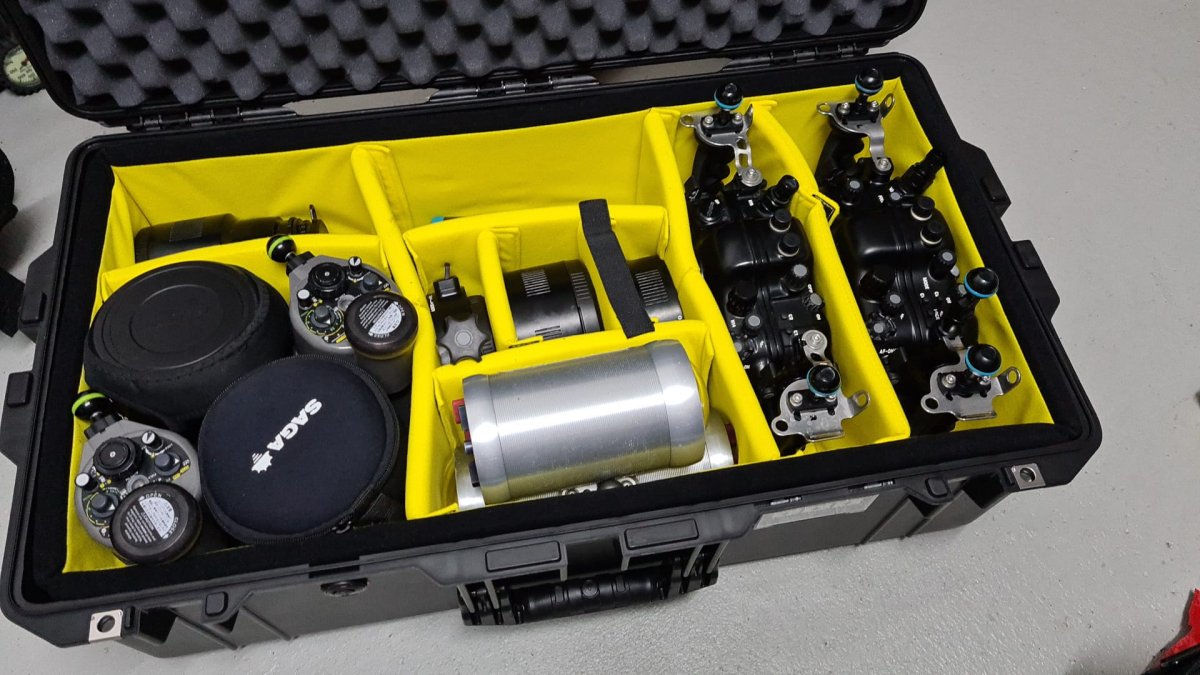
  2. @phxazcraig I have also recently bough a Pelican 1615 Air WD . I have chosen the AIR model because of the light weight in comparison with others models and i am very happy with this weight (it is always a compromise).

    Traveling with 2 Nauticam Housings, 230 Dome, 140 Dome, 100 Dome, Macro Port, Extension rings, Buoyancy arms and clamps, 2 Viewfinders (180° and 45°), 2 x Inon Z-240 (for Macro) , 2 x SUBTRONIC Nova (for Wide Angle, batteries with me as carry-one when flying) and some stuff like cable etc...

    Not using the pre-cut foam from Peli but the scratches.

    Total, including the Pelicase is 27 kilos

    went twice in Indonesia over the the last 2 months, and no problem at all with any "over weight" for my 2 checked cases (Pelicase and case for clothes + wetsuit and mask)) and my Carry-one (cameras, lenses and laptop computer).

    I must admit that for a few years i am no more flying with BCD and regulators and fins. Just suit and mask.


    IMG-20220708-WA0004.jpg

  3. Where is your 230mm dome in that Pelican?

  4. @phxazcraig Just under the 2 Inon Strobes and the Saga 100 mm dome. The Case is deep enough

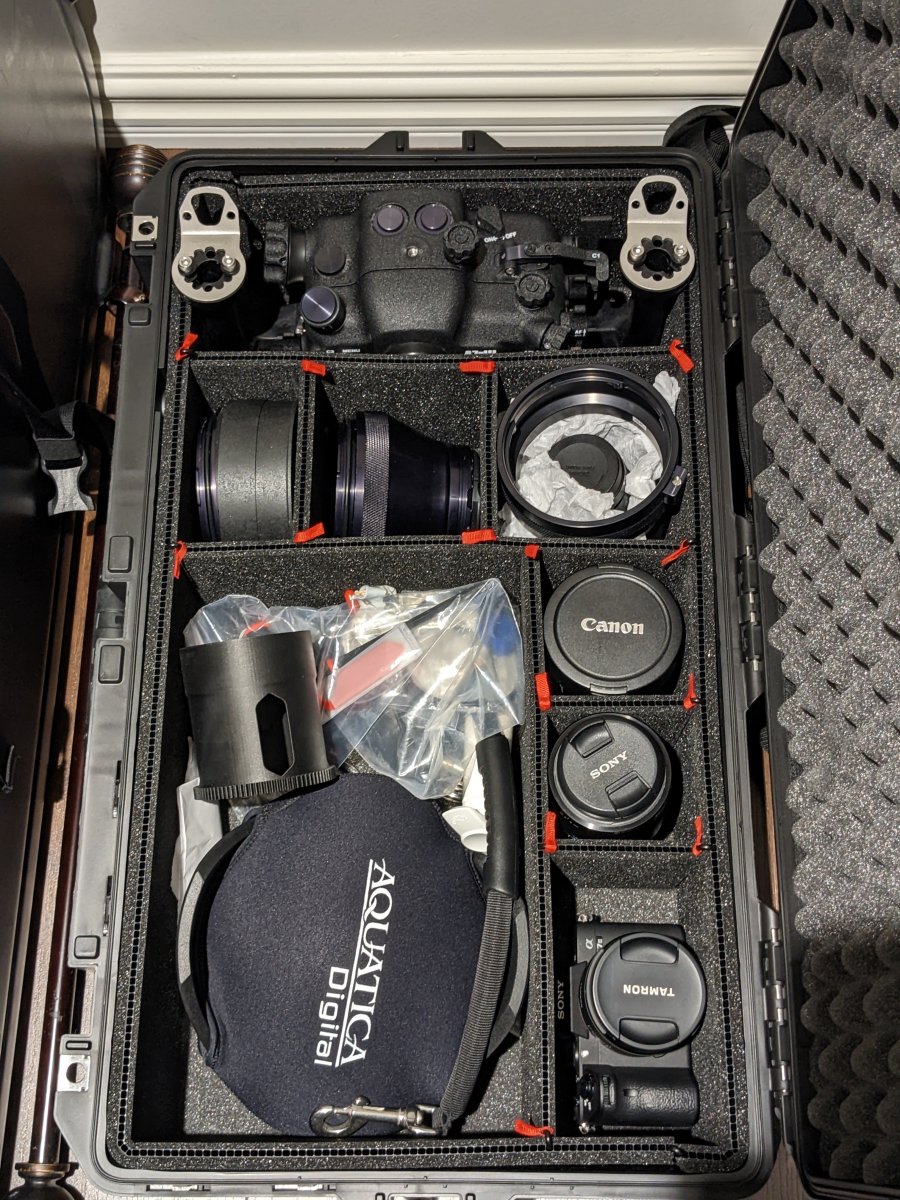
  5. This is a pelican Air 1605, it contain an Aquatica housing, sony A7III, three lenses, macro port, 4inch dome and 8inch dome.


    So far I'm very happy with the setup and trekpaks were very easy to install. I generally don't fly, so I don't have experience with it on airline.


    PXL_20221021_102840129.jpg

  6. 5 hours ago, phxazcraig said:

    Pelican suggested outlining in chalk to mark for removal of foam and having an undersized hole for each piece of gear

    Undersized for sure. It's better for the piece of equipment to squeeze into the space rather than rattle around. 

    I used cocktail sticks to mark out the corners of the equipment having laid them on the foam and juggled them around for hours trying to get hte best fit.

    I did find that care needs to be taken not to get two items too close or, overtime, the foam starts to tear and break down as the dividing wall is thin. 

    Have to say though, no matter how you "finally" decide to lay out the gear, I'm sure you'll find in time to come that you either have a new bit of kit you want to include - or you want to reposition stuff. After a few years with a 1510 and foam I ended up getting one of the padded interior sets which gives great flexibility and constant adjustment options. Just a bit pricey.  The lid storage units are useful too. The Trekpaks look great!

    I did have endless fun though marking out the foam...... 

  7. Thanks all.  I have focus on other projects through October, but I have a few months to prep the Pelican.   It's going to be great not dragging the big dome around and stressing about carryon space.  It's also going to be scary wondering how my gear is going to survive the first time I fly with it.  (Truk Lagoon).

  8. Here is my Pelican Air 1615 case with all my gear including a 230mm glass dome and weighs just under the weight allowance. I have traveled many times with it and never worried about damage. It’s well padded and practically indestructible. I did mount an Apple Air Tag hidden inside the case and I can see where it is at all times, even if it made it on the flight with me. I also have a TSA lock on it. I have my camera body, lenses, laptop, and all the batteries in a small backpack that fits under the seat.

    EA172914-B0B3-40FB-8A25-B25B3C0810A8.jpeg

    Edited by UWPics
  9. On 10/22/2022 at 10:41 PM, UWPics said:

    Here is my Pelican Air 1615 case with all my gear including a 230mm glass dome and weighs just under the weight allowance. I have traveled many times with it and never worried about damage. It’s well padded and practically indestructible. I did mount an Apple Air Tag hidden inside the case and I can see where it is at all times, even if it made it on the flight with me. I also have a TSA lock on it. I have my camera body, lenses, laptop, and all the batteries in a small backpack that fits under the seat.

    EA172914-B0B3-40FB-8A25-B25B3C0810A8.jpeg

    These all look encouraging.   It's been a while since I packed anything but an ultra-light suitcase, and the weight of the Pelican is probably 10 pounds more than my last suitcase.

    I'm thinking I might just be able to pack 1 nauticam Z9 housing, 1 230mm dome port, 1 macro port, 3 YS-D1 strobes, 1 Backscatter ministrobe, 1 Backscatter MW-4300 focus light, 1 45 degree viewfinder and 1 180 degree viewfinder.   If all that, plus the Pelican, plus the foam, adds up to under 50 pounds I will be very happy indeed to get the bag checked in.   If that ends up at 60 pounds, I guess I pull the strobes.

    I have the pick-n-place (?) foam, but I see dividers being used instead in this thread.  I take it the dividers weigh less?

    I'd like to have my Maha charger on the road too!

  10. 45 minutes ago, phxazcraig said:

    have the pick-n-place (?) foam, but I see dividers being used instead in this thread.  I take it the dividers weigh less?

    Almost certainly the dividers weigh more than a foam block, Craig. I’ve got dividers and they’re fairly heavy

Account

Navigation

Search

Search

Configure browser push notifications

Chrome (Android)
  1. Tap the lock icon next to the address bar.
  2. Tap Permissions → Notifications.
  3. Adjust your preference.
Chrome (Desktop)
  1. Click the padlock icon in the address bar.
  2. Select Site settings.
  3. Find Notifications and adjust your preference.