



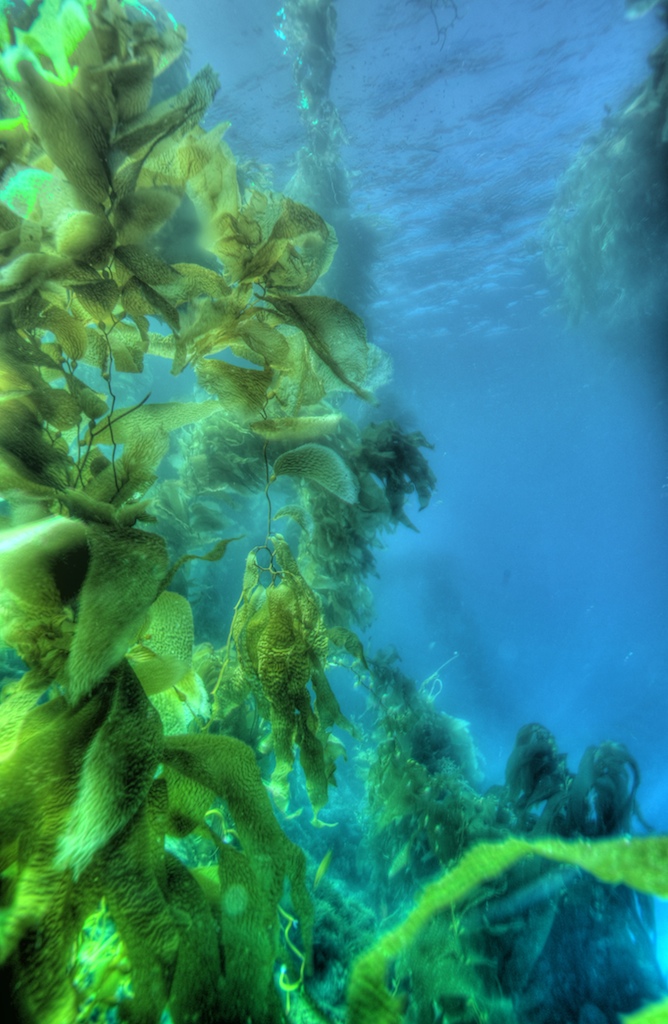
A slight variation; also in Photomatrix, Details Enhancement (Tone Compression just turns it to mud) and playing with the sliders to bring out a little more detail in the kelp. Lost a bit in the blues, but that may be a color space conversion thing.
Read-only discussion
A slight variation; also in Photomatrix, Details Enhancement (Tone Compression just turns it to mud) and playing with the sliders to bring out a little more detail in the kelp. Lost a bit in the blues, but that may be a color space conversion thing.
That was my impression after looking at the shot compared with the 0 EV exposure.I've dusted off my $40 aluminum tripod and will be bringing that with me to Turks in two weeks to try some more shots of this nature. I have my trusty machinist working on a mounting bracket for my housing as I type.
One thing of interest to me is that some HDR shooters here on Wetpixel advocate less shots with greater EV spreads. I have found that shooting smaller series takes some of the finesse away from the tonemapped images, making for more "startling" lighting.
However, it would make such shots potentially suffer less ghosting. As Jeremy pointed out, the Nikon only goes up to 1 EV steps, and depending on the scene, 3 - 1 EV shots may not cover the dynamic range required (certainly not the shot I took in the kelp).
I did a bunch of HDR series this weekend in Colorado and it changed my perspective on the bracketing a bit.
When the subject is static and I make effective use of a tripod, I'm getting better tonal range using all 5 shots separated by 1EV than using the +2/0/-2 triplet.
Here's an example:

But with moving subjects underwater, I would still think the ideal would be to keep the number of shots to a minimum ... maybe if we complain enough, there could be a future firmware upgrade that would allow 2EV bracketing ...
The 5 shot, 1EV seems to give tbe best results when tonemapping as far as I can tell. You are right about limiting # of shots UW. Of the 7 shot series, i found the best results using only 4 of the shots, both for lighting and ghosting.
Nice shot, by the way.

Terms of Use Privacy Policy Guidelines We have placed cookies on your device to help make this website better. You can adjust your cookie settings, otherwise we'll assume you're okay to continue.

A worldwide community for underwater imaging.
