Skip to content

Photo / Video Showcase / Archived topic

Pool Studio

Started by loftus ·

  • 36Posts
  • 36Replies

Read-only discussion

Pool Studio

36 posts
  1. After more than a year of experimentation and frustration working with underwater strobes for my poolwork, trying HID video lights etc,

    I finally bit the bullet and set things up the way I really want to moving forward; using studio strobes as my primary light sources.

    The good Dr. Mustard (and Howard Schatz) helped to convince me that I need to do this if I want the flexibility I need.

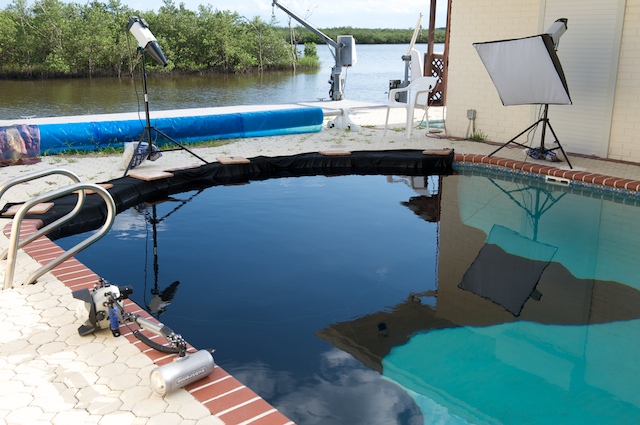
    So I set up my studio strobes with appropriate precautions; I used 20 pound bags to stabilize the stands and GFI's for each strobe with the outdoor grade electrical cords well away from the pool area.

    Instructions to the model to get in and out of the pool away from the lights as well.

    Used a long Nikonos type cord to Pocket Wizards on the light stands and a single Subtronic Nova on the camera at 1/32 and 1/16 for fill only.

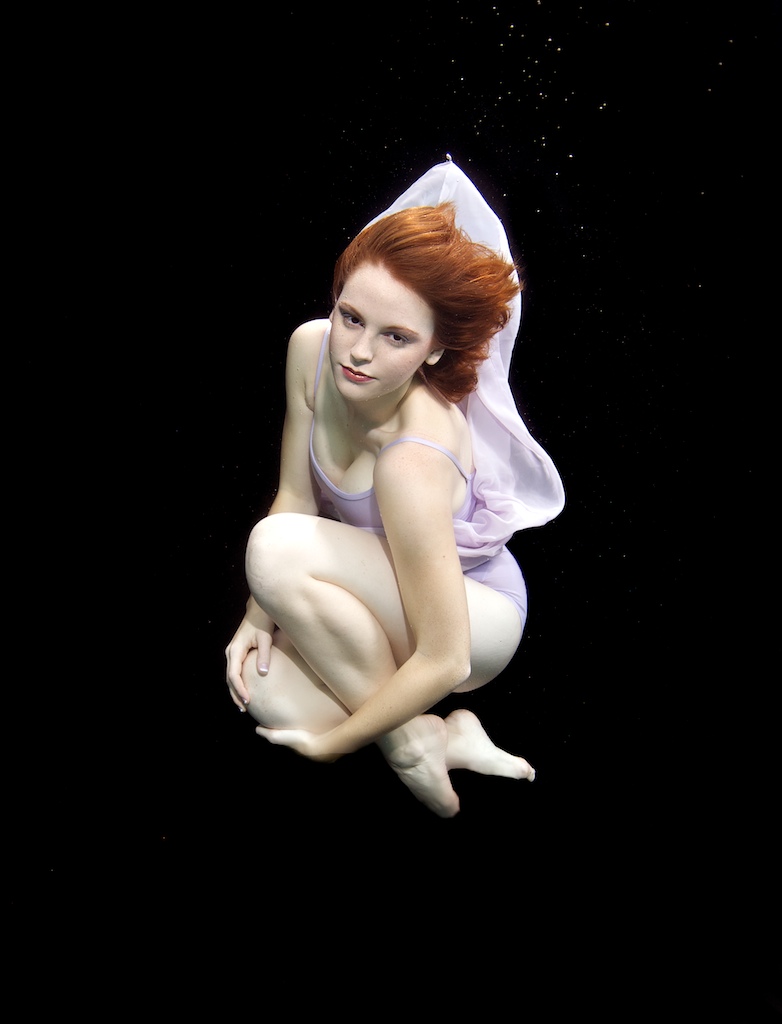
    This time I used two outside strobes - a snoot behind the model to pick up the hair and a single softbox to the right.

    Next time, once I get a couple more long cords and another Pocket Wizard or two, I will likely place the underwater strobe(s) off camera on a stand in the pool, and maybe even a third outside studio strobe.

    Here's a pic of the setup and an example.

    You can see a few more at

    http://homepage.mac.com/jeffinorlando/Brianna/
    post-5478-1221780933.jpg

    post-5478-1221780944.jpg

    Edited by loftus
  2. After more than a year of experimentation and frustration working with underwater strobes for my poolwork, trying HID video lights etc,

    I finally bit the bullet and set things up the way I really want to moving forward; using studio strobes as my primary light sources.

    The good Dr. Mustard helped to convince me that I need to do this if I want the flexibility I need.

    So I set up my studio strobes with appropriate precautions; I used 20 pound bags to stabilize the stands and GFI's for each strobe with the outdoor grade electrical cords well away from the pool area.

    Instructions to the model to get in and out of the pool away from the lights as well.

    Used a long Nikonos type cord to Pocket Wizards on the light stands and a single Subtronic Nova on the camera at 1/32 and 1/16 for fill only.

    This time I used two outside strobes - a snoot behind the model to pick up the hair and a single softbox to the right.

    Next time, once I get a couple more long cords and another Pocket Wizard or two, I will likely place the underwater strobe(s) off camera on a stand in the pool, and maybe even a third outside studio strobe.

    Here's a pic of the setup and an example.

    You can see a few more at


    Very nicely done....very impressive results. Wow.

  3. beautiful shot. Wonderful, soft shadowing.

  4. great job, but i liked the last ones you posted. Scott

  5. Thanks folks.

  6. You've certainly put a lot of thought and effort into this and it's paying off. Great results.

  7. Jeff,


    Thanks for posting the photos of your setup - this will be so helpful for others. You've now got a lot of light to play with and some great light modifiers. I love the soft quality of the light in these new shots - you can see a huge difference in these vs using small diffusers and underwater strobes. Thanks!


    Kudos to Brianna also - she looks like she did a great job. It's not often you can get a model that will tilt their head back and look calm like that - because the water usually rushes in!


    James

  8. I hope your wires are setup to disconnect past 45° BEFORE it hits the water... otherwise you may hurt your housing. LOL

  9. WOW those are some great pics.

    Yes I hear water is very good when it comes to the flow of electrons too. ;)

    Edited by wagsy
  10. Excellent images, Jeff.


    I really like the movement in this one.


    thumb-1.jpg


    Embarrassed by the thanks and particularly so to be with Howard Schatz (me having never done this sort of photography, Howard Schatz arguably world No. 1).


    Alex

  11. WOW those are some great pics.

    Yes I hear water is very good when it comes to the flow of electrons too. ;)

    Yes, that's why I consider the 20-25 lb bags of river rock on the legs of the light stands to be the most important piece of equipment.

    BTW; I do not take responsibility for anyone else doing this and having a light fall in the pool. :) Serious actually.

    Thanks for the encouragement guys.

  12. You do have circuit breakers on there too, Jeff?

  13. Jeff - truly impressive!


    Now if you could only get those Great Whites into your pool ... :-)

  14. Now if you could only get those Great Whites into your pool ... :-)

    with or without Brianna in the pool also? ;)


    Excellent images,

  15. You do have circuit breakers on there too, Jeff?

    Yes, we call them GFI's here, they're part of the extension cords I use.

  16. fantastic photos!, the red dress is fantastic underwater !

  17. poetic!!!


    that's super difficult art works. Splendid!!!


    cheers,

  18. Spectacular, Jeff!


    Thanks for sharing with us...


    Mark

  19. Brilliant !!!


    Happy to see all your new toys.... seems that santa made an early visit this year ;)


    Just keep it out of sight of la jefa :):)


    Buddy i think you already can get out of the clinic ! :)


    Congratulations , you worked hard for that and now you have images to be really proud of them .


    Also my jefa said she is really impressed and happy to see your amazing images !


    Best regards


    JA

  20. Great Stuff, I Love it…….


    What are you using for your background?


    Thanks


    Mark

Account

Navigation

Search

Search

Configure browser push notifications

Chrome (Android)
  1. Tap the lock icon next to the address bar.
  2. Tap Permissions → Notifications.
  3. Adjust your preference.
Chrome (Desktop)
  1. Click the padlock icon in the address bar.
  2. Select Site settings.
  3. Find Notifications and adjust your preference.