Skip to content

Shooting Technique, Workflow and Editing / Archived topic

Lightroom 2.1 Release Candidate Available

Started by Steve Williams ·

  • 36Posts
  • 36Replies

Read-only discussion

Lightroom 2.1 Release Candidate Available

36 posts
  1. My biggest frustration, however, is the raw conversion, or more accurately, the default conversion. I am able to adjust my raw images using presets and other minor adjustments to get them looking the way I want, but by default I often have no idea how the image should look.


    Are you using the new, camera-specific color calibration profiles? They make a HUGE difference in this regard in my opinion.


    http://www.adobe.com/cfusion/entitlement/i..._cameraprofiles

  2. I would never use an in-camera JPG as a reference for how an image *should* look.


    Lightroom makes selecting your default settings embarrassingly easy. I could care less what a thumbnail looks like straight from an import with Adobe defaults. Those are the first things to go. Since when do you need optimal color and tone curves to judge focus and composition anyway?

  3. Are you using the new, camera-specific color calibration profiles? They make a HUGE difference in this regard in my opinion.

    I am. I only see a very slight improvement. But even if they gave me something that is close, it is still not good enough. I have images where most of the processed raw image was almost identical to the JPEG image, but one or two colours were way out. Without having the JPEG I wouldn't have known. For those images I process in CaptureNX and import the TIFF into Lightroom.

  4. I would never use an in-camera JPG as a reference for how an image *should* look.

    But I would! I have painstakingly set up my camera so that the JPEG is reliable. I have even confirmed it with colour separation charts. LR doesn't even come close.

  5. If you believe it's reliable.


    I take test images of ColorChecker charts. If the resulting image isn't accurate then the process isn't "reliable". ACR defaults don't do it and ACR profiles don't do it, but then neither do the defaults or profiles of any converter I've ever tried. In-camera JPG's have never produced anywhere close to a correct CC image for me and I don't believe they will for anyone else either.


    My process is pretty simple. I create a profile and a set of defaults that produce a good CC chart given a well-shot test image. I then apply those to every image I shoot and use that, plus proper WB and exposure, as a starting point. I use UniWB in-camera so my camera JPGs won't have proper white balance anyway. I prefer to use the camera histogram to indicate exposure accurately and that, unfortunately, precludes decent JPGs even if such a thing did exist.


    How, ATJ, do you set your camera up to produce reliable JPGs? What is the measure? How do color separation charts help? I agree that LR doesn't come close, at least not with Adobe defaults. It sure comes close after I'm done with it. Do you custom-profile your camera?

    Edited by craig
  6. I believe it is reliable.


    I use preset white balance with my D300. The presets were created using a Kodak Gray card with the intended lighting. I have one preset for use for my above water macros with my softbox. I have another preset for use with my twin DS125s underwater. I have verified the results of the presets by taking photographs of the gray card using the intended lighting and ensuring the gray is grey (R=B=G).


    I shoot raw+JPEG. If I load the raw and the JPEG into CaptureNX they are identical. i.e. Nikon applies the settings inside the raw image when presenting it on the screen in CaptureNX. This is the default raw processing, I, of course, have the option of changing this if I want, but they do match.


    I have taken photographs of my Kodak Color Separation chart using the preset for the corresponding lighting in use. To my eyes (and I use my eyes for doing my post processing) the colours on my calibrated monitor very closely match the colours on the physical charts when looking at the JPEG or the raw in CaptureNX. When I load the raw in Lightroom, I can get most of the colours to match but not all of them. Perhaps I'm not tweaking the ACR settings correctly, but I cannot get them all to match.


    Here's an example of a photograph where the colours were correct in the JPEG (or raw in CaptureNX) but the processed raw in Lightroom was different. (And, yes, it is not a fantastic photograph, but it does display the issue.)


    Here is the JPEG (which exactly matched the raw in CaptureNX):

    C_muricata_Oak08.jpg


    Here's the best I could do with the raw in Lightroom:

    C_muricata_Oak08-2.jpg


    The sponge in the top right was yellow. I know it was yellow as I saw it in the flesh. The JPEG correctly captures it as yellow. I could not get the same yellow with Lightroom without messing up the other colours. But, assuming I was able to get it right, without having the JPEG showing me what is correct (or at least what I am prepared to believe is correct), I probably would not have got it correct. If I was to process this photograph, I would have used CaptureNX to do the raw conversion and then imported a TIFF into Lightroom.


    Fortunately, the above image is an exception. For most of my images, the preset I used (MLK D300) does a sterling effort and the end result closely matches the JPEG, but without the JPEG, I would not know.


  7. Have you tried the the custom profile editor? Overkill for my purposes ... but perhaps you could fix some of the stuff that seem to go wrong with the profile you are using.

    That is my plan. I have the editor already and just waiting on a new ColorChecker Chart. My Color Separation chart doesn't have the right colours, only the basic red, blue, green, yellow, cyan magenta in two tones.

  8. Nikon embeds metadata in its output that Capture NX uses to control conversions so comparing JPG output to Capture NX tells you nothing. Nikon makes sure that works transparently.


    The Kodak card you refer to isn't suitable for that type of analysis. There aren't enough colors or gray scale patches to get the job done. Worse yet, your eye is the worst possible means of measuring the color accuracy of a JPG or raw conversion. If this is what you mean by "painstaking" then it can get a whole lot more painstaking.


    ACR's color rendition, ignoring the new beta profiles, is notoriously bad and your complaint appears to be an observation of that. Yes, there are differences in the defaults of various raw converters, but nothing you've said demonstrates that you've verified that your JPG output is "reliable". You would need to first verify linearity using gray steps and I can assure you that your JPG output will fail that test. I know, I've done it. Those types of tests are done and published on dpreview all the time.


    It's fine, of course, if you like the results you are getting and I'm not trying to convince you to change your workflow, but don't claim that you've verified the "reliability" of your process or the failure of LR to live up to the standard. LR may not be giving you the look that you want but it's more than capable of giving consistent, "reliable" results with the right settings. I can easily get a more accurate conversion out of LR than you could ever achieve with an in-camera JPG. No camera manufacturer produces truly neutral JPG output since they have no reason to.

  9. Regarding the DNG profile editor, it produces a result that is different than what the new profiles are designed to deliver and what many raw converters attempt to provide. The creator of the new profiles discusses them on the Adobe and LL sites and there's plenty of good reading available on that subject. :blink:


    Basically (and I'm no expert) profile makers attempt to simulate the eye's perception of color by adjusting color conversion based on brightness. Doing so produces a result that is not accurate but is, hopefully, pleasing. When you use a ColorChecker chart and the DNG editor, you will be getting a profile that does not do that. Instead, you will get a conversion that is theoretically more accurate. I personally would rather have that but others may not. This issue is the same for other converters that use ICC profiles that you can make using ICC generating tools. If you are doing HDR you don't want those color tricks being played.


    I've used the DNG profile maker and a CC chart shot. It is super fast. :fool:


    I promise you that creating your own DNG profile will fix those nasty yellows and reds that ACR always produced. There is a gotcha though. The new DNG profile contains a curve that you can edit but IMO you should not. ACR defaults to brightness/contrast settings that are not 0. The linear constrast curve in the DNG profile actually offsets those settings and produces a flat curve in combination. I feel you are far better off resetting those awful ACR defaults to 0 to get a linear result. That topic is covered if you dig for it at the Adobe site and an explanation for why they do that is there.

  10. The Kodak card you refer to isn't suitable for that type of analysis. There aren't enough colors or gray scale patches to get the job done. Worse yet, your eye is the worst possible means of measuring the color accuracy of a JPG or raw conversion. If this is what you mean by "painstaking" then it can get a whole lot more painstaking.

    I use my eyes to do do all my post processing, so if they are not good enough for measuring colour accuracy, I may as well give up now and not do any post processing. Perhaps I should just give up photography altogether. How do judge whether the colours in your photographs are "accurate"? How do you know when to adjust the colours of a photograph and when not to?


    ACR's color rendition, ignoring the new beta profiles, is notoriously bad and your complaint appears to be an observation of that. Yes, there are differences in the defaults of various raw converters, but nothing you've said demonstrates that you've verified that your JPG output is "reliable". You would need to first verify linearity using gray steps and I can assure you that your JPG output will fail that test. I know, I've done it. Those types of tests are done and published on dpreview all the time.

    OK, perhaps my JPG output isn't all that reliable, but I can tell you most certainly, that ACR gives me a result that is far worse - even with my eyes which aren't good enough to tell.


    It's fine, of course, if you like the results you are getting and I'm not trying to convince you to change your workflow, but don't claim that you've verified the "reliability" of your process or the failure of LR to live up to the standard. LR may not be giving you the look that you want but it's more than capable of giving consistent, "reliable" results with the right settings. I can easily get a more accurate conversion out of LR than you could ever achieve with an in-camera JPG. No camera manufacturer produces truly neutral JPG output since they have no reason to.

    I'd rather rely on the JPG I get from the camera which appears to be close (close enough for me) to the original subject, that what I get from ACR which I can easily tell is significantly different from the original. Again, how do you verify that the colours in your final post processed image bare resemblance to the original subject.


    But anyway, I am happy with the result I get even if I'm putting faith in Nikon that you think I probably shouldn't. In the end they are my photographs and if they match what I remember reality to be, that's good enough for me.

  11. I am glad it's good enough for you. Just don't tell others you've done the painstaking work to know for sure.


    Do you use a calibrated monitor? If so, is your calibration technique to look at it and decide it looks close enough? Might as well since that's precisely your argument here. Yes, it's a fact that your eye isn't good enough to measure color. That's why there's a whole industry out there producing products to do just that.


    The funny thing is that you're convinced that you know what an underwater scene actually looks like even though you've never seen it in the light your camera did. You really have no idea what that scene really looked like, not that it matters because Nikon isn't trying to be faithful to it anyway.


    Once you get your CC chart, ATJ, take your JPG and compare it to a downloaded correct version like you can get online. You're in for a real eye-opener.


    To answer your questions, I don't judge whether colors in my photographs are accurate because I don't intend for them to be. I calibrate my equipment and my software settings so that I know exactly how to shoot to get reasonably accurate results. I then shoot and develop precisely that way and use the result as a starting point for my image. I am no slave to color accuracy but I am a slave to knowing and understanding the process. Getting accurate and reliable scene-referred data is the first step in the process, it is not the end result.

  12. Do you use a calibrated monitor?

    Yes. I already stated that it was. And it was calibrated using a tool.


    Do you use a calibrated monitor?To answer your questions, I don't judge whether colors in my photographs are accurate because I don't intend for them to be. I calibrate my equipment and my software settings so that I know exactly how to shoot to get reasonably accurate results. I then shoot and develop precisely that way and use the result as a starting point for my image. I am no slave to color accuracy but I am a slave to knowing and understanding the process. Getting accurate and reliable scene-referred data is the first step in the process, it is not the end result.

    But by your own admission, none of the tools give accurate colour. You said ACR doesn't. You don't trust the camera manufacturer. How exactly do you calibrate your strobes? Your camera settings?

  13. But by your own admission, none of the tools give accurate colour. You said ACR doesn't. You don't trust the camera manufacturer. How exactly do you calibrate your strobes? Your camera settings?

    Now, where exactly did I "admit" that no tools give accurate color? You're just making crap up to be argumentative.


    ACR doesn't give accurate color using default profiles. I, however, generate my own profiles (or did until I stopped using ACR). I don't "trust" the camera manufacturer because it is well known, and proven in tests, that they don't produce accurate color. You would know this if you read some reviews.


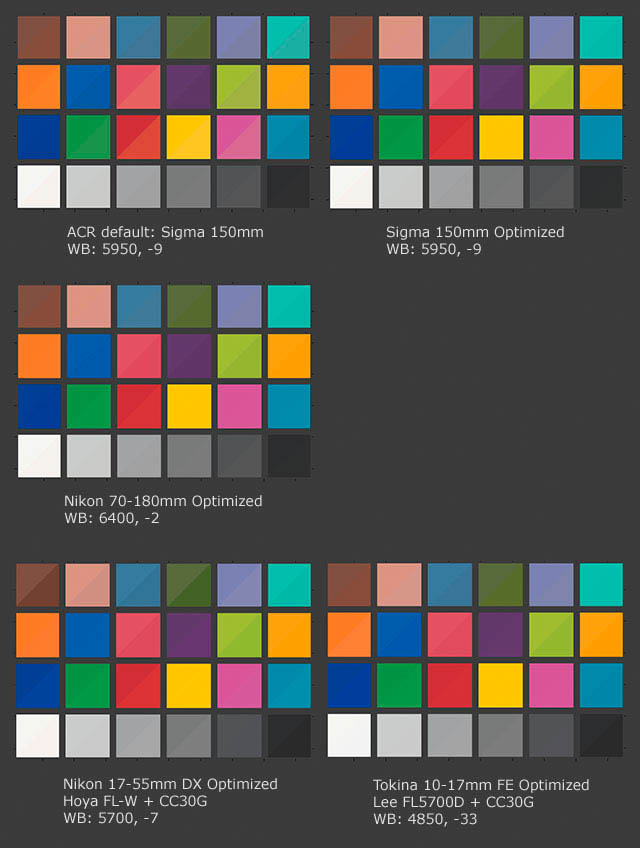
    I calibrate my strobes along with my camera, lenses, and filters together when performing the profiling. I do not calibrate camera settings because I shoot raw and no camera settings have any effect. I would think you'd know this since you've chosen to participate in this discussion. Here's a summary image that I generated for Wetpixel on a recent trip:


    post-525-1223999304.jpg


    Although I can get closer that that now with ICC profile generators and the new DNG profile editor, those results are closer than you will ever see out of an in-camera JPG.


    ATJ, don't assume that because you don't know how to get good color out of ACR or LR that no one does.

  14. Would you two please both "knock it off." You are getting too personal to the point where this has broken down from being a technical discussion to a personal argument.


    James

  15. Play nicely, please.

Backscatter

Account

Navigation

Search

Search

Configure browser push notifications

Chrome (Android)
  1. Tap the lock icon next to the address bar.
  2. Tap Permissions → Notifications.
  3. Adjust your preference.
Chrome (Desktop)
  1. Click the padlock icon in the address bar.
  2. Select Site settings.
  3. Find Notifications and adjust your preference.