Skip to content

Shooting Technique, Workflow and Editing / Archived topic

Galapagos with EX-1

Started by dareksepiolo ·

  • 27Posts
  • 27Replies

Read-only discussion

Galapagos with EX-1

27 posts
  1. 7 minutes of underwater Galapagos shot September 2008 with Sony EX1 and custom made housing. It's just a short video inspired by Hans Zimmer's music.

    http://vimeo.com/1935228


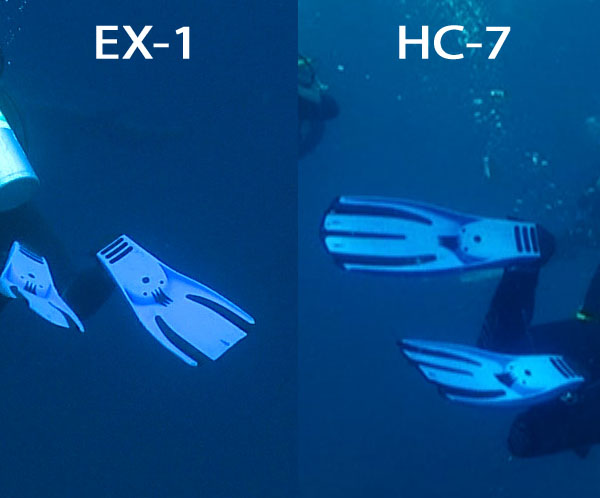
    I used to shoot with HC-7 before and was curious how the EX-1 compares to the small brother. Was it worth to upgrade? I think once you get familiar with the EX-1 you can get amazing results.
    post-7239-1223841697.jpg

    post-7239-1223842090.jpg

    Edited by dareksepiolo
  2. Looks fantastic! Very little grain and some of the shots looked pretty low light.

    How fast was that guy swimming for the whale shark????


    You must be stoked!!!

  3. Beautiful imagery Darek, this is very well done IMHO. I thought there was some special editing going on,

    Congrats on a great set of dives and some special video. :blink:

    Cheers,

    Steve

  4. 7 minutes of underwater Galapagos shot September 2008 with Sony EX1 and custom made housing. It's just a short video inspired by Hans Zimmer's music.

    http://vimeo.com/1935228


    I used to shoot with HC-7 before and was curious how the EX-1 compares to the small brother. Was it worth to upgrade? I think once you get familiar with the EX-1 you can get amazing results.


    Wow. You have some top "must do's" all right there in that same video. So many interesting shots like the turtle swimming to you. Great editing and I watched with no audio.

  5. Beautiful footage and editing, Darek! Congratulations.


    That guy swimming at the whale shark? Textbook maneuver for "How to Make a Whale Shark Turn Around." :blink:

  6. Well you have to be happy with that...well done.

    The little single CMOS camera\\\'s are no match for the larger 3 CMOS-CCD ones when it comes to sharpness.


    Some guy the other day put a clip with his EX1 shot at the GBR on my little hdvundersea site...it\\\'s heavily compressed though.

    Edited by wagsy
  7. Thank all of you for the comments.


    There was no special editing, most of the shots are raw files from the camera, some have WB corrected in FCP.


    Eric you're right the guy scared the whaleshark off. Btw that was our DM...

  8. Hey who made your housing?

    Have you got some pics of it.

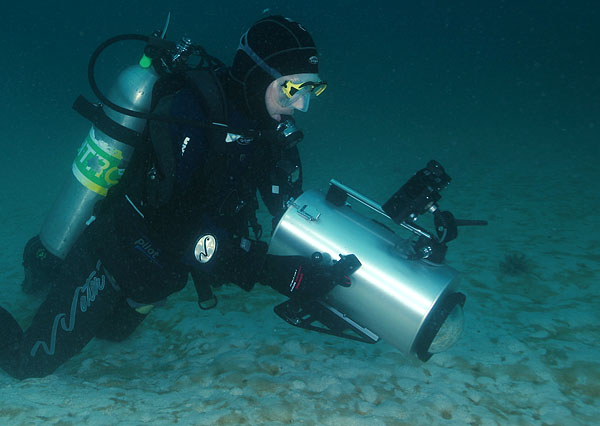
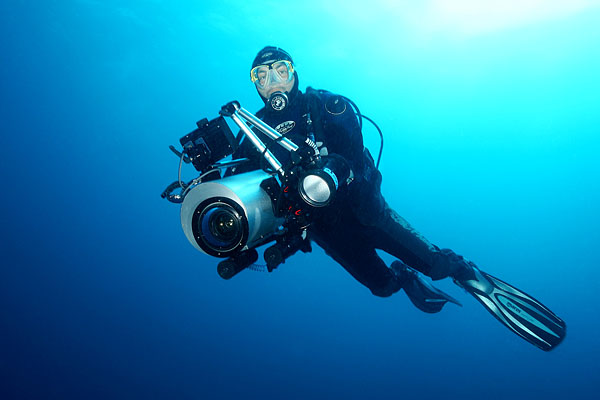
  9. Wagsy you can see the housing on the first shot. Here is another one but without the lights.

    The concept of the housing is mine the work was done by a friend of mine here in Poland.

    You can use in the housing the Sony x0,8 wide angle lens.

    You have an access to all the features the IR pilot has plus manual WB as an option. I was shooing with manual focus using push AF from time to time.

    We're working right now on the viewfinder at the back cover and few minor modifications.

    It's a simple housing but it has all you need to control the shooing and it's quite cheap.

    post-7239-1223905353.jpg

    Edited by dareksepiolo
  10. Cool, congratulations on making it yourself. :blink:

    The Sony x0.8 works great even behind a flat port.

    It should give you a pretty good zoom through range as well.


    Any chance of grabbing like 10 seconds of raw mxf footage from you of shooting up towards the surface into the sun kind of thing.

    I can give you a FTP to load it to.

    Just would like to see how the 35mbps compression handles it.

  11. Quite nice, loved the pulsing music. Fire the divemaster for chasing away the whale shark. I am curious as to what monitor you are using and how easy/difficult it was to achieve critical focus. I know Shawn had a horrible time getting focus with the Gates monitor and housing he was using in the Cocos this summer.

    Steve

    Edited by steve
  12. Wagsy, I'll try to find a shot torwards the sun but as far as I remeber most of the days were cloudy.


    Steve, I wasn't able to focus using mine monitor that's why I want to have a viewfinder at the back of the housing.

  13. A cloudy day will be fine if you can.

    You can load it to here..cheers..


    FTP host = www.pcwags.com

    Usename = hdv@pcwags.com

    password = ningaloo123

    Edited by wagsy
  14. There was no special editing,

    Darek,

    I'm sorry if my choice of words wasn't clear. When I said "special" I meant extremely well done. I especially liked the coordination of the manta clips with the music. The mood of the piece and the way it made me feel as I watched was enthralling and "special". Thanks again.

    Steve

    Edited by Steve Williams
  15. Steve, I missunderstood you. I'm glad you like the editing :blink:

  16. Hi Darek,

    Good to have you on the forums. Nice work on the housing. I was wondering if you could tell us more about the external monitor you have on there?

    Thanks

    shawn

  17. Hi Shawn,

    The preview is the biggest problem right now. We're lookig for better monitor as the one I used is not good enough. I also plan to have a viewfinder at the back of the housing.

  18. Fantastic footage Darek. Thanks for introducing me to the name of Hans Zimmer, it gave me chills. I never realized all the stuff he has done that I've heard before.

    Galapagos is just so special, and your video with the music made me feel like I was right there again.

    What boat were you on; DM looks a little like our guy on the Undersea Hunter? Was this shot mostly at Darwin?

    Edited by loftus
  19. Awesome work!!

    Magic dive(s?) Epic treatment. Absolutely classic! State of the art!


    Would you be interested to make me such a housing? I think it would be better to buy than the camera :-)


    (P.S..is there a Vimeo vid widget here?)

  20. It's too bad the Zimmer music is not royalty free.

    Steve

Reef Photo & Video

Account

Navigation

Search

Search

Configure browser push notifications

Chrome (Android)
  1. Tap the lock icon next to the address bar.
  2. Tap Permissions → Notifications.
  3. Adjust your preference.
Chrome (Desktop)
  1. Click the padlock icon in the address bar.
  2. Select Site settings.
  3. Find Notifications and adjust your preference.