Skip to content

Shooting Technique, Workflow and Editing / Archived topic

Sunballs and Lightroom

Started by james ·

  • 28Posts
  • 28Replies

Read-only discussion

Sunballs and Lightroom

28 posts
  1. Hi Gang,


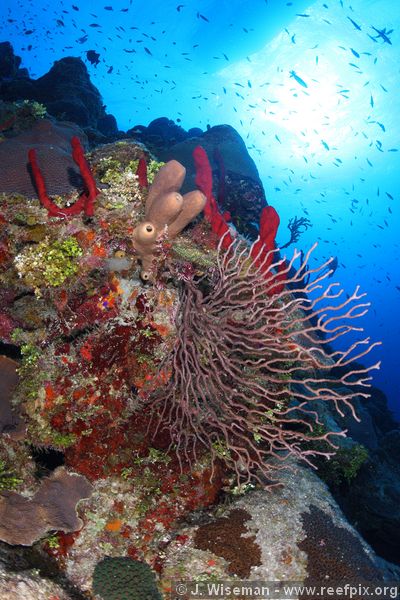
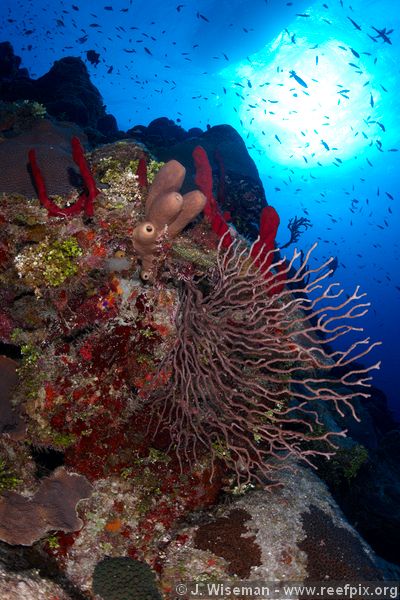
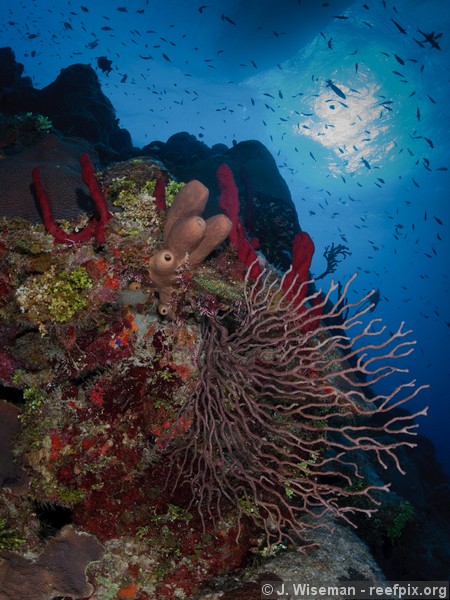
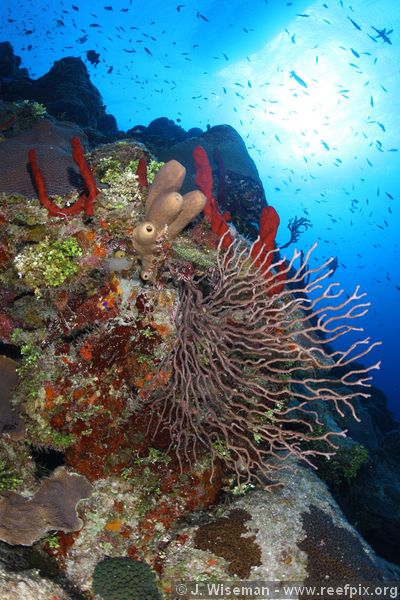
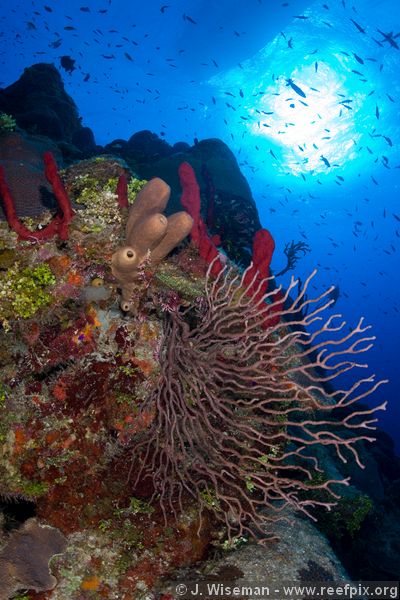
    I just got back from Cayman was was processing a photo or two in Lightroom 1.4 I noticed that the sunball has a terrible cyan fringe in Lightroom, but looks a lot better in Breezebrowser! Here's the two for comparison - I tried to get all other settings (like WB and exposure) similar, but they are not exactly the same. Calibrated monitor, yada yada.


    The first image is the one from Breezebrowser. Has anyone used Lightroom 2.0? Is it better?


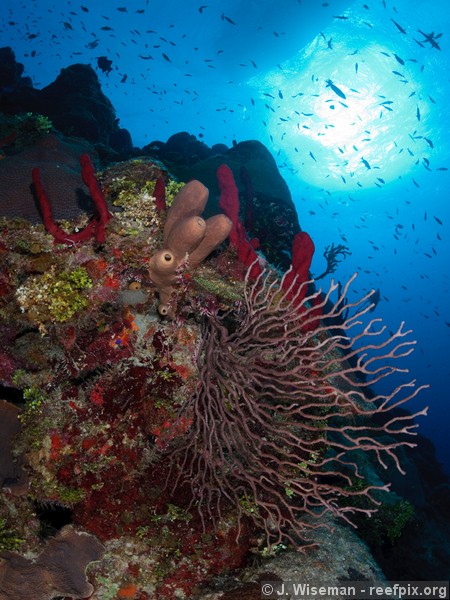
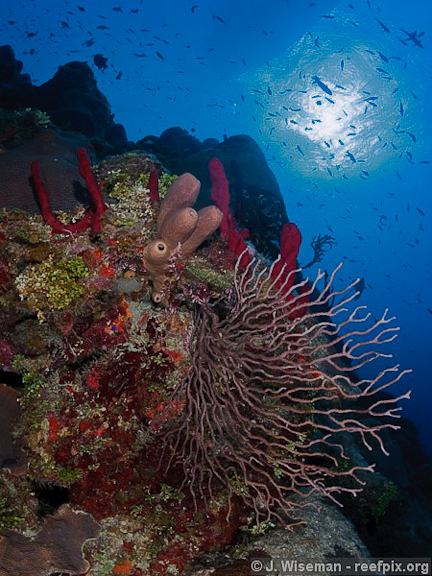
    [Edit]Following up, I've done 2 more conversions - the third one using Capture 1's latest version and the forth using Canon's DPP.
    post-21-1233256652.jpg

    post-21-1233256660.jpg

    post-21-1233352492.jpg

    post-21-1233352496.jpg

    Edited by james
  2. I don't think LR 2, that is to say ACR, has progressed much in that regard.


    Do you use Mac or PC? On the Mac, there's Raw Developer. In my experience it handles sunballs better than ACR. Eric reports that Canon's own software does as well.


    If you like, I can try a Raw Developer conversion of your raw file. They allow demo downloads though.

  3. First image looks better - sure you haven't mixed the order? (I see your correction, order appears better now)


    DPP and C14 are usually quite good with sunballs...

    Edited by segal3
  4. Sorry, the first image is from Breezebrowser and second from LR. Whoops! I'll edit the post.


    Craig, I used ACR for the PC. I have Canon's DPP software at home and will try that too. I don't have C1 on this computer but might have it installed at home.


    James

    Edited by james
  5. I think the new camera calibrations in LR 2.0 might help here .... not sure, but maybe.


    I was happier with many of my G9 underwater images after I reprocessed them with the new calibrations.


    If you'd like, I'd be happy to re-process in LR 2.0 to see if it makes a difference - could do it this evening.

  6. If you'd like to see an RD conversion I'll do one and post it. If you aren't on a Mac it would be largely academic. With Lightroom you could adjust the cyan and with LR2 there are localized adjustments than may help.


    Highlight recovery is one of the differences between converters.

  7. Thanks Craig and Jeremy, I'll send the RAW file (1DsIII) tonight when I am not at the office. Please PM me your email address.


    Cheers

    James

  8. I just updated the post w/ new photos converted using C1 and DPP


    Cheers

    James

  9. I just updated the post w/ new photos converted using C1 and DPP


    Cheers

    James

    I'll have my laptop with CS4 and LR 2.2 with me all weekend if you want to try again with the file.


    I'm very curious myself to see what happens with the camera specific profile applied ... interesting that LR is so different from the others.

  10. OK, I bought Lightroom 2.2 (upgrade) and developed the shot using the Camera Faithful calibration. What do you think - better?


    Cheers

    James

    post-21-1233520268.jpg

  11. OK, I bought Lightroom 2.2 (upgrade) and developed the shot using the Camera Faithful calibration. What do you think - better?


    Cheers

    James

    I still prefer the DPP result, too bad it take 100 years to edit the shots from each dive. Breezebrowser looks good too.


    The cyan fringe looks like results from Kodachrome....

    Edited by photovan
  12. developed the shot using the Camera Faithful calibration

    Do you mean the camera profiles? Otherwise, please clue me in as I'm right in the middle of a pack of sunballs. I had issues with the latest version of the DNG Profile editor messing up my license, so I am now trying to come up with a preset. I am finding the Nikon profiles can have some hideous results with the blues and too much detail loss in the shadows.


    Love Lightroom 2.2, but it still has a way to go. I am waiting to try out 2.3, but I'll let others do the Beta testing...once burned......


    Cheers,

    Marli

  13. These shots involve overexposure. I don't think the new ACR camera profiles make a significant difference since it's highlight recovery that's critical.

  14. Having analyzed the colour profiles of a number of my own sunball images using Aperture, Lightroom and NX2 I've found that there are definitely differences in how the different RAW convertors represent the blue / cyan areas of the spectrum, resulting in larger or smaller out of gamut areas. I suspect that you will be able to confirm this by looking at the out of gamut warning in Photoshop for each of these images and comparing them. I am also going to hazard a guess that the image that looks the best will have the least out of gamut area.

  15. James,

    Try this on now that you have 2.2


    Drop a graduated filter down from the upper right down to around the coral. Lower the exposure just a little. Click done to get out of that tool


    Go to the Tone curve and lower the highlights down about 60

    Click on the HSL and set this up;

    Hue / Aqua +50 (more toward blue)

    Saturation / Aqua -36 or so

    Luminance /Green -76, /Aqua -42, Blue -24


    post-4526-1233528507.jpg


    It's not Velvia but it's a little better. I only played with it for 10 min. or so but I think there is an opportunity here. Biggest factor seems to be dropping the luminance for the aqua. (vazuw taught me that trick). If you put the Tat on the sunball cyan color and drag it down it will move all the appropriate sliders. The cool part with LR is that if you find something that works you can make a preset.


    Cheers,

    Steve

  16. dropping down the cyan has really flattened off the detail in the rest of the water, lost its life.

  17. Yep, I think James can do better on the raw file, I was playing with his jpeg.

    Steve

  18. Yeah, I meant camera profile, not calibration - sorry.


    Steve - I still have a lot to learn about the new version of LR - that grad curve tool (that's what it is, it's not an ND filter lol) is great to have automated. Andy Biggs showed me how to do it in photoshop but it takes more steps. Right on!


    I agree w/ Craig and Jeff about the out of gamut OE areas - they are tough. But what is a good sunball but an overexposed area? It's just the tighter it is the less overexposure you have. It's difficult to pull it in w/ digital.


    Oh, I forgot to list the Exif, it's 1/200th at f5.6 ISO200. So the sunball should be decent but it could maybe be tighter if I'd have shot it at 1/250th.


    What I don't is the cyan fringe in some of the outputs - and the fact that some converters render it and some don't. Obviously, some are assigning green bits there for some reason and some aren't.


    Cheers

    James

  19. OK, I had another shot at it using LR2.2 and some of Steve's tips. I added the Gradient curve from the upper right, and I tweaked the green/aqua hue to get rid of the fringe. All in all, lots better.


    Cheers

    James

    post-21-1233539792.jpg

    Edited by james
  20. James, have you tried the HSL Aqua control in Lightroom? I'd try that first before proceeding to the gradient. I use it frequently with sunball shots.


    The problem with these variations is that the overall color of the water is varying greatly. Makes it hard to judge.

Retra

Account

Navigation

Search

Search

Configure browser push notifications

Chrome (Android)
  1. Tap the lock icon next to the address bar.
  2. Tap Permissions → Notifications.
  3. Adjust your preference.
Chrome (Desktop)
  1. Click the padlock icon in the address bar.
  2. Select Site settings.
  3. Find Notifications and adjust your preference.