Here's why I thought the new camera calibration profiles in LR 2.x might help ...
Shot RAW with Canon G9 and two S&S strobes @ f/5.6 1/125
Imported and processed with Adobe LR defaults (ACR 4.4):
Same default settings, except camera calibration set to "Camera Standard" profile:
Same image with a bit more love ...
Craig is right. It's going to be different everytime. I like your last attempt James. I can't help wondering though how nice it would have been to have moved over so the boat was covering the sun. Guess we'll have to go diving again until we get it right.
Cheers,
Steve
Steve - I still have a lot to learn about the new version of LR - that grad curve tool (that's what it is, it's not an ND filter lol)
Just so we're on the same page. I was trying to have you try the graduated filter tool that is directly under the histogram. It does work like a gradient filter with exposure except you can also adjust brightness, contrast, clarity, sharpness, and even color locally. I've had a lot of luck with it to bring down overexposures in the sky and around sunballs. Works amazingly well on overunders. You don't have to pull it down from the top, you can come from the bottom up or any angle.
Looks like this; (the rectangle next to the brush)
Have fun!
Steve
I've been a longish time bibble pro user : since the preview of bibble 5 is out now (http://bibblelabs.com/products/bibble5/preview, free to use for a few weeks), I would be very curious how that works out.
I dont really have sunball shots myself, just the sun on the edge of the frame..
Gerard
Holy S both James and Steve's versions look good, im leaning towards Steve's as on the monitor(not calibrated but close to it, and Im still waiting on my color munki to arrive) im looking at it has good punch, plus i disagree with the flatness in the water as it may not be that kodak royal saphire blue but it does look very good. Both are very good and with the tips i have seen here it looks like some photos i took in the past maybe workable now with LR that i couldnt do with PS in the past
... plus i disagree with the flatness in the water .... as it may not be that kodak royal saphire blue but it does look very good...
Just saying that it is often the "aqua" tones that are giving some highlight/variety/texture to the water's surface, when you remove it you often loose the surface as an element in the picture. (I'm referring to areas outside the sunball)
In a picture looking "up" I feel you need to see the surface for context/reference.
btw .... I didn't say I liked kodachrome blue, just that the cyan fringe looked like it..
Yep, that's what I used Steve - pulled the gradient from the upper righthand corner.
Yeah, a pity I couldn't have blocked the sun - but I would have had to move those corals and sponges about 15' over to get the shot then ;-)
FWIW, I didn't pick this shot for discussion because I think it's a good one, I picked it because it's decent EXIF to get a good sunball, and the results were disappointing. I have better shots from the trip.
Cheers
James
I still prefer the DPP result, too bad it take 100 years to edit the shots from each dive.






 Guess we'll have to go diving again until we get it right.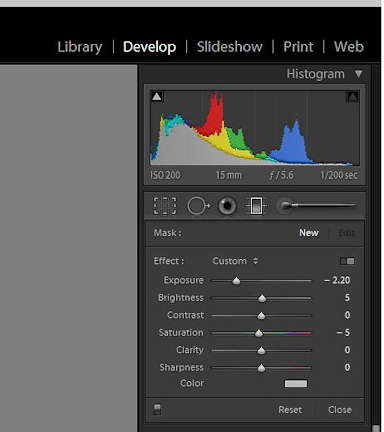
 .
.

