I have to say that I'm impressed, particularly with your use of a filter. It's difficult to avoid the purple cast to the water unless you do colour correction in CS4 on a layer, separating the water from the shark by applying a layer mask.
I think that your compositional skill is stunning.
As an aside, does anyone know of a hotel near to JASA for when I fly over to do a Shearwater trip in the summer?
Tim
Motel 8 was close and worked great for a reasonable price with an outdoor pool.
From another angle...hope you like it.
Great shots. Just as a matter of interest where did you mount the filter on the rear of 10 - 17?
Thanks Steve for this info. I think that you can even use the filter with a small compact camera like (for instance) the Canon Powershot A75 in the Canon housing, that has a fixed zoom lense. You then have to stick the filter to the circular front of the lens. This little camera even has a white balance adjustment facility. You wont need the built in flash. I sometimes use the little Canon as a back-up camera for snapshots.
Al
I'm glad that people like these pictures of the tiger sharks. All taken in 2009 in Bahama's. There are I think (but I'm only an amateur... ) three types of interesting shots. First, the action shots showing several sharks grabbing their bait, or even a shark frenzy. Second, the interactive shots where there seems to be some form of communication going one between diver and shark, and third the shark portrait where the shark acts as a model facing the photographer (like in the three pictures shown here).
Cheers Albert
Amazing pictures, love them!
Tiger is THICK! So seriously - how much "escaping" are you doing during these shoots? Moving to get out of the way of those guys.
No escaping. You wanna to stay with these guys ('galls' mostly)!
amazing shots!
You may like this close op of the Lorenzini pores. Its from the shark that had a fish hook in the left corner of its mouth (second shark in this series; the fish hook was taken out with Photoshop).
Beautiful images! Thank you for sharing!
Juvenile tiger shark facing two divers ..
Same juvenile tiger shark showing her scars..
I inserted this pic from my Flickr collection, to replace a picture I deleted earlier. Hope this works..
Just showing the usual muddle of lemon sharks with a tiger shark around the bait..
Al
Another tiger shark I cropped out of the general scene. Lots of lemon sharks underneath. Also lots of dust particles in the water that I tried to get rid of with the clone stamp. The 'metallic' tiger comes out nicely (I think) against the blue-ish background. Great fun...Al
WOW! Great photos on a great dive!
Thanks. This shark is the same as nr 1 in this series (back part of dorsal fin missing) . Now entering the scene from the left with sun right on top.. I erased the diver on the backgriound.





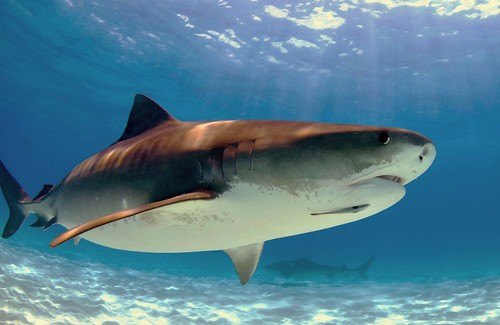
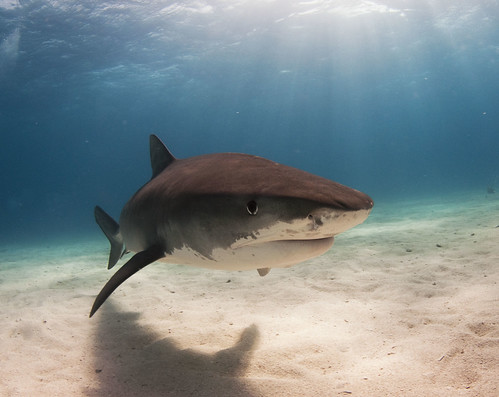
 ) three types of interesting shots. First, the action shots showing several sharks grabbing their bait, or even a shark frenzy. Second, the interactive shots where there seems to be some form of communication going one between diver and shark, and third the shark portrait where the shark acts as a model facing the photographer (like in the three pictures shown here).




