



I must be doing something wrong with this thing. Suggestions?Steve
Probably your Mac, my PC works fine. 

Cheers,
Steve
Read-only discussion
I must be doing something wrong with this thing. Suggestions?Steve
Probably your Mac, my PC works fine.
Cheers,
Steve
Fortunately, I received my card reader in the mail yesterday. Pulled out the card from the cam and put it in the card reader. Created a new folder and dragged the clips into there and opened and transcoded them to pro res using MPEG Streamclip.
Here's another question, using a 16gig card, how much video shooting time can I expect to get out of it?
Steve
Glad you got it working.
1920 X 1080 @ 30fps- 4 GB card = 12 min., 16 GB Card = 49 min
Look on page 157 of the 7D manual, I’ve never actually run up against the limit so haven’t tested it myself.
Remember that each individual recording file is limited to 4GB or 12 minutes.
Cheers,
Steve
Also the only times I've had the overheat warning and shut down is if I have filled a card more than about 75%.
Hey Jonny,
I never thought of that. I know that an external drive should never be filled past 80-85% capacity but is that also true with cards? Yesterday I was testing the Zoom H4n audio recorder for a review and just let the card completely fill before switching it out. Is that a no-no?
Steve
Hey Jonny,I never thought of that. I know that an external drive should never be filled past 80-85% capacity but is that also true with cards? Yesterday I was testing the Zoom H4n audio recorder for a review and just let the card completely fill before switching it out. Is that a no-no?
Steve
Well I have totally filled out cards, but try not too. Regarding the heat issue, it really does seam only to be an issue when the cam is hot and the card nearly full. But there is no scientific basis for it. 32 GB cards were good for me due to being cheap and last decent amount of time with room spare.
Last week I managed to get my 7D to overhead for the second time underwater. It was in a poly housing and I had been shooting constantly for 50-60mins (720p60). I managed to get it to limp through maybe another 30 mins before it decided that I wasn't a very nice owner and shut down completely. I honestly thought that I'd fried it and when I got out of the water 30 mins or so later it was still pretty 'hot' inside the housing, but it seems ok now. I've never had a problem in a aluminium housing, but then again I'm not sure that I've ever worked it that hard in one.
There does seem to be a general consensus that it is far more likely to overheat when shooting 720 vs 1080. Whenever I've had it overheat topside I've been shooting 720. I've never personally seen a big difference with filled up cards causing the problem because using 32gb cards I've probably only ever got above 75% a couple of times.
Cheers, Simon
Just got a Hoya 77mm UV filter to protect my 10-22mm lens. Should I keep the UV filter on even when putting it in the Nauticam housing?
Steve
Just got a Hoya 77mm UV filter to protect my 10-22mm lens. Should I keep the UV filter on even when putting it in the Nauticam housing?Steve
I have never thought about the effect a UV filter will have underwater. By initial reaction would be to take it off, not sure what if anything it would do to the "blues". Hopefully somebody can give us some help here.
Cheers,
Steve
Just got a Hoya 77mm UV filter to protect my 10-22mm lens. Should I keep the UV filter on even when putting it in the Nauticam housing?Steve
I wouldn't, it's just another layer of glass to shoot through.
I use the 5d, but have conditioned myself to switch off live view whenever I'm not recording. I've never had a problem with overheating and I use mine everyday, two dives a day, but in an ali housing.
As for file size, 25-30 mins of footage takes up about 8-10Gb. It really depends on the amount of data you have in each frame. Black/darker frames carry more digital data than lighter frames and mainly black dark shots come out a lot larger.
So for lenght of video, will the 7D record longer then the time it takes to have a single 4 Gig file. I noted mine was ending around the 12 minute mark at 720p 60fps even though I have a 16 Gig card. Some google research seems to suggest the video quits after the max fat32 file size of 4 Gig.
I think length of video segment is dicatated based on file size, and number of video segments is dicated based on media size. Subtle but important.
Cheers
BC
So for lenght of video, will the 7D record longer then the time it takes to have a single 4 Gig file. I noted mine was ending around the 12 minute mark at 720p 60fps even though I have a 16 Gig card. Some google research seems to suggest the video quits after the max fat32 file size of 4 Gig.
I think length of video segment is dicatated based on file size, and number of video segments is dicated based on media size. Subtle but important.
That's correct. The first limit is 4GB... regardless of recording time. The 12 min limit is just the camera's max bit rate filling 4GB.
There are also EU import tax issues which affect how long you can record on HDSLR's which are officially regarded as photographic cameras that can record video. If they could record continuously then they'd be taxed as video cameras at a much higher rate. I think Panasonic at one time made a non time limited HDSLR for sale outside of Europe (could be wrong on this but seem to remember hearing that), but everyone else seems to have conformed to this time limited model.
Useless fact of the day no: 348 
Cheers, Simon
Perfect, thanks for the confirmation. My bad I just noticed Steve touched on this in his above time post, guess I missed it. Enjoy the thread Steve, well done.
Cheers
BC
There are also EU import tax issues which affect how long you can record on HDSLR's which are officially regarded as photographic cameras that can record video. If they could record continuously then they'd be taxed as video cameras at a much higher rate. I think Panasonic at one time made a non time limited HDSLR for sale outside of Europe (could be wrong on this but seem to remember hearing that), but everyone else seems to have conformed to this time limited model.
Useless fact of the day no: 348
Not useless at all. The Panasonic GH1/2 have the ability to span files, so it will create 4GB blocks of continuous video. Canon and Nikon (and pretty much everyone else) just stop at the 4GB limit.
Okay, finally got over the complete intimidation of this thing. Went out and shot some stills and clips. I know this sounds absurd, but when I plug it into the computer, it opens up in iPhoto and I can see it mounted in iPhoto but I cannot drag the video clips to the desktop. Also, there is no Canon 7D on the desktop and I don't see it in the Disc Utility either. Went to FCP's log and transfer window and nothing there either.
I must be doing something wrong with this thing. Suggestions?
Steve
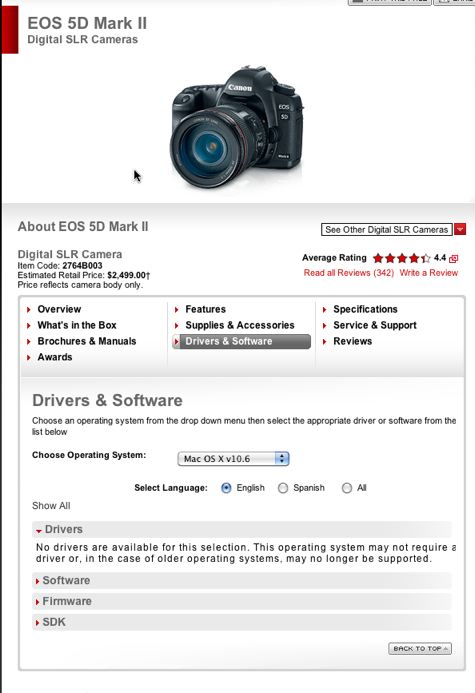
Steve download the Final Cut Pro Plug in from Canon's website. Then the footage will show up when you open Final Cut and Log and Transfer window.
http://usa.canon.com/cusa/professional/pro...versAndSoftware
Under the drivers window and it's the Canon 5D plug in. It will work for 7D and if the camera plist is modified also for the T2i. I have the camera plist file if you want me to email the modification to the file to you. Works wonderfully.
It will allow you to bring the footage in as Pro Res and edit it easily.
Best,
Frazier Nivens, Ocean Imaging
Just went to the link and clicked on Drivers. It says there are none.
Steve
Has anyone tried to set the White Balance according to the stated color temperature of their lights? I was just sent a pair of the Keldan lights and thought that that may be the way to go. Though, if I was shooting off into the blue where lights don't have much reach, not sure how that would then affect the image.
Steve
WB off the palm of your hand works really well on the 7D if there is no white sand around which I found to be far the best option. WB off the surface/sun never seems to work as well as it does on a proper 'camcorder'. I've been amazed at the 7D's ability to MWB even at depths way beyond what was possible with a camcorder. I have tried to use the temp control to change the WB settings, but could never seem to get the right setting while underwater, although this could just be a lack of patience issue!
Cheers, Simon

Terms of Use Privacy Policy Guidelines We have placed cookies on your device to help make this website better. You can adjust your cookie settings, otherwise we'll assume you're okay to continue.

A worldwide community for underwater imaging.
