Skip to content

Shooting Technique, Workflow and Editing / Archived topic

Sony 1080/60i stored as 30p? Confused.

Started by echeng ·

  • 24Posts
  • 24Replies

Read-only discussion

Sony 1080/60i stored as 30p? Confused.

24 posts
  1. I've been shooting 3D video with two Sony CX550V camcorders that claim to shoot in AVCHD 1080/60i. I'm a big fan of ClipWrap, which re-wraps the AVCHD content into a Quicktime movie for easy workflow -- I find FCP's Log & Transfer to be unwieldy and time consuming, especially in the field.


    If I open a re-wrapped video file in Quicktime 7 or in Cinema Tools, it tells me the clip is 29.97fps. This is really confusing, as the video clearly has an interlaced look. Is the Sony camcorder laying down 29.97 and grabbing 2 fields from 1 frame when it outputs 60i?


    Anyway, this makes it quite difficult to de-interlace the footage. I suppose I need something that converts 30p (29.97) content to 60i by frame doubling and grabbing upper and lower fields (as opposed to a 30p->60p conversion that might interpolate or do something more fancy). I could then take the 60i content and de-interlace.


    I haven't tried Log & Transfer to see whether it will give me 60i... but even if it will, I have a couple hundred gigabytes of re-wrapped AVCHD "1080/60i" content that is actually 29.97fps progressive.


    Any tips or other thoughts? Thank you! (also posted over at Creative Cow).

  2. AVCHD is Progressive Segmented Frames (PsF), which basically means it records progressive on the interlaced by split odd/even lines into the interlaced segments.


    I'm confused by what you are asking. Are you trying to get 60p out of a 60i stream? That was done in the days of 1080i, where you deinterlaced 60i to 60p then conformed to 24p for slo-mo.

  3. Ahh, I see. That explains it. I can't figure out how to get rid of my jaggies in the progressive-stored interlaced frame. It's terrible, especially on my new 24" 3D display, which uses line by line interleaving.


    I'm trying to de-interlace AVCHD. Ending up at 30p from the 30p / interlaced PsF would be fine. Help me! :)

  4. You shouldn't have to deinterlace. PsF is progressive. Should be no jaggies at all. What program are you viewing with? You are probably messing up the settings if it's in FCP or MC.

    Edited by Drew
  5. It is progressive, but each frame has jaggies using Quicktime and VLC and ever other player. I think it has recorded interlaced content onto progressive frames. Sony CX550V is listed as "60i."

  6. Opps, sorry. For some reason I thought you were using Canon. :) But if it's 1080/60i, the frame rate will still be 29.97fps. What you are experiencing is the usual problem of viewing interlaced material on progressive screens. It's still 1080/60i. When you see the interlace artifacts then you know it's interlaced material :D

  7. Drew - all info panes state that the content is 29.97. Shouldn't it state that it is 60? Or is 60i always stored as 29.97?


    The question is how I de-interlace the content. De-interlacing through Compressor has no effect.

  8. OK, I clearly have no idea how AVCHD video gets marked as 60i. It seems plausible that it would get stored in frames at 29.97, and played back using upper and lower fields at 60i. But I want to de-interlace the video, and my machine thinks that the video is just 29.97fps. How do I conform the video to 60i so it can be properly de-interlaced? I want to mark it so that Compressor knows that it is interlaced source.


    Do I have some fundamental misunderstanding here?

  9. Yes. 60i uses 29.97 as frame rate. So it should say 29.97fps. Now when you put it in Compressor, does the inspector say Top First for Field Dominance? If it does, you're good to go.


    The 60 in 60i means 60 fields per second, not frames. And it's really 59.94. Are you using Frame Control Settings correctly? Not to mock you but have to eliminate the obvious before you can ignore me. :)

    Edited by Drew
  10. Drew - I'm not sure if I am using Frame Control Settings correctly. I do see Top Field in compressor's inspector. This is a good sign -- I didn't know that 60i would be inspected as 29.97 with field dominance, but it makes sense.


    In Frame Controls, I am setting Output Fields to Progressive with Better (Motion adaptive) de-interlacing. However, I am still targeting 29.97 as output. I suppose I should be targeting 59.94 instead?

  11. OK. Got it. I was trying to deinterlace 60i (29.97 top-field first) into 30p, and that didn't do what I expected (it just ... kept the full 29.97 fps frames).


    I just de-interlaced to 60p, and it had the expected effect.

  12. Ah ok, what you are going through is terminology confusion. Here's an explanation:


    60i = 59.94 FIELDS per second = 29.97 frames per second (fps) Interlaced

    60p = 60 FRAMES per second Progressive Scan

    30p = 29.97fps (if NTSC) or 30 fps Progressive Scan


    Deinterlacing 60i at 29.97fps will give you 30p. Deinterlace 60i at 59.94fps will give you 60p. This is a popular method of getting smooth motion by deinterlacing the 59.94 FIELDS per second into 59.94 separate frames per second, then conforming to 23.976 frames per second. All progressive scan TVs interpolate 60i/30p to 60p anyways because they can't display interlaced images.

    I hope this clarifies things.

    Edited by Drew
  13. Thanks, Drew. I understand fields vs frames. I was just unclear that 60i was storing its fields within 29.97 frames per second instead of as 60 fields per second (there is a distinction there).


    If you deinterlace to 59.94 fps and then confirm to 23.97 fps, won't it play back half speed? Don't you have to actually convert the footage?

    Edited by echeng
  14. Yes basically it's 40% slomo. Cheap overcrank done in post. I use to overuse it to smooth out camera movement.


    All you need to do is deinterlace the clips at 59.94 fps. Then conform to 23.976 fps. The file size will grow obviously because you added double the information (half field to full frame) but it is a very effective way of post overcrank. You just have to shoot accordingly with 1/48 or 1/50 shutter speed.

  15. OK. I am clear on all points now. thank you!


    (however, I'm still looking for a one-step 60i -> 30p with proper deinterlacing. at the moment, I'm going 60i -> 60p -> 30p, and it takes FOREVER and requires that I kick off the second transcode manually).


    I guess this could have been done over email or Skype, eh? No one else cares!

  16. Eric,

    60i deinterlaced is 30p. You don't need to go to 60p unless you want super smooth action OR conform to 24p for slomo. Hell you can even conform to 29.97fps for a 50% speed reduction.

  17. Drew - please tell me how to deinterlace from 60i to 30p. When I turn on Frame Controls and set progressive output to 30p in one step, I get 30p... with interlacing artifacts (looks the same as if I take the 60i footage and play it on a progressive monitor).


    I'll go try it again...

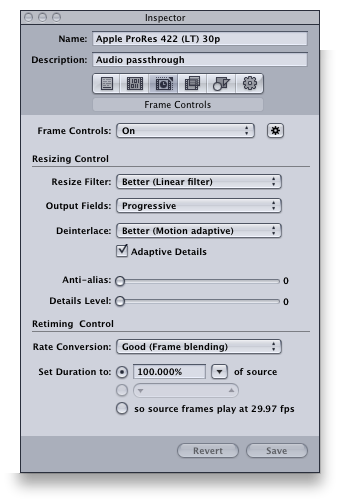
  18. Drew - forget I wrote that. 60i -> 30p works fine and has no interlacing artifacts when I turn on Frame Controls with the following settings:


    compressor_settings.png


    If you have any suggestions, I'd love to hear 'em. :)

  19. Yeah, I knew it probably was Frame Control settings. You can turn off Resize and Retiming conversion if you are not doing any of those things.

    I haven't dealt with interlaced material in a few years, but for just deinterlacing and pull downs, I used JES Deinterlacer. Faster and better quality than Compressor. It's a donation software. However, it does not transcode to Pro Res. So it'd be another step in the workflow.

    Edited by Drew
  20. How do I turn off resize and retiming? I don't see a way to do that in the dialog box. I would assume that if I'm not resizing or retiming, it would ignore those settings.

Aquatica

Account

Navigation

Search

Search

Configure browser push notifications

Chrome (Android)
  1. Tap the lock icon next to the address bar.
  2. Tap Permissions → Notifications.
  3. Adjust your preference.
Chrome (Desktop)
  1. Click the padlock icon in the address bar.
  2. Select Site settings.
  3. Find Notifications and adjust your preference.