



Skip to content

Video Gear and Technique / Archived topic

White Balance with Lights? Wide Angle

Started by Oceanshutter ·

  • 29Posts
  • 29Replies

Read-only discussion

White Balance with Lights? Wide Angle

29 posts
  1. I can't believe the ignorance of the comment "fix-it-in-post is an obscenity!" Whoever believes that has a long learning curve ahead of them!


    My previous career was in post-production working on documentaries for NGT and PBS. The cameramen I worked with worked hard with whatever techniques were necessary to get shots as close as possible to corrected color. They had to, since there's only so much color correction that can be applied to compressed camera streams, even when shooting 100mbps DVCProHD, or similar. I learned to shoot from those guys, so my approach is strongly biased towards that. I'm no Howard Hall, but it ain't my first rodeo, either wink.png


    I do understand that shooting RAW is totally different--and I agree that it will make it much easier to fix colors in post. However, given that most cameras are still shooting compressed codecs without anything near the color latitude of a camera shooting film or RAW video, I believe it's still good procedure to get the colors right (or close to it) in-camera, so that any color correction performed is just a minor adjustment, and doesn't end up pushing the codec farther than its color latitude allows.


    As a post-production guy who learned to shoot, I know exactly what it takes to correct an image that could have been shot better on location...and I avoid it at all costs in my own footage!


    You've got a stock footage business, and I don't, so I'm not going to argue with you about what sells, or what makes a successful shooting technique smile.png Clearly, the approach you outlined works great in many situations! I don't think that means it's the ONLY approach that will provide good results, though, and I think that having lots of techniques in the toolbag is the best way to guarantee success.

    Edited by blaisedouros
  2. I basically agree with you...I was reacting to the word "obscenity". That phrase is incredibly narrow and dogmatic... and contradicts your last comment about "lots of techniques in the toolbag is the best way to guarantee success". If using a good NLE it's possible to do decent color grading even with crappy old HDV material (which I used for several years...so I know it's limitations well).


    Of course it's better to get the color as close to perfect during the shoot! That's exactly why I always use powerful lights when the ambient underwater light is a monochromatic blue. But no amount of White Balancing by itself is going to give "correct color". smile.png

    Edited by HDVdiver
  3. You got that right, Blaise! The best solution is the one that works for the chosen shot!


    Problem is with a DSLR in video mode, it's not as simple as hitting the MWB button and it adjusts automatically. Often it's hidden in a menu, and the CaNikon cameras even require a picture to be taken and used as a reference for MWB. Not something one wants to do constantly esp if the subject isn't constant ie changing depth/distance etc.


    To answer the OP's question, it's best to MWB on the subject (coral head/reef etc) with lights on subject. Never use AWB because it may shift settings as the scene changes, making it difficult to correct in post.


    EDIT: There are a lot of buts, ifs and whens to this method. Which is why I advocate learning the physics and applying it vs looking for rules.

    Edited by Drew
  4. You got that right, Blaise! The best solution is the one that works for the chosen shot!


    Problem is with a DSLR in video mode, it's not as simple as hitting the MWB button and it adjusts automatically. Often it's hidden in a menu, and the CaNikon cameras even require a picture to be taken and used as a reference for MWB. Not something one wants to do constantly esp if the subject isn't constant ie changing depth/distance etc.


    To answer the OP's question, it's best to MWB on the subject (coral head/reef etc) with lights on subject. Never use AWB because it may shift settings as the scene changes, making it difficult to correct in post.


    So you white balance on the reef instead of a white slate? Wouldn't this give an incorrect "white" to the camera?

  5. Sorry I meant for subjects like reef. The most accurate is to have your slate at the same distance as where your subject will be, but most people do 2 ft away and correct in post.


    EDIT: There are a lot of buts, ifs and whens to this method. Which is why I advocate learning the physics and applying it vs looking for rules.

    Edited by Drew
  6. I was reacting to the word "obscenity".


    Once again, the need for a special sarcasm/hyperbole font becomes apparent...come on, internets! Let's have some REAL innovation!

  7. For those interested in seeing what color correction/grading can do for UW video have a look at:


    It's very basic but will give you an idea of what's achievable very easily with a good NLE (Edius in this case).

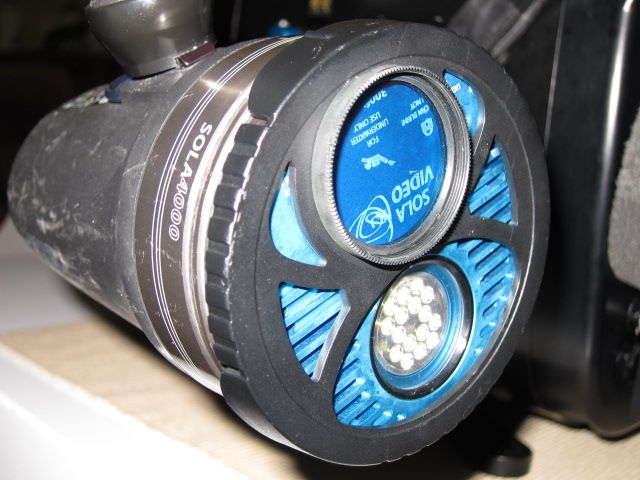
  8. My cyan filters arrived today. A big thanks to Pete Mooney from Scubapix.

    I will get some comparison footage over the next few weeks to test the differences. I do like the way they just twist around when not in use. So you don't have to remove them underwater.

    Cheers Pete.


    IMG_0009-2.jpg

Reef Photo & Video

Account

Navigation

Search

Search

Configure browser push notifications

Chrome (Android)
  1. Tap the lock icon next to the address bar.
  2. Tap Permissions → Notifications.
  3. Adjust your preference.
Chrome (Desktop)
  1. Click the padlock icon in the address bar.
  2. Select Site settings.
  3. Find Notifications and adjust your preference.
