



Thanks for the Infos from everybody!
Glad you could track one down!
Cheers,
Jim.
Photography Gear and Technique / Archived topic
Started by E_viking ·
Read-only discussion
Thanks for the Infos from everybody!
Glad you could track one down!
Cheers,
Jim.
Thanks Jim
NOTE: The Aquatica +10 diopter lens is a 2 element achromat (as far as I can tell - but correct me if I'm wrong, Jean), while the SubSee +10 is a 4 element achromatic system. Spreading the +10 dioptric strength over more elements allows significantly less edge distortion to be present.
Keri
Love my SubSee magnifiers! Took a little to get the right technique down pat but now I've got the hang I'm
slowly building a collection of shots I've been after for some time. Loving the detail!
http://www.flickr.com/photos/jimswims/tags/subsee10/
Cheers,
Jim.
I've got a fl diopter that works with any lens with a 67 mm thread so you should be use the Aquatica lens. If I read the review of the Aquatica lens correctly it has an air element like the Subsee. I think it would have to have more than 2 optical elements.
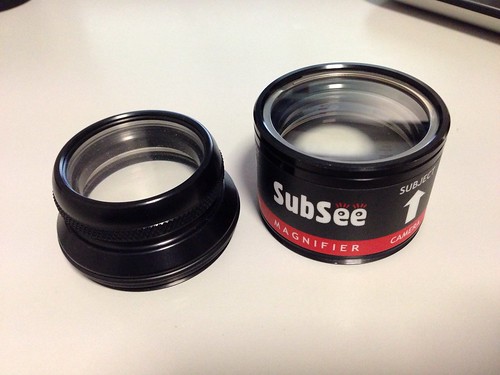
Here is a pic of the Aquatica +5 and the Subsee +10. The Aquatica +10 is the same size as the +5. The phyiscal size and weight og the Aquatica +10 is smaller than the Subsee. The Aquatica wet lenses come with 67mm thread and a o-ring style connection with the Aquatica lens holder. I personally Don't like the Aquatica wetlens holder and prefer to screw my wetlenses into a holder with 67mm thread as it feels more secure.
My girlfriend ended up taking my Aquatica +10 as she prefers it to her Subsee leaving me the subsee with no way of using it....................lol
I cant not tell you the quality between the two as I rarely shoot macro and I also cant mount the subsee with my Aquatica lens holder.
Regards Mark

Terms of Use Privacy Policy Guidelines We have placed cookies on your device to help make this website better. You can adjust your cookie settings, otherwise we'll assume you're okay to continue.

A worldwide community for underwater imaging.
