Skip to content

Shooting Technique, Workflow and Editing / Archived topic

Panasonic GH4 might get a V-log profile?

Started by kc_moses ·

  • 37Posts
  • 37Replies

Read-only discussion

Panasonic GH4 might get a V-log profile?

37 posts
  1. Rumor say that the next GH4 firmware update (end of Feb) will give the GH4 a V-log profile. Just curious, does anybody bother to color grade under water footage?


    If your white balance is a bit off, do you still use it as it, or you would attempt to color grade it?

  2. Rumor say that the next GH4 firmware update (end of Feb) will give the GH4 a V-log profile. Just curious, does anybody bother to color grade under water footage?


    If your white balance is a bit off, do you still use it as it, or you would attempt to color grade it?

    I would attempt to colour grade it.

  3. Bleh no. I want it as close to accurate as possible out of the camera.


    Sorry, posted to soon. I do attempt to fix the color if it's not too far off, but I don't think I need a flat profile for that. I think there are too many factors shooting underwater that flat profiles will never help for.

    Edited by ScubaBob
  4. Absolutely every clip I publish gets colour-corrected individually even if it's already pretty close to what I want out of the camera. At the minimum I use a Sony Vegas Pro color curves fx to get the levels right, because they never ever are. Most clips I shoot are pretty far off what I publish.


    Not hugely excited about V-log on the GH4 but will try it with interest if it happens. I think it's of most interest for those working topside and trying to match GH4 footage with footage from other cameras that can shoot log profiles.

  5. If your white balance is a bit off, do you still use it as it, or you would attempt to color grade it?


    I use a fairly flat profile in the GH4.


    In FCPX, I've set up and saved a few colour grading presets:

    - Increase contrast

    - Reduce Green a little

    - Reduce Green a lot

    - Increase Blue a little

    - Increase Blue a lot

    - Warm up slightly


    These seem to work on 95% of all footage.


    Regards

    Peter

    Edited by peterbkk
  6. Will be interesting to see whats in-store for the GH4 with these firmware upgrades. Looks like the A7S and the NX1 really have given the GH4 a run for its money.


    I'm also of the opinion (now) that shooting flat underwater isn't the way to go. I'm on a quest to find out which profile is the best to use underwater...

  7. The footage that requires the most correction is when I use custom white balance despite the use of expensive slates once underwater something seems to be going on and at the end it is better to balance on sand or similar. Best option when there has been good light has been to use a good filter in auto that result in no corrections needed unless I pointed upwards and had a red jue as result

  8. Interesting......


    I don't think the A7S give the GH4 for the run because it's priced double then the GH4 and way more bulky if shoot with Shogun for 4K. The NX1 however really may beat GH4 down the road as Samsung keeps release firmware almost every month to improve the video feature.


    Color grading wise, I think I'm developing a bit of OCD (Obsessive Compulsive Disorder) that I need to touch every single clip to make sure it's appealing to the eye, especially after watching the same clip like 5 times, you will find something to improve and grade, whether is highlight, contrast, hue etc.


    As for issue with Custom White balance. I tested it yesterday on land. I found that a Grey/Gray card actually works better than a white card. For starter, balance off a gray card give me a better and more accurate color. When I white balance off a white card, I always find that it's a hit and miss and some of the clips are a bit off and only discover that when I review the clips on land in the laptop. With the white card, I often struggle with it being too reflective, if I hold the card in an angle, it reflect the sun so it's very white, if I hold it more perpendicular to the lens, it's a bit more yellow off white. My next trip I will white balance off the gray card.


    Oh, I tried white balance off my hand, as an Asian, my hand is more yellow than Caucasians...... :lol2: This trick won't work that well for me.

  9. I used whibal card which is actually grey and underwater it would give purple green hues even if only land was totally fine. That was the last of a series I have tried before giving in. I had weird results with both panasonic and sony. Sony would give a white balance error panasonic would give no error just be off. Sand when available much better option

  10. Sand when available much better option


    After trying many options for the first year I got a camera that I could manually white balance (in 2004) I started using sand or rock as my main target to MWB - and still do that to this day. I do the same with the GoPro or other cameras that only have AWB. I turn the camera off, and then back on again trying to have sand feeling as much of the frame as possible when the camera turns on - this seems to work as the white balance doesn't change much it is initially set on cameras with AWB.

  11. I'm on a quest to find out which profile is the best to use underwater...

    Me too. I've been shooting 0-255, Natural, -2 contrast, -2 sharpening, -3 noise reduction, -1 saturation, 0 hue, iResolution STANDARD.


    I decided to try Natural after doing Dave Dugdale's online GH4 course.


    Now I'm finding that I still have too much contrast in my footage. In particular the blue channel is often getting clipped a lot at both ends. So I'm either going to go for less contrast (e.g. -5) or think about shooting 16-235 or maybe even using a little master pedestal (needs a lot of testing on dry land, viewing results in NLE scopes). I think I'm going to set noise reduction back to 0 as I have some very noisy footage shot at ISO 800. Saturation I may take back to 0. I might even switch to the Standard Photo Style instead of Natural. Really not sure about sharpening.


    To be honest I'm not thrilled with the out-of-camera "look" of any of my GH4 footage yet, especially underwater wide angle, but I can't quite put my finger on why. Maybe I'm expecting too much or just haven't got the right settings yet.

  12. I have not found iresolution useful in any panasonic camera so far. Looking at test studio shots looks like sharpening is not overdone and saturation is normally oversaturated. For contrast generally the minimum setting is the most effective however you can still get highlights clipped. To fix this you can try setting a custom gamma curve that reduces contrast only on highlights. For noise looking at studio scenes it would seem that turning down too far produces quite a bit of chroma noise that can lead to posterisation or grainy images.

  13. I've trying everything at the moment at +0.


    I'm trying to work out, what I'm doing in Post in FCPX to 'fix' my videos and seeing if I can do it on the camera before hand.


    Things like contrast increases, saturation (slight tweak). I think the camera is actually running slightly underexposed underwater...


    NR - this I used to run at -5 and then run it through NeatVideo, however I found that due to the compression, having all that noise really muddled the footage, as the codec was trying to save definition in the noise!! So now I'm still using NeatVideo (amazing) but no so aggressively.


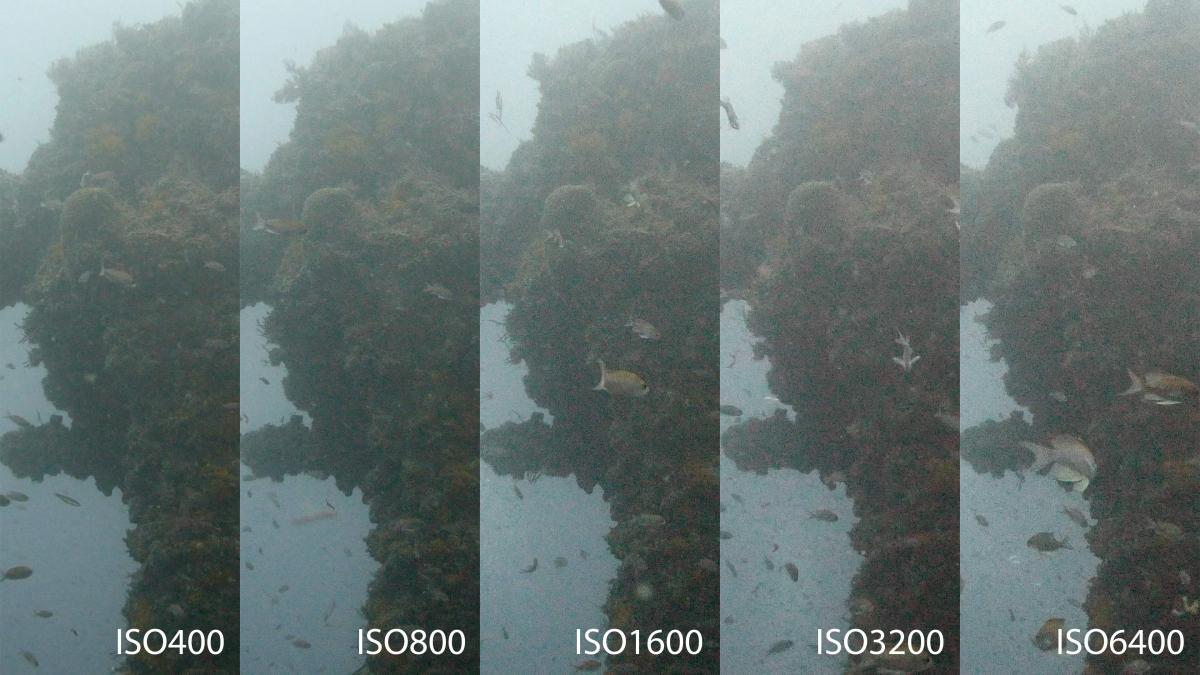
    ISO800 is very noisy, even ISO400 is noisy when its underexposed.


    Intercepter - you are probably right with the WB. I've got those Magic Filters from Alex and Peter, and I've swapped the filter holder off the 8mm to my 7-14mm - but awaiting the nicer days for having a play with that.

  14. ISO 800 to be noisy is poor. I wonder if that is because of the crop. Generally I have found that if I look at still frames reducing noise reduction can bring a bit of detail but chroma noise kills it. Once the image moves in the clip the detail gained is not visible whilst the chroma noise is so I leave it to zero. To bring more detail out the best thing is to dial contrast right at the -5 end. This improves shadows and you can always bring more contrast back in lost of you really want. What does not work for me is to dial down both contrast and saturation as it looks like panasonic camera do a better job than editor at separating the two. So what I do is to find a setting I like in terms of saturation and then dial down contrast to -5. On land I have not yet played with the gamma curve but should be able to experiment in wraysbury at the end of the winter

  15. Well there is a bit of backlit and chroma noise. What were the noise reduction settings?

  16. When I test dive with the GH4, I experience what Richard has shared. Before diving with it, I thought ISO 800 was good and ISO1600 is the max, but as it turned out even at ISO800, it's noisy, and with the 14-42mm lens, there isn't much you can do with the aperture to bring the ISO down with overcast environment like this.


    I haven't brought my LX100 down to the ocean yet, but will do it in next couple weeks. So far I read that the LX100 adjustment is different from GH4.


    But for GH4 users, this is a good place to start:


    https://www.opticaloceansales.com/setting-up-the-panasonic-gh4-for-diving.html

  17. Thanks for the link. Will have a look at that.


    Looks like someone has spent a while working it out!


    The NR (as with all the settings) is at +0 for these shots.

    Edited by thetrickster
  18. That's what Peter uses (he posted it here) he grades everything that may not suit others. Interestingly most of the settings go exactly in the opposite direction I use

  19. Some of the information get lost or updated. Peter also started to use color gel/filter now for macro? I'm starting to lost track of what information for what and when...... aging or information overload? Hmmm.....

Nauticam

Account

Navigation

Search

Search

Configure browser push notifications

Chrome (Android)
  1. Tap the lock icon next to the address bar.
  2. Tap Permissions → Notifications.
  3. Adjust your preference.
Chrome (Desktop)
  1. Click the padlock icon in the address bar.
  2. Select Site settings.
  3. Find Notifications and adjust your preference.