Skip to content

Video Gear and Technique / Archived topic

Panasonic GH4 advanced settings

Started by Interceptor121 ·

  • 37Posts
  • 37Replies

Read-only discussion

Panasonic GH4 advanced settings

37 posts
  1. Am thinking of investing in a GH4 and have been doing a bit of reading of the manual plus some other sources

    I am curious about the use of the advanced video settings specifically

    Does anyone change the luminance, master pedestal and highlight shadow curve when shooting and why?

  2. Too be honest, I looked and read and tried to understand all I could about: 0-255, 16-235, Master Pedestal, the Profile options and the curves.


    As to Luminance, a lot with depend on where you want your videos shown - some systems show 0-255 correctly, some cut off 0-15 and 236-255 (so you get clipping) and some are clever enough to squeeze 0-255 into 16-235. Youtube appears to show 16-255 (so only clipping 0-15)


    With that, I just settled on shooting 16-235, so it appears correct everywhere.


    Master Pedestal, from my understand this is there purely so you can level the baseline black to other cameras in a recording setting. So I've left it alone.


    Curves? Well thats a personal preference, none of the changes will gain you any extra dynamic range, its more to do with less post processing. Again I've left it alone.


    The Profiles, this is one which I still haven't got my head around. For Underwater for me the 'nicest' so far has been the Natural Profile. But we now have the Log Profile - but I personally think this is a stretch too far for underwater.


    Again many people try and go -5 on all the settings and wonder why it looks s*** All these setting I found you can easily more refine in post, more than try and bake them in before hand.


    I tried at the beginning, to play with curves, more sat, more contrast in-camera - but realised I still did a lot of 'playing' in FCPX on the clips anyway - so when back to all 'zeros' and 16-235. At least I know where I begin, when I start colour correcting.


    The GH4's colour science isn't perfect, thats for sure.

  3. How about Cinelike D/V?

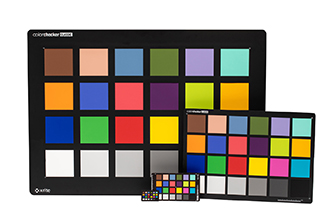
  4. As far as color science, I have been thinking. If we have both a Canon and Panasonic take a shoot of a color checker board:


    MSCCC_M1.jpg

    Then fine tune the Panasonic until it matches the one from Canon. We mostly need to concern on matching the blue color, then decide if the red and the yellow is acceptable. Since we can't fine tune individual R G B on the camera, I guess if we found a match on the blue, the other color might suffer. I don't have time to experiment nor do I have a color checker card, but I think this could be a right direction.


    As for setting, the good thing is GH4 has a lot of resources out there.:


    http://blog.josephmoore.name/2014/10/29/the-three-most-misunderstood-gh4-settings/


    Here is a good place to start when come to setting up the GH4:

    http://suggestionofmotion.com/blog/panasonic-gh4-setup-quick-start/

  5. Does anyone change the luminance, master pedestal and highlight shadow curve when shooting and why?


    This is what I'm doing both underwater and topside:


    Photo Syle: Natural

    Contrast: -2 (I might go to 0 as I'm always adding contrast in post anyway)

    Sharpness: -2 (I might go to -5 and do it all in post. Need to test in-camera vs post sharpening)

    Noise reduction: -2 (I think -5 to 0 are all valid settings depending on your post production workflow)

    Saturation: 0

    Hue: 0

    i.Dynamic: Off

    i.Resolution: Off

    Master pedestal: 0

    Luminance level: 0-255

    Highlight/Shadow: 0

    White Balance: 3300K adjusted to A:5 M:5 (with my Keldan 4X lights)


    These are based on my own testing as well as what others do and recommend (including the video courses by Dave Dugdale and Caleb Pike).


    I shoot 0-255 because I correct/grade every clip I publish and confirm to broadcast/web video levels (16-235 with an individual chroma channel allowed to go to 240 if the overall luminance is under 236), so I want to use the full 8 bits rather than limiting myself to 7.78 bits of 16-235. However 0-255 doesn't give the error-room that 16-235 does, so exposure is more critical to avoid clipping, and I quite often mess up a little.


    I won't be using VLOG-L for shooting internally, despite having the "free" version. Not enough benefit to justify the drawbacks.


    As to Luminance, a lot with depend on where you want your videos shown - some systems show 0-255 correctly, some cut off 0-15 and 236-255 (so you get clipping) and some are clever enough to squeeze 0-255 into 16-235. Youtube appears to show 16-255 (so only clipping 0-15)


    In the vast majority of playback scenarios, YouTube shows 16-235 and clips >235 as well as <16.


    Test video is here:


    Edited by Nick Hope
  6. I read from the link from Moses that luminance has nothing to do with bit depth and dynamic range. It is just a way to tell the editor how to interpret the information. So there is the same info in any of the 3 options but same programs may not like one or another. Or basically saying if there is a clipped highlight its always there but if you tell him 235 it will cut off later but still records it.

    I take it that the Cinelike are a waste of time then. Is anyone shooting with filters?

    Edited by Interceptor121
  7.  

    YouTube shows 16-235 and clips >235 as well as <16. Test video is here:


    Howdy Nick - this I think clearly shows why my head hurts with all this :D - Hence why I stick to 16-235!


    As far as color science, I have been thinking. If we have both a Canon and Panasonic take a shoot of a color checker board:


    Then fine tune the Panasonic until it matches the one from Canon. We mostly need to concern on matching the blue color, then decide if the red and the yellow is acceptable. Since we can't fine tune individual R G B on the camera, I guess if we found a match on the blue, the other color might suffer. I don't have time to experiment nor do I have a color checker card, but I think this could be a right direction.


    I thought about this too, alas I don't know anyone locally with a Canon with a housing :(


    If you did this and use Resolve, Resolve has a colour match function -


    You could then build a color correcting preset (or in todays language a LUT) to fix all the colour issues (in theory)


    I read from the link from Moses that luminance has nothing to do with bit depth and dynamic range. It is just a way to tell the editor how to interpret the information. So there is the same info in any of the 3 options but same programs may not like one or another. Or basically saying if there is a clipped highlight its always there but if you tell him 235 it will cut off later but still records it.

    I take it that the Cinelike are a waste of time then. Is anyone shooting with filters?


    I agree (or rather believe) that luminance doesn't effect the dynamic range.


    Never liked the Cinelike color profiles.


    Check this website out - http://www.dvinfo.net/article/acquisition/micro-43/panasonic-gh4-dr-and-gamma-timelapse-and-more.html

  8. I read from the link from Moses that luminance has nothing to do with bit depth and dynamic range. It is just a way to tell the editor how to interpret the information. So there is the same info in any of the 3 options but same programs may not like one or another. Or basically saying if there is a clipped highlight its always there but if you tell him 235 it will cut off later but still records it.

    No, as I understand it the luminance choice on the GH4 does not just set a flag that maps levels at playback. It really is affecting your bit depth (the maximum number of levels you can capture). I believe the first article is wrong on that point, and that the misunderstanding has come from FCPX's semi-intelligent attempts to interpret and decode the footage correctly.


    If you record 16-235 you're limiting your maximum capture to 220 levels instead of 256.


    0-255: 255-0+1 = 256 = 2^8 (i.e. 8 bit depth)

    16-235: 235-16+1 = 220 = 2^7.78 (i.e. 7.78 bit depth)


    And while we're at it, VLOG-L is apparently recording (in 8-bit format) blacks at 32 and whites at 182 (so the same LUTs as full VLOG can be used), which limits the bit depth much more:


    182-32+1 = 151 = 2^7.24 (i.e. 7.24 bit depth)


    This can be tested in Sony Vegas, which is dumb in this respect compared to other NLEs and decodes each of the options to the same range, making no attempt to interpret and conform levels. But in reality 8 vs 7.78 is only a small difference, which is why the extra values will not be apparent on scopes. I just like to eek out every bit of quality that I can.


    I'm no mathematician or video scientist. I'm prepared to be corrected on the above :)


    I take it that the Cinelike are a waste of time then. Is anyone shooting with filters?

    I've shot wide, available-light stuff with a Magic Filter behind my 8mm fisheye lens. Worked OK but the colours weren't of Canon standard, although a bit of work on white balancing techniques might help. I'm also pondering using a B+W ND filter on my Olympus 12-50mm and 60mm macro lenses to enable me to throw a lot of artificial light at macro subjects and still avoid overly-small, diffraction-inducing apertures.

    Edited by Nick Hope
  9. So in essence 0-255 and any photo style that is not cine V or vivid is the same. The dvinfo article seems to indicate Cinelike D has some more dynamic range??

  10. They're not the same. This is what the manual says:


    GH4-photo-styles.jpg


    Cine D does not give more dynamic range. It seems to be a flawed attempt to do something a bit loggish. Dugdale found it had a funny kink in the gamma curve but was otherwise the same as Natural. Caleb Pike reckons it's just too flat and reduces information too much. I found in the brief time I used it that it gave some weird colours including orange skin.


    If I were you I would stick with a modified Natural or Standard. But I'd love to see some test results from you if you get one and can be bothered.


    If you mean "the same" in terms of the range of luminance that they record to, as far as I know they're all the same except VLOG-L.

  11. I think if I managed to get the GH4 that based on previous Panasonic experience I will stay on standard touch nothing and use a filter that has a lot of magenta in it. See how I get on with that set up and then adjust

  12.  

    I thought about this too, alas I don't know anyone locally with a Canon with a housing :(


    If you did this and use Resolve, Resolve has a colour match function -


    Bringing a color chart into the water was my first thought, but after searching, it's impossible to find water proof color chart, the one made by Amphibious is $88+, way over price for a piece of plastic with color printed on it. Some suggest get regular color chart, laminate it and call it a day. That may work but then when come to the post, you still have to do the Davinci method of correcting it. I can't run Davinci smoothly as it's a resource hog. Later I found out that I need two video cards to drive Davinci, which I don't have time to take apart my computer and mess with it. Davinci round trip to Premiere is slow.


    Anyway, what I'm thinking of using Canon camera as reference is do it on land, no time to mess with two cameras underwater. Think about it, if on land, the Panasonic match the color of the Canon, once under water, the water will affect the color of the Panasonic just like it would affect the Canon. So "copying" the color of Canon on land should work in the water. So, now who want to spend the weekend and keep messing with the Panasonic to get more Canon like color? :crazy:

    Edited by kc_moses
  13. I have the Amphibico slate - its actually metal and is more of a 'warming' white balance slate, more than the normal 90% white, and the Resolve colormatch function only works on (I think) 3 color charts - with the Amphinico not being one of them...


    You know, yeah I could be over over thinking it - and just match a canon to the gh4 above water, alas the only Canon I do have access to is my wife 1100D


    Worth have a look mind ;) Will report back...

  14. I think Lightroom may also have a similar color match function to Resolve. On a workshop I attended, Bruce Shafer brought along an X-Rite ColorChecker Passport in some sort of heavy duty vacuum bag for people to try. I could ask him what the bag was. I borrowed it for a couple of shots but never did anything with them. This one was at white balance 3000K A:9 M:9. I'd really like to try the Resolve feature but I need a new GPU first.


    x-rite-colorchecker-passport.jpg

  15. I think if I managed to get the GH4 that based on previous Panasonic experience I will stay on standard touch nothing and use a filter that has a lot of magenta in it. See how I get on with that set up and then adjust


    With apologies for generalisations, the one thing that "everyone" is turning down is sharpening. Of all the professional GH4 users I've surveyed (which is a lot), I haven't read of a single one who was shooting more than -2 sharpening. And "most" are turning down noise reduction. Default settings are very sharp and "video-like".

  16. The criticism of GH4 default sharpening is commonly called "brittle hair" artifacts, that's why almost everybody turn down the sharpening value.

  17. I like video like. I think some of the artefacts you see may depend on the relatively aggressive codec. 100 Mbps at 4K is not a lot. I wonder what the results are with the shogun or external recorder. But 0 to -2 is worth checking. In my other tests with other cameras changing noise reduction doesn't result in any real improvement but may give a go. Ultimately Panasonic standard setting is less aggressive than for example Sony or Olympus and many people ultimately rave for that look. I am using an LX100 at present and I can see that in this occasion though sharpening seems excessive it may have to do with the low sensor resolution and bigger pixels no idea. Anyway just got some images of the rig am about to buy and looks good

  18. Interceptor, apologises if this topic got side tracked, but here is a montage of my wife's Canon 1100D and my GH4 - to see where the GH4 is going wrong with color rendition.


    Set up a scene with a few primary colours (the best I could, with what I have!) and used the Daylight white balance on both cameras and tried to match them - this is straight from the cameras. Top Left and bottom Right are GH4, where as bottom left and top right is the canon.


    First thing, is wow they are actually VERY close! Much closer than I thought. So to me the color rendition is good from the GH4, so what gives?


    post-43742-0-24813100-1442673826_thumb.jpg

  19. Hi Richard, thanks for the testing! Yeah the color is closer than I thought, the color on Canon is a lot cooler, I always feel the Green/foliage from Canon is not what I like but the blue is perfect. The GH4 is a bit warm which explain once it's underwater, the blue has a bit of purple tone.


    Anyway, you should try shoot Standard and Natural color profile since you don't use Daylight underwater do you? Also, give Scneray a try, I think it's the best blue from Panasonic's profile. If possible, try to shoot the sky/cloud because that will truely show how off is the blue from GH4 compare to Canon.

  20. The cameras may be close with daylight WB topside, but I think it's in underwater manual white balance that the Canon cameras excel. I haven't seen anyone nail an underwater wide angle look with a GH* that is as nice as nicely done Canon 5D footage. But I'd still like to believe it's possible to get close with the right techniques in white balance and post production.

WaterPixels Store

Account

Navigation

Search

Search

Configure browser push notifications

Chrome (Android)
  1. Tap the lock icon next to the address bar.
  2. Tap Permissions → Notifications.
  3. Adjust your preference.
Chrome (Desktop)
  1. Click the padlock icon in the address bar.
  2. Select Site settings.
  3. Find Notifications and adjust your preference.