Skip to content

Shooting Technique, Workflow and Editing / Archived topic

Nauticam Battery Pack Problem - A6500

Started by jgttrey ·

  • 40Posts
  • 40Replies

Read-only discussion

Nauticam Battery Pack Problem - A6500

40 posts
  1. 7 hours ago, Marsh said:

    Thanks for all the info. I noticed on other post Nauticam has discontinued this product altogether (which I have from a used rig I purchased and was planning on buying a backup battery) . Then i came across this post looking for a battery. Looks like I'm going to have to test my unit and see if it has the new firmware or not. As to a backup battery, looks like I might have to spring for the $12 Amazon one above. 

    Clownfish, does the Amazon battery work with the stock Nauticam cable or do I have to buy the one you listed?

    Appreciate all the help.

    Marshall

    Hi Marsh, the posts you have found are about 5 years old and the links are dead.  I'm thinking you might need to do some scouring of suppliers to find a battery of about the right dimensions.

  2. I tried a small battery I found on Amazon a couple of weeks ago and it didn’t fit…. Too thick. If you find something please share it here. I have a couple of the original ones but I don’t know how much longer they will hold a charge.


    Sent from my iPhone using Tapatalk

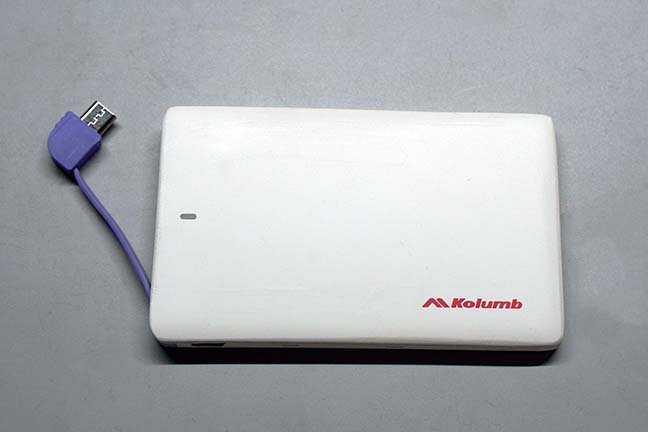
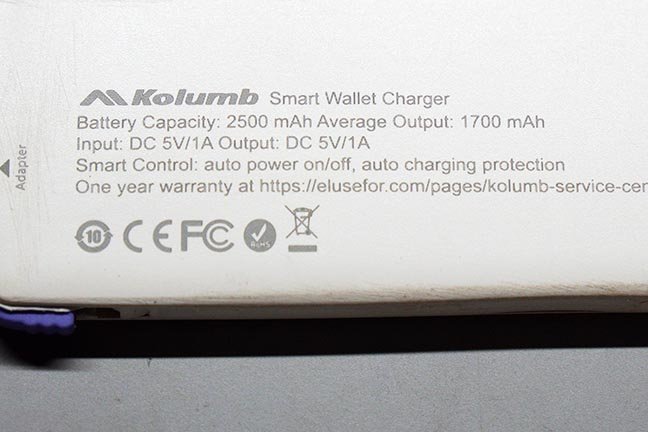
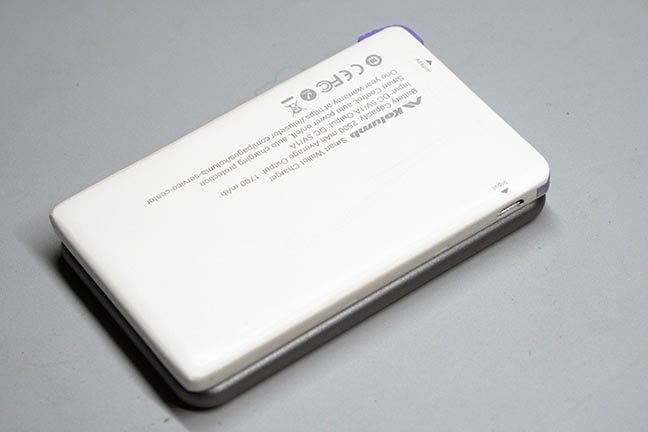
  3. Okay, I found a solution to the battery pack for the Sony a6500 and other camera housings that used the now discontinued Nauticam 36331 iThin battery pack.  It's a battery pack I found on Amazon listed as a Ultra Slim  and distributed by many dealers under different names.  The first one I received was marketed by " Kolumb "'. When I went to buy a 2nd, it's no longer available, but another identical unit is under the name " Attom Tech " NOTE: Turns out the Attom case is wider than the Kolumb case by and bit and won't work. Get the Kolumb power pack.

    It's exactly the same battery under a different name.  I tried to find a suitable battery on Alibaba and have a Chinese dealer/manufacturer looking for one that doesn't need modifications and has the same exact measurements and specs as Nauticam's iThin pack.  So far he has been unable to find one. He actually proposed the same white plastic one I bought on Amazon. Apparently iThin no longer exist and why Nauticam discontinued the product. 

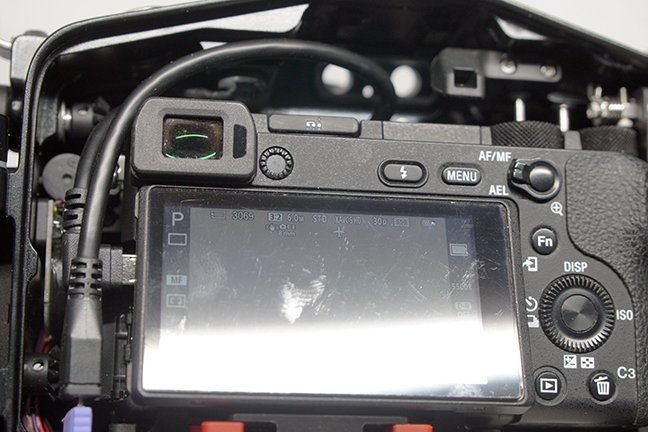
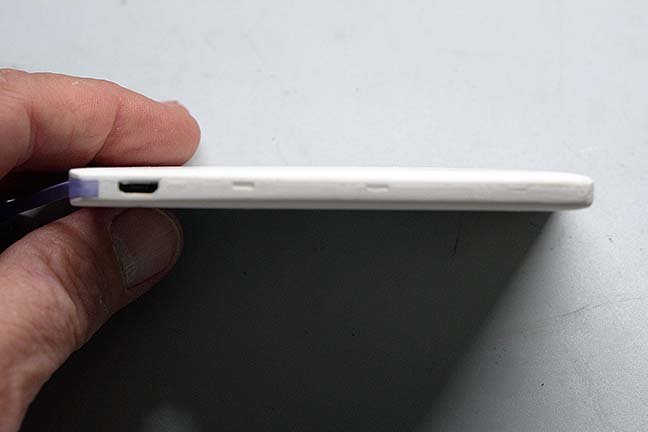
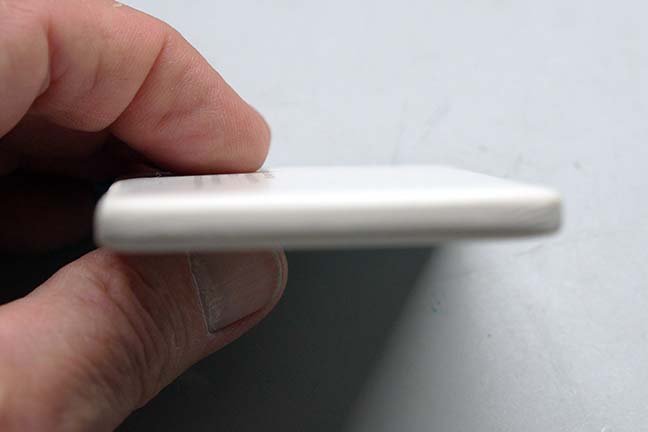
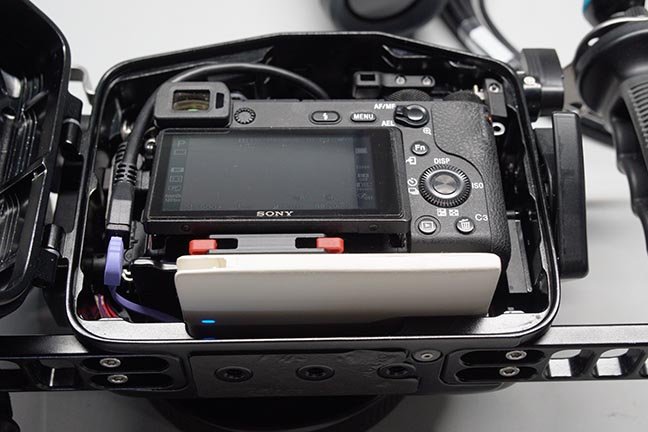
    The Kolumb Power Pack will work with just some slight physical modifications. It has exactly the same length and thickness as the Nauticam iThin, but it's 3mm wider at 61mm (the iThin was 58mm).  This extra 3 mm will keep the rear door from closing correctly on the o-ring. The solution is to take a fine straight file and remove 3mm of plastic casing on it's sides.  Most of it will come from the side where the built in USB cable nests itself when not in use, but some has to be taken from the side with the Micro USB power input charging port.  You can also remove some from the end, but this is not absolutely necessary, but I did so to make it exactly the same length. 

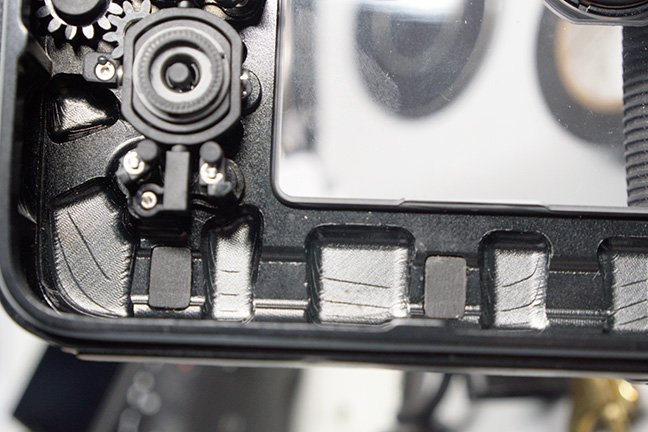
    When finished the plastic on the sides will be paper thin, but still holds the case together.  You can see in the attached photos where the top is starting to want to separate from the thin siding, so I will apply a drop of super glue to reinforce it.  One of the options I didn't try was removing two rubber pads that help seat the original battery (see photo). If these were removed from the housing, they would allow for a lot less material being removed from the case, maybe 1-1.5mm.  However, I didn't want to remove them from my NA-a6500 housing, so I filed the battery case sides down to 58mm. 

    The battery pack will shut itself down shortly after you finish charging and unplugging it. It will activate as soon as you plug it into the camera's Micro USB charging port and will stay active as long as it plugged in to the camera, even when the camera is turned on/off. In addition, it will charge the camera battery whether the camera is on/off.  I tested the charge both ways and even checked to make sure it didn't shut off when the camera battery was fully charged, which was a problem mentioned above on the original Nauticam 1st generation battery.  So this battery works exactly like the improved generation 2 Nauticam pack.

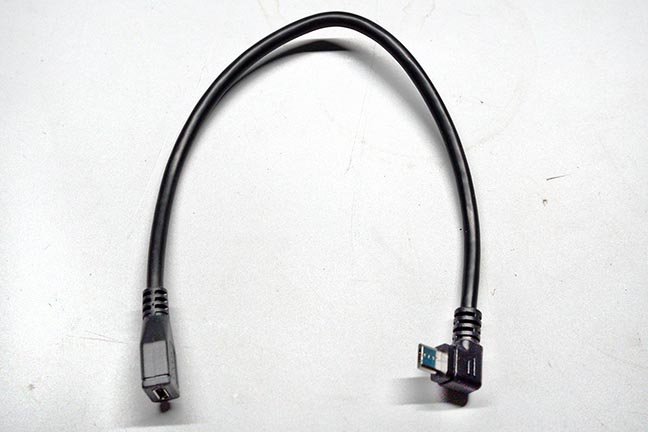
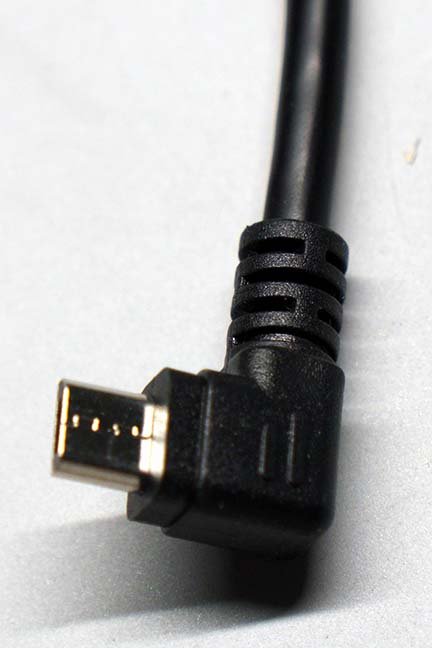
    Besides the slight physical modification, one has to purchase a 25cm Micro USB extension cord.  I had a hard time finding one the same length as the Nauticam with the correct angle (90 degrees-R angle (or L ? which was confusing due to bad pictures and descriptions on Amazon). I ended up buying a pair of one left hand and one right hand to make sure I got the correct one.  The pair cost me $8 and the battery $12. Heres' a link to the 25cm cables: https://www.amazon.com/dp/B09SD5Z3MM?psc=1&ref=ppx_yo2ov_dt_b_product_details

    The cable is routed exactly the same as the Nauticam unit.  You plug the new battery's built in Micro USB cable into the new extension cord which has a 90 degree angle for plugging into the camera.

    Took 15 minutes to file down the plastic case and you're ready to go.  See the photos below for everything you need to do. 

    Finally more power for our cameras that are designed to work in housings with Nauticam's now discontinued battery pack. Should I get notice of another battery from my Chinese contact that works better, I'll update and let you know. For now, this one and it's cable are inexpensive at $20 and work just fine.

    Good luck,

    Marshall
    DSC00699.JPG

    DSC00700.JPG

    DSC00701.JPG

    DSC00702.JPG

    DSC00703.JPG

    DSC00704.JPG

    DSC00705.JPG

    DSC00706.JPG

    DSC00707.JPG

    DSC00708.JPG

    DSC00709.JPG

    DSC00710.JPG

    DSC00711.JPG

    Edited by Marsh
  4. UPDATE: The Attom Tech case arrived today and was  larger and not as thick as the Kolumb case. The electronics appear the same, but if you can get the Kolumb cases they are easier to file down and get you to 58mm. The Attom Tech case is at 61mm and I'm running out of plastic to remove. I may try to remove the two rubber bumpers I mention in the housing to accommodate if necessary, but best to just get the Kolumb Power Pack in the above photo. 

    Edited by Marsh
  5. Do you have a link for the Kolumb one?


    Sent from my iPhone using Tapatalk

  6. I discovered today that they're getting quite difficult to find.  The one I got from Amazon this week, that I ran my tests on,  was apparently the last one in stock. I just happened to score the only two on eBay tonight for $9 & 17.  Like the iThin battery, they're most likely no longer being manufactured. Too bad for us Nauticam users.  

    Walmart still lists them at $28:  https://www.walmart.com/ip/Ultra-Slim-Ultra-Portable-Ultra-Safe-2500mAh-Wallet-Pocket-Power-Card-Bank-ONE-for-All-External-Mini-Battery-Most-Smart-Phone-Digital-Devices-White-L/217372674

    Hope you can find one.

    Good luck,

    Marshall

     

    Edited by Marsh
  7. It might be possible for someone with electronic skills to make one up using something like this:

    https://core-electronics.com.au/polymer-lithium-ion-battery-2000mah-38459.html

    You would need to add a DC-DC converter to get 5V and a USB socket.  This is probably what is inside those power banks.

    Something like this might work: 

    https://core-electronics.com.au/dc-dc-usb-0-9v-5v-to-5v-dc-boost-step-up-power-supply-module.html

    you could probably mount battery and circuit onto a board and shrink wrap it.

  8. Making one from scratch might work, but it would  be rather difficult to get it down to size.  In regards to basic components and such,  I still think the Attom Tech model will work filed down if those two rubber bumpers pads were removed from the housing.  Or one can just file the Attom Tech down to 58mm and not worry about the casing holding together by shrink wrapping it as you suggested.  

    I still have some manufacturers on Alibaba doing some hunting for me. The size factor of the Kolumb might still be available. It's just that Amazon makes things so convenient for most divers. If a Kolumb model shows up on ebay, grab it.  Be nice to know if the Walmart source still has a supply. 

    Edited by Marsh
  9. 10 hours ago, Marsh said:

    Making one from scratch might work, but it would  be rather difficult to get it down to size.

    I think the dimensions of the components I listed should work if placed on a flat plastic card, they have dimensions for both components on the website.  The battery is 56mm wide x long and the circuit board 34 x 16 mm the only dimension not listed is the height.

  10. I bit the bullet and purchased the $28 kolumb power pack listed on walmart. Lets see if thats what actually shows up or if the lister pulls a switcheroo.

  11. My Chinese sources got back to me today and said they could find nothing the size of the original Nauticam iThin battery.  Too bad, I was hoping for a alternate that wouldn't require any modifications at all.  

  12. Howdy!

    So, I have an update for you all. I bought a bunch of batteries a while back and then said screw it. Well my original Nauticam battery is getting long in the tooth so I pulled them back out after reading this thread. 

    I've found what I think is a working solution.  

    Using this battery:

    Attom Tech Ultra Thin 

    https://www.amazon.com/Attom-Tech-Portable-External-Emergency/dp/B07JZCZSH9


    and this cable:

    https://www.amazon.com/gp/product/B01N5OOYE1/ref=ppx_yo_dt_b_search_asin_title?ie=UTF8&psc=1


    I was able to get the camera to charge and recognize the battery as power. The battery DID not turn off. Now after 24 hours the battery was drained so keep that in mind. 


    Now to fit it in the A6400 housing I had to pop the cover off the battery. This exposes the insides but who cares,  It then fit with no issue into the housing, The door closes as normal it seems. 


    Just thought I'd share. 


    -Scott


  13. Great work Scott, a battery with a USB A output like the original Nauticam iThin battery!  If all one has to do is pop off the lid and the other measurements work, that's an easy alternative.  The Attom Tech I experimented with (and previously referred to)  was a bit larger and had a built in Micro USB male cable output, so apparently Attom Tech makes two models of Ultra slim batteries. The one you show appears to be their latest model and is actually considerable smaller than both the batteries I found, along with it's length and width shorter than the Nauticam iThin! Plus, it has more power at 3,000 Mah compared to 2,400.  Nice that we now have some alternatives to Nauticam's now discontinued iThin battery. I noticed it has both Micro and USB C inputs, so it'll probably be around for a while :-) 

    Cheers for sharing this! 

    Marshall

    Edited by Marsh
  14. 1 hour ago, ScottAudette said:

    Howdy!

    So, I have an update for you all. I bought a bunch of batteries a while back and then said screw it. Well my original Nauticam battery is getting long in the tooth so I pulled them back out after reading this thread. 

    I've found what I think is a working solution.  

    Using this battery:

    Attom Tech Ultra Thin 

    https://www.amazon.com/Attom-Tech-Portable-External-Emergency/dp/B07JZCZSH9


    and this cable:

    https://www.amazon.com/gp/product/B01N5OOYE1/ref=ppx_yo_dt_b_search_asin_title?ie=UTF8&psc=1


    I was able to get the camera to charge and recognize the battery as power. The battery DID not turn off. Now after 24 hours the battery was drained so keep that in mind. 


    Now to fit it in the A6400 housing I had to pop the cover off the battery. This exposes the insides but who cares,  It then fit with no issue into the housing, The door closes as normal it seems. 


    Just thought I'd share. 


    -Scott


    Thats funny because I bought this battery a few months ago to try it in the a6400 housing and it didn't fit so I returned it.  Didn't even think about taking the cover off.  What is exposed when removing the cover?  

    Edited by Wah
  15. 9 hours ago, Wah said:

    Thats funny because I bought this battery a few months ago to try it in the a6400 housing and it didn't fit so I returned it.  Didn't even think about taking the cover off.  What is exposed when removing the cover?  

    The top of the battery is exposed and the board.  But neither should cause you any issues. 

  16. Scott,

    How do you take the cover off? Is it glued on or does it have a snap on design that simply required one to use an X-Acto knife or some other sharp blade to wedge between the case and top cover?

    Thanks,

    Marshall

  17. Okay, I used a straight edge razor blade under one corner to get it started and then followed around with a spludger until it completely snaps off.  I put a piece of nylon electric tape over the circuit board exposed contacts and wires to finish the job. Looks like one has to get the cable you suggested as my Nauticam kit has the USB A contacts in the reverse side.  Hooked it up to my Sony a6500 and everything works fine.

    Thanks again Scott for sharing. 

    Marshall


  18. UPDATE:  In doing some electrical testing,  the new smaller Attom Tech battery seems to be displaying some of the same characteristics as the original Gen. 1 iThin.  It deactivates and shuts down after a while. I haven't done extensive testing, but on the surface it looks like it does this when the camera battery is fully charged and/or after a certain length of time.  Not totally certain how this would affect real world use? The Kolumb battery supplies a constant charge when the battery is plugged into the camera and never deactivates until unplugged, same as the Nauticam Gen. 2 iThin.  Perhaps some divers who have used the Attom Tech can chime in on real world usage as a viable working replacement.

    Thanks,

    Marshall

    UPDATE: Seeing that Scott didn't experience the battery shutting down, I ran a fully charged camera battery and Attom Tech, both starting at 100% with the camera "on" all the time. This time the battery did not shut down and kept the camera battery at 100% while it discharged itself first.  It's starting to look like a camera "on" position will keep the Attom Tech going. However,  should one turn the camera off the Attom Tech will deactivate at some point, either when the camera battery is fully charged or at some other timing point, of which I'm not sure of yet, but will inform after fully testing. One good thing to note, is the shut down wasn't immediate after I turned the camera off, so it might not shut down as long as the camera is periodically turned on/off during the dive, which is how I shoot (and likely many others) to conserve battery power.  It appears the only way to get the Attom Tech to reactivate is to unplug and replug the camera or push the Attom Tech battery check button, which means opening the housing :-( 

    I'm going to run the same tests on the Kolumb power pack and see what the differences are between the two.  My initial test on the Kolumb showed it activated after the camera was attached but stayed active and charging whether the camera was on or off.  I'll try to verify all of this when I get some time.

    Edited by Marsh — UPDATE
  19. Hi Marshall,

    I dove this weekend and didn't see the battery pack turning off at all. Regardless of on/off switch position on camera. Maybe it's camera specific issue as I am using an A6400 with the battery? After reading this Friday night I put the battery pack on in the housing and the camera switched off to double check what I had seen previously. In the morning the lights on the battery pack were still lit, 12 hours roughly. 

    The only issue is that the battery will drain regardless as there is load on it wether the camera is on or off it seems. That being said I did five dives this weekend (charged the battery over one night to be clear) and walked out of the water with a full camera battery! Something to be said for that! LOL

    -Scott


    On 8/1/2022 at 11:16 AM, Marsh said:

    UPDATE: Seeing that Scott didn't experience the battery shutting down, I ran a fully charged camera battery and Attom Tech, both starting at 100% with the camera "on" all the time. This time the battery did not shut down and kept the camera battery at 100% while it discharged itself first.  It's starting to look like a camera "on" position will keep the Attom Tech going. However,  should one turn the camera off the Attom Tech will deactivate at some point, either when the camera battery is fully charged or at some other timing point, of which I'm not sure of yet, but will inform after fully testing. One good thing to note, is the shut down wasn't immediate after I turned the camera off, so it might not shut down as long as the camera is periodically turned on/off during the dive, which is how I shoot (and likely many others) to conserve battery power.  


  20. Hi Scott,

    That is really good news! As I mentioned,  it took quite a while (actually didn't time it, just left it overnight) for the battery to shut down with the camera off.  So turning the camera on/off may be keeping it active. My testing was on a a6500 so it's possible (as you mention) the cameras power systems are different, since you let it run 12 hours in off position and still had active Attom Tech indicator lights?  Moreover, I only tested it once, so maybe it was a fluke that it shut down?  I just haven't been able to give it the time for more testing, especially in a real world use like you.  Five dives and still a full battery is fantastic!

    As to the battery(s) discharging even when the camera is off and not being used, I had read on a Sony forum (or the Sony official site tech site)  that the camera's WiFi mode searches for a signal even when the camera is off which acts as a battery drain. Unless you're using WiFi  you might try turning it off to see if the drain is still there. I've done this on my a6500 but haven't really taken the time to see if it works.  

    Marshall

    Edited by Marsh

Account

Navigation

Search

Search

Configure browser push notifications

Chrome (Android)
  1. Tap the lock icon next to the address bar.
  2. Tap Permissions → Notifications.
  3. Adjust your preference.
Chrome (Desktop)
  1. Click the padlock icon in the address bar.
  2. Select Site settings.
  3. Find Notifications and adjust your preference.