Skip to content

Video Gear and Technique / Archived topic

IS IT WORTH IT? GH5s - No Stabilization

Started by gearbow_36218 ·

  • 67Posts
  • 67Replies

Read-only discussion

IS IT WORTH IT? GH5s - No Stabilization

67 posts
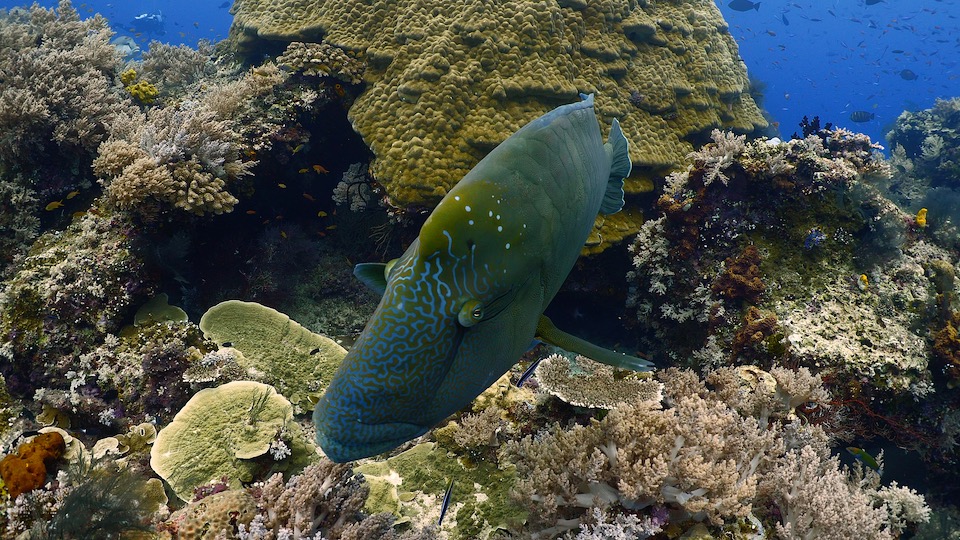
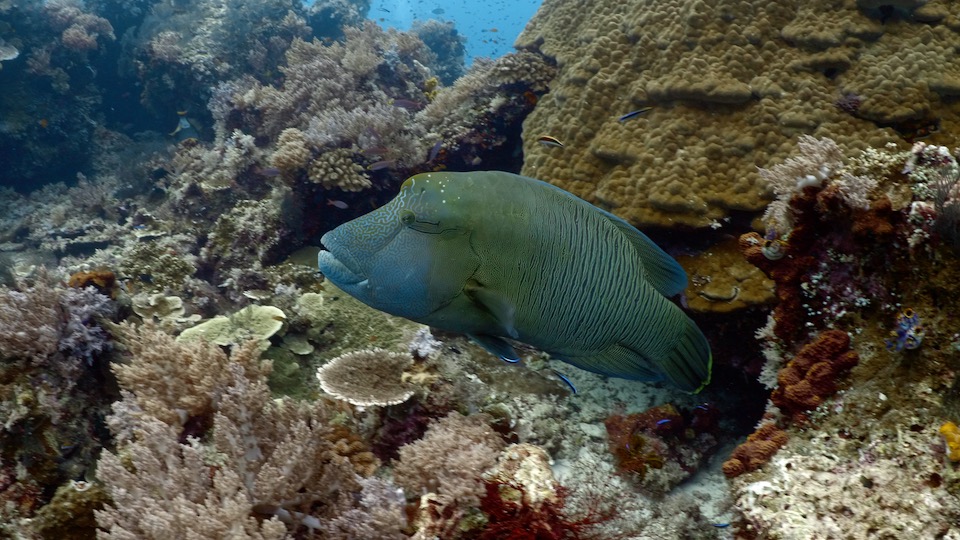
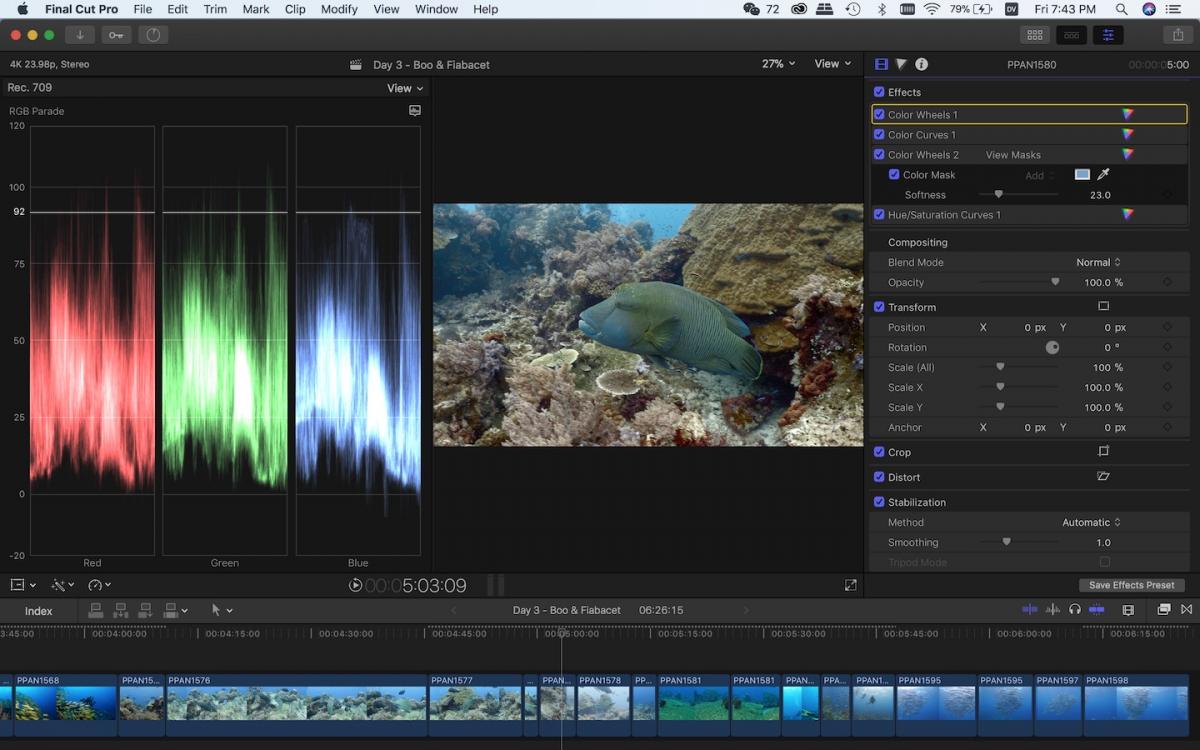
  1. GH5, CWB with ambient light at 10m, no red filter, standard picture profile, 4k60fps in 8-bit 4:2:0 at 150mbs.


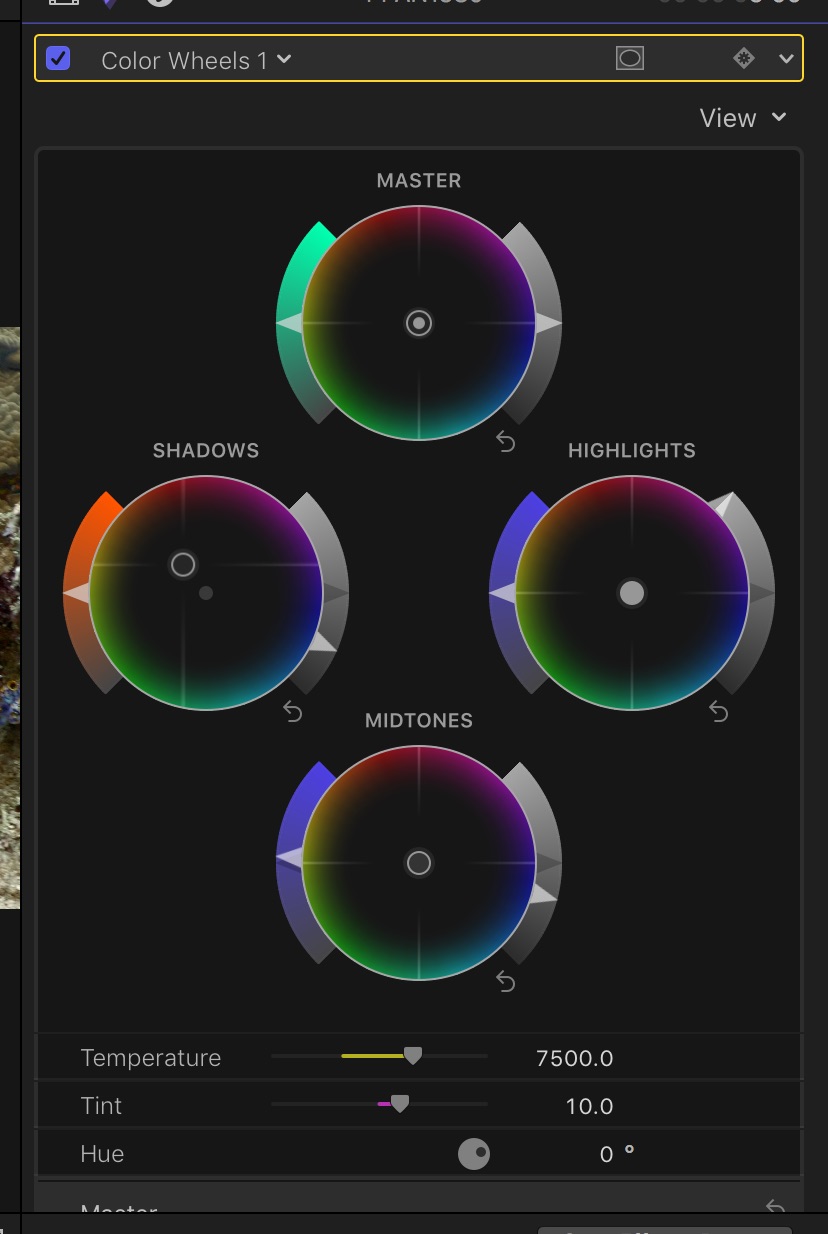
    Before/after simple color correction in FCPX (WB->warmer/+magenta; crushed shadows)


    post-42872-0-50261400-1520590202_thumb.jpg

    post-42872-0-16872000-1520590248_thumb.jpg


    For the record, I tried shooting same scene at 4k24fps in 10-bit 4:2:2 400mbs with v-log and was much less pleased with the results after applying the official lut and trying to color correct the scene. I think you give up too much color information when shooting in v-log.


    post-42872-0-73745300-1520590080_thumb.jpg

  2. GH5, CWB with ambient light at 10m, no red filter, standard picture profile, 4k60fps in 8-bit 4:2:0 at 150mbs.


    Before/after simple color correction in FCPX (WB->warmer/+magenta; crushed shadows)


    attachicon.gifDay 3 - Boo & Fiabacet 3.jpg

    attachicon.gifDay 3 - Boo & Fiabacet 2.jpg


    For the record, I tried shooting same scene at 4k24fps in 10-bit 4:2:2 400mbs with v-log and was much less pleased with the results after applying the official lut and trying to color correct the scene. I think you give up too much color information when shooting in v-log.


    attachicon.gifDay 3 - Boo & Fiabacet 5.jpg

    Lovely colors. That's actually the conclusion I've come to as well after seeing lots of v log footage. Works well for macro but for wide angle shots I totally agree with you about losing too much information.


    Skickat från min VTR-L29 via Tapatalk

  3. For the record, I tried shooting same scene at 4k24fps in 10-bit 4:2:2 400mbs with v-log and was much less pleased with the results after applying the official lut and trying to color correct the scene. I think you give up too much color information when shooting in v-log.


    attachicon.gifDay 3 - Boo & Fiabacet 5.jpg

    Have you made adjustments others than applying the LUT? Because with V-Log you still need add some saturation and contrast at minimum.


    Sent from my iPhone using Tapatalk

  4. post-42872-0-49514300-1520593139_thumb.jpg post-42872-0-30486400-1520593173_thumb.jpg post-42872-0-29752700-1520593234_thumb.jpg


    Yes. There's quite a bit of extra contrast added. Adding additional saturation after the LUT only produces less natural-looking colors. My point isn't that the color-corrected result from v-log looks terrible -- it just doesn't look as good (and certainly not any better) than the color corrected result from shooting in the standard picture profile in 8bit.


    Basically, when you choose to shoot a desaturated image initially, what you're doing by compressing the saturation range (as all log formats do) is throwing away the subtle differences between shades of color. Adding saturation back in post doesn't bring back those subtle differences -- they're gone forever. Shooting in 10 bit does alleviate this to some extent, but at the end of the day, you're not gaining anything. Probably better to just shoot in 10-bit using the standard picture profile.

  5. OK thanks for the feedback.

    Yeah, probably for underwater footage as we are looking for natural look rather than cinematic look, a non-log picture profile seems right.

  6. GH5, CWB with ambient light at 10m, no red filter, standard picture profile, 4k60fps in 8-bit 4:2:0 at 150mbs.


    Before/after simple color correction in FCPX (WB->warmer/+magenta; crushed shadows)


    attachicon.gifDay 3 - Boo & Fiabacet 3.jpg

    attachicon.gifDay 3 - Boo & Fiabacet 2.jpg


    For the record, I tried shooting same scene at 4k24fps in 10-bit 4:2:2 400mbs with v-log and was much less pleased with the results after applying the official lut and trying to color correct the scene. I think you give up too much color information when shooting in v-log.


    attachicon.gifDay 3 - Boo & Fiabacet 5.jpg


    I just watched your "What Lies Beneath" that was amazing!! Liked, subbed and shared! Would love to meet you one day and get some tips. Looks like you're a fellow Cunuk as well!

  7. Thanks Mike. I'm mostly based in Indonesia these days :)

  8. Does the 5s fit/work properly in the NA-GH5 housing?

  9. Does the 5s fit/work properly in the NA-GH5 housing?

    Yes


    Skickat från min VTR-L29 via Tapatalk

  10. Thanks Mike. I'm mostly based in Indonesia these days :)

    Did you switch from the Sony to the Gh5?


    Sent from my SM-G955W using Tapatalk

  11. Yes, I used to use the A7RII underwater. Now it's relegated to land-only duties.

  12.  

    Yes. There's quite a bit of extra contrast added. Adding additional saturation after the LUT only produces less natural-looking colors. My point isn't that the color-corrected result from v-log looks terrible -- it just doesn't look as good (and certainly not any better) than the color corrected result from shooting in the standard picture profile in 8bit.


    Basically, when you choose to shoot a desaturated image initially, what you're doing by compressing the saturation range (as all log formats do) is throwing away the subtle differences between shades of color. Adding saturation back in post doesn't bring back those subtle differences -- they're gone forever. Shooting in 10 bit does alleviate this to some extent, but at the end of the day, you're not gaining anything. Probably better to just shoot in 10-bit using the standard picture profile.

    Have you tried HLG? Can't remember where I read it but someone was actually advising to bump up the in-camera saturation and take saturation off in post if needed.

  13. Yes, I've done a few tests with HLG. -- for some reason, if I bring the footage into a regular (non HDR) timeline in FCPX, the colors are all wrong and there's no easy way to normalize them

    Have you tried HLG? Can't remember where I read it but someone was actually advising to bump up the in-camera saturation and take saturation off in post if needed.


    Yes, I've done a few tests with HLG. With underwater shots, for some reason, if I bring the footage into a regular (not wide color gamut) timeline in FCPX, the colors are all quite a bit off and there's no easy way to normalize them. So I prefer using VLOG over HLG for that reason -- at least with vlog there's an easy official LUT to covert it to REC709 that will get you in the ballpark for color correction. But as I mentioned, 99% of the time I think you're just fine shooting in standard without any sort of log profile at all.


    Regarding saturation, theoretically I think you'd indeed be better off removing saturation in post rather than adding it in terms of preserving as much color shade separation as possible. But the best option IMO on cameras that don't record in raw is to get the saturation in camera as close to the final output you want so you don't have to do any tweaking in post. That's why I prefer the standard color profile over CineD or Vivid/Landscape. CineD I find desaturates the footage in a way that looks unnatural for underwater shots and it's hard to get them to look good by just adding saturation in post. Conversely, Vivid/Landscape are a bit too saturated. If you reduce the saturation in post, you get a result that looks ok, but not any better than the standard picture profile IMO.


  14. Yes, I've done a few tests with HLG. -- for some reason, if I bring the footage into a regular (non HDR) timeline in FCPX, the colors are all wrong and there's no easy way to normalize them


    Yes, I've done a few tests with HLG. With underwater shots, for some reason, if I bring the footage into a regular (not wide color gamut) timeline in FCPX, the colors are all quite a bit off and there's no easy way to normalize them. So I prefer using VLOG over HLG for that reason -- at least with vlog there's an easy official LUT to covert it to REC709 that will get you in the ballpark for color correction. But as I mentioned, 99% of the time I think you're just fine shooting in standard without any sort of log profile at all.


    Correct me if i am wrong but the idea i have about HLG is that it is designed not as a VLOG profile but as an out of the box HDR ready profile (meaning you dont have to do all this grading that is required with VLOG). From what i read its designed to work on a wide gamut timeline and then carries metadata that allows non HDR monitors to play it as such and HDR monitors to take advantage of it. I think Resolve has an HLG to 709 lut but not 100% sure need to check it.

  15. Correct me if i am wrong but the idea i have about HLG is that it is designed not as a VLOG profile but as an out of the box HDR ready profile (meaning you dont have to do all this grading that is required with VLOG). From what i read its designed to work on a wide gamut timeline and then carries metadata that allows non HDR monitors to play it as such and HDR monitors to take advantage of it. I think Resolve has an HLG to 709 lut but not 100% sure need to check it.


    I just found out that FCPX 10.4 also has a "HDR Tools" effect that allows you to map from HLG to Rec709 -- but by default the conversion doesn't re-map the highlights into the 709 range, it just cuts them off. Pretty ugly effect underwater if you're shooting upwards into the water column.

  16. GH5, CWB with ambient light at 10m, no red filter, standard picture profile, 4k60fps in 8-bit 4:2:0 at 150mbs.


    Before/after simple color correction in FCPX (WB->warmer/+magenta; crushed shadows)


    attachicon.gifDay 3 - Boo & Fiabacet 3.jpg

    attachicon.gifDay 3 - Boo & Fiabacet 2.jpg


    For the record, I tried shooting same scene at 4k24fps in 10-bit 4:2:2 400mbs with v-log and was much less pleased with the results after applying the official lut and trying to color correct the scene. I think you give up too much color information when shooting in v-log.


    attachicon.gifDay 3 - Boo & Fiabacet 5.jpg


    I'd be very interested to know more about your colour correction process as i will also be shooting mostly in 4k 60p 8 bit.

  17. Hey guys I finally did it after many years mulling over the options, I am a Proud new owner of a GH5 in the Nauticam housing. OLY M.Zuiko Pro 7-14 and the 60mm macro! Little bit of buyers remorse as it was a lot of money for me but very excited to get in the water and learn. I've been shooting GoPro for years and have some pretty good content but looking to up my game so to speak. You all can expect this NEWB to be asking a fair bit of questions on Wetpixel and don't be surprised if you get a PM from me in the near future as all you guys are amazing. I am open to suggestions and critique about method and settings, workflow, and equipment options. I currently am limited to sola 3500's with diffuser and no monitor yet. My quote for a monitor package is 2900 USD for the 502 HD. That might be a little rich for me at this stage. A better light package is for sure in the future.


    If you had to make a choice on a better light package or monitor for video which would you go for first?

  18. Hey guys I finally did it after many years mulling over the options, I am a Proud new owner of a GH5 in the Nauticam housing. OLY M.Zuiko Pro 7-14 and the 60mm macro! Little bit of buyers remorse as it was a lot of money for me but very excited to get in the water and learn. I've been shooting GoPro for years and have some pretty good content but looking to up my game so to speak. You all can expect this NEWB to be asking a fair bit of questions on Wetpixel and don't be surprised if you get a PM from me in the near future as all you guys are amazing. I am open to suggestions and critique about method and settings, workflow, and equipment options. I currently am limited to sola 3500's with diffuser and no monitor yet. My quote for a monitor package is 2900 USD for the 502 HD. That might be a little rich for me at this stage. A better light package is for sure in the future.


    If you had to make a choice on a better light package or monitor for video which would you go for first?

    Maybe this needs to be moved to a different thread.

    I actually unboxed my monitor yesterday (smallhd 501 in nauticam housing) and I don't regret the purchase one bit.

    To answer your question tho I guess it depends what u want to shoot most, if macro is your priority I'd definitely pick up a monitor as your lights are sufficient for that.

    If wide angle is your main priority I'd definitely get better lights before a monitor. Monitor isn't really a necessity at all, but a very nice addition to primarily macro as u don't have to bury your head in the sand[emoji16]


    Skickat från min VTR-L29 via Tapatalk

  19. I use the 45° viewfinder for macro. Less bulky and pricey. I like the fact that I can concentrate on the subject by looking through a viewfinder.

Nauticam

Account

Navigation

Search

Search

Configure browser push notifications

Chrome (Android)
  1. Tap the lock icon next to the address bar.
  2. Tap Permissions → Notifications.
  3. Adjust your preference.
Chrome (Desktop)
  1. Click the padlock icon in the address bar.
  2. Select Site settings.
  3. Find Notifications and adjust your preference.