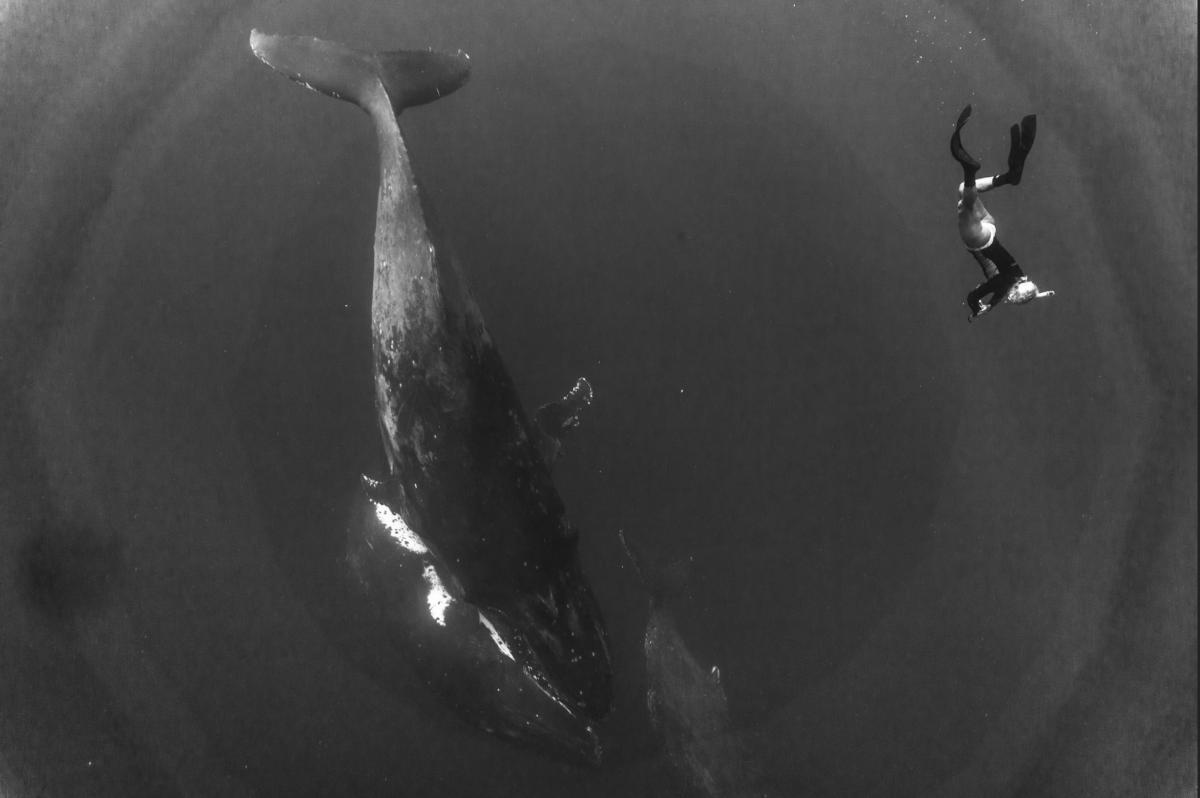
I came back to Tonga and took some pictures with the whales. I was using a dome port on an underwater housing and 16-55mm lens. As I was processing the pictures in Lightroom, I see strange concentric circles in the picture. Does anyone have any idea is this because of the dome?
I have attached one of such picture.
Thanks,
That looks to be a reflection of the front of your lens, coming off of the inside of the dome.... at least, thats my guess....
What direction was the ambient light coming from?
Hi photography gurus,
I came back to Tonga and took some pictures with the whales. I was using a dome port on an underwater housing and 16-55mm lens. As I was processing the pictures in Lightroom, I see strange concentric circles in the picture. Does anyone have any idea is this because of the dome?
I have attached one of such picture.
Thanks,
I think you are using an acrylic dome and it is a reflection...
Sent from my iPhone using Tapatalk
Interesting observation! Sun was on the top and I was looking down and it does look like a lens reflection of the blades. I was wondering why it looks like a polygon.
So is there a way to avoid it? Does acrylic or glass matter?
Short of an antireflection coating, you could consider post processing. For astrophotography, I use Gradient Exterminator to get rid of such banding.
It might be a reflection, but the banding suggests to me that it could also be an artifact of post processing. I see this sometimes when applying extreme corrections like a lot of contrast and color correction to a lower resolution JPEG file. Were you working with a RAW file or JPEG?
I also see what looks like sensor dust at the lower left.
I shoot a lot, including tons of blue water whale images and I've never seen a reflection like that. Reflections come from sunlight hitting the front of the lens and reflecting in the dome port. You only ever see a section of the lens, not an entire circle. You'd have to shoot with the sun dead center in the frame for that to be possible.
I'd agree with troporobo - my best guess is post processing artifacts. It happens with blue water images quite easily.
It might be a reflection, but the banding suggests to me that it could also be an artifact of post processing. I see this sometimes when applying extreme corrections like a lot of contrast and color correction to a lower resolution JPEG file. Were you working with a RAW file or JPEG?
I also see what looks like sensor dust at the lower left.
You are right. I was processing Raw and playing with contrast and shadows to get the whales clearer. Weirdly when I used the same dome for my underwater pictures, I didnt see this banding. So I was wondering if this is the dome acting differently because of the sunlight as I was getting a lot of sunlight while freediving.
I shoot a lot, including tons of blue water whale images and I've never seen a reflection like that. Reflections come from sunlight hitting the front of the lens and reflecting in the dome port. You only ever see a section of the lens, not an entire circle. You'd have to shoot with the sun dead center in the frame for that to be possible.
I'd agree with troporobo - my best guess is post processing artifacts. It happens with blue water images quite easily.
Thats interesting that you say blue water pictures. Do you mean as general dive pictures or where you are on shallow depth and shooting whale sharks/whales?
Thats interesting that you say blue water pictures. Do you mean as general dive pictures or where you are on shallow depth and shooting whale sharks/whales?
I mean open ocean images - where you're shooting into the endless blue. I've seen some weird things happen, especially in post processing trying to add contrast.
Yes generally from a shallow depth as I do most of this stuff freediving.
If you were shooting downwards there is no lens reflection in the dome
However have you considered light bleeding into the viewfinder? If your camera has an optical viewfinder and you are using the screen this can aggravate things together with banding from the sensor
Sent from my iPhone using Tapatalk
I mean open ocean images - where you're shooting into the endless blue. I've seen some weird things happen, especially in post processing trying to add contrast.
Yes generally from a shallow depth as I do most of this stuff freediving.
Yeah..I use the same setup in diving...but I haven't found that issue before. This is quite consistent in freediving/endless blue pictures with post processing....any tips to avoid it?
If you were shooting downwards there is no lens reflection in the dome
However have you considered light bleeding into the viewfinder? If your camera has an optical viewfinder and you are using the screen this can aggravate things together with banding from the sensor
Sent from my iPhone using Tapatalk
It does have an optical view finder..I dont have a blind for it..but it is inside the housing. So its not completely blocked...
It does have an optical view finder..I dont have a blind for it..but it is inside the housing. So its not completely blocked...
So that is definitely possible. What camera and lens did you use?
Sent from my iPhone using Tapatalk
I've found this type of banding when adjusting contrast to darken background after using a noise filter to eliminate large backscatter. Some of the newer tools on PS work better without this kind of remnants.
I've found this type of banding when adjusting contrast to darken background after using a noise filter to eliminate large backscatter. Some of the newer tools on PS work better without this kind of remnants.
If the banding is not there in the raw file the op is going too far with editing
But I thought the ring are already there?
Sent from my iPhone using Tapatalk
So that is definitely possible. What camera and lens did you use?
Sent from my iPhone using Tapatalk
I use a sony a6000 and kit 18-55mm with meikon housing
I've found this type of banding when adjusting contrast to darken background after using a noise filter to eliminate large backscatter. Some of the newer tools on PS work better without this kind of remnants.
Thats interesting. I have PS creative cloud. What kind of tools that you suggesting? I can try and see...
I use a sony a6000 and kit 18-55mm with meikon housing
So plastic and does the banding show also before editing the picture?
Sent from my iPhone using Tapatalk
So the op has plastic meikon housing and it does not have a dome just a push on wet adapter. The camera does not have an optical viewfinder but electronic
With that in mind are you at least shooting raw? Because jpeg will exhibit banding immediately as they are 8 bits as soon as you touch them
Sent from my iPhone using Tapatalk
So the op has plastic meikon housing and it does not have a dome just a push on wet adapter. The camera does not have an optical viewfinder but electronic
With that in mind are you at least shooting raw? Because jpeg will exhibit banding immediately as they are 8 bits as soon as you touch them
Sent from my iPhone using Tapatalk
I have the dome they sell with meikon body. I was shooting raw. Let me see if I can attach the link of the raw file so you gurus can take a look. Thanks again...really appreciate the help.