Skip to content

Video Gear and Technique / Archived topic

4k shipwerck

Started by thani ·

  • 26Posts
  • 26Replies

Read-only discussion

4k shipwerck

26 posts
  1. Hi,

    This video is shot in my home country in the emirates of Fujairah. It is during different seasons. Although visibility is not great, the wreck is full of life and lies in 24m. The whole video is shot in ambient light with red filter using the Panasonic GH5s.

    I hope you enjoy it.


    Edited by thani
  2. Looks very nice Thani.   What equipment / camera?  

    J-

  3. Thank you John. I used the GH5s in Nauticam housing. All shot in ambient light with red filter.

  4. Inchape :)

    Its amazing how the GH5s works in terms of noise and color compared to the GH5.

  5. 3 hours ago, Lionfi2s said:

    Inchape :)

    Its amazing how the GH5s works in terms of noise and color compared to the GH5.

    where did you read inchape? it is suppose to be Inchcape :)

    yes, the GH5s is quite capable in low light. In clear waters it will even do much better in ambient light.

  6. On 4/13/2020 at 2:27 PM, thani said:

    where did you read inchape? it is suppose to be Inchcape :)

    yes, the GH5s is quite capable in low light. In clear waters it will even do much better in ambient light.

    Inchcape it is I just made a typo

  7. That's the benefit of dual gain amplifier in action. Noise is contained colours as good as they can be considering the situation

    I think the URPRO past 15 meters has an edge on other filters

  8. 4 hours ago, Interceptor121 said:

    That's the benefit of dual gain amplifier in action. Noise is contained colours as good as they can be considering the situation

    I think the URPRO past 15 meters has an edge on other filters

    I really like the URPRO red filter and I tested at 30m depth with good color reproduction.  Our 30 meters due to the bad visibility could mean that it can work much deeper in good visibility conditions.

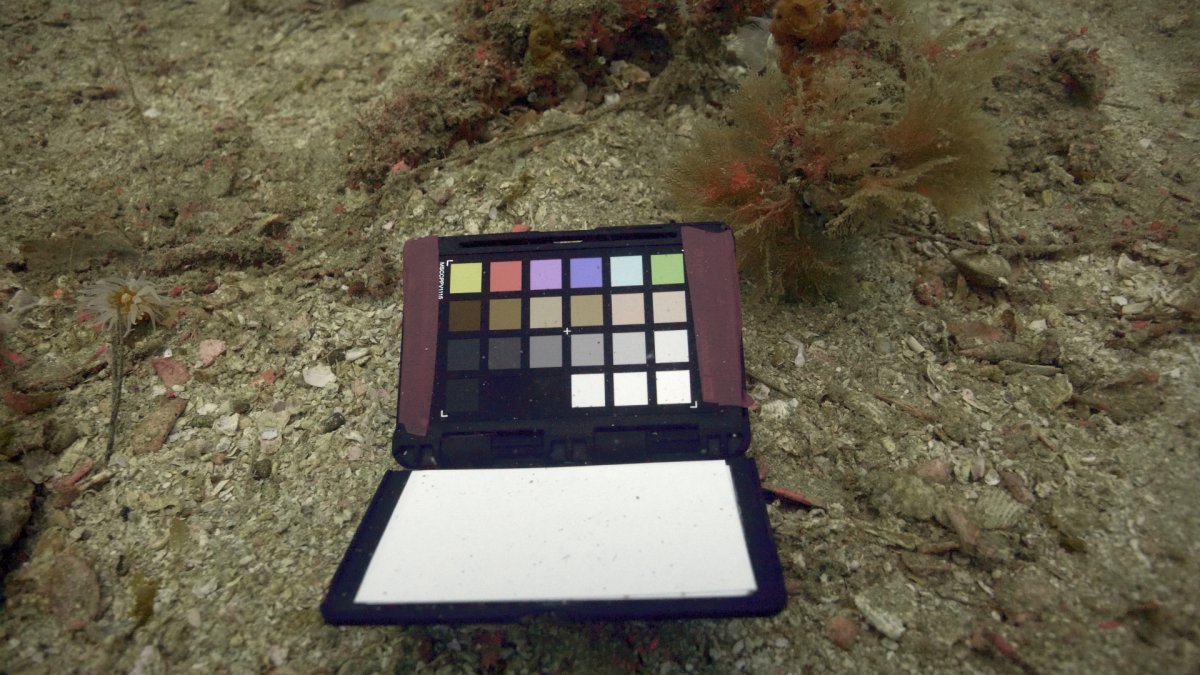
    BTW,  when I post the attachment the image/colors lose their contrast and color saturation during upload on wetpixel. Any body is facing the same issue?

    The image on my laptop is quite close the physical color chart.


    Color_Chart_FHD_90.thumb.jpg.2decc0f7c57c8d057d46686c4e181dc3.jpg


  9. Well done, thanks for sharing. That's a lot of life down there. Great escape for this cold, snowy evening with some nice variety.

  10. Wow very nice colours indeed

  11. Thank you guys for your kind comments & stay safe.

  12. @thani what is the ISO range in the video out of interest?

  13. ISO is configured as Auto (the camera decides) with a maximum ISO set at 6400.

  14. So I'm the last Jedi working full manual ?:ninja:

  15. 45 minutes ago, thani said:

    ISO is configured as Auto (the camera decides) with a maximum ISO set at 6400.

    But at the start of the clip inside the camera you can see what is applied at least at the start

    Anyway good info

  16. 4 hours ago, Interceptor121 said:

    But at the start of the clip inside the camera you can see what is applied at least at the start

    Anyway good info

    I have not enabled ISO on my screen cause I know even if the camera decides on max 6400, It is quite usable. I use the Camera in Aperture priority mode so I can control which aperture to use. And mostly I use the largest/widest iris to maximize light cause I am shooting in ambient light. And that is why the camera will always choose the minimum possible ISO. But you can know what ISO the camera has chosen during replay time.

    4 hours ago, Davide DB said:

    So I'm the last Jedi working full manual ?:ninja:

    As explained above, this is a good functionality in the GH5/S. Make sure you keep the iso increment in smallest possible steps. But if you are shooting with artificial lights, you can have a fixed ISO. And actually if you choose to shoot in vlog, the camera uses some preferred preset to maximize dynamic range, I think.

    The only control, I choose, is aperture. and mostly It is set at the widest and the camera is in Continuous AF with AF centered as a point in the middle frame. This approach makes may focus on the videography/composition  rather than the technicality.  Remember, we mostly can not plan the shots.

    So my freind, you are one of few last Jedi’s in full manual :)

  17. On 4/19/2020 at 3:58 PM, Davide DB said:

    So I'm the last Jedi working full manual ?:ninja:

    Nope, another one here

  18. I use both auto ISO and full manual. The issue with auto ISO is that when the camera metering changes the camera drops 1/3 of a stop and this changes is visible in the footage. However this tends to happen more in long clips if you shoot 20 seconds it doesn’t really and you can cut later
    It is more a case to understand if you trust or not the metering of the camera


    Sent from my iPhone using Tapatalk

  19. 2 hours ago, Interceptor121 said:

    I use both auto ISO and full manual. The issue with auto ISO is that when the camera metering changes the camera drops 1/3 of a stop and this changes is visible in the footage. However this tends to happen more in long clips if you shoot 20 seconds it doesn’t really and you can cut later
    It is more a case to understand if you trust or not the metering of the camera


    Sent from my iPhone using Tapatalk

    I thought that with auto iso the changes were invisible.

    I have a GH5 now. I got it just a month before the lock-down. Now it looks at me from the drawer :cry:

    I hadn't the time to test auto ISO underwater. I have to try it in my flat.

  20. 2 hours ago, Interceptor121 said:

    I use both auto ISO and full manual. The issue with auto ISO is that when the camera metering changes the camera drops 1/3 of a stop and this changes is visible in the footage. However this tends to happen more in long clips if you shoot 20 seconds it doesn’t really and you can cut later
    It is more a case to understand if you trust or not the metering of the camera


    Sent from my iPhone using Tapatalk

    I agree with you that this is a good challenge to be tackled. But I think the GH5s (may be the GH5 too) Auto ISO doesn’t cause sudden shift in brightening/dimming the scene. This can be proven by further testing. I have the problem in mostly in clipping highlights cause I always manually fix my aperture. This happens when you follow the subject in situations where lighting extremely changes during the same shot. How do yo guys deal with this situation. Can you avoid it during filming or you fix this in post?

    In Davinci, I can fix this by animating for example the highlights over the duration of the clip. 

    May be it is a good idea to start a new topic on what is the best metering technique? 

    Edited by thani
Turtle

Account

Navigation

Search

Search

Configure browser push notifications

Chrome (Android)
  1. Tap the lock icon next to the address bar.
  2. Tap Permissions → Notifications.
  3. Adjust your preference.
Chrome (Desktop)
  1. Click the padlock icon in the address bar.
  2. Select Site settings.
  3. Find Notifications and adjust your preference.