Skip to content

Photography Gear and Technique / Archived topic

RX100 VI or A7 III

Started by newdiver ·

  • 35Posts
  • 35Replies

Read-only discussion

RX100 VI or A7 III

35 posts
  1. On 8/15/2020 at 4:21 PM, ChrisRoss said:

    Two strobes is a lot better for wide angle work, you can get away with a single strobe for macro a lot easier. 

    On the UWL-09F I found the compatibility table for those lenses here: http://www.fantasea.com/downloads/WetLensesCompatibilityTable.pdf

    You need to zoom into 29mm for it to not vignette. 

    I have a few more months to make a decision so I am still researching and trying to figure things out that would be best bang for buck.

    I have also been checking Nauticam WWL-C, it is a bit more expensive than the UWL-09F but being Nauticam and newer it might provide sharper image. I haven't found any info if it is compatible with Fantasea housing and not sure who to ask to confirm. Nauticam only provides compatability with their own housing. 

    It is one expensive hobby though :)

  2. On 8/17/2020 at 6:52 PM, Andrej Oblak said:

    No, I don't use any filters with it so unfortunately I can't help you here.

    Yes, I shoot f8 on RX100. I do it to improve corner sharpness, but even on this aperture it still isn't perfect, but it's satisfactory for my needs.

    I see, I thought f5.6 would be the max on 1" sensor, but that is interesting that you are shooting at f8 to achieve overall sharpness.

    Any experience or info with Nauticam WWL-C? Looks very interesting and hopefully better than UWL-09F.

    I am still deciding on strobes so will try to go into a dive shop and get the feel for them once the restrictions are lifted.

  3. If you look at the port charts for WWL-C you'll see that it is designed for 24mm lenses and to get the maximum angle of view it needs a short port, you also see other cameras like the Pany LX-10 needs to zoom into 32mm to stop vignetting.  Your housing will be a similar situation, needing to zoom in until it doesn't vignette.  If the spacings are the same as the Fantasea  lens discussed earlier and you need to zoom into 29mm then your field of view max would be 122° on the diagonal the Panasonic field of view at 32mm zoom would be 116°, so I expect you would be somewhere in this range which is approximately a 12-13 mm equivalent lens field of view - so quite wide but still not 130° you would get with optimal spacings.  Note this is the diagonal field of view the horizontal/vertical field of view does not scale the same due to the barrel distortion so if comparing to rectilinear lenses the field of view will be less.

    The Fanstasea housing will provide a m67 mount for lenses - so to mount the WWL-C you would need the M67 - Bayonet adapter listed in the port chart.

    The exact field of view is going to depend on how close the bayonet adapter gets the lens to port glass.  You can test the FL at which vignette starts on land. 

    This is the port chart :  https://www.nauticam.com/pages/wwl-c-port-chart

    This thread has some comments on the WWL-C with one guy reporting back his experience on an LX-10 - unfortunately he didn't clarify all the parameters around his settings. 

    View archived post in: New Nauticam Wet Wideangle WWL-C


  4. On 8/19/2020 at 12:38 PM, ChrisRoss said:

    If you look at the port charts for WWL-C you'll see that it is designed for 24mm lenses and to get the maximum angle of view it needs a short port, you also see other cameras like the Pany LX-10 needs to zoom into 32mm to stop vignetting.  Your housing will be a similar situation, needing to zoom in until it doesn't vignette. 


    Thanks, finally got a response from Nauticam, they don't know anything about using this with Fantasea housing which is expected. Like you mentioned there will be some vignetting but at what focal length, I will have to find out for myself I guess unless someone else gets to use it and report it.

    Also I am guessing any bayonet adapter should be fine as long as it is 67mm, is this right? I know Nauticam has mentioned their own specific one but I am not sure if it has to be theirs. I am thinking of getting a dual ring flip one to have both macro and the UWL mounted at the same time.

  5. The potential difference in flip adapters will be how close they place the rear element of the lens to the port glass.  The closer the better without touching.  If it is too far away then you get more vignetting than you otherwise would. Apart from that - the quality and strength of the adapter - the WWL-C is a big heavy chunk of glass and the hinge will need to be stiff to prevent it moving under the weight of the lens.  The ones for ordinary macro lenses are likely to be not strong enough.  See this to see the size which is not apparent from the photos of just the WWL:


  6. Generally wide angle lenses don't work so well on flip adapters, because even with the nauticam you add some distance to the port. It depends on housing, camera and wet lens chosen, but more often than not a flip adapter will introduce vignetting. They are really only made for macro lenses. The exception may be the MWL-1. Nauticam provides a specific flip adapter for this lens, but it (and the lens) are very expensive.

  7. On 8/23/2020 at 1:48 PM, ChrisRoss said:

    the WWL-C is a big heavy chunk of glass and the hinge will need to be stiff to prevent it moving under the weight of the lens.  


    WOW, that is huge, it doesn't look big in photos, even if a sturdy flip adapter is used the lens will get in the way of anything you want to do with Macro. Compared to the older version it is massive, bigger than the housing lol

  8. On 8/23/2020 at 4:08 PM, hyp said:

    Generally wide angle lenses don't work so well on flip adapters, because even with the nauticam you add some distance to the port. It depends on housing, camera and wet lens chosen, but more often than not a flip adapter will introduce vignetting. They are really only made for macro lenses. The exception may be the MWL-1. Nauticam provides a specific flip adapter for this lens, but it (and the lens) are very expensive.

    I guess the only option is to carry both lenses and removing one to use the other in the water, not sure how feasible that would be. I only had a macro lens on my RX100 VI in my last dive and it was easy just to unclip the lens and use the standard port. 

  9. It's possible, but you better have sure hands or don't change lenses in the blue. And with lenses like the WWL-1 they become a bit too unwieldy to swap. I think with that lens it's really a choice you make before you start the dive and you stick with that, same as if you had a dome and wide angle lens.

  10. 9 hours ago, hyp said:

    It's possible, but you better have sure hands or don't change lenses in the blue. And with lenses like the WWL-1 they become a bit too unwieldy to swap. I think with that lens it's really a choice you make before you start the dive and you stick with that, same as if you had a dome and wide angle lens.

    Have to agree given the heft of the lens it dwarfs the little RX100 housing.

  11. 18 hours ago, ChrisRoss said:

    Have to agree given the heft of the lens it dwarfs the little RX100 housing.

    I've done a few dives with the WWL-C on a LX-10 (similar enough to the size/weight of the RX100) while waiting to get my a6400 setup complete and it is a big piece of glass. I've got it mounted with the M67 bayonet mount. I agree with the above points and would summarize:

    1. I personally wouldn't mount it on a flip adapter. I think it would be to flimsy, especially for the types of dives I do.

    2. I would only take on dives where the intention is wide angle. I would not plan on a "presto-change-o" mid-dive to remove the lens and shoot "true" macro on the same dive.

    3. I haven't done any serious tests yet, but I believe that if you using a zoom lens, you could get a reasonable fish portrait type shot even with the WWL-C still attached.

    - brett

  12. On 8/27/2020 at 6:59 AM, TmxDiver said:

    I've done a few dives with the WWL-C on a LX-10 (similar enough to the size/weight of the RX100) while waiting to get my a6400 setup complete and it is a big piece of glass. I've got it mounted with the M67 bayonet mount. I agree with the above points and would summarize:

    1. I personally wouldn't mount it on a flip adapter. I think it would be to flimsy, especially for the types of dives I do.

    2. I would only take on dives where the intention is wide angle. I would not plan on a "presto-change-o" mid-dive to remove the lens and shoot "true" macro on the same dive.

    3. I haven't done any serious tests yet, but I believe that if you using a zoom lens, you could get a reasonable fish portrait type shot even with the WWL-C still attached.

    - brett

    Which bayonet mount or adapter do you use?

    Re point number 2, what is the reason for not changing the lens to use macro in the water? Is it because of the size of the lens or any other reason?

    What aperture do you use to get sharp images on the LX-10? Do you have to stop down to get sharper image? I have read and the Fantasea 09F has to be stopped down to get good results.


    Thanks

  13. 12 hours ago, newdiver said:

    Which bayonet mount or adapter do you use?

    Re point number 2, what is the reason for not changing the lens to use macro in the water? Is it because of the size of the lens or any other reason?

    What aperture do you use to get sharp images on the LX-10? Do you have to stop down to get sharper image? I have read and the Fantasea 09F has to be stopped down to get good results.


    Thanks

    I use the Nauticam M67 Bayonet II adapter (part 83250):

    https://www.nauticam.com/products/m67-to-bayonet-converter-ii

    The reason for not changing mid-dive is size/weight and because I can zoom in with the WWL-C in place (but not true macro). Once you remove it, you have to store it somewhere and hope either the front or rear glass won't get scratched. You could install one of those lens holders on an arm I guess, but it is a pretty heavy piece of equipment. 

    Most of my dives are wrecks and so I dive with the intent of shooting wide angle. If I see the occasional wolf eel or other cool creature, I just zoom in and take the pic. Will it be perfect? Nah, but I'm not shooting for the cover of a magazine either.

    In terms of aperture, I'm still experimenting. Again, since a lot of my shots involve water or sand around the primary subject, it doesn't matter as much. Also, in Southern California on deep wrecks, I need all the help I can get in terms of light.

    My general methodology has been:

    1. Shoot natural light shots of the overall wreck with a wider open aperture just knowing the corners might be soft but also that they are generally water or sand

    2. Shoot closer up features with a light (strobe or video) and close down the aperture. 

    Below is a picture of a turbo supercharger on a P-38 that I shot earlier this week in San Diego. It is 1/80th, f6.3, ISO 1600. You can see that the corners aren't perfect - but my real "focus" is on the supercharger so I don't really care so much. I actually had to stop down the exposure in LR by a full stop. So, in reality, I should have stopped down f8 when I shot the picture. Still learning. :)

    This week I've got my Sony a6400 ready to go so I'll be shooting with the WWL-C on that rig instead and we'll see how it works.
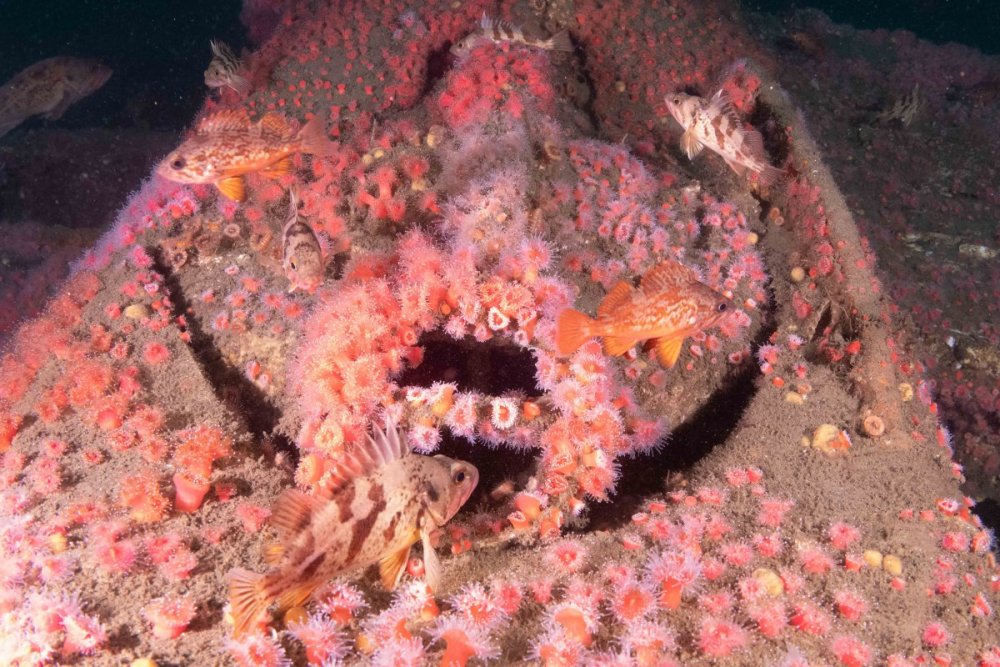

    p38-1040265.jpg

  14. The whole premise of the WWL series is to break away from the need to stop down due to trying to accommodate the curved virtual image from a dome. 

    Taking pictures of a 3D object brings a new set of challenges and you have to think in terms of depth of field for the subject  as well as the issue with getting the edges of the virtual image in focus.  On you example above the corners also appear to be a lot closer physically to the lens and you may be able to improve this by choosing what you focus on.  Depth of field in this type of image with wide angle lenses will have the DOF distributed 1/3 in front of focus point and 2/3 behind, so in the example above if you focus on the closest part of the image you have a better chance of the DOF covering the image.

    I discovered this shooting with a fisheye on m43 - a lot of DOF available and no issues accomodating the curved virtual image due to  the different optics, but with a 3D subject in my case shooting along a wall and just using central focus point the wall very near to me was blurred, but that was due to the DOF not being placed properly.  The required DOF scales with with sensor size m43 at f8 or example is equivalent DOF to f16 on full frame.

    So the summary is the need to stop down depends more on the 3D nature of the subject and because you are shooting wider open than a traditional dome you have to think more about what part of the image you focus on. 

  15. 2 hours ago, ChrisRoss said:

    Depth of field in this type of image with wide angle lenses will have the DOF distributed 1/3 in front of focus point and 2/3 behind, so in the example above if you focus on the closest part of the image you have a better chance of the DOF covering the image.

    ...

    So the summary is the need to stop down depends more on the 3D nature of the subject and because you are shooting wider open than a traditional dome you have to think more about what part of the image you focus on. 

    Very good points, thanks Chris!

    I'll try to keep it all "in focus" (hah!) when I'm taking pictures of a destroyer this week. So much to think about -- especially at 80 meters deep with deco time multiplying quickly. :)

    I'm planning to get some pictures of the 5" guns which will present a very long depth-of-field picture so we'll see how those come out. I'll plan on focussing closer to the front of the gun as opposed to the turret or further back along the gun.

    Brett

Kraken Sports

Account

Navigation

Search

Search

Configure browser push notifications

Chrome (Android)
  1. Tap the lock icon next to the address bar.
  2. Tap Permissions → Notifications.
  3. Adjust your preference.
Chrome (Desktop)
  1. Click the padlock icon in the address bar.
  2. Select Site settings.
  3. Find Notifications and adjust your preference.