



Do I possibly have a bad copy? I end up having to crop down a lot of my wide angle shots because the outside corners are usually super soft. Here is an example:
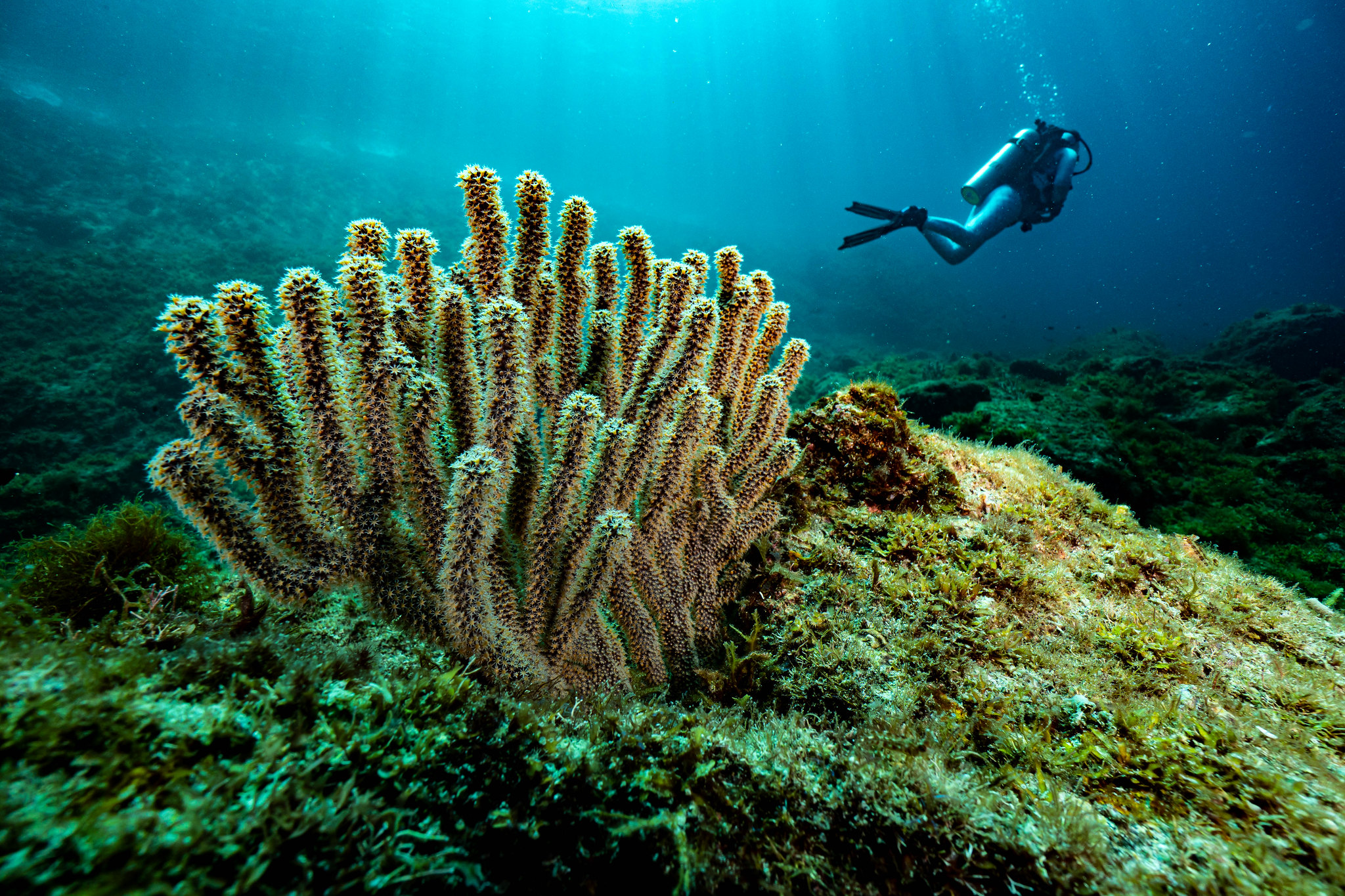 DSC00728 by Chad Nuttall, on Flickr
Photography Gear and Technique / Archived topic
Started by Spizeck ·
Read-only discussion
Do I possibly have a bad copy? I end up having to crop down a lot of my wide angle shots because the outside corners are usually super soft. Here is an example:
DSC00728 by Chad Nuttall, on Flickr
What size dome are you using ? - this can make all makes a difference.
I see from linking to the Flikr image you're at f8, typically for APS-C you want to be at least f11 - possibly f13 range depending on what size dome you are using. Also in this image the corners are physically closer, your depth of field extends further behind the focus point than in front so focusing on a closer area of the image should also help. this is 15mm full frame equivalent focal length so quite wide and getting good corners behind a dome when that wide can be a challenge.
Chris,
I am using a 180mm (7 inch) glass dome from Nauticam. Thank you for the tip, I have been experimenting with different apertures and will continue to experiment. That is a good point about the depth of field, didn't think about that. I will have to try messing with the focus point in future dives.
13 hours ago, Spizeck said:Do I possibly have a bad copy? I end up having to crop down a lot of my wide angle shots because the outside corners are usually super soft. Here is an example:
The lens is very wide and it is possible that the acrylic dome is not positioned exactly where it needs to be to make the corners better albeit they will never be perfect.
If you invest in the glass port you will see the recommended extension is 60mm so it is likely the acrylic port is too short and this compromises the corners
4 hours ago, Interceptor121 said:The lens is very wide and it is possible that the acrylic dome is not positioned exactly where it needs to be to make the corners better albeit they will never be perfect.
If you invest in the glass port you will see the recommended extension is 60mm so it is likely the acrylic port is too short and this compromises the corners
I have a 50mm port adapter, a 10mm extension ring and the 180mm glass dome.
I have a 50mm port adapter, a 10mm extension ring and the 180mm glass dome.
a seven inch/180mm dome is probably a little on the small side - the Zen 170mm is generally thought too small for 14mm full frame equivalent lens and you have a bigger sensor to cover. Nauticam are possibly reluctant to recommend a big dome due to the small camera/housing with the Sony system.
If you look at the Canon port charts you will see they recommend the 230mm dome for the Canon 10-18 lens and also the 10-22mm lens as most optimised. The only difference is it's going on a DSLR rather than a mirrorless - but the optic problems are the same mirror or no mirror as the sensor is near the same size (1.5x crop Sony vs 1.6x crop Canon)
A couple of approaches you could try - first aperture in the range 11-13. Second if the corners are important in the shot zoom in a little maybe 11 or 12mm. As well as trying out focusing on the closest elements in the shot. Too bad S&S don't make a small field flattening lens as this would probably be a good candidate for it.
7 hours ago, ChrisRoss said:Too bad S&S don't make a small field flattening lens as this would probably be a good candidate for it.
I contacted S&S a few months ago on this and they had no plans on creating filters for the different lens sizes out there unfortunately
There is a lot of information on the physics of dome ports here on Wetpixel, but to stress, your corner issues are caused by trying to present a curved virtual image onto the flat plane of the sensor. I would have a search about dome port theory here on the forums
It is not a focus point issue!
They only way to cure it is to use a bigger dome, or shoot at a smaller aperture. With a cropped sensor, I use a 230mm Superdome with a 10-24mm and still find that I need to shoot it at f/8 or greater. There is also the possibility that the 10-18 just doesn't work well behind a dome. I have no personal experience with this lens, but some very competent wide angle lenses don't work well behind a dome. This is likely to be to do with close focusing not being a design objective for wide angle lens designers...
1 hour ago, adamhanlon said:There is a lot of information on the physics of dome ports here on Wetpixel, but to stress, your corner issues are caused by trying to present a curved virtual image onto the flat plane of the sensor. I would have a search about dome port theory here on the forums
It is not a focus point issue!
They only way to cure it is to use a bigger dome, or shoot at a smaller aperture. With a cropped sensor, I use a 230mm Superdome with a 10-24mm and still find that I need to shoot it at f/8 or greater. There is also the possibility that the 10-18 just doesn't work well behind a dome. I have no personal experience with this lens, but some very competent wide angle lenses don't work well behind a dome. This is likely to be to do with close focusing not being a design objective for wide angle lens designers...
The 180mm dome is a cut of a 220mm diameter dome while the 230mm is a cut of a 240mm if I recall correctly. So there is only 1 cm difference in radius. However f/8 seems too wide for APSC. I shoot f/8 with my 180mm dome at 8mm which is narrower than the OP on MFT. This does not consider that the lens itself may have issues on land. Many people do not test their lenses on land and then wonder why they don't perform underwater. Go and shoot a brick wall you will be surprise it won't be as sharp as you would think most times
All excellent information. Thank you all! Here is a shot from a few weeks ago at F11. You can see, the corners still suck. I can't see a difference between the F8 and the F11 shot.
 DSC02230 by Chad Nuttall, on Flickr
I have the same lens on an a6400 and use the acrylic dome (due to depth requirements) and shoot under much worse conditions so it is hard to compare. A few thoughts:
1. I took a look at other photos in your photo stream and it seems like the corners are better at 14mm (which is to be expected) so with that lens/dome combo it might just need either a higher f-stop than f/11 or a bigger dome or cropping.
2. As Interceptor121 says, maybe try shooting a brick wall on land at different apertures and focal lengths to see if/when it breaks down. I might try that myself on my lens/camera combo to see what happens.
3. It is interesting that it is always the lower left corner that is the worse. In most photos the upper corners are blue water (which makes sense) but it also makes it little hard to do a comparison. However, the lower right corner does not look as bad. I wonder if it might be the dome. Going back to #2 above, at least get a baseline on land without any of the underwater issues.
I'm definitely curious to see what happens and if I get a chance to shoot mine on land, I'll post the results.
- brett
Brett,
I noticed the same thing about bottom left... I am going to be checking on a Stucco wall this afternoon. I wonder if the bottom left thing might just be a subconscious thing when I am shooting where I might tend to shoot looking to the right a little more. Anything I have printed, I have just cropped down a bit.
I really wish there was a legit fisheye out there for e mount...
Chad
Both examples had the foreground much closer in the lower left, so it's to be expected to be the worst corner if it's the closest. It's kind of a DoF-Problem after all.
I just took some "quick and dirty" test shots with mine. It wasn't the ideal subject but it was all I had that was nearby. It is truly amazing how wide angle a rectilinear 10mm APS-C lens is.
I really wish I had a big, flat brick wall close to my house but I live in Southern California and those aren't very common. This wall was slanted and it was hard to get close enough on a tripod to get perfect pictures.
I also thought I had it at 10mm but it was at 11mm focal length but it will have to do for now.
Here are three sections (center, lower left, lower right) with a screenshot showing the crop area. These are all at f6.3. There is some blur in the corners, but not too bad.
I also have shots at other apertures if anybody wants to see them (f5.6, f7, f8, etc) or I can post the RAW if anybody wants it.
My conclusion from this quick "hack" of a test is that, at least in my case, a majority of any corner blur is due to the underwater conditions and dome. If I had the time, I'd find a pool with a lot of tile and do some underwater testing but that will have to wait.

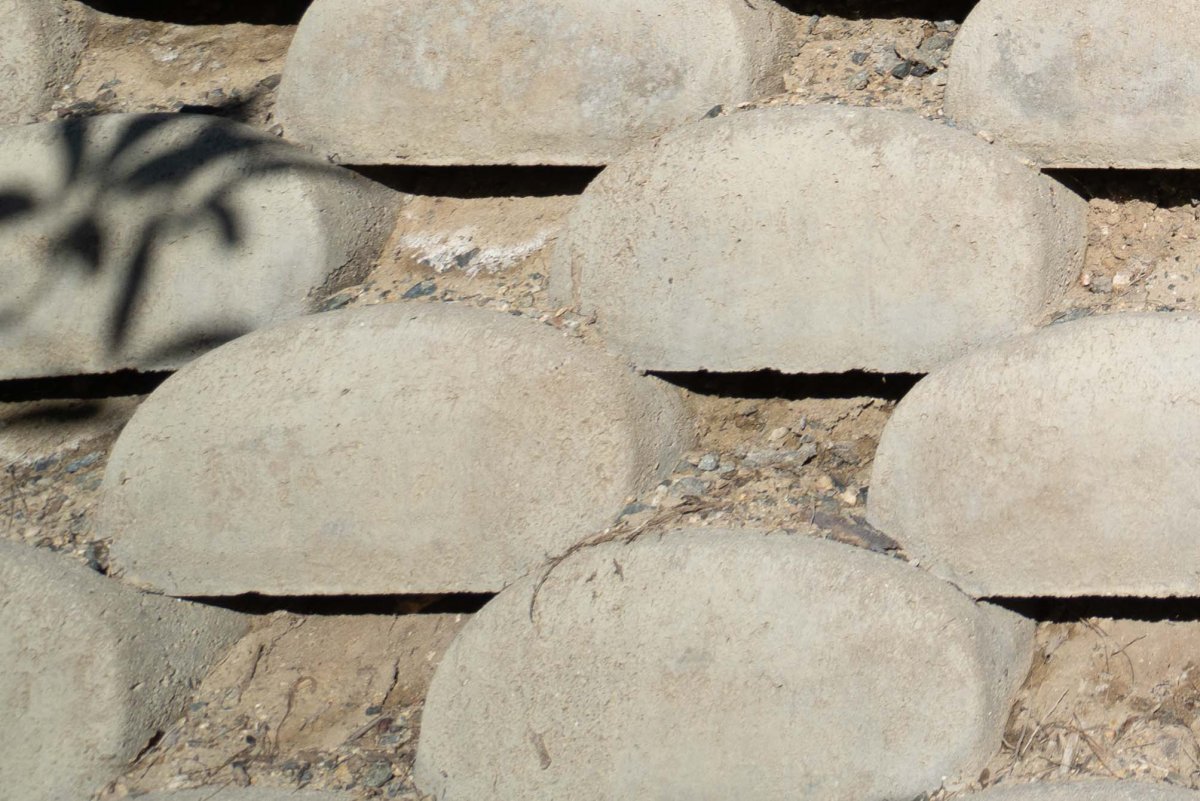
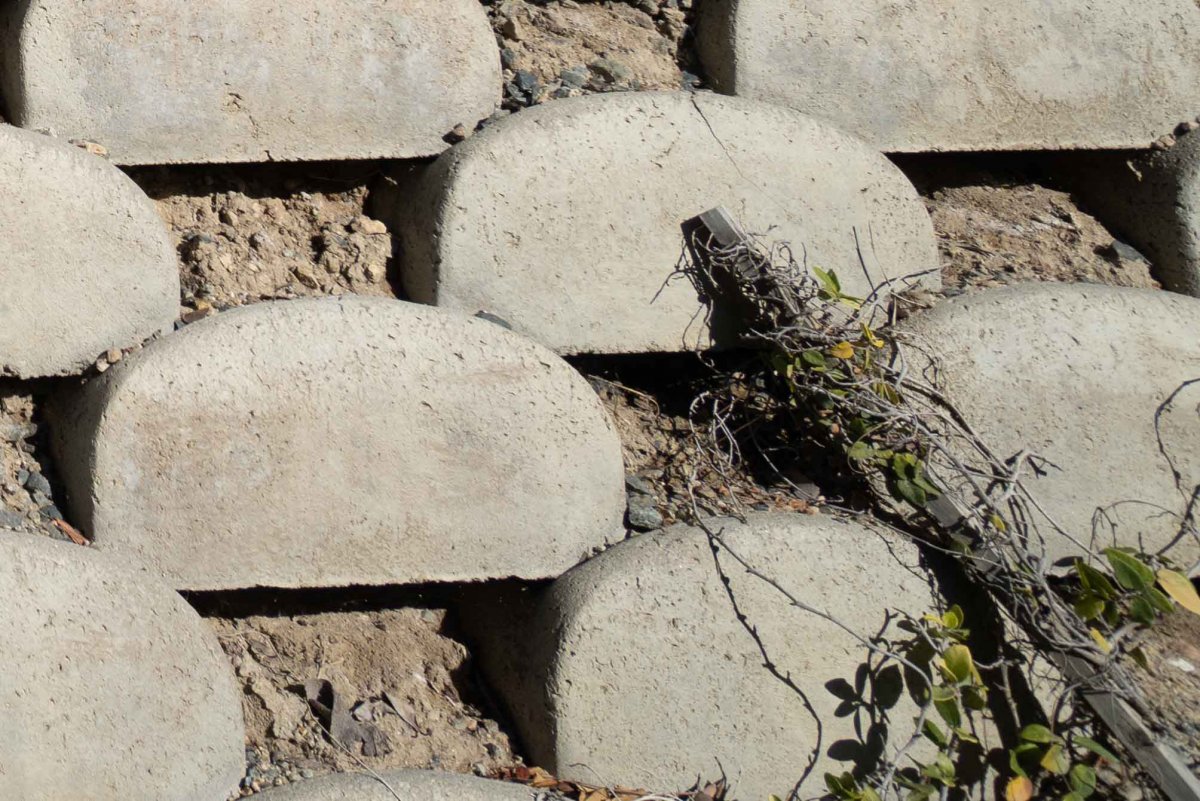
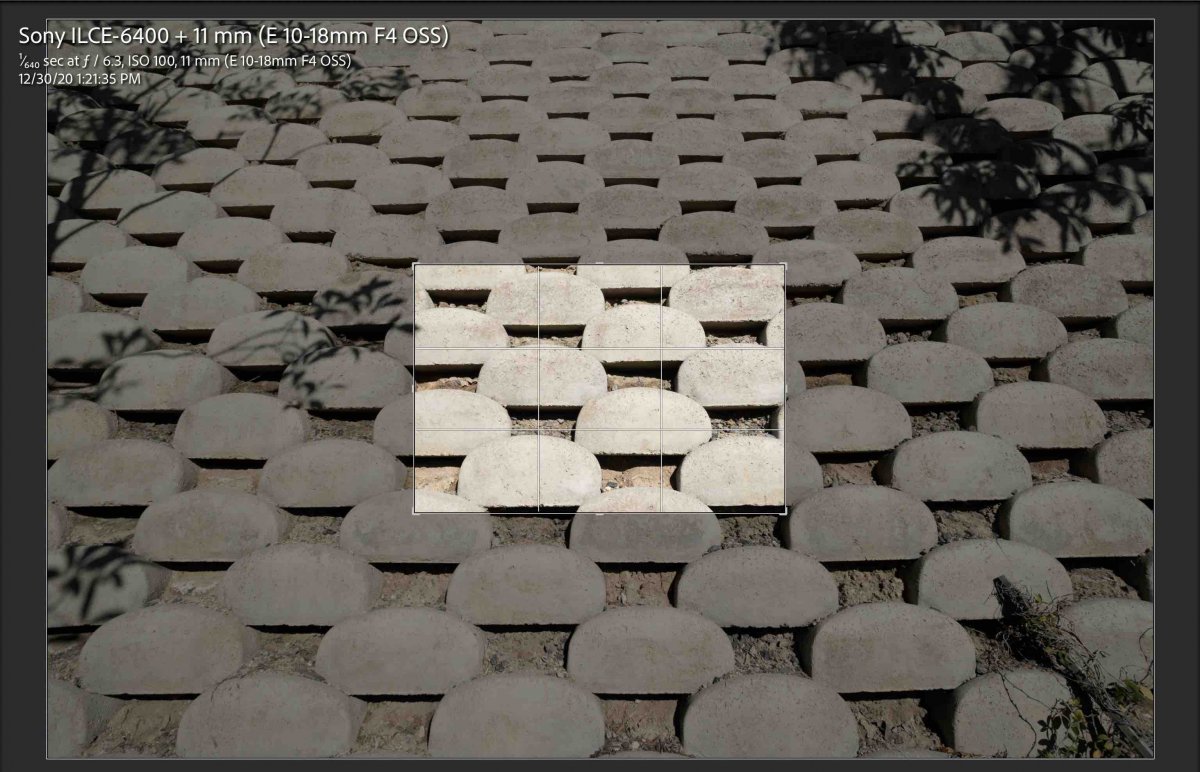
2 hours ago, TmxDiver said:I just took some "quick and dirty" test shots with mine. It wasn't the ideal subject but it was all I had that was nearby. It is truly amazing how wide angle a rectilinear 10mm APS-C lens is.
I really wish I had a big, flat brick wall close to my house but I live in Southern California and those aren't very common. This wall was slanted and it was hard to get close enough on a tripod to get perfect pictures.
I also thought I had it at 10mm but it was at 11mm focal length but it will have to do for now.
Here are three sections (center, lower left, lower right) with a screenshot showing the crop area. These are all at f6.3. There is some blur in the corners, but not too bad.
I also have shots at other apertures if anybody wants to see them (f5.6, f7, f8, etc) or I can post the RAW if anybody wants it.
My conclusion from this quick "hack" of a test is that, at least in my case, a majority of any corner blur is due to the underwater conditions and dome. If I had the time, I'd find a pool with a lot of tile and do some underwater testing but that will have to wait.
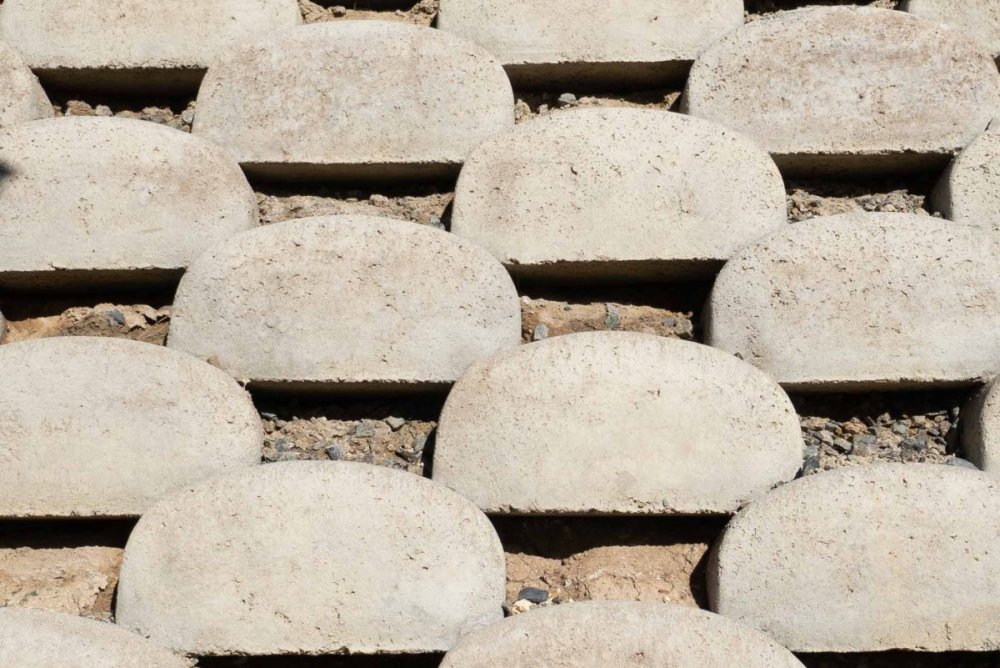
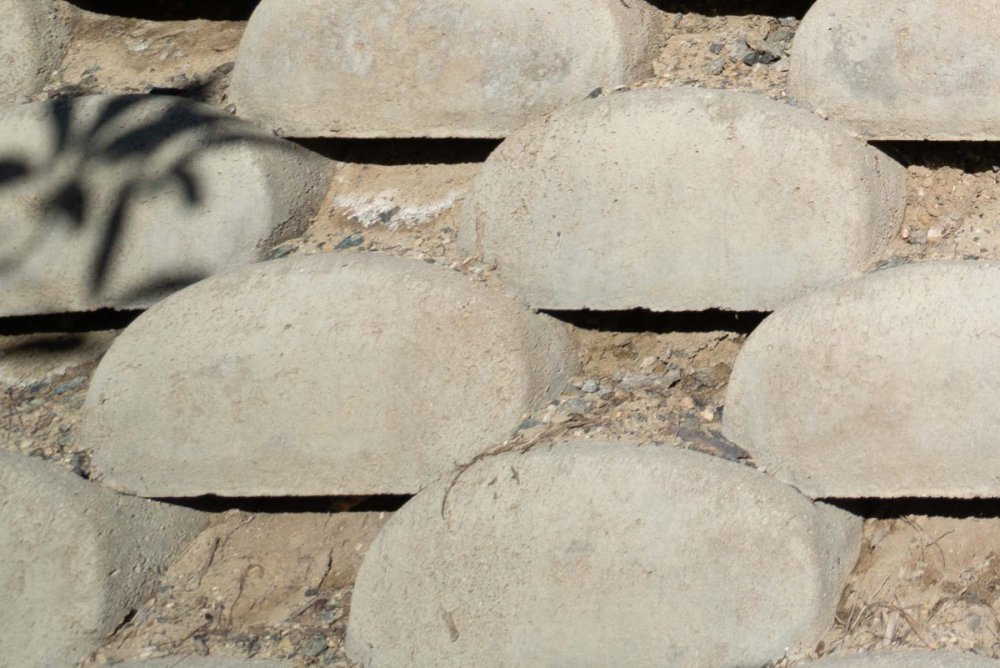
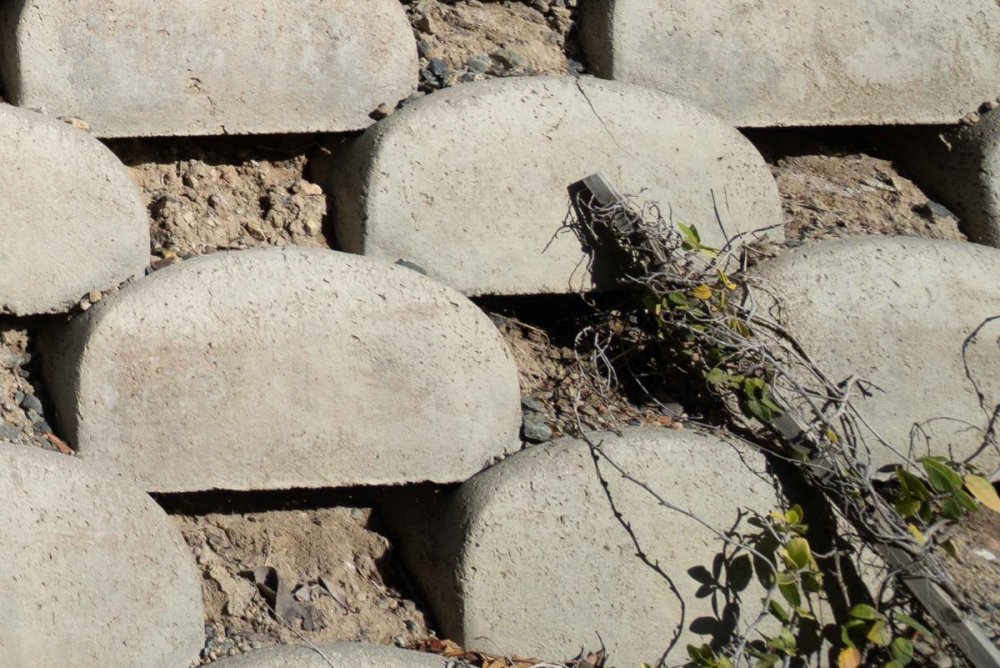

Shot 3 the one with the branch shows the lens is not that sharp in the corners. It has probably field of curvature issues of its own before you even take it underwater so I would expect things to deteriorate at close range and f/11 to be the norm
11 hours ago, TmxDiver said:3. It is interesting that it is always the lower left corner that is the worse. In most photos the upper corners are blue water (which makes sense) but it also makes it little hard to do a comparison. However, the lower right corner does not look as bad. I wonder if it might be the dome. Going back to #2 above, at least get a baseline on land without any of the underwater issues.
I'm definitely curious to see what happens and if I get a chance to shoot mine on land, I'll post the results.
- brett
In the two shots posted here the lower left corner is physically closer so even more likely to fall outside the depth of field you have. I still believe focusing on something a little closer should help - or framing so you don't have one much closer element in the corner .
Chad - The reports I have read say the Canon 8-15 works quite well on Sony via adapters - though below 10mm the image circle doesn't reach the corners. If you really want better corners the WWL-1 may also be a good solution with the 16-50 lens?
4 hours ago, ChrisRoss said:In the two shots posted here the lower left corner is physically closer so even more likely to fall outside the depth of field you have. I still believe focusing on something a little closer should help - or framing so you don't have one much closer element in the corner .
Chad - The reports I have read say the Canon 8-15 works quite well on Sony via adapters - though below 10mm the image circle doesn't reach the corners. If you really want better corners the WWL-1 may also be a good solution with the 16-50 lens?
No the corner that is bad is the right corner where you can see the lens is corrected for distortion this is likely the issue
Processing the raw with a software that can disable it will improve matters
1 hour ago, Interceptor121 said:No the corner that is bad is the right corner where you can see the lens is corrected for distortion this is likely the issue
Processing the raw with a software that can disable it will improve matters
Really?? which shot? - the original shot starting the post is all mushy in the lower left corner. here's a crop from it - the two red squares are the same height above the bottom of frame, the LHS is much and the RHS while not great is clearly showing more definition. To me at least this is because the LHS is physically closer - the mush extends across much of the bottom of frame.
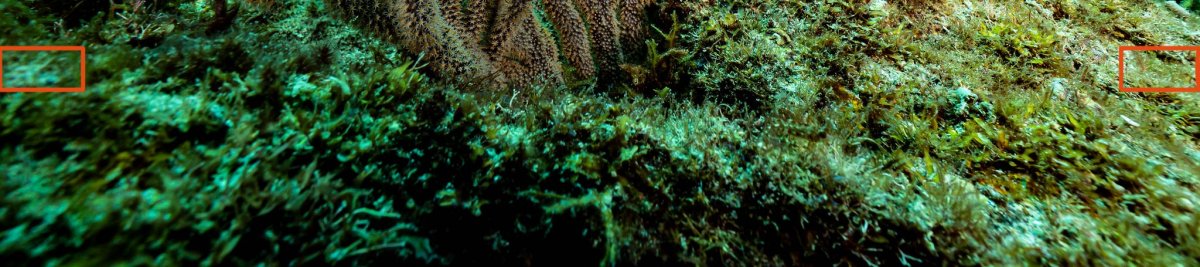
1 hour ago, ChrisRoss said:Really?? which shot? - the original shot starting the post is all mushy in the lower left corner. here's a crop from it - the two red squares are the same height above the bottom of frame, the LHS is much and the RHS while not great is clearly showing more definition. To me at least this is because the LHS is physically closer - the mush extends across much of the bottom of frame.
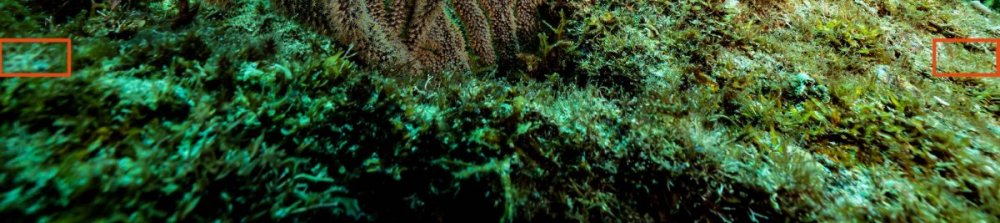
The land shot n 3 where there is a branch coming in. With regards to this underwater shot the lens may be decentered which is a different issue altogether

Terms of Use Privacy Policy Guidelines We have placed cookies on your device to help make this website better. You can adjust your cookie settings, otherwise we'll assume you're okay to continue.

A worldwide community for underwater imaging.
