Skip to content

Shooting Technique, Workflow and Editing / Archived topic

Updating "old" computers for image editing

Started by adamhanlon ·

  • 52Posts
  • 52Replies

Read-only discussion

Updating "old" computers for image editing

52 posts
  1. I have invested some time and effort in updating/repairing my computers over the past few weeks and thought I would share the results.

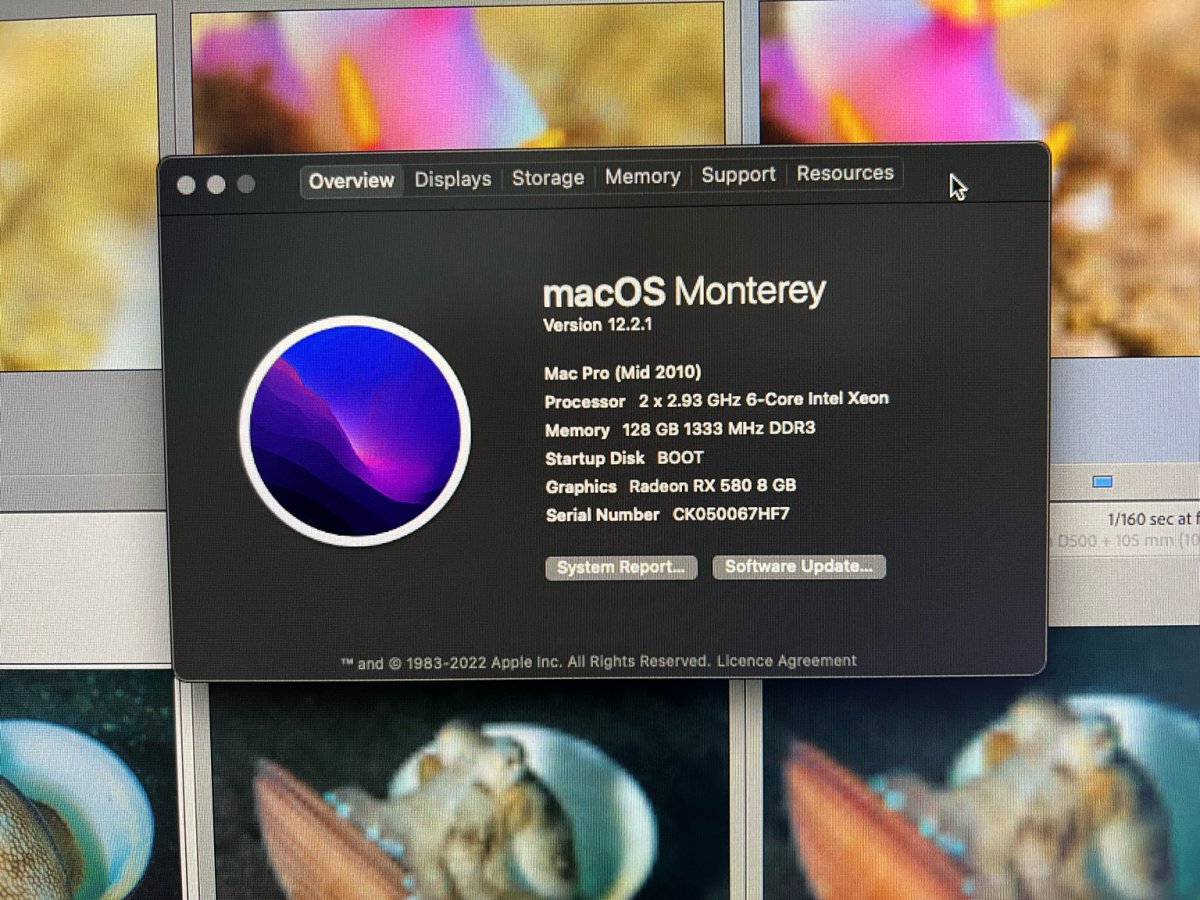
    I have a 2010 5.1 Mac Pro that I was kindly given by @echeng. Even though this computer is designed to be very modular, Apple stopped offering OS updates for it some time ago. Adobe stopped offering updates to Lightroom and Photoshop for it last year. Fortunately, there are a number of very smart folks that have figured out a working solution!

    I should point out that I am a competent user, but by no means an kind of computing expert!

    I installed Martin Lo's Open Core (https://thehouseofmoth.com/quick-guide-to-installing-opencore-on-a-classic-mac-pro-cmp/). It took a few hours and a little figuring out, but it now stable and running OS Monterey and Lightroom 11./Photoshop 2022 etc. happily.

    4DA357B1-B8AD-4A41-AEC1-78BEA2BE5811.jpg
     

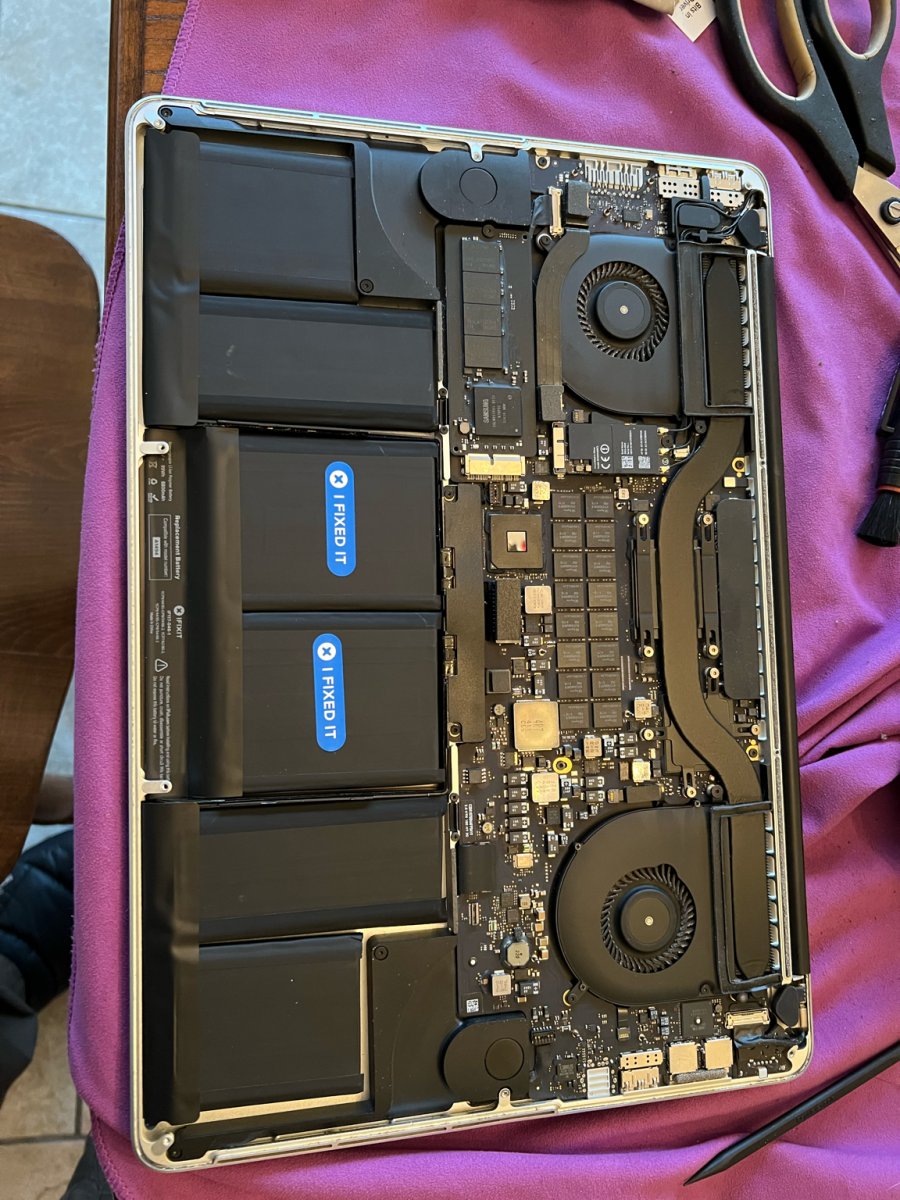
    While I was on a roll, my 2013 MacBook Pro's battery had reached the end of its life. Quotes for a battery replacement were very high, so I ordered a battery replacement kit from iFixit (https://www.ifixit.com/). There are resources on the site explaining how to do it. It took about an hour, and m,y MacBook Pro's battery is like new!

    8FA6DFF2-D931-40F1-A384-0C0C4A78E85F.jpg

    At this point, I am finding that (for my use) the hardware I have is not limiting what I want to do, but lack of software updates and built-in obsolescence are the issues. I should stress that I am not dealing with huge files like 8K video etc, so this is my experience in my user case. 

    While I enjoy using the latest technology, being able to repair and/or update my existing hardware seems to be a great solution!

  2. Woah! Never heard of Open Core before and I have a 2012 iMac which, similarly, can no longer be updated with new OSs. Like you, no hardware problems at all. Runs perfectly.

    I was planning to wait for the expected release of a new 27" iMac maybe later this year and likely update my system then.

    Hmmmmm...  worth exploring OC for sure.

    Thanks!

  3. Good to see that you were able to breathe new life into it!  I take a different approach of building my own Windows boxes, the only thing of note that has been obsoleted on me in many many years is my old Canon slide scanner as the SCSI card won't run on greater than Windows XP as drivers are not available.  Up until my most recent upgrade I could have run it off a virtual XP machine but the the latest motherboards don't have PCI slots.  I still run Photoshop CS-6 which was released 10 years ago without any drama.

    Edited by ChrisRoss
  4. Guys

    I was just watching Adam and Alex's discussion on which computer they use for editing. I'm in a similar position having a 10-year old iMac 27" that has been/still is superb. As I wrote above, I had thought I'd replace it with a new 27" iMac when that became available. However.....

    ... with the release of the Mac Studio it looks unlikely that a 27" iMac is going to appear. So I have a dilemma. Do I spend a huge amount of cash on a low spec Studio (plus a new monitor); or, would the new Mac Mini (and new monitor) be enough?  As Adam and Alex were discussing, I'm essentially also only using LR Classic and Photoshop, a catalogue of 60,000 images and no  - or next to no - video editing. My 27" iMac has 24GB of RAM and a 3TB Fusion Drive. It handles that extremely well.

    From what I have read a Mac Mini with 16GB of RAM (ie the max available) and a 2TB SSD should do the trick; and splurge on the new MacStudio Monitor....  rather than for for a Mac Studio which sounds like it might be way more powerful than I really need and hugely more expensive. 

    I really want to stay with Apple; and I do have an ageing MacBook Pro but don't really want to use a laptop for home work. 

    Any thoughts? Is anyone using the MacMini and how do you find it with LR/PS?

    Thanks!

  5. 3 hours ago, TimG said:

    Guys

    I was just watching Adam and Alex's discussion on which computer they use for editing. I'm in a similar position having a 10-year old iMac 27" that has been/still is superb. As I wrote above, I had thought I'd replace it with a new 27" iMac when that became available. However.....

    ... with the release of the Mac Studio it looks unlikely that a 27" iMac is going to appear. So I have a dilemma. Do I spend a huge amount of cash on a low spec Studio (plus a new monitor); or, would the new Mac Mini (and new monitor) be enough?  As Adam and Alex were discussing, I'm essentially also only using LR Classic and Photoshop, a catalogue of 60,000 images and no  - or next to no - video editing. My 27" iMac has 24GB of RAM and a 3TB Fusion Drive. It handles that extremely well.

    From what I have read a Mac Mini with 16GB of RAM (ie the max available) and a 2TB SSD should do the trick; and splurge on the new MacStudio Monitor....  rather than for for a Mac Studio which sounds like it might be way more powerful than I really need and hugely more expensive. 

    I really want to stay with Apple; and I do have an ageing MacBook Pro but don't really want to use a laptop for home work. 

    Any thoughts? Is anyone using the MacMini and how do you find it with LR/PS?

    Thanks!

    Mac seem to be backing away from desktop applications - now is as good a time as any to contemplate a switch to the dark side!  seriously though 16GB of RAM sounds a little low, it'll work of course but might be limiting.

    On monitors the mac studio looks very sexy but seems more video oriented, believe it covers DCI-P3 rather than adobe RGB.  If you want a seriously good monitor then Eizo would be my first port of call.  Adobe RGB leans more towards blues and greens than DCI-P3 apparently and it's an 8 bit panel.  The mac display includes webcam speakers etc - designed to be like having a an imac I guess - but is basically a fairly ordinary 5K panel otherwise.   The Eizo panel all the $ is spent on the panel. - they really are very nice displays.

    Edited by ChrisRoss
  6. Thanks Chris

    Yeah, I thought 16GB was a bit low on RAM too. But I wondered if maybe with the new Apple chip, it’d be more effective. 
     

    I’ll take a look at Eizo. 


    But return to the Dark Side? After 14 years with a Mac, there ain’t no going back. 

  7. Now since you refuse to join the dark side, have you looked into Hackintosh ? That would be best of both worlds probably. or if you like the general Linux feeling, there are plenty out there, that wont be that much different than MacOS. Both are derived from Unix, just MacOS is completely closed source and a locked platform (since that is Apple business model).

    I mean i get it, Mac is nice and so on, but LR + PS is hardly Mac specific workflow and Mac prices are frankly outrageous....mac Studio in DE starts at 2.2k and goes up to 7k+...and that is just the unit alone, no monitor included...i can spec 3-4 dark sides, with 2-3x the power, for that price (and that is with a very decent GPU, If just doing photos, GPU acceleration is less important, one could go lower model). And best is, one can just upgrade a PC as you please, meaning any future cost will be way lower. Meanwhile with Mac you can more or less throw it in the bin, and even if upgrades like RAM are allowed, they cost an arm and a leg.
    Less money spent on a computer means more money to be spent underwater :)

    M1 is an interesting chip but vs current AMD offerings, and upcoming Zen 4, it might not fare off that well, especially given the prices. Currently it it very slightly better in single threaded workflows (vs existing Zen 3 lineup, once Zen3D and Zen 4 get released that won't be the case most likely), but once considering multi threaded workflows, it gets is ass whooped by AMD significantly.


    As for monitors, have a look at sites like:

    https://tftcentral.co.uk/
    https://www.prad.de/

    https://pcmonitors.info
    https://www.displayspecifications.com

    There is RTrings too, but they seem to force registrations now and slowly moving to paid model.

    Monitor industry however is nothing but a cartel - due to the way lower volume and competition vs TVs, there was very little innovation, and basically "manufacturers" (i.e mostly re-rebranders) just keep peddling the same 8bit+FRC, 350cd/m2 panels (mostly made by one company, AU Optronics) for a decade plus. The only thing that has finally moved forward is color spectrum, with a lot, even lower end monitors now covering 95%+ DCI-P3 and Adobe RGB. However prices remain rather crazy, with anything better, especially with better HDR implementation like FALD, costing thousands. Meanwhile TV business is steaming ahead, with perhaps LG being recently the best example - absolutely amazing OLED panels, 10 bit native  (12 bit color processing) and prices as low as 1k. These actually been a huge hit amongst console folks, to the degree that they will even release 42" version this year, that might be finally small enough to be used with a PC (there, forbidden word).
    And what monitor "manufacturers" are doing? Literally buying the same OLED panel from LG, rebranding it as a monitor (and adding Display Port) and selling for 1.5-2x price.
    Now yes, there are higher end folks, eg. Eizo, Dell etc that cater specifically to the photo/video folks. These indeed are higher quality, where you pay not only for color spectrum, but mainly panel uniformity (i.e. you pay for the highest "bin" in a given batch of panels), longer warranty or things like being made in Japan, and not China. So price is high, but if in the workflow every pixel matters, guess justified to a degree.

    Personally I would look for two choices - LG has already released a 32" OLED monitor, and boy it beats anything out there. Was about 3k, prices came down to 2k now. 99% of both DCI-P3 and Adobe RGB, Display HDR 400 Tru Black.
    Alternatively wait, Samsung is about to release QN-OLED this year (albeit first as a 34" curved panel), but more and more actual TV manufactures are seeing the market with smaller panels, as such it seem that we might finally have some kinda revolution in the monitor market.

    Anyways, i will now stop boring everybody. If you need any help, just ask. While i might stink at photography, i do know a thing or two about computers.

    Also...

    image.thumb.png.81247bf0229116aa34c83d333eaf531f.png

    Edited by makar0n — spelling mistakes due to fat finger syndrome
  8. On 2/26/2022 at 1:23 PM, ChrisRoss said:

    Good to see that you were able to breathe new life into it!  I take a different approach of building my own Windows boxes, the only thing of note that has been obsoleted on me in many many years is my old Canon slide scanner as the SCSI card won't run on greater than Windows XP as drivers are not available.  Up until my most recent upgrade I could have run it off a virtual XP machine but the the latest motherboards don't have PCI slots.  I still run Photoshop CS-6 which was released 10 years ago without any drama.

    https://www.startech.com/en-be/cards-adapters/pex1pci1

    That is if you still need that slide scanner :D

  9. Wow, thanks for all this, makar0n. Fascinating stuff. You sure know your computers.

    I'll have a read for sure.

    The thing with the Mac/Apple is that, with PCs, I found that I was wanting to upgrade my system every 3 years or so as they became chuggy and crashy. That's just not been my experience with the Macs. 10 years almost with the MacBook Pro and slightly longer with the iMac. I swicth them on and they just work.

    But I'm sure you have heard that all before - and I don't want to turn this thread into a PC v Mac yawnathon :rolleyes:

    I did think about trying what Adam discovered with Open Core - but felt that was just a bit beyond my comfort level messing with computers

  10. Well yeah, yawnathons are better avoided :D

    Nothing against Mac's they are definitely interesting and well designed pieces of hardware. But at the end (well perhaps apart from M1 CPU as its ARM architecture), it is 100% the very same hardware running on both sides. (actual components not laptop finish :D ).
     

    As for Opencore, have also a look here.
    https://dortania.github.io/OpenCore-Install-Guide/

    There is also some configuration app that might make things easy (automated to some degree; this seems to be a newer replacement for the Clover app mentioned in the original tutorial):
    https://mackie100projects.altervista.org/opencore-configurator/

    Might take time but seems the only risk is modifying EFI partition (just image the disk before making any changes so that you can recover easily) and updating firmware (well that one seems only needed in certain cases but that can brick the device indeed)


    Or buy a PC with the same parts Adam has (seems dual Xeon X5670, just not sure about motherboard) and just copy his OS :D

    Edited by makar0n
  11. Many thanks, maker0n. I'll have a another look at that OpenCore. Sounds a good option although I just love the "that can brick the device indeed"..... :crazy:

  12. Tim, you probably know this, but your old iMac can be upgraded with more RAM and a full SSD.  Doing so made a huge difference with mine, even with an older processor, and it’s now just fine for running LR and PS.  

    I too am really hoping for a new large iMac though (some rumor sites suggest it may be a 29” model!)

  13. Thanks Robert - yeah, I've increased the RAM over the years and the 3TB Fusion Drive (which I ordered at the get go) is brilliant and I still have a 1TB free! So there isn't really  problem with the iMac other than what Adam encountered, I can no longer upgrade the OS. LR and PS run no problem.

    I guess I was thinking that before long, I should think about a new machine. A bit like you, I had anticipated just getting another 27" iMac. If a 29" one comes along I'd be up for that!

    But from what I've read so far (and I kinda hope it's wrong) the new Studio may have put paid to a bigger iMac. The Studio seems overkill for what I need.

    As Adam and Alex discussed in the recent WP Live, photo editing programmes (LR, PS) no longer need cutting edge computers. Hence wondering if the 16GB Mac Mini (with a 2TB SSD) would be sufficient coupled with a 27" screen. My iMac has 24GB so 16GB would be going backwards - maybe. But with the new Apple Silicon is the RAM use just better, more efficient, faster, whatever so as to make 24GB unnecessary for PS/LR? And of course with the Mac Mini it's not possible to upgrade the RAM (nor with the Studio either) and it maxes out with 16GB.

    Bring on the 29" iMac!

  14. 12 hours ago, TimG said:

    The thing with the Mac/Apple is that, with PCs, I found that I was wanting to upgrade my system every 3 years or so as they became chuggy and crashy. That's just not been my experience with the Macs. 10 years almost with the MacBook Pro and slightly longer with the iMac. I swicth them on and they just work.

    Mine certainly last longer than that - older Windows systems had issues that would build up over time, XP for example where doing a re-install of the operating system every now and then was a thing.  The newer operating systems don't seem to to be as prone to decay.  Mind you they are not perfect and systems updates can throw a spanner in the works - but Mac is not immune from that either.

    Mind you I wouldn't recommend you go to a big box store and buy a PC, all the Dell, HP etc desktop boxes are generally loaded with bloatware.  Getting a system built by a specialist store is the way to go, or do what I do and build your own!  For a long time Mac could claim some sort of superiority in components and software, security etc but those days are really gone.

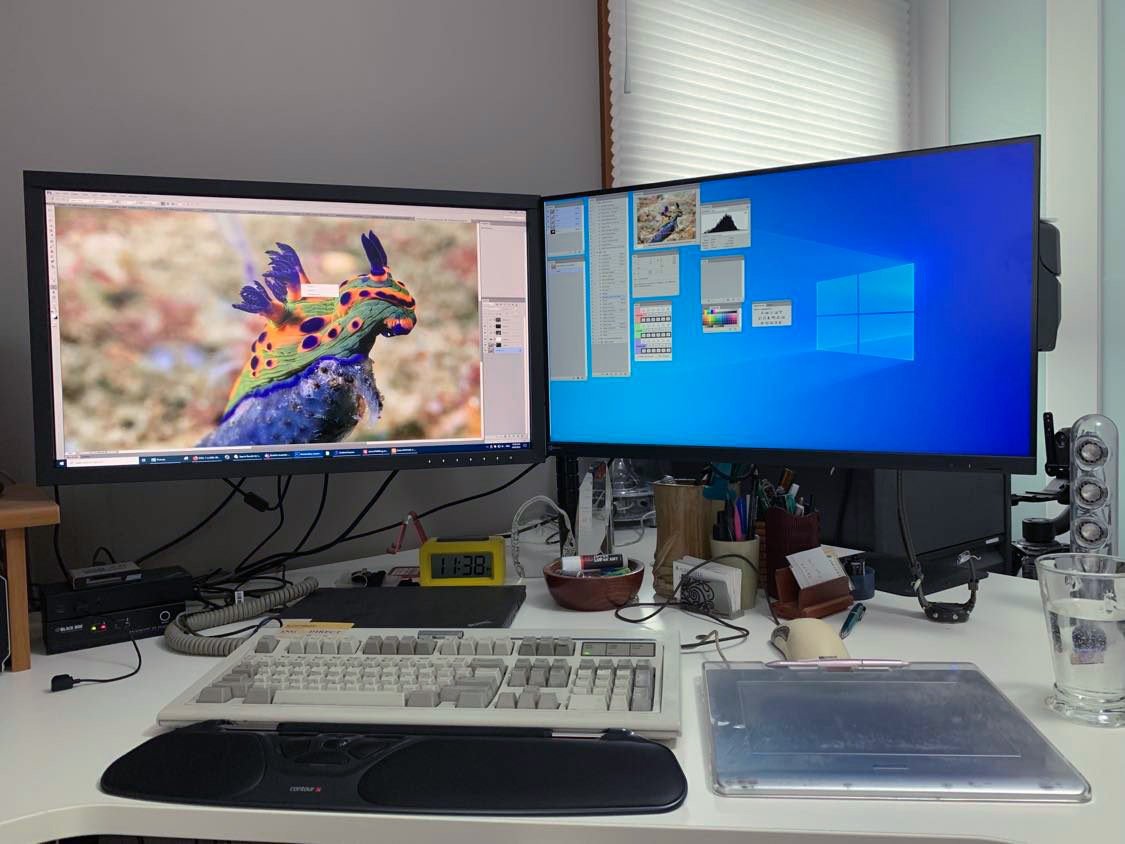
  15. Here's my monitor setup, twin Eizo's , the LH screen is a CS series colour accurate screen while the RH screen is an EV series standard gamut monitor.

    Monitor_setup.jpg

  16. Looks very neat, Chris.

    Noted on the big box. I'm not sure though that I really want to start building my own machines. I don't really have the knowledge, nor, I suspect, the enthusiasm. I want to unpack it, switch it on, admire it and use it.... digging around under the hood doesn't really appeal. 

    You're spot on about XP - that was my recollection and why switching to an Apple was such a relief. I see a Windows screen now and have no clue how to use it. Although I hear what you and makar0n are saying, I just can't see myself going back to Windows now. 

    Hence wondering if a Mac Mini will do the job.......

  17. 41 minutes ago, TimG said:

    Looks very neat, Chris.

    Noted on the big box. I'm not sure though that I really want to start building my own machines. I don't really have the knowledge, nor, I suspect, the enthusiasm. I want to unpack it, switch it on, admire it and use it.... digging around under the hood doesn't really appeal. 

    You're spot on about XP - that was my recollection and why switching to an Apple was such a relief. I see a Windows screen now and have no clue how to use it. Although I hear what you and makar0n are saying, I just can't see myself going back to Windows now. 

    Hence wondering if a Mac Mini will do the job.......

    No need to dig under the hood, just find a shop that custom builds to specification - it's easy to find guides to building machines for PS.    I can understand the reluctance to change - certainly learning a new operating system seems daunting but with your usage should be very straight forward.  The big attraction on WIndows to me is I can still run older software without being forced out - Apple have no hesitation in locking you out of older apps and actively seem to discourage backwards compatibility. 

  18. 9 hours ago, ChrisRoss said:

    I can understand the reluctance to change - certainly learning a new operating system seems daunting but with your usage should be very straight forward

    Yeah, and I am so "invested" in the Apple ecosystem (phones, iPads, etc etc) I really don't want to change now.


    9 hours ago, ChrisRoss said:

    The big attraction on WIndows to me is I can still run older software without being forced out - Apple have no hesitation in locking you out of older apps and actively seem to discourage backwards compatibility. 

    I've had this once some years back but then found a workaround. In recent years it hasn't been an issue. I guess I'm so Mac'd up now I don't use anything that's not available for the OS!

  19. Hi Tim

    There is another path you can go.

    Find someone that has expertise enough to install on your iMac the Open Core that Adam installed on his Mac. Even if you pay 100 bucks for the service, if at the end you can use your computer with newer software, you gave yourself another dive trip.

    If it does not work (not so probable if the expert you find is really an expert), you solve it going to an Apple Store and buy a new model.

    At the end you still are on the Apple ecosystem (almost)….

  20. Thanks, yeah, that's a good idea. I'll ask around - this is a small island but maybe there is someone who can do it.

Backscatter

Account

Navigation

Search

Search

Configure browser push notifications

Chrome (Android)
  1. Tap the lock icon next to the address bar.
  2. Tap Permissions → Notifications.
  3. Adjust your preference.
Chrome (Desktop)
  1. Click the padlock icon in the address bar.
  2. Select Site settings.
  3. Find Notifications and adjust your preference.